
How to Appear Offline to One Person on Discord: What Works
Discord has no way to appear offline to one person or one server. Invisible hides you from everyone. What blocking, ignoring, removing a friend and per-server activity settings hide, from Discord's own help center.
You cannot appear offline to one person on Discord. Discord's status applies to your whole account: set it to Invisible and you look offline to everyone, set it to Online and everyone who can see you sees the green dot. There is no per-person or per-server invisible mode, and users have asked for one in Discord's community forum for years. What you can do is hide other things from one person or one server, and each option hides something different.
We build Slack Green, a Slack presence tool, and we write about how status works across chat apps. The same question for work apps is answered in how to appear offline on Teams and can you appear offline on Slack.
How to appear offline on Discord (to everyone)
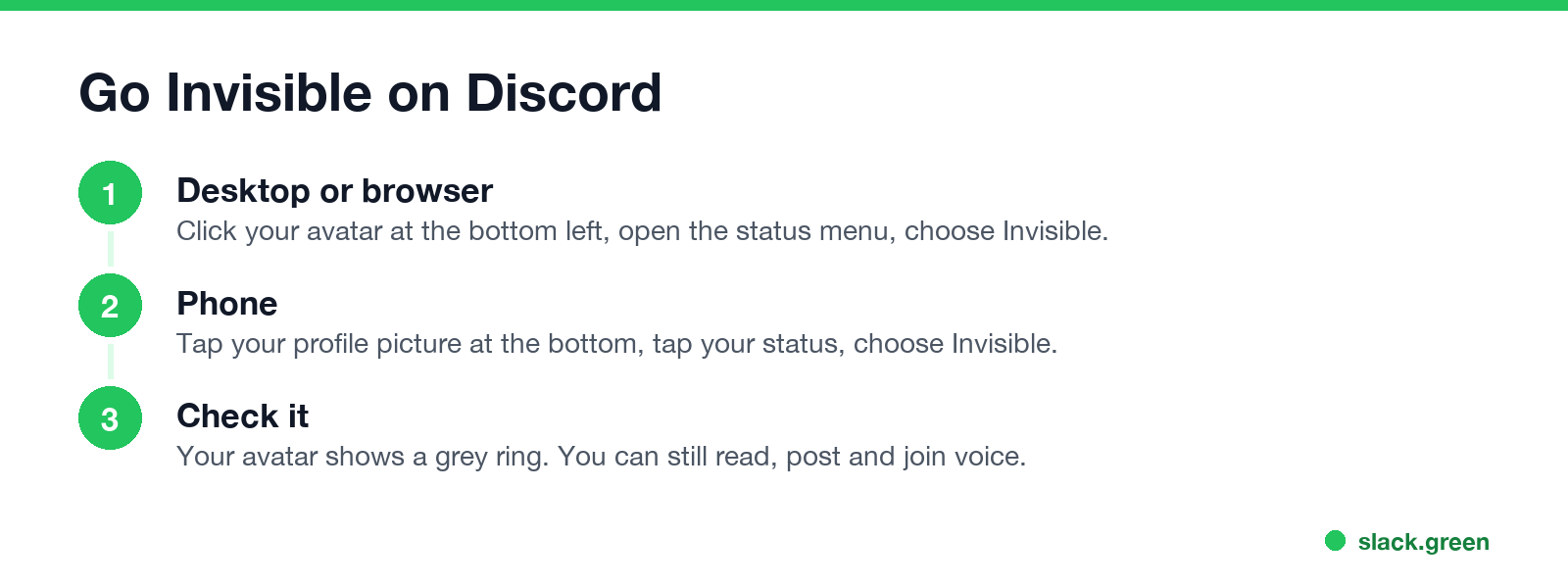
Desktop app or browser
- Click your avatar at the bottom left.
- Open the status menu.
- Choose Invisible.
- Tap your profile picture at the bottom right.
- Tap your status.
- Choose Invisible.
- Right-click the server name, or open the server's drop-down menu.
- Select Privacy Settings.
- Turn off Activity Status.
Phone app
Discord's help center says Invisible "will make you appear offline entirely, but you'll still be able to access all of Discord as normal. This includes messaging your friends without appearing online." Invisible also removes the phone icon that Discord shows next to your name when you are only on mobile; Discord says there is no other switch for that icon.
Discord has five dot colors: green for Online, yellow for Idle, red for Do Not Disturb, purple for Streaming and grey for Invisible or Offline. A manual Idle stays until you change it, while the automatic Idle ends when you come back. When and why the yellow moon appears is in what does idle mean on Discord.
What each option hides, and from whom
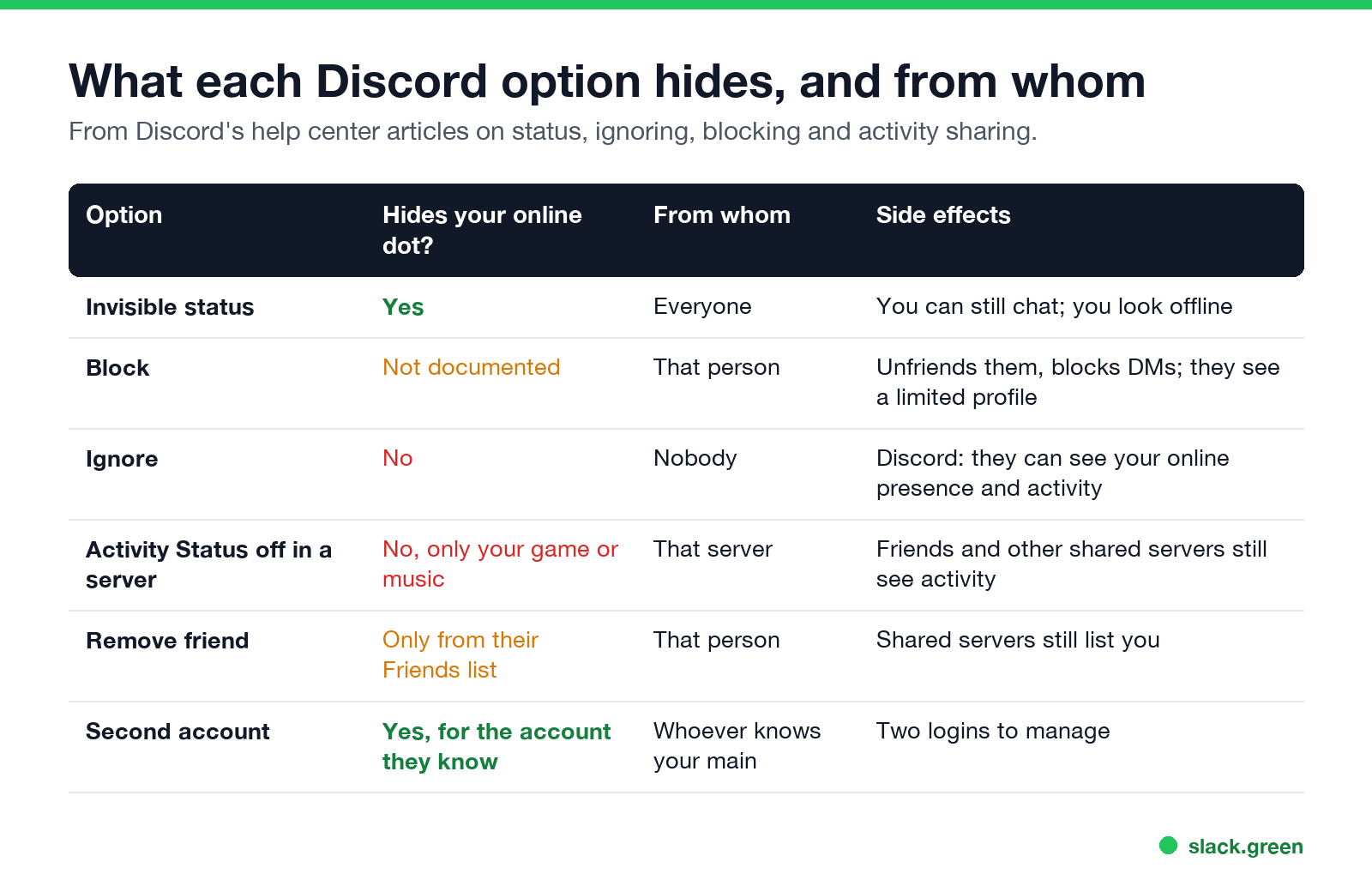
| Option | Hides your online dot? | From whom | Side effects |
|---|---|---|---|
| Invisible status | Yes | Everyone | You can still chat, and you look offline |
| Block | Not documented | That person | Unfriends them and blocks DMs; they see a limited profile |
| Ignore | No | Nobody | Discord says they "can see your online presence and activity" |
| Activity Status off in one server | No, only your game or music | That server | Friends and other shared servers still see your activity |
| Remove friend | Only from their Friends list | That person | Shared servers still list you |
| A second account | Yes, for the account they know | Whoever knows your main | Two logins to manage |
Block
Blocking removes the friendship, stops their DMs and shows them "a limited version of your profile," according to Discord's blocking article. Discord does not say that blocking hides your online dot. If you share a server, you still appear in its member list. It is also a visible act: when they try to add you again, they get an error.
Ignore
Ignore is the quiet version. It hides their messages from you without notifying them. Discord's comparison table is clear that an ignored person "can see your online presence and activity." It hides them from you, not you from them.
Turn off Activity Status for one server
This is the closest thing to "appear offline for one server," and it only covers your activity, such as the game you are playing or your Spotify track.
Your dot still shows. Discord also notes that members of that server "will still be able to see your activity if they're also friends with you or if they share another server with you where your activity is allowed."
Remove them as a friend
You leave their Friends list, including its Online tab. In any server you share, the member list still shows you and your status.
Use a second account
People who want to be online for one group and offline for another often run a second account. Discord lets you switch between accounts in the app. It is the only setup that shows different people different statuses, because they are looking at different accounts.
Discord appear offline not working
Never appear "away" on Slack again
Cloud-based. No downloads. Works 24/7 even when your laptop is off.
Discord vs Slack vs Teams: hiding your status
| Discord | Slack | Microsoft Teams | |
|---|---|---|---|
| Appear offline | Invisible | Set yourself as away | Appear offline |
| Per-person hiding | No | No | No |
| Lasts | Until you change it | Until you change it | Indefinitely, per Microsoft |
At work the problem is often the reverse: looking away while you are working. For Slack, that is what Slack Green handles, keeping your dot green on a schedule.
FAQ
Can I appear offline to just one person on Discord? No. Invisible applies to everyone. Blocking and ignoring do not hide your dot, according to Discord's help center.
Can I appear offline in one server only? No. You can turn off Activity Status for one server, which hides your game or music there, but your online dot still shows.
Does blocking someone on Discord make you appear offline to them? Discord does not document that. Blocking unfriends them and stops DMs, and in a shared server you still show in the member list.
Can someone tell if I am Invisible on Discord? Not from your dot, which looks the same as Offline. They can tell if you post, join voice or start typing.
How do I appear offline on Discord mobile? Tap your profile picture, tap your status, and choose Invisible.
Stop Jiggling Your Mouse.
Join hundreds of remote workers who never worry about their Slack status. Set it up once, stay green forever.
Related Articles
How to Keep Skype Status Active: Skype for Business Idle Timers
To keep your Skype for Business status active, open Options, Status, and raise both idle timers, Inactive and then Away, from 5 minutes to as much as 360 minutes each. Consumer Skype shut down on May 5, 2025 and Skype for Business Online in 2021, so for most people the real question is now Teams. What still works, status icons, Outlook, and status not updating.
Is It Legal for My Employer to Monitor Me? US, EU and UK Rules
In the US it is mostly legal for an employer to monitor company devices, accounts and premises, often without asking. The limits are state notice laws in New York, Connecticut and Delaware, consent rules for audio recording and biometrics, bans on cameras in restrooms, and your personal devices. The EU, UK and parts of Canada and Australia add notice and proportionality rules.
Can My Employer See My Personal Email on My Work Computer?
Your employer cannot sign in to your Gmail, and doing so without permission can break the Stored Communications Act. But on a work computer, screenshot and keystroke monitoring, browser history, HTTPS inspection and Outlook's local cache can all expose personal email. Work email is fully visible, deleted messages included. Case by case, with what to do.