
Does Discord Notify When You Change Your Status?
Switching between Online, Idle and Do Not Disturb sends no notification. But friends on the Discord mobile app can get a push when you come online, set a new custom status, or start a game, and you cannot stop Discord from sending it. They can turn it off on their side; you can go Invisible.
Switching your Discord status between Online, Idle and Do Not Disturb does not send anyone a notification. Three other changes can: when you come online, when you set or change a custom status, and when you start a game Discord detects, your friends may get a push notification on the Discord mobile app, such as "[username] updated their status". The setting belongs to the person receiving it. You cannot stop Discord from sending it about you; a Discord staff member said on Reddit in November 2025 that "broadcasting isn't configurable at the moment". Going Invisible is the one way to not announce yourself.
We build Slack Green, which keeps a Slack status green during your work hours, and we write about how chat apps handle presence. What each Discord dot means is in Discord status icons meaning.
Which status changes notify your friends
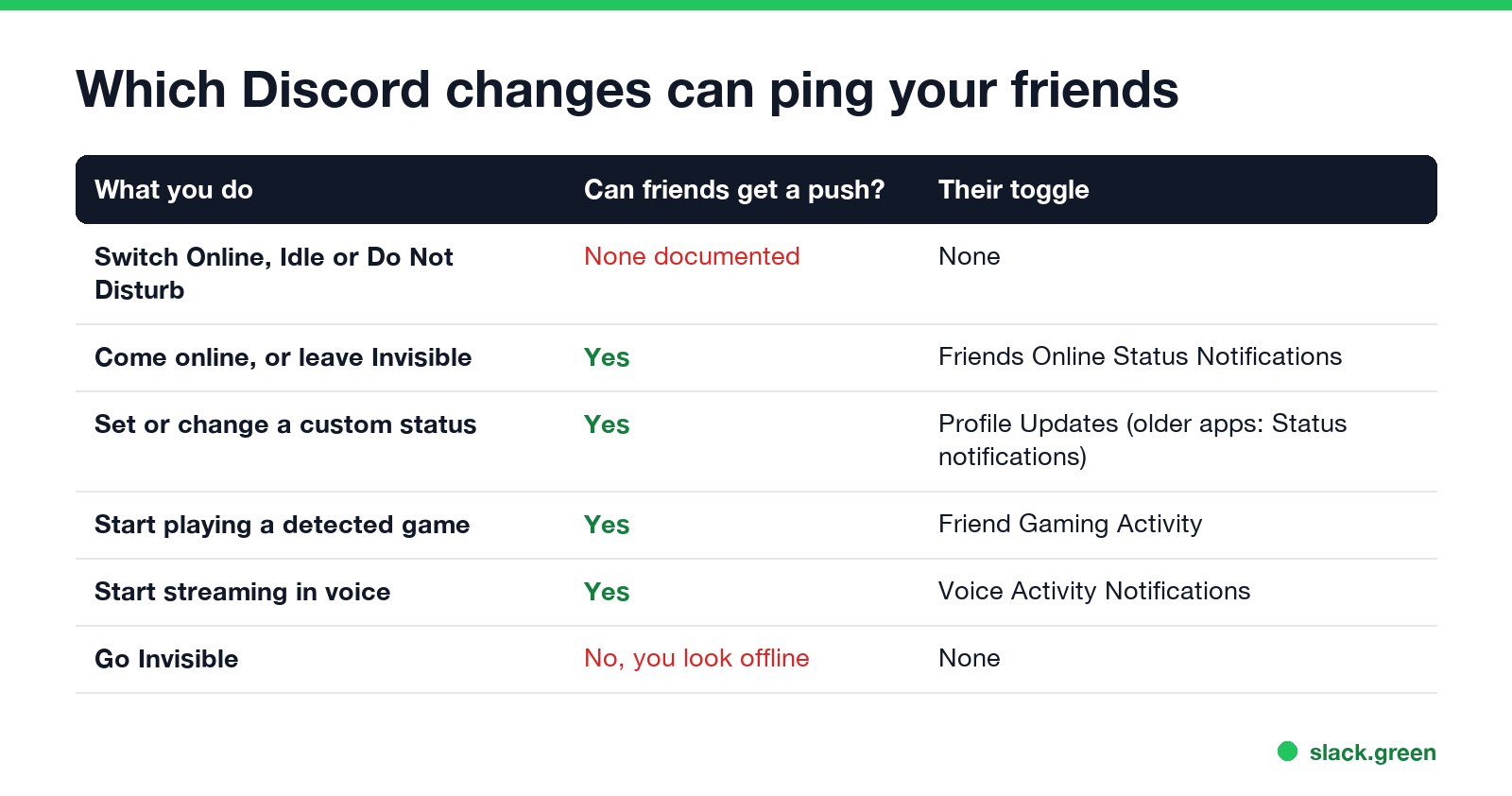
| What you do | Can friends get a push? | The toggle on their phone |
|---|---|---|
| Switch between Online, Idle and Do Not Disturb | No notification is documented | None |
| Come online, or switch from Invisible to Online | Yes | Friends Online Status Notifications |
| Set or change a custom status | Yes, "[username] updated their status" | Profile Updates |
| Start playing a game Discord detects | Yes | Friend Gaming Activity |
| Start streaming in a voice channel | Yes | Voice Activity Notifications |
| Go Invisible | No; to them you look offline | None |
The toggle names come from Discord's help article "[Mobile] Notifications Settings 101", updated in September 2026. A guide from roboin.io in April 2026 called the custom-status toggle Status notifications, so the label depends on the app version. These alerts are push notifications on the mobile app; Discord's desktop app has no matching setting. Only friends get them, not everyone in a shared server.
The pushes started rolling out in late 2025. PiunikaWeb reported in November 2025 that Discord began sending alerts when friends come online or change their status, and that users could turn off receiving them but not sending them.
How to turn off Discord status notifications
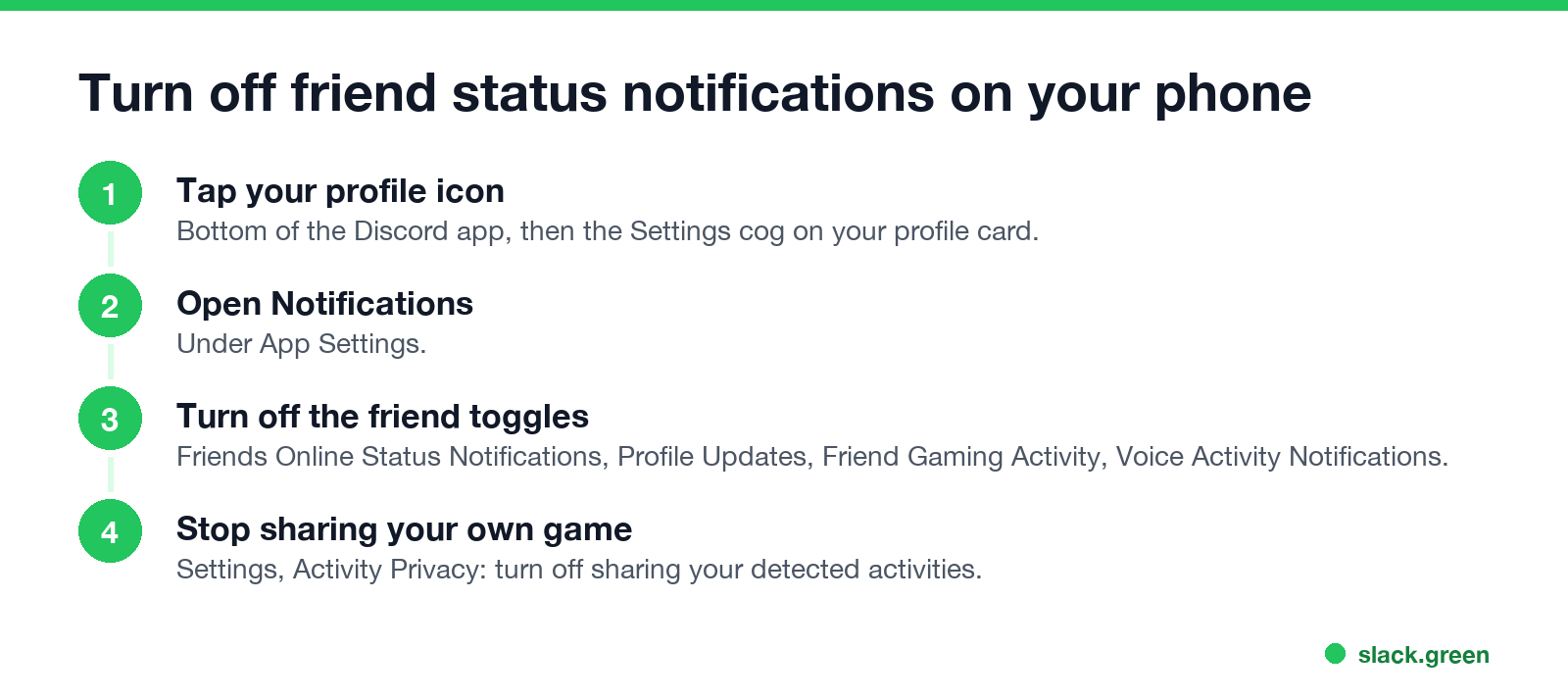
To stop getting "updated their status" and "is online" pings on your phone:
- Tap your profile icon at the bottom of the Discord app, then the Settings cog on your profile card.
- Under App Settings, tap Notifications.
- Turn off Friends Online Status Notifications, Profile Updates, Friend Gaming Activity and Voice Activity Notifications, whichever you do not want.
- • Go Invisible first. You appear offline, so coming online sends nothing, and your custom status is hidden while you are Invisible. Your friends lose the ability to see you are around, too. What still shows is in Discord invisible vs offline.
- • Change Online, Idle or Do Not Disturb freely. No push is documented for these.
- • Stop sharing your game. In User Settings, Activity Privacy, turn off sharing your detected activity. You can also turn it off per server under the server's Privacy Settings.
- • Leave the custom status alone. Each new custom status can ping friends who have the toggle on. Set one with a long Clear After instead of changing it several times a day. How to set it is in how to set a custom status on Discord.
You can also reach the same screen from the Notifications page: tap the bell, then the three dots, then Notification Settings. Discord notes that you get no push at all while the app is open and in focus.
How to change your status without notifying friends
You cannot switch off the alert for other people, but you can avoid the triggers:
If you want a status that says more without changing it often, the status message generator writes short lines by situation. It is built for Slack, and the lines fit Discord's 128-character custom status.
Do people see your status change without a notification?
Yes. Anyone who shares a server with you sees your dot and custom status in the member list and on your profile as soon as it changes. In a DM or group chat the custom status shows under your name. Discord does not keep a public history of past statuses, so a friend who was not looking only sees the current one.
If the change does not show for them at all, their app may be out of date or the change did not save; fixes are in Discord status won't change.
Slack and Teams do not ping on status changes
| App | Notifies others when you change status? |
|---|---|
| Discord | Friends on mobile can get a push for coming online, a custom status, or a game |
| Slack | No. Your status and dot update quietly |
| Microsoft Teams | Only if someone asked to be notified when you become available |
In Slack, nobody is told when you set a status or when your dot turns green. The dot follows your activity in the Slack window and goes away after 10 minutes without input; see Slack away status meaning.
FAQ
Does Discord tell people when you change your status? Not for Online, Idle or Do Not Disturb. Friends with the right toggle on can get a mobile push when you come online, set a custom status, or start a game.
Can I stop Discord from notifying friends about my status? Not directly. Go Invisible to avoid the online alert, and turn off activity sharing for games.
How do I turn off "updated their status" notifications? On mobile: Settings, Notifications, then turn off Profile Updates (Status notifications in some versions).
Does Discord notify when you go invisible? No. Invisible makes you look offline, and no notification is sent.
Related Articles
Webex Status Ideas: 35 Custom Statuses Under 75 Characters
35 Webex status ideas you can paste into Set a status: funny ones, meetings, focus time, lunch, out of office and time zones, each under Webex's 75-character limit. How to set a custom status, save five for reuse, and make it clear on its own.
How to Make an Emoji From a Video (Slack and Discord)
To make an emoji from a video, cut 1 to 2 seconds, crop it to a square, scale it to 128 x 128 and save it as a GIF under 128 KB for Slack or 256 KB for Discord. One tested ffmpeg command, the frame rate and color settings that decide the file size, and a free browser tool that shrinks the GIF for you.
How to Make a Custom Emoji for Discord (From Any Image)
To make a custom Discord emoji, crop an image to a square, keep it under 256 KB, name it with letters, numbers and underscores, and upload it with Add Emoji in the emoji picker or Server Settings, Emoji. How to make one from a photo, a GIF or text for free, add animation, and use it in other servers.