
What Does Idle Mean on Discord? The Yellow Moon, Explained
Idle on Discord, the yellow crescent moon, means the person is signed in but has not used their computer for about 10 minutes, has left the Discord app on their phone, or set Idle by hand. Idle vs online, the idle color and icon, how long it takes, and what server AFK timeouts do.
Idle on Discord means the person is signed in but not active right now. Discord shows it as a yellow crescent moon on their profile picture. It happens in one of three ways. They have not touched their computer's keyboard or mouse for about 10 minutes, or they left the Discord app on their phone. Or they chose Idle by hand. An idle person still gets your messages and notifications. They may not see them for a while.
We build Slack Green, which keeps a Slack status green during the working hours you set. Discord's moon is the same idea as Slack's away dot with different rules. The Slack side is in Slack away status meaning.
Discord statuses and their colors
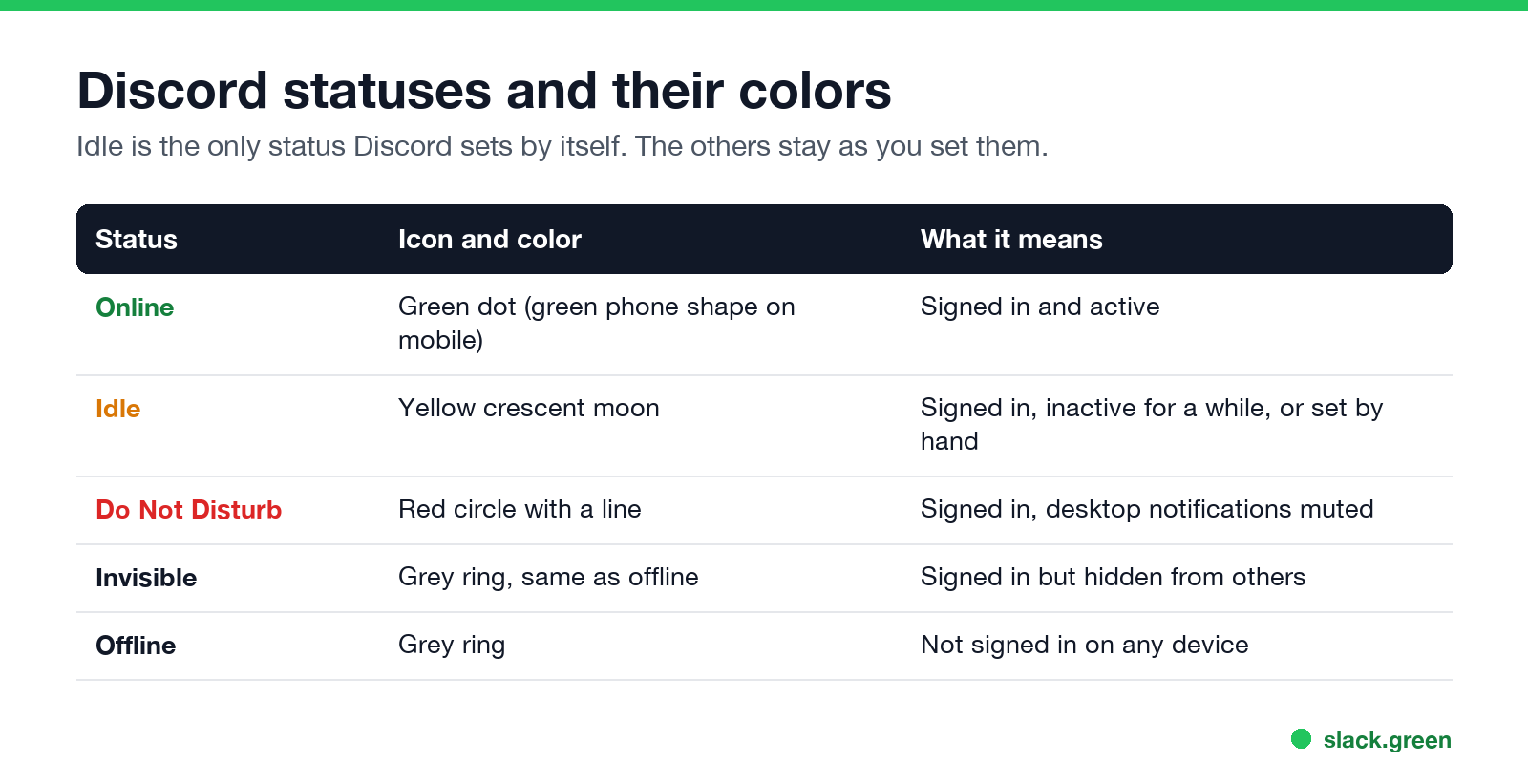
| Status | Icon and color | What it means | Set by |
|---|---|---|---|
| Online | Green dot, or a green phone shape on mobile | Signed in and active | Discord |
| Idle | Yellow crescent moon | Signed in, inactive for a while | Discord, or you |
| Do Not Disturb | Red circle with a line | Signed in, desktop notifications muted | You |
| Streaming | Purple | Live on Twitch or YouTube, linked to Discord | Discord, from the linked stream |
| Invisible | Grey ring, the same as offline | Signed in, hidden from others | You |
| Offline | Grey ring | Not signed in on any device | Discord |
Idle is the only status Discord sets by itself, apart from online and offline. Do Not Disturb and Invisible stay as you set them, and while either is on, Discord does not switch you to idle.
Three ways to become idle
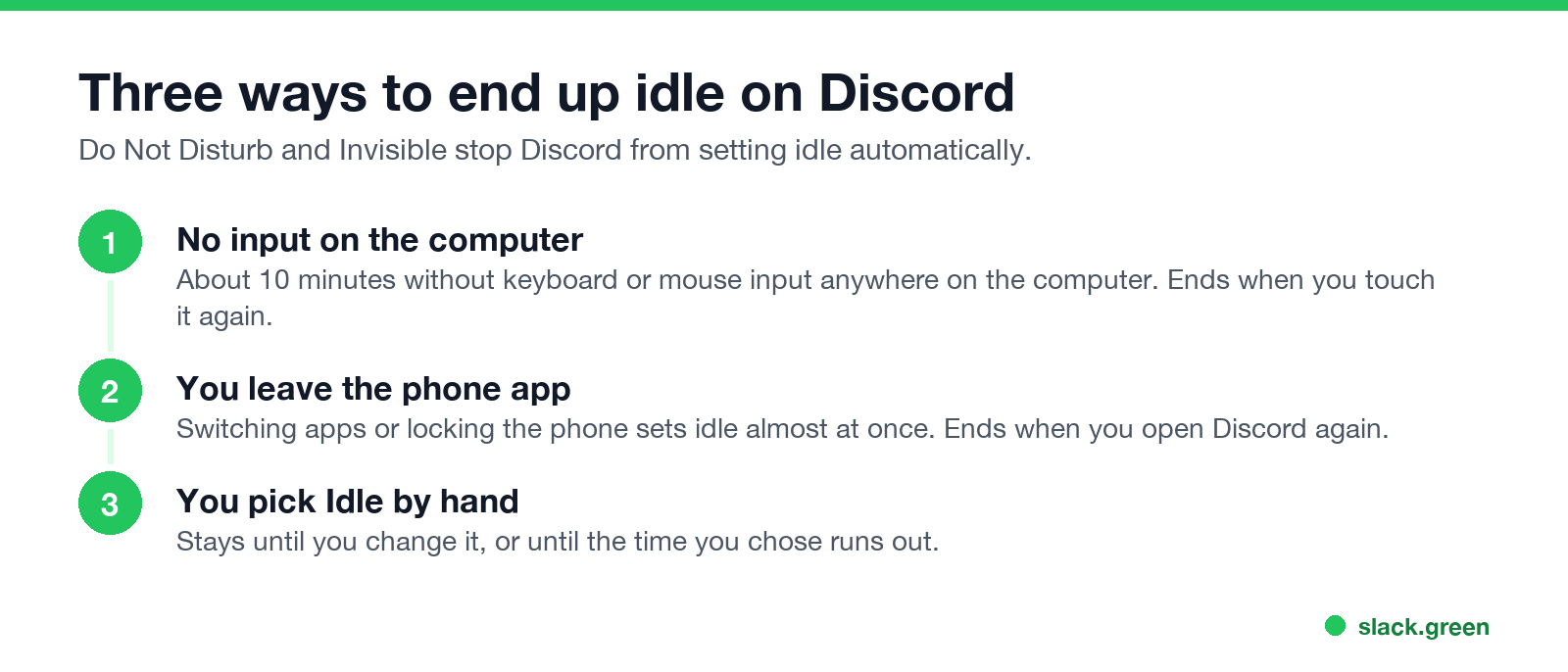
- No input on the computer. The desktop app watches keyboard and mouse input on the whole computer, not only in Discord. After about 10 minutes with none, you go idle. Discord does not publish the number; about 10 minutes matches most user reports, and some older guides say 5.
- You leave the phone app. On iOS and Android, switching apps or locking the screen sets idle almost at once. Details in does Discord show idle on mobile.
- You pick Idle. Click your profile picture at the bottom left on desktop, or open the You tab on mobile and tap your picture, then choose Idle. A manual Idle stays until you change it.
The first two end the moment you are active again.
Idle vs online on Discord
Never appear "away" on Slack again
Cloud-based. No downloads. Works 24/7 even when your laptop is off.
Both mean the person is signed in and can get messages. Online means they are active now. Idle means they have been away from the keyboard or the app for a while, so a reply may take longer. Neither status tells you what the person is doing. Someone reading a long thread on a second screen, or watching a stream without touching the mouse, turns idle while they sit right there.
Idle in a voice channel and server AFK timeouts
Your status can turn idle during a voice call if the computer gets no keyboard or mouse input, because the desktop timer counts input, not talking. That alone does not remove you from the call.
A server can move you, though. Server owners can pick an Inactive Channel and an Inactive Timeout, from 1 minute to 1 hour, under Server Settings, Overview. When you have been inactive in voice for that long, Discord moves you to the inactive (AFK) channel, where microphones are muted. That is a server rule, separate from your idle status.
Idle and notifications
Idle does not mute anything. Messages and mentions still arrive. On desktop, Discord also uses inactivity to decide when to send push notifications to your phone instead. The timing is under User Settings, Notifications, Push Notification Inactive Timeout. Do Not Disturb is the status that mutes desktop notifications.
Why someone always looks idle
Never appear "away" on Slack again
Cloud-based. No downloads. Works 24/7 even when your laptop is off.
To stay online you have to keep using the computer or keep the app on screen. There is no setting that changes the timer. Hiding your status completely is covered in Discord invisible vs offline.
FAQ
What does the yellow moon mean on Discord?
Idle. The person is signed in but has not been active for a while, or set Idle by hand.
How long until Discord goes idle?
About 10 minutes without keyboard or mouse input on a computer, and almost at once after you leave the app on a phone.
Can people message me when I am idle?
Yes. Idle changes nothing about messages or notifications.
Is idle the same as AFK on Discord?
Close. Idle is your personal status. AFK usually means a server's inactive channel, where Discord moves people who have been inactive in voice.
Can I turn off idle on Discord?
Not as a setting. Set Do Not Disturb or Invisible, which Discord does not change automatically, or keep the app in use.
Stop Jiggling Your Mouse.
Join hundreds of remote workers who never worry about their Slack status. Set it up once, stay green forever.
Related Articles
How to Keep Skype Status Active: Skype for Business Idle Timers
To keep your Skype for Business status active, open Options, Status, and raise both idle timers, Inactive and then Away, from 5 minutes to as much as 360 minutes each. Consumer Skype shut down on May 5, 2025 and Skype for Business Online in 2021, so for most people the real question is now Teams. What still works, status icons, Outlook, and status not updating.
Is It Legal for My Employer to Monitor Me? US, EU and UK Rules
In the US it is mostly legal for an employer to monitor company devices, accounts and premises, often without asking. The limits are state notice laws in New York, Connecticut and Delaware, consent rules for audio recording and biometrics, bans on cameras in restrooms, and your personal devices. The EU, UK and parts of Canada and Australia add notice and proportionality rules.
Can My Employer See My Personal Email on My Work Computer?
Your employer cannot sign in to your Gmail, and doing so without permission can break the Stored Communications Act. But on a work computer, screenshot and keystroke monitoring, browser history, HTTPS inspection and Outlook's local cache can all expose personal email. Work email is fully visible, deleted messages included. Case by case, with what to do.