
Why Does Discord Show Someone Online When They Are Offline?
Discord shows the most active status across every device a person is signed in on. If Discord still runs in the tray on a PC, or a browser tab is open, they stay green after closing their phone. The causes, how to check your own devices, and the reverse bug where you appear offline.
Discord shows someone as online when any device they are signed in on is still active. Close Discord on your phone, and a PC with Discord running in the system tray, or a forgotten browser tab, keeps you green. On Windows, clicking the X only hides Discord to the tray; it keeps running until you quit it from the tray icon. The other common cause is timing: after someone loses their connection, their green dot can stay for a short while until Discord notices the connection is gone.
If the person really has Discord closed everywhere, reload your own app with Ctrl+R (Cmd+R on Mac). Your member list may be showing an old status.
We build Slack Green, a presence tool for Slack, so we spend a lot of time on how chat apps decide who is online. Discord's statuses and what each color means are in Discord status icons meaning.
How Discord decides who is online
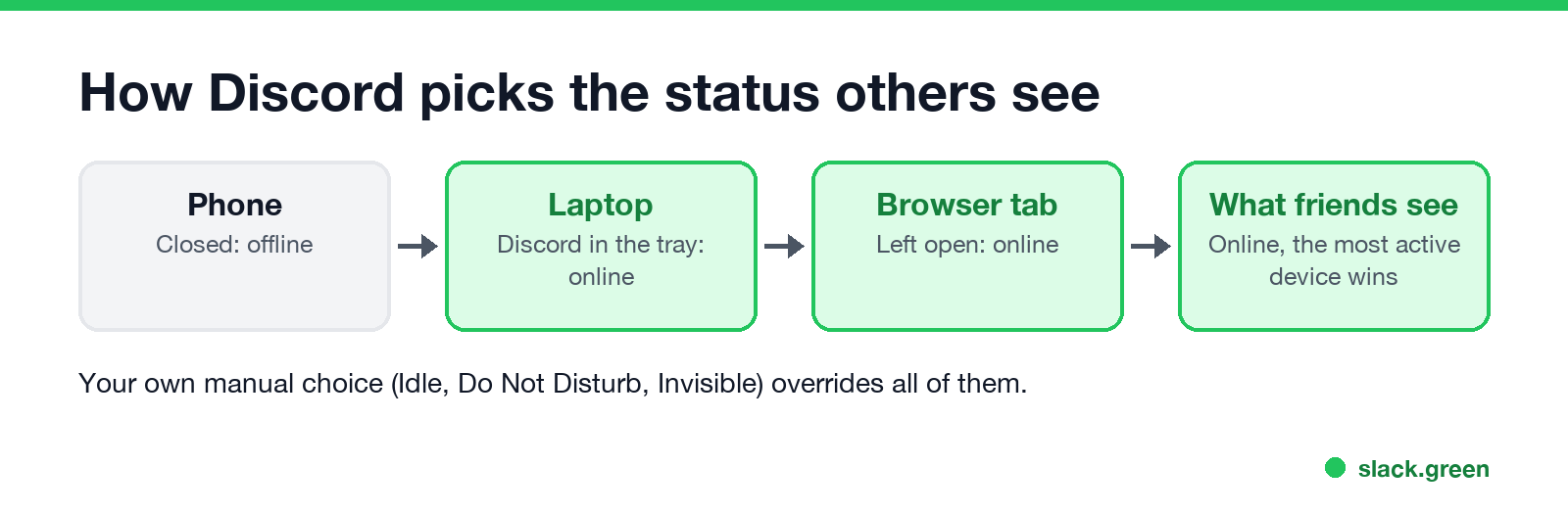
Every signed-in app counts: the desktop app, the phone app, and discord.com in a browser. Friends see one status, taken from the most active of them. A laptop in the tray that nobody touches goes idle after about 10 minutes without input on that computer, so the person shows a yellow moon rather than green. A computer in use, for a game or a film with the keyboard, never goes idle.
A status you pick yourself wins over all of this. Discord's help center says a manually set Idle stays that way indefinitely, and Invisible makes you appear offline while you keep using Discord.
Six causes, and the fix for each
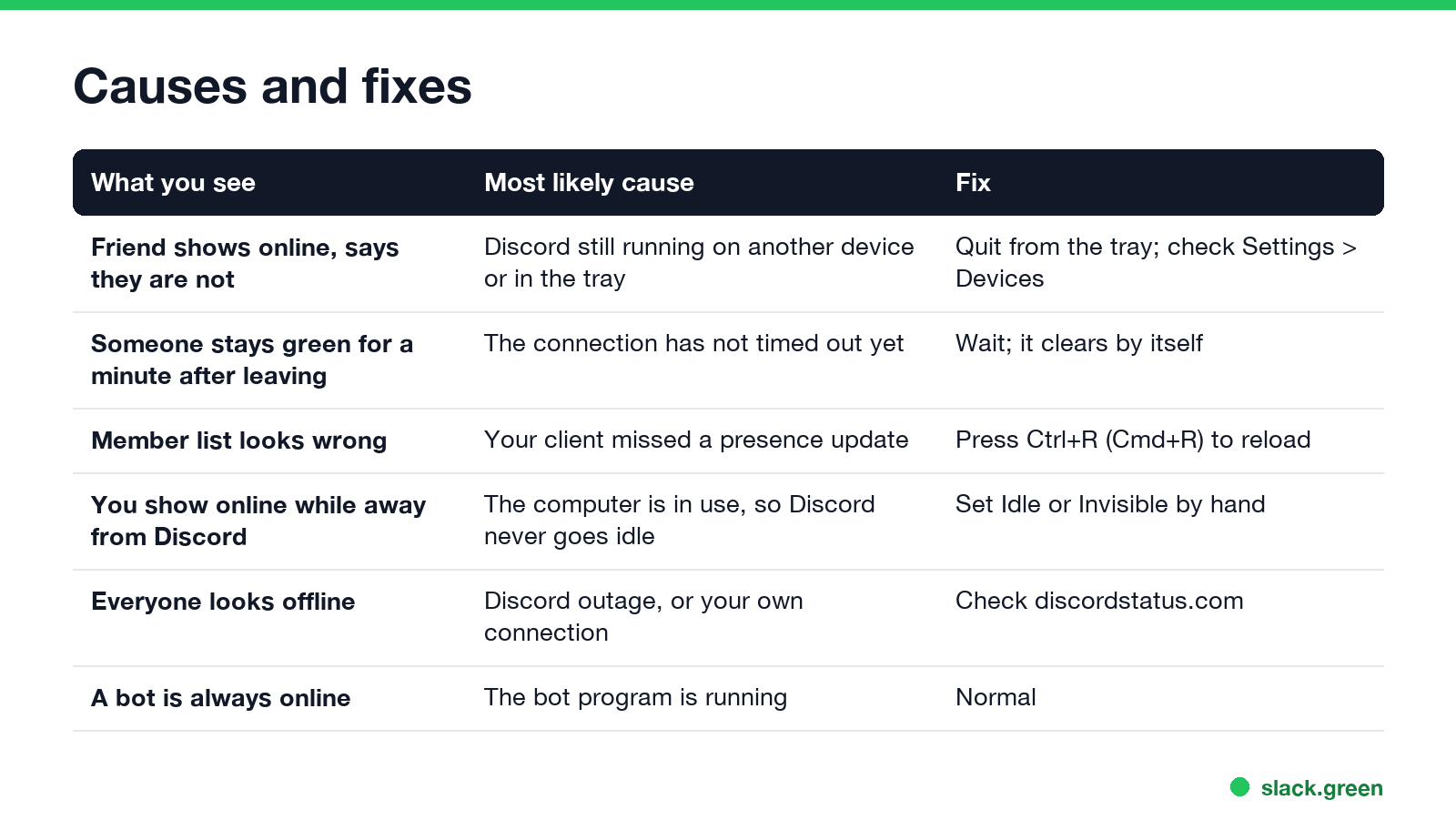
| What you see | Most likely cause | Fix |
|---|---|---|
| A friend shows online but says they are not | Discord still runs on another device or in the tray | They quit it from the tray, or log out the device |
| Someone stays green briefly after leaving | Their connection has not timed out yet | Wait, it clears by itself |
| The member list looks out of date | Your app missed a status update | Reload with Ctrl+R or Cmd+R |
| You show online while away from Discord | Your computer is in use, so Discord never goes idle | Set Idle or Invisible by hand |
| Everyone looks offline at once | A Discord outage or your own connection | Check discordstatus.com, then reconnect |
| A bot is always online | The bot program is running | Nothing to fix |
Stop showing online after you leave
Never appear "away" on Slack again
Cloud-based. No downloads. Works 24/7 even when your laptop is off.
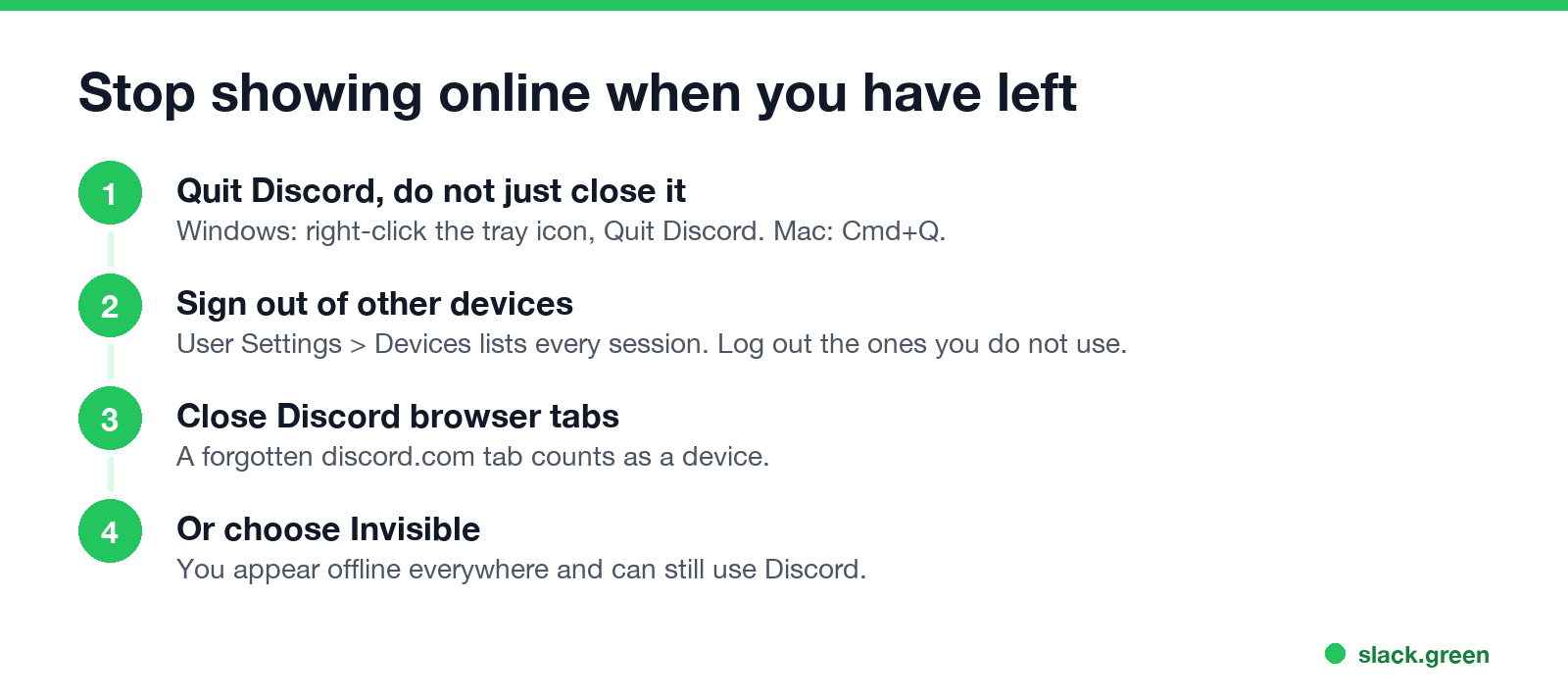
- Quit Discord instead of closing the window. On Windows, right-click the Discord icon in the tray (bottom right, sometimes under the ^ arrow) and choose Quit Discord. On Mac, press Cmd+Q. To make the X quit for good, turn off Minimize to Tray under User Settings, Windows Settings.
- Sign out of devices you forgot. Open User Settings, then Devices. It lists every signed-in session with its location and last use. Log out the ones you do not recognise or do not use.
- Close Discord tabs in your browser, on work computers too.
- Or choose Invisible. Click your profile picture at the bottom left and pick Invisible. You appear offline everywhere and can still read and send messages. What others can still tell is in Discord invisible vs offline.
- • You set Invisible and forgot. Your own avatar shows a grey ring. Click it and choose Online.
- • Your connection keeps dropping. Discord shows "Connecting" at the top. Others see you offline until it reconnects. Restart the app and your router.
- • You are on your phone with the app in the background. Discord marks you idle, then offline, as soon as you leave the app. See does Discord show idle on mobile.
- • Discord is having an outage. Status changes can lag for everyone. Check discordstatus.com.
The reverse: Discord shows you offline when you are online
People search "Discord appearing offline bug" for the opposite problem. Check these in order:
Is someone faking offline?
If a friend shows offline but replies at once, they are probably Invisible. Discord does not tell you. If you want to hide from one person rather than everyone, see how to appear offline to one person on Discord.
Same problem in Slack and Teams
Never appear "away" on Slack again
Cloud-based. No downloads. Works 24/7 even when your laptop is off.
Work apps have the same rule. In Slack, you stay active while any signed-in device is in use, and go away after 10 minutes without input in the Slack window. In Teams, the most active device sets your status. The other direction, looking away while you are working, is the problem Slack Green solves: it keeps your Slack status green during your work hours.
FAQ
Why does Discord show someone online when they are offline? Discord is still running on another device of theirs, often a PC in the system tray or an open browser tab.
Does closing Discord make you offline? On a phone, yes. On Windows, closing the window only hides Discord to the tray. Quit it from the tray icon.
How long does Discord take to show someone offline? Usually seconds after they quit. After a lost connection it can take a little longer, until Discord notices.
How do I see which devices are signed in to my Discord? User Settings, then Devices. You can log out any session there.
Can I appear offline without logging out? Yes. Choose Invisible from your profile picture.
Stop Jiggling Your Mouse.
Join hundreds of remote workers who never worry about their Slack status. Set it up once, stay green forever.
Related Articles
Webex Status Stuck in a Meeting? Causes and Fixes
Webex shows In a meeting while a Webex meeting is still open on any of your devices, and In a calendar meeting while an event is on your calendar. Leave the meeting everywhere, check your calendar, or turn off Show when in a calendar meeting. Plus the fixes when Webex status does not show in Outlook.
RingCentral Status Stuck on In a Meeting? Turn Off Calendar Presence
RingCentral usually shows In a meeting when you are not in one because Calendar presence is on: it shows In a meeting for every event on a connected calendar, whether you join or not. How to turn it off, the other four causes (Teams presence sync, a meeting that never ended, another RingCentral app, old events), and what each presence icon means.
Slack Huddle API: What Apps Can Read and Do
Slack has no API to start, join or record a huddle. Apps can read whether a user is in one from huddle_state on the user profile, see which channel from huddle_state_channel_id, and get the user_huddle_changed event when it changes. Code for both, plus audit log events on Enterprise.