
How to Get People to Use Threads in Slack (With a Bot That Nudges)
Slack cannot force replies into threads. A visible rule plus a small bot that privately nudges channel replies does it; code and test results included.
Slack has no setting that forces replies into threads, so getting people to use them takes three things: a rule people can see in the channel, people who post questions inviting thread replies, and a reminder at the moment someone answers in the channel instead. The reminder is the part you can automate. We wrote a 30-line bot that spots a top-level message posted within 5 minutes of someone else's and sends that person a private 'reply in thread' nudge, and we ran it in a test channel on 22 November 2026.
What the nudge looks like
A test app asked three questions in a channel, and a member answered them, mostly in the channel and once in a thread. The bot sent a nudge for each channel answer it saw, and only the person who answered sees it:
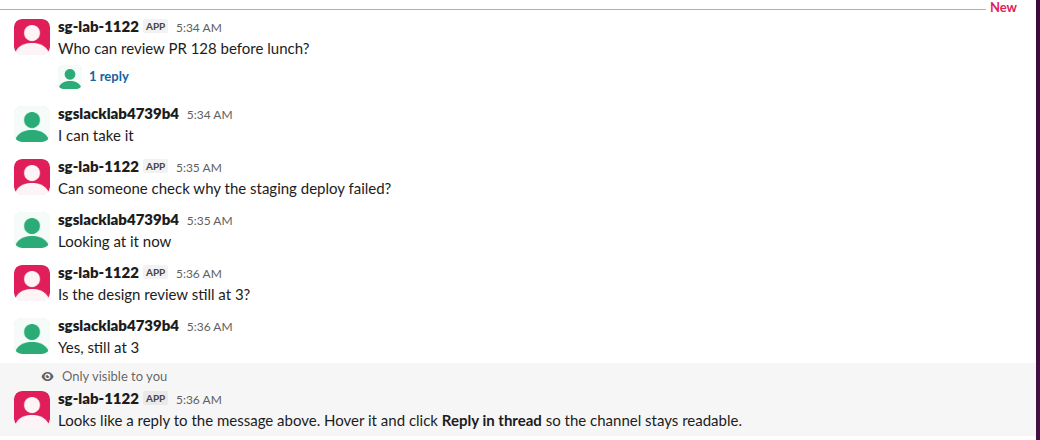
What we saw in the test:
- • Nobody else sees the nudge. It is an ephemeral message, marked Only visible to you, so the channel does not fill up with reminders and nobody gets called out in public.
- • A thread reply gets no nudge. The answer 'Taking it now', posted in the thread of the first question, was skipped, as it should be.
- • The nudge does not stay. After a page reload the first nudge was gone. Ephemeral messages are not saved, so the bot repeats itself only if people repeat the habit.
- • It comes within one poll. The bot checks every 10 seconds, and the first nudge arrived 10 seconds after the answer 'Looking at it now'.
One note on the screenshot: we restarted the script after the first exchange, so the first answer, 'I can take it', came before the run that sent the nudges. The script only looks at messages newer than its own start.
The script
It needs a bot token with channels:history and chat:write, and the bot added to the channel. Our guide to the Slack bot token shows how to create the app and copy the token.
import os
import sys
import time

import requests

TOKEN = os.environ["SLACK_BOT_TOKEN"]  # xoxb- with channels:history, chat:write
CHANNEL = sys.argv[1]
WINDOW = 300  # a top-level message this soon after someone else's looks like a reply
TEXT = "Looks like a reply to the message above. Hover it and click *Reply in thread* so the channel stays readable."
H = {"Authorization": "Bearer " + TOKEN}


def api(method, **data):
    return requests.post("https://slack.com/api/" + method, headers=H, data=data, timeout=20).json()


nudged = set()
oldest = str(time.time())
while True:
    msgs = api("conversations.history", channel=CHANNEL, oldest=str(float(oldest) - WINDOW), limit=50)["messages"]
    msgs = [m for m in reversed(msgs) if not m.get("subtype") and "thread_ts" not in m or m.get("thread_ts") == m.get("ts")]
    for prev, cur in zip(msgs, msgs[1:]):
        if cur["ts"] in nudged or float(cur["ts"]) < float(oldest):
            continue
        if cur.get("user") != prev.get("user") and float(cur["ts"]) - float(prev["ts"]) < WINDOW and not cur.get("bot_id"):
            r = api("chat.postEphemeral", channel=CHANNEL, user=cur["user"], text=TEXT)
            print(time.strftime("%H:%M:%S"), "nudged", cur["user"], "for", repr(cur.get("text", "")[:40]), r["ok"], flush=True)
            nudged.add(cur["ts"])
    time.sleep(10)
Start it with the channel id as the only argument:
SLACK_BOT_TOKEN=xoxb-... python thread_nudge.py C0123456789This is what it printed during our test, one line per nudge (times in KST):
14:36:07 nudged U0CDVBA6TMZ for 'Looking at it now' True
14:36:59 nudged U0CDVBA6TMZ for 'Yes, still at 3' True
Three numbers decide how pushy it is. WINDOW is how soon after someone else's message a post counts as a reply; 300 seconds caught the quick answers in our test without flagging new topics posted later. The sleep of 10 seconds is how fast the nudge arrives. And the bot_id check keeps it from nudging other apps. To run it all day, put it on any small server or in a container; it holds no state except the set of messages it has already nudged.
Never appear "away" on Slack again
Cloud-based. No downloads. Works 24/7 even when your laptop is off.
Rules that make threads stick
The bot only works next to a visible rule. These four help most:
On paid plans Slack's help center also describes posting permissions that let only some people post in a channel while everyone else can still reply in threads. That suits announcement channels; we could not test it on our Free workspace.
Threads have a cost of their own: replies are easy to miss. If people say they stopped seeing answers, send them to Slack thread notifications not working, and if a thread will not stop showing as unread, Slack threads keep showing unread has the fixes.
FAQ
Can I make Slack reply in thread by default? No. Slack has no default-to-thread setting for a channel or a person; a reply goes to the channel unless you click Reply in thread on the message.
Will the bot annoy people? It sends one private line per channel reply and nothing in public. In our test the nudge disappeared after a reload, so it leaves no trace.
Stop Jiggling Your Mouse.
Join hundreds of remote workers who never worry about their Slack status. Set it up once, stay green forever.
Related Articles
How to Resolve or Close a Slack Thread (and Who Can Lock One)
Slack has no Resolve or Close button for threads. We checked every thread menu as a member, found the admin-only lock in Slack's code, and tested the workarounds that do work: a checkmark, a to-do you mark complete, and muting replies.
Slack conversations.replies: Read a Whole Thread, and a Paging Trap We Hit
conversations.replies returns a thread's parent and its replies. We paged a 25-reply thread on October 31, 2026: without oldest the pages run newest first, and with oldest plus a cursor one reply went missing at every page break.
Open a Slack Thread in a New Window or Full View: What Works
In the Slack web app, a thread opens in the side panel. Its menu offers Open in split view, which keeps the thread on screen while you move to other channels. We tested every option on October 28, 2026.