
How to Leave a Group DM in Slack (You Can't, Here's What Works)
Slack has no Leave button for a group DM. We checked every menu and the API, then tested Close conversation and Mute and hide to see which one keeps it away.
You cannot leave a group DM in Slack. There is no Leave item in any of its menus, and Slack's own conversations.leave method refuses group DMs. What you can do is make it go away for you: right-click the group DM in the sidebar and choose Mute and hide. It then stays out of your sidebar and stops notifying you, even when people keep posting. Close conversation also hides it, but only until the next message arrives.
We tested this on 25 November 2026 in Slack's web app, as a member of a Free test workspace, in a group DM with one other person and a test app. Nothing we did posted a message the others could see, except renaming the conversation.
Every place we looked for a Leave button
| What we tried (25 Nov 2026) | Result |
|---|---|
| Conversation header menu (three dots) | Conversation details, Copy, Star conversation, Summarize conversation, Open in split view; no Leave |
| Right-click the group DM in the sidebar | Edit conversation name, notification choices (All new posts, Just mentions, Mute and hide), Close conversation; no Leave |
| Conversation details dialog, About, Members and Settings tabs | Name, topic, member list, Change to a private channel; no Leave |
conversations.leave on the group DM | method_not_supported_for_channel_type |
conversations.kick to remove the bot | method_not_supported_for_channel_type |
| Close conversation | Gone from the sidebar; is_open false; still a member |
| A new message after closing | Group DM came back in the sidebar with an unread badge |
| Mute and hide, then a new message | Stayed out of the sidebar; still a member |
The sidebar menu is where the useful options are:
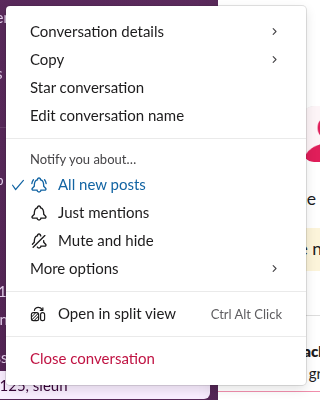
Close conversation vs Mute and hide
We closed the group DM, had the test app post one message, then muted it and had the app post again:

- • Close conversation removed it from the sidebar at once, and
conversations.infoshowedis_open: false. The next message from the app brought it straight back with an unread badge. Use it to tidy up a group that has gone quiet. - • Mute and hide removed it too, and after the next message it stayed hidden, with no badge. This is the closest thing to leaving. You remain a member, and the others can still read what you posted before.
Neither action tells the others anything. No message appeared in the group's history for either one, so you can step away from a group chat without anyone knowing.
Never appear "away" on Slack again
Cloud-based. No downloads. Works 24/7 even when your laptop is off.
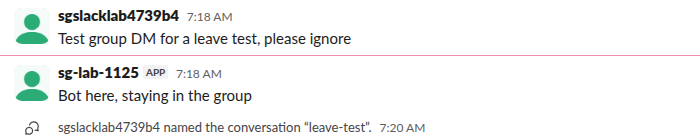
Rename a group DM
A group DM can have a name. Right-click it and choose Edit conversation name, or open Conversation details and edit Conversation name. Unlike closing or muting, this posts a visible line for everyone:
Remove someone from a group DM
You cannot. conversations.kick gave the same method_not_supported_for_channel_type error, and the details dialog has no remove option. The only way to drop a person is to start a new group DM without them. If the group needs to change members over time, turn it into a private channel, which converting a group DM to a channel shows step by step; in a channel people can leave and be removed. Leaving a channel works differently, as does Slack notify when you leave a channel explains.
FAQ
Will the others see that I muted or closed the group DM? No. Neither action posted anything to the conversation in our test.
Can I leave a group DM in the Slack mobile app? We tested the web app only. Slack's API refuses to remove anyone from a group DM, so the mobile app has no way to do it either; mute it there instead.
How do I get a hidden group DM back? Open it from any link to it and it shows in the sidebar again with a crossed-out bell. Right-click it and choose All new posts to unmute it; we did this to undo our test.
Stop Jiggling Your Mouse.
Join hundreds of remote workers who never worry about their Slack status. Set it up once, stay green forever.
Related Articles
Slack Supported File Types: What Previews and What Only Downloads
Slack accepts almost any file type. We uploaded 15 types to a real workspace and recorded which ones preview, which show inline and which only download.
How to Get People to Use Threads in Slack (With a Bot That Nudges)
Slack cannot force replies into threads. A visible rule plus a small bot that privately nudges channel replies does it; code and test results included.
How to Send a Slack Message Without Notifying Anyone (Tested)
Slack has no silent send button. We tested which messages raise a notification badge and which do not, including edits, threads, code and DMs.