
Slack Supported File Types: What Previews and What Only Downloads
Slack accepts almost any file type. We uploaded 15 types to a real workspace and recorded which ones preview, which show inline and which only download.
Slack accepts almost any file type. What changes from type to type is only how the file shows up in the conversation: text, code, Markdown, Office documents and PDFs get a preview, common image formats show inline, and archives, installers and design files appear as a download card. In our test Slack refused none of the 15 types, including .exe and .apk.
We checked this on 25 November 2026 in Slack's web app, signed in as an ordinary member of a Free test workspace. We made one small file of each of 15 types, uploaded each into a private test channel, looked at how each one appeared, and read back the filetype and pretty_type that Slack's files.info method stored for it. Every upload was accepted.
The results for 15 file types
| File | filetype | pretty_type | What the channel showed |
|---|---|---|---|
notes.txt | text | Plain Text | Text preview, expands in place |
people.csv | csv | CSV | Table-style text preview with a side scroll |
config.json | json | JSON | Code preview with line numbers |
readme.md | markdown | Markdown (raw) | Rendered Markdown (heading, list) |
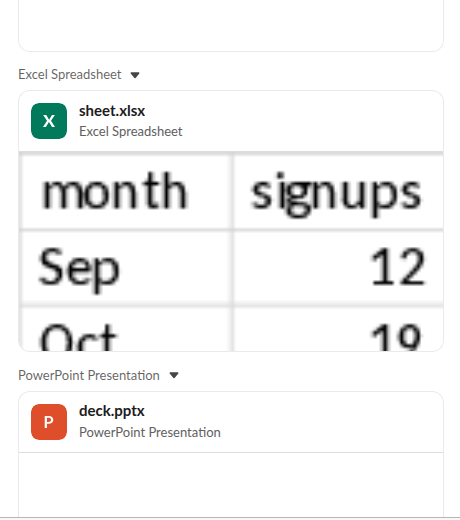
report.docx | docx | Word Document | Page preview |
sheet.xlsx | xlsx | Excel Spreadsheet | Page preview of the cells |
deck.pptx | pptx | PowerPoint Presentation | Slide preview |
guide.pdf | pdf | Page preview | |
bundle.zip | zip | Zip | Download card only |
setup.exe | exe | Windows Application | Download card only |
installer.dmg | binary | Binary | Download card only |
app.apk | apk | APK | Download card only |
design.psd | psd | Photoshop Document | Download card only |
photo.heic | heic | High Efficiency Image File | Inline image |
photo.webp | webp | WebP | Inline image |
The first four (.txt, .csv, .json, .md) are stored with mode set to snippet, which is why they open as text inside the message. Everything else is stored as hosted, a normal file.
Text and code files open inside the message
Slack reads small text files and shows them in the conversation. JSON gets line numbers and syntax colors, and a Markdown file is rendered with its heading and list, even though files.info still names it 'Markdown (raw)':
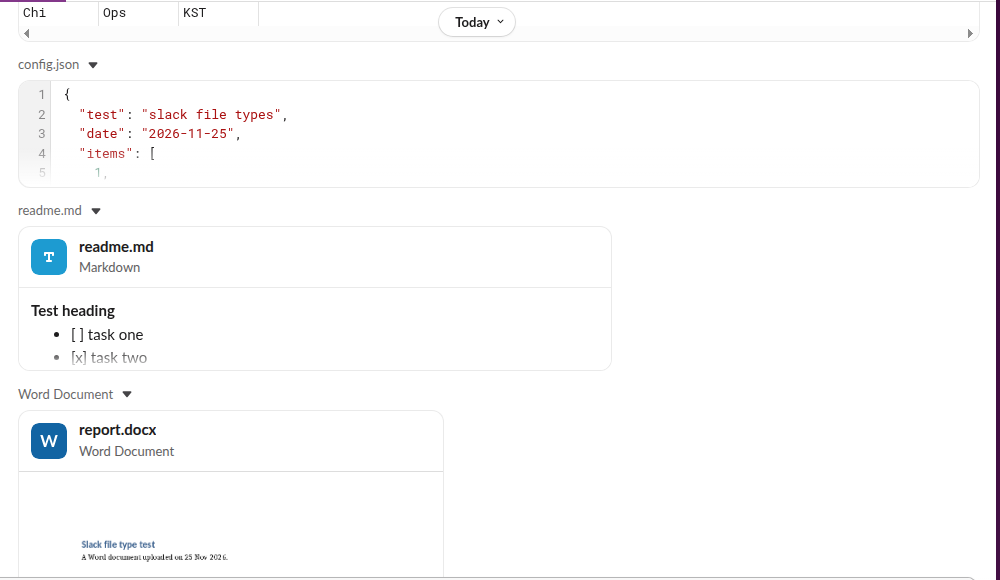
Slack's Markdown file preview goes deeper on what that renderer does with tables and task lists.
Office files and PDFs get a page preview
For .docx, .xlsx and .pptx, Slack makes a PDF copy of the file and shows its first page. files.info lists that copy as converted_pdf and a page image as thumb_pdf. A PDF gets the page image directly, with no conversion. Nobody needs Office to see the preview:
Never appear "away" on Slack again
Cloud-based. No downloads. Works 24/7 even when your laptop is off.
Archives, installers and design files only download
A .zip, .exe, .apk or .psd uploaded fine, but Slack showed only a card with an icon and the type name. Clicking it downloads the file. A .dmg was the odd one: Slack did not recognize it and stored it as binary, so its card says Binary:
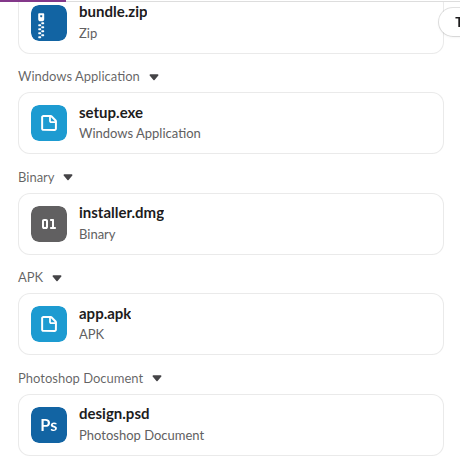
So 'binary' in Slack is not an error. It means Slack has no type name for that extension and will not preview it.
Images: HEIC and WebP show inline
Both the iPhone format HEIC and WebP appeared as images in the channel, at full width of the image card. For HEIC, Slack made its own thumbnails (thumb_360 up to thumb_720) so the picture shows on computers that cannot open HEIC. A Photoshop .psd, by contrast, gets no thumbnail at all. Video and audio have their own rules, covered in Slack video formats and Slack audio files; SVG is a special case explained in how to upload an SVG to Slack.
When a file does not preview
On our Free workspace no extension was refused at upload. When a file does not behave the way you expect, it is usually one of these:
- The file is over Slack's per-file limit. Slack file size limit has the numbers we measured.
- Slack has no viewer for the type. A ZIP, PSD or DMG is still stored and shareable; Slack just has nothing to render, so you get the download card.
- Your company limits files. Some companies connect file-scanning or retention tools to Slack. Those rules come from your admins, so ask them if a file disappears after you post it.
If you need to check what Slack recorded for a file, files.info returns the same filetype and pretty_type values shown in the table above. Files you upload stay in the workspace until someone deletes them, as where Slack files are stored explains.
FAQ
Can Slack preview a ZIP file's contents? No. In our test a ZIP showed only a download card labeled Zip; Slack does not list the files inside.
Why does my .dmg say Binary in Slack?
Slack has no type name for .dmg, so it stores it as binary with application/octet-stream. The file is intact and downloads normally.
Do Office previews need Microsoft 365? No. Slack converts the file to PDF on its side and shows the first page to everyone in the conversation.
Stop Jiggling Your Mouse.
Join hundreds of remote workers who never worry about their Slack status. Set it up once, stay green forever.
Related Articles
How to Leave a Group DM in Slack (You Can't, Here's What Works)
Slack has no Leave button for a group DM. We checked every menu and the API, then tested Close conversation and Mute and hide to see which one keeps it away.
Slack Public File Link: How to Share a File Outside Slack
A normal Slack file link only opens for people signed in to your workspace. A public link needs an admin setting and a user token. Our signed-out tests and API errors.
How to Get People to Use Threads in Slack (With a Bot That Nudges)
Slack cannot force replies into threads. A visible rule plus a small bot that privately nudges channel replies does it; code and test results included.