
Slack Audio Files: Which Formats Play and Get Transcripts
Slack plays MP3, M4A and WAV uploads in the message with a transcript button. We uploaded five audio formats and a spoken note on 20 November 2026: OGG and FLAC got no player, and the spoken MP3 got a transcript on the Free plan.
Slack plays uploaded MP3, M4A and WAV files right in the message, with a play button, a progress bar, a speed control and a transcript button. In our test on 20 November 2026, OGG and FLAC files uploaded fine but got no player: OGG showed as a plain "Ogg Vorbis" card and FLAC as "Binary". A spoken MP3 got a written transcript under the player after one click, in a workspace on the Free plan. We made the test files with ffmpeg and the macOS say command, uploaded them as a regular member in the Slack web app, and deleted them afterwards.
| File (5-second 440 Hz tone) | Slack's label | MIME type in files.info | Inline player in the web app | Transcript button |
|---|---|---|---|---|
| MP3 | MP3 | audio/mpeg | Yes | Yes |
| M4A | MPEG 4 Audio | audio/mp4 | Yes | Yes |
| WAV | Waveform Audio | audio/vnd.wave | Yes | Yes |
| OGG (Vorbis) | Ogg Vorbis | audio/ogg | No, plain card | No |
| FLAC | Binary | application/octet-stream | No, plain card | No |
What each audio file looks like in Slack
We uploaded the same 5-second tone in five formats, made with one ffmpeg command per format:
for f in mp3 m4a wav ogg flac; do
  ffmpeg -f lavfi -i "sine=frequency=440:duration=5" -ac 1 -ar 44100 tone-440hz.$f
done
MP3, M4A and WAV each got the same player card: the file name, the length and size ("0:05 (45 kB)"), a play button, a seek bar, the transcript button and a 1x speed button. OGG and FLAC came out as plain file cards you can only download:
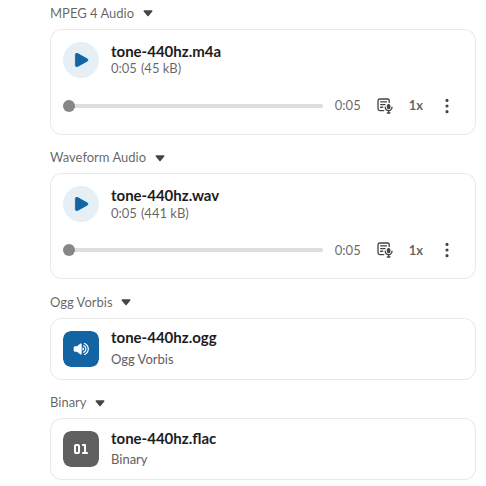
The OGG result is odd, because Slack did read the file. Its files.info had media_display_type: "audio", a duration_ms of 5000 and a waveform, like the MP3, yet the web app showed no player. FLAC was not recognized as audio at all: filetype: "binary", mimetype: "application/octet-stream" and no duration. So for audio people should play in Slack, send MP3 or M4A. Converting takes one ffmpeg line; for our spoken note below we ran ffmpeg -i standup-note.aiff -ac 1 -b:a 96k standup-note.mp3, and the same form works with a .flac or .ogg input.
Transcribe an audio file in Slack
The transcript button works on uploaded files, not only on clips recorded in Slack. We recorded a 9-second spoken note with say on a Mac, converted it to MP3 and uploaded it. Before anyone clicked, files.info said "transcription": {"status": "none"}, so Slack does not transcribe uploads by itself. After one click on the transcript button, the text appeared under the player within 20 seconds, with a View transcript link for the full text:
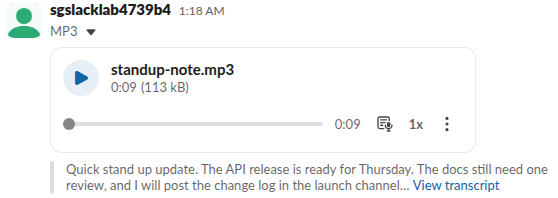
The transcript was word for word apart from two splits: we said "standup" and "changelog", and Slack wrote "stand up" and "change log". The API carries the same text:
{
  "name": "standup-note.mp3",
  "mimetype": "audio/mpeg",
  "filetype": "mp3",
  "duration_ms": 9351,
  "media_display_type": "audio",
  "is_transcription_region_supported": true,
  "transcription": {
    "status": "complete",
    "locale": "en-US",
    "preview": {
      "content": "Quick stand up update. The API release is ready for Thursday. The docs still need one review, and I will post the change log in the launch channel",
      "has_more": true
    }
  },
  "audio_wave_samples": [100, 100, 100, "... 100 values in total"]
}
The 5-second tone got a different answer. Its transcript button spun, then gave up, and files.info recorded why:
"transcription": {
  "status": "fatal",
  "display_error": "This media file does not contain enough speech that can be transcribed."
}
So music, sound effects and silent files get no transcript, and the button stays visible anyway. For live audio in a call, see how to share audio in a Slack huddle.
Never appear "away" on Slack again
Cloud-based. No downloads. Works 24/7 even when your laptop is off.
Audio as a Slack notification sound
Several "slack mp3" searches are really about notification sounds. An uploaded MP3 does not become one: Slack's sound menu offers only its own built-in sounds. Our page on changing the Slack notification sound lists all of them.
FAQ
Why won't my audio file play in Slack? Check the format. In our test MP3, M4A and WAV got an inline player, while OGG and FLAC got plain file cards. Convert to MP3 or M4A with ffmpeg and upload again.
Can Slack transcribe an uploaded audio file? Yes, on our Free workspace. Click the transcript button on the player. Slack transcribed a spoken 9-second MP3 and refused a tone with "This media file does not contain enough speech that can be transcribed."
Stop Jiggling Your Mouse.
Join hundreds of remote workers who never worry about their Slack status. Set it up once, stay green forever.
Related Articles
Slack PDF Preview: What Opens and What Does Not (Tested)
Slack shows page 1 of a PDF in the channel and opens the whole file in its own viewer. We uploaded a 1-page PDF, a 40-page PDF, a password-protected PDF and an HTML file on 20 November 2026 and recorded what each preview showed, how fast it came up, and what files.info returned.
Upload SVG to Slack: What Works and What Fails (Tested)
Slack accepts an SVG file but shows it as a plain file card with no preview. We uploaded, pasted and tried one as a custom emoji and a profile photo on 20 November 2026, then converted it to PNG, which worked everywhere.
How to Change Your Display Name in Slack (Tested)
Change your Slack display name under Profile > Edit. We tested where it shows, which names Slack refuses, and why a change may not stick.