
How to Change the Slack Notification Sound on Desktop and Mobile
Change the Slack notification sound in Preferences, Notifications, Sound & appearance on desktop, or under Notifications, Sound on iPhone and Android. The full sound list, per-type sounds, why there is no per-channel sound, custom sound workarounds, and fixes when no sound plays.
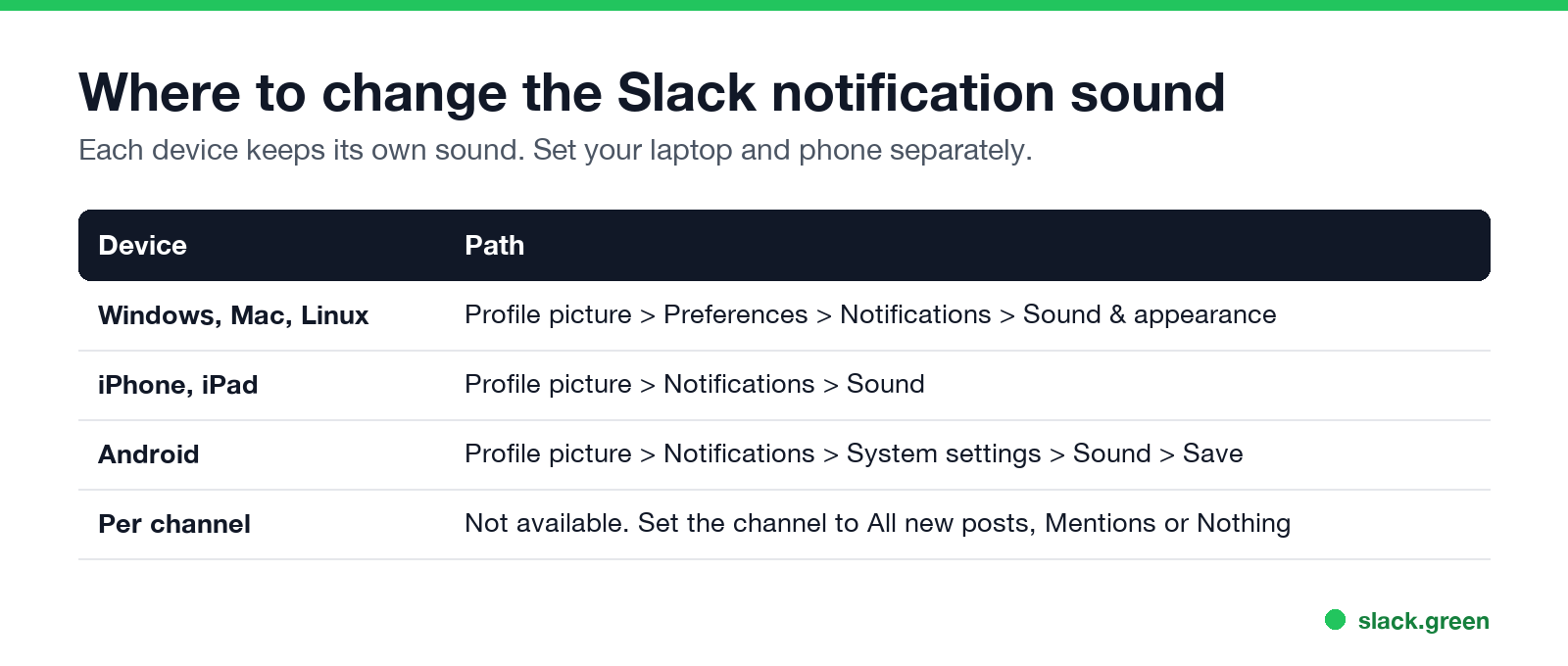
To change the Slack notification sound on desktop, click your profile picture in the sidebar, select Preferences, then Notifications, and scroll to Sound & appearance. Pick a sound from the drop-down menu for each notification type, such as new messages or huddles. Slack plays a preview as you choose. On iPhone, tap your profile picture, Notifications, Sound. On Android, tap your profile picture, Notifications, System settings, Sound. The change applies to the device you set it on, so set each computer and phone separately.
A quieter sound helps you focus, but Slack still sets you away after 10 minutes without input in the Slack window. If you mute Slack to get work done and want your status to stay active, Slack Green keeps it green during your working hours from its own servers.
Change the notification sound on Windows, Mac and Linux
- Click your profile picture in the sidebar.
- Select Preferences, then Notifications.
- Scroll down to Sound & appearance.
- Choose a sound from the drop-down menu next to each notification type.
- Close Preferences. The new sound works right away.
- • Knock Brush, the Slack default
- • Ding, Boing, Drop, Ta-da, Plink, Wow, Here you go, Hi, Whoa! and Yoink
- • Hummus, a voice clip
- • None, for no sound on that notification type
Slack lets you pick a separate sound for each of these, per its help center:
| Notification type | When it plays |
|---|---|
| New messages | A DM, mention, keyword or a channel set to all new posts |
| VIP messages (paid plans) | A message from someone on your VIP list |
| Huddles | A huddle starts or someone invites you |
| Sending a DM | You send a direct message |
| Receiving a DM while in the conversation | A reply arrives in the DM you have open |
In the same section you can tick Mute all sounds from Slack, and choose whether banners include a preview of the message.
Every Slack notification sound
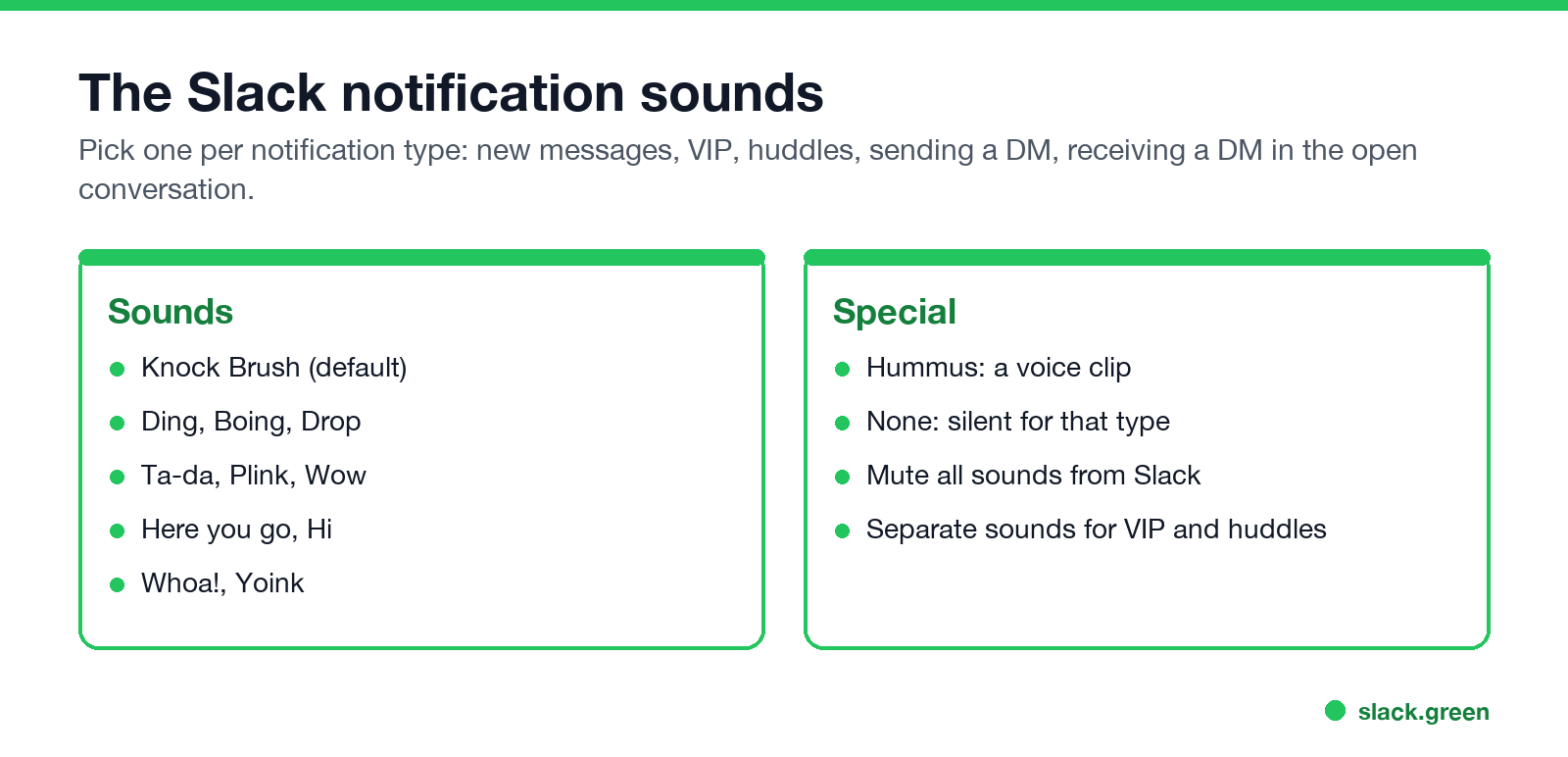
The drop-down includes these sounds. The exact list can change between Slack versions.
The Hummus sound is a recording of a person saying the word, not a tone. It became a Slack in-joke, and people search for it by name.
A setup that keeps things calm: a short sound such as Plink or Yoink for new messages, a different one such as Ta-da for VIP messages so they stand out, and None for sending a DM.
Change the sound on iPhone and Android
Never appear "away" on Slack again
Cloud-based. No downloads. Works 24/7 even when your laptop is off.
iPhone and iPad. Tap your profile picture, then Notifications, then Sound, and pick one.
Android. Tap your profile picture, then Notifications, then System settings, then Sound, and tap Save. This opens Android's own notification settings for Slack, so you can also use a ringtone or sound file from your phone. Slack's help notes that the sound setting is not available on Huawei devices.
Phones also follow your system sound mode. In silent mode or a Focus mode on iPhone, or Do Not Disturb on Android, Slack notifications arrive silently.
Can you set a different sound per channel?
Not in Slack itself. Sounds are set per notification type, not per channel or per person. What you can change per channel is whether it notifies you at all: open the channel, click its name, then Notifications, and choose All new posts, Mentions, or Nothing.
Two ways to get close to per-channel sounds:
On Android, the system notification settings may split Slack's notifications into categories, each with its own sound.
Can you use a custom Slack notification sound?
On desktop, not through Slack's settings. Older guides describe replacing the sound files inside Slack's install folder with a file of the same name, such as knock_brush.mp3. That is unsupported. Each Slack update puts the default files back, and on a Mac, changing files inside a signed app can stop it from opening.
On Android there is a supported way: pick any sound file on your phone through System settings, Sound, as above.
Slack notification sound not working
Never appear "away" on Slack again
Cloud-based. No downloads. Works 24/7 even when your laptop is off.
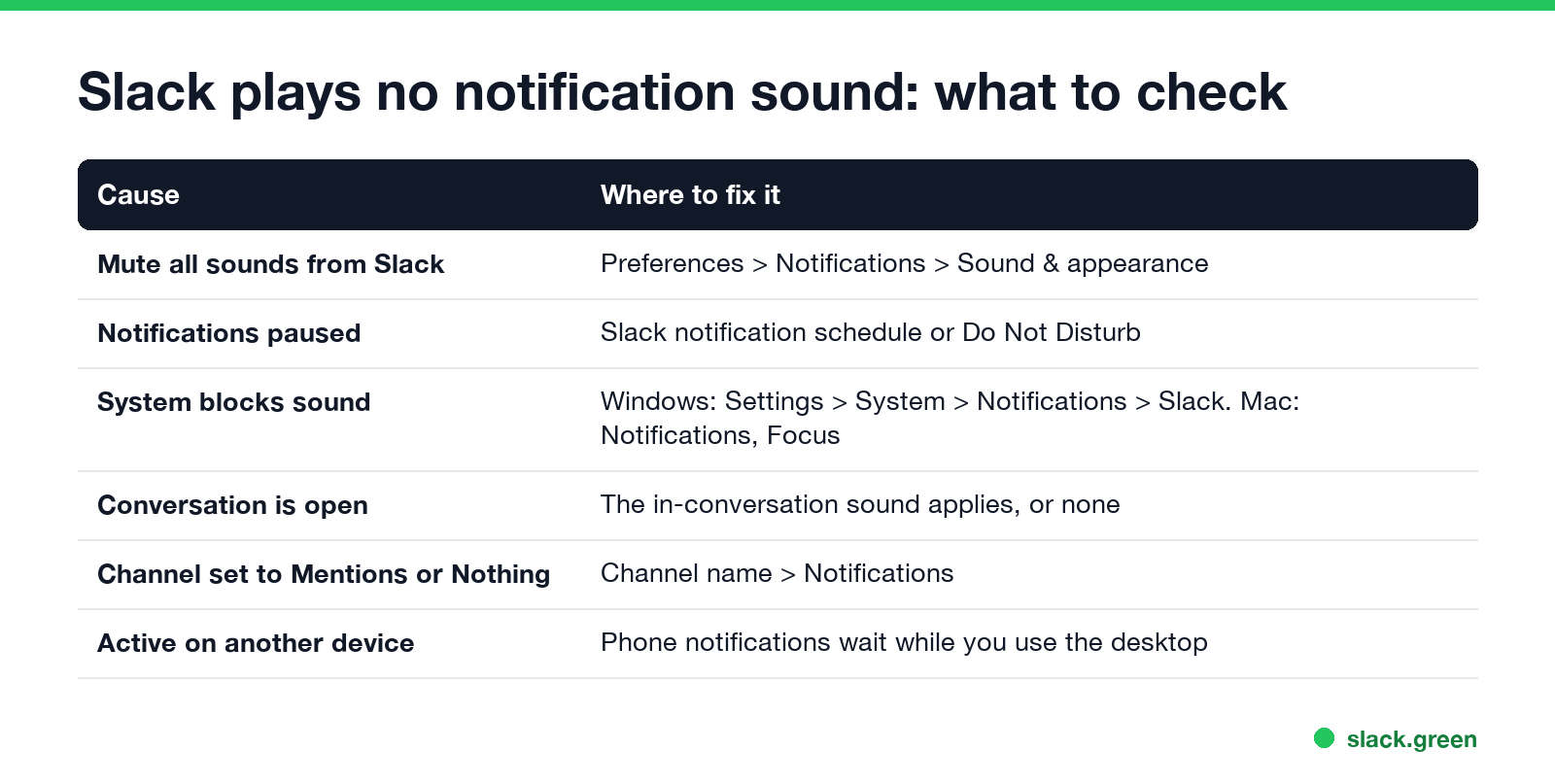
Work down this list:
If notifications do not arrive at all, not only the sound, the full checklist is in Slack notifications not working. For missed thread replies, see Slack thread notifications not working.
FAQ
What is the default Slack notification sound called? Knock Brush.
How do I turn off the sound when I send a message? In Sound & appearance, set Sending a DM to None.
Does changing the sound on my laptop change it on my phone? No. Each device keeps its own sound setting.
Can I make Slack silent but still show banners? Yes. Tick Mute all sounds from Slack. Banners and badges still appear.
Stop Jiggling Your Mouse.
Join hundreds of remote workers who never worry about their Slack status. Set it up once, stay green forever.
Related Articles
Best Calendar App for Slack: Official Apps and Add-Ons Compared
Slack has no calendar of its own. The best calendar app for most teams is Slack's free Google Calendar or Outlook Calendar app, whichever matches your email: reminders, invites, a daily agenda and automatic In a meeting status. Add Calendly, Reclaim, a leave tracker or a birthday bot only for the job those miss.
Slack Outlook Calendar Integration: Setup, Status Sync and Fixes
The Outlook Calendar app for Slack connects a Microsoft 365 calendar to Slack: event reminders, join buttons, invitations you can answer in Slack, and Status Sync, which sets In a meeting, Working remotely or Out of Office from your calendar. How to set it up, why the status sometimes does not update, and what to do on on-premise Exchange.
Is Slack End-to-End Encrypted? No. Here Is Who Can Read It
No, Slack is not end-to-end encrypted. It encrypts messages and files in transit and at rest, but Slack holds the keys, so its servers can read your data and workspace owners can export it on some plans. What Slack encrypts, who can read your messages, how Slack compares with Signal, WhatsApp and Teams, and the real Slack security risks.