
How to Change Your Display Name in Slack (Tested)
Change your Slack display name under Profile > Edit. We tested where it shows, which names Slack refuses, and why a change may not stick.
To change your display name in Slack, click your profile picture, choose Profile, click Edit next to your name, type the new name in Display name and click Save Changes. The new name replaces your full name in messages, the sidebar and mentions right away, including on messages you sent before. We changed ours on 21 November 2026 in the Slack web app and also tested which names Slack refuses.
Steps
- Click your profile picture at the bottom left of Slack.
- Choose Profile. Your profile opens on the right.
- Click Edit next to your name.
- Fill in Display name. Leave Full name as it is unless you want to change both.
- Click Save Changes.
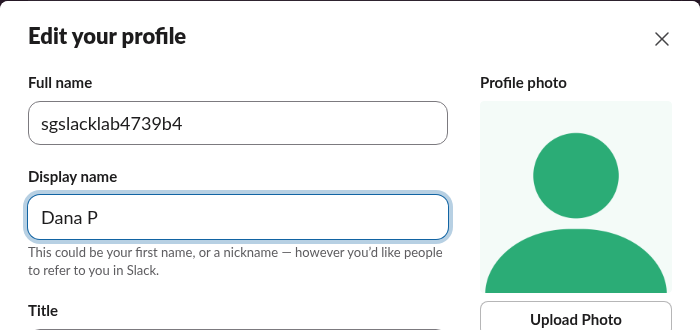
Display name vs full name
Slack keeps two names. The full name is your real name; the display name is what people see in conversations. If the display name is empty, Slack shows the full name instead.
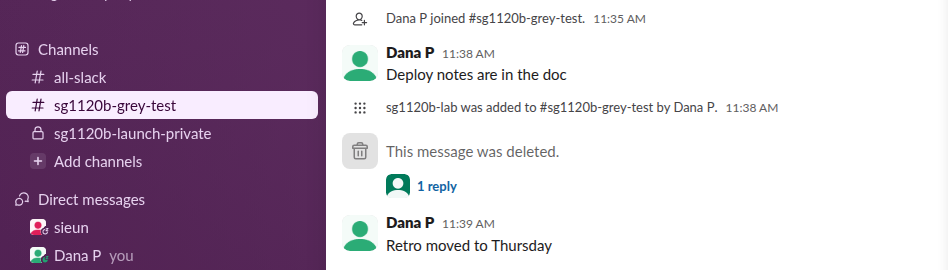
After we saved 'Dana P', every message by the account in the channel switched to the new name at once, including two posted before the change, and the sidebar showed 'Dana P (you)':
The @mention list shows both names, display name first and full name beside it, so people can still find you by your real name:

Never appear "away" on Slack again
Cloud-based. No downloads. Works 24/7 even when your laptop is off.
Names Slack refuses
We tried a set of names through the same endpoint the profile editor saves to, users.profile.set. These are the answers we got:
| Display name we tried | Result |
|---|---|
Dana P | Saved |
| 80 letters | Saved |
| 81 letters | too_long |
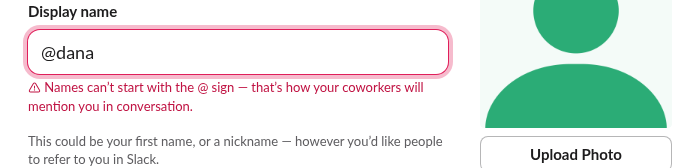
@dana | invalid_starts_with_at |
Dana 🌿 | invalid_emoji_not_allowed |
dana.p | Saved |
DANA | Saved, capitals kept |
sieun, the full name of another member | Saved: names do not have to be unique |
| Three spaces | Saved as an empty display name |
In the app, a leading @ is caught before saving with this message:
Emoji are refused in the name itself. To show an emoji next to your name, use your status instead, as in how to put an emoji next to your name in Slack.
Display name not changing?
ratelimited. Waiting 20 seconds and saving again worked.Uniqueness is the trap to watch for. Because Slack accepted a display name that matched another member's name, two people can look the same in a channel; the avatar and the full name in the mention list are how to tell them apart. A profile title helps too.
FAQ
Do other people get notified when I change my name? No notice was posted in any channel when we changed ours. The new name simply appeared on old and new messages.
Can I change my display name with the API?
Yes. users.profile.set with {"display_name": "New name"} changed it for us, and a user token with the users.profile:write scope did the same in an earlier test. Setting it to an empty string brings back the full name.
Is there a length limit?
80 characters. The 81st character made Slack answer too_long.
Stop Jiggling Your Mouse.
Join hundreds of remote workers who never worry about their Slack status. Set it up once, stay green forever.
Related Articles
Slack Profile Title: Add a Job Title and Search by It
Your Slack title sits under your name on your profile, and people search can filter by it. We set one on 20 November 2026 as a regular member, searched for it, tried to set it through the API, and read which profile fields a Free workspace has.
How to Add Someone to a Private Channel in Slack
Only current members can add people to a private Slack channel. We tested Add people, /invite and the API, and what a newcomer sees.
Slack Audio Files: Which Formats Play and Get Transcripts
Slack plays MP3, M4A and WAV uploads in the message with a transcript button. We uploaded five audio formats and a spoken note on 20 November 2026: OGG and FLAC got no player, and the spoken MP3 got a transcript on the Free plan.