
Slack Profile Title: Add a Job Title and Search by It
Your Slack title sits under your name on your profile, and people search can filter by it. We set one on 20 November 2026 as a regular member, searched for it, tried to set it through the API, and read which profile fields a Free workspace has.
To add a job title in Slack, click your profile picture, choose Profile, click Edit next to your name, type it in the Title field and click Save Changes. The title then shows under your name on your profile, and other members can find you by it in search under People. We did this on 20 November 2026 in the Slack web app as a regular member of a Free workspace. One surprise came from the API: users.profile.set answered "ok": true to a new title and left the old one in place.
Add your title in Slack
- Click your profile picture at the bottom left and choose Profile.
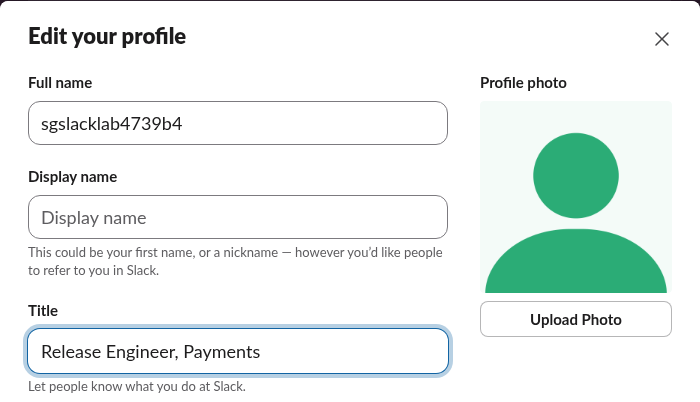
- Click Edit next to your name. The Edit your profile window opens.
- Type your job in Title. The hint under it says "Let people know what you do at Slack." The field showed no character limit while we typed.
- Click Save Changes.
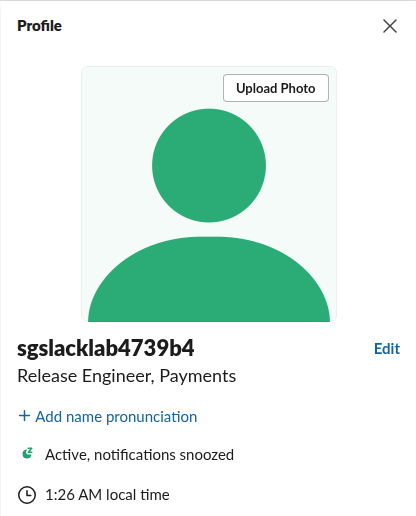
The title appeared under the name in the profile panel at once:
To remove a title, open the same window, clear the field and save. That is how we put our test account back.
Search Slack by job title
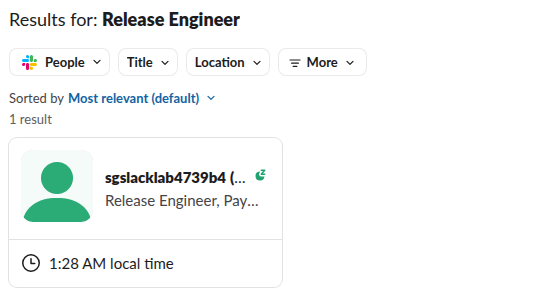
Type the title in the search bar at the top and press Enter. The results open on Messages, which found nothing for "Release Engineer". The type menu next to it showed People 1; switching to People listed our member with the title on the card:
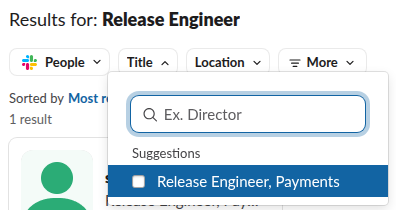
The People tab has a Title filter, which suggests every title in use. In a large workspace this is a quick way to list everyone with the same job:
The search suggestions that drop down while you type did not show the person, only "Show results for: Release Engineer". You need the full results page.
Never appear "away" on Slack again
Cloud-based. No downloads. Works 24/7 even when your laptop is off.
Set the title with the API: ok, but no change
users.profile.set is the documented method for profile fields, and it needs a user token with the users.profile:write scope. We installed a test app with that scope and called it as the same member:
curl -s https://slack.com/api/users.profile.set \
  -H "Authorization: Bearer $SLACK_USER_TOKEN" \
  --data-urlencode 'profile={"title":"Platform Lead (set by API)"}'
{"ok": true, "profile": {"title": "Staff Engineer, Billing", "...": "..."}}Slack answered ok, but the title in the reply was still the one we had typed in the app, and users.profile.get confirmed nothing changed. The name=title&value=... form and a write to the field's ID (fields: {"Xf0B7A5A0KDZ": {"value": ...}}) gave the same result. A display_name sent the same way did change, so the token and the call were fine. team.profile.get showed why. In this workspace Title is a managed field whose API write list is empty:
{
  "id": "Xf0B7A5A0KDZ",
  "field_name": "title",
  "label": "Title",
  "type": "text",
  "options": {
    "is_scim": true,
    "is_protected": true
  },
  "is_hidden": false,
  "permissions": {
    "api": [],
    "ui": true,
    "scim": false
  }
}
The web app saves the title another way. When we clicked Save Changes, it called users.profile.setSections with the title as a section element and then users.profile.set. If a script must set titles in your workspace, read the title field in team.profile.get first; when its permissions.api list is empty, expect the same silent no-op. Changing a profile photo from a script, which did work for us, is in our Slack API profile picture test.
Which profile fields a Free workspace has
team.profile.get listed 13 fields in our Free workspace. Five show on profiles, and a member can edit them in the app. The other eight are hidden fields for admins and directory sync:
| Label | field_name | Type | On profiles | Member can edit in the app | API write allowed for |
|---|---|---|---|---|---|
| Start Date | Start Date | date | Shown | Yes | nobody |
| Title | title | text | Shown | Yes | nobody |
| Name Recording | Name Recording | file | Shown | Yes | nobody |
| Phone | Alternate Phone | text | Shown | Yes | nobody |
| Name Pronunciation | Name Pronunciation | text | Shown | Yes | nobody |
| Manager | managerId | user | Hidden | No | Admins and owners |
| Organization | organization | text | Hidden | No | Admins and owners |
| Division | division | text | Hidden | No | Admins and owners |
| Department | department | text | Hidden | No | Admins and owners |
| Cost Center | costCenter | text | Hidden | No | Admins and owners |
| City | locality | text | Hidden | No | Admins and owners |
| State | region | text | Hidden | No | Admins and owners |
| Country | country | text | Hidden | No | Admins and owners |
"Phone" is stored as a field named Alternate Phone. Adding new fields of your own, such as a team or a desk number, is for admins; Slack's help article "Customize member profiles" covers it. Display name rules are in how to put an emoji next to your name in Slack.
FAQ
Where is the job title in Slack? Under your name on your profile, which also opens when someone clicks your name in a message. Set it with Profile > Edit > Title.
Why does users.profile.set not change the title?
In our workspace the title field had an empty permissions.api list in team.profile.get. Slack answered ok and ignored the new value. The app's Edit profile window still worked.
Stop Jiggling Your Mouse.
Join hundreds of remote workers who never worry about their Slack status. Set it up once, stay green forever.
Related Articles
How to Change Your Display Name in Slack (Tested)
Change your Slack display name under Profile > Edit. We tested where it shows, which names Slack refuses, and why a change may not stick.
How to Add Someone to a Private Channel in Slack
Only current members can add people to a private Slack channel. We tested Add people, /invite and the API, and what a newcomer sees.
Slack Audio Files: Which Formats Play and Get Transcripts
Slack plays MP3, M4A and WAV uploads in the message with a transcript button. We uploaded five audio formats and a spoken note on 20 November 2026: OGG and FLAC got no player, and the spoken MP3 got a transcript on the Free plan.