
How to Rename a Slack Channel (and Who Is Allowed To)
Open the channel name, pick Edit next to Channel name, type the new name and save. We tested who can rename, which names Slack refuses, and what happens to links and old names.
To rename a Slack channel, click the channel name at the top of the channel, then click Edit next to Channel name, type the new name and click Save Changes. That works for public and private channels alike, as long as the Channel name row is there. On our Free test workspace a Member saw that row only on channels they created; on a channel the owner made, the row was missing and the API answered not_authorized.
We ran every step below on 29 November 2026 as an ordinary Member (not an admin) of a Free workspace, in the web app and through the conversations.rename API with the same account.
Rename a channel in four clicks
- Open the channel and click its name in the header (for example # sg-1129-launch-plan).
- On the About tab, find Channel name and click Edit.
- Type the new name. Slack lowercases letters and turns spaces into dashes as you type, so "Q4 Launch Plan" becomes
q4-launch-plan. - Click Save Changes.
The desktop app runs the same client, so the steps are the same there.
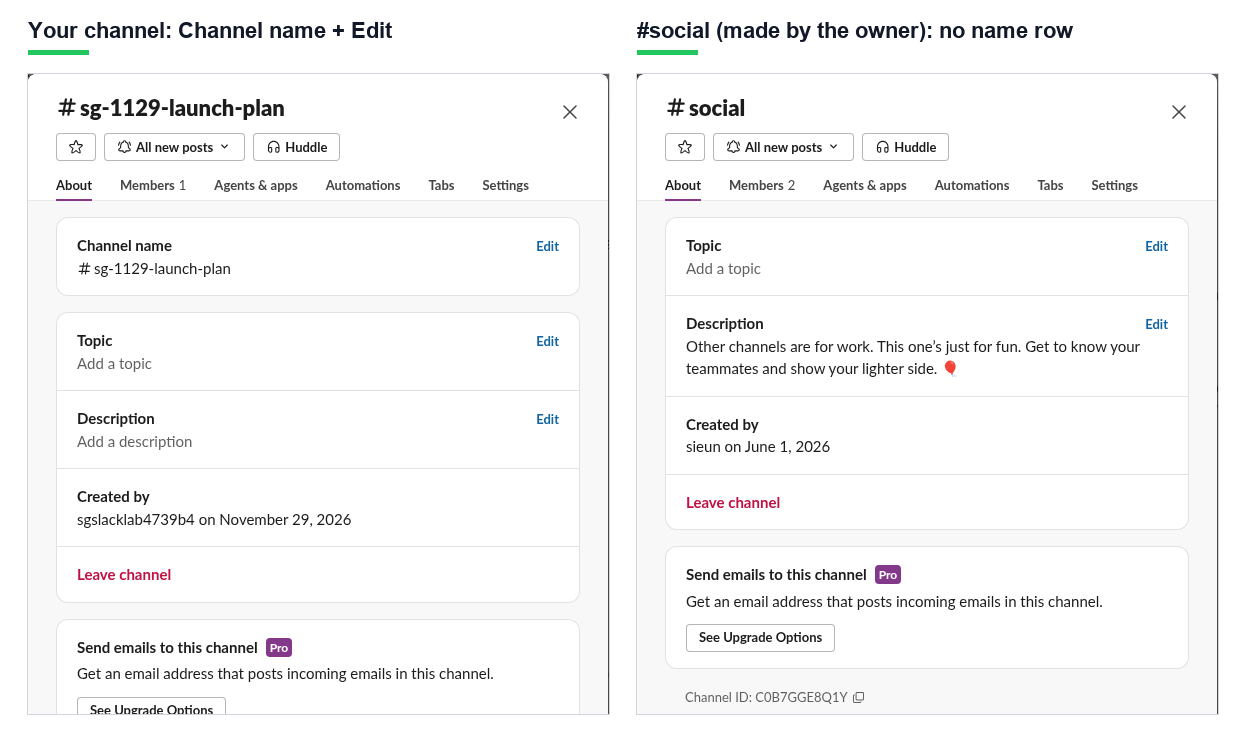
Same Member, two channels. Left: a channel the Member created, with Channel name and Edit at the top. Right: #social, created by the owner, where the row is not shown at all.
Who can rename a channel
If the Edit link next to the channel name is missing, you do not have permission for that channel. Here is what our Member account could do:
| Channel | Edit link shown | API result for the Member |
|---|---|---|
| Public channel the Member created | Yes | ok |
| Private channel the Member created | Yes | ok |
| #social (created by the owner) | No | not_authorized |
| #general (the workspace's default channel) | No | not_authorized |
| Archived channel created by the owner | not opened | not_authorized |
| Archived channel the Member created | not opened | ok |
So a Member can rename what they made, and nothing else. If you need a name changed on a channel you did not create, ask the person who made it, a workspace admin, or a channel manager of that channel.
Names Slack refuses
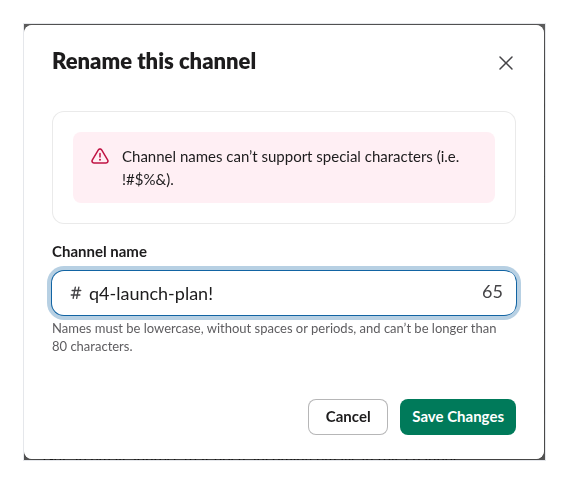
The dialog shows the rules under the box: lowercase, no spaces or periods, 80 characters at most. When we typed q4-launch-plan! and saved, Slack refused it with this message:
The API is stricter than the dialog, because it does not fix the name for you. Each line below is a real conversations.rename call and its answer:
name="Q4 Launch Plan"   -> invalid_name_specials   (spaces and capitals are not converted)
name="Launch-Plan"      -> invalid_name_specials   (capitals alone fail)
name="launch!plan"      -> invalid_name_specials
name="social"           -> name_taken              (another channel has it)
name=81 characters      -> invalid_name_maxlength
name=80 characters      -> ok
name=current name       -> ok                      (and still posts a rename message)
So if a script or bot renames channels, lowercase the name and swap spaces for dashes before you call the API. The full list of allowed characters, and which prefixes teams use, is in our page on Slack channel name rules.
Never appear "away" on Slack again
Cloud-based. No downloads. Works 24/7 even when your laptop is off.
What changes after a rename
Slack posts a line in the channel for every rename, including a rename to the same name:
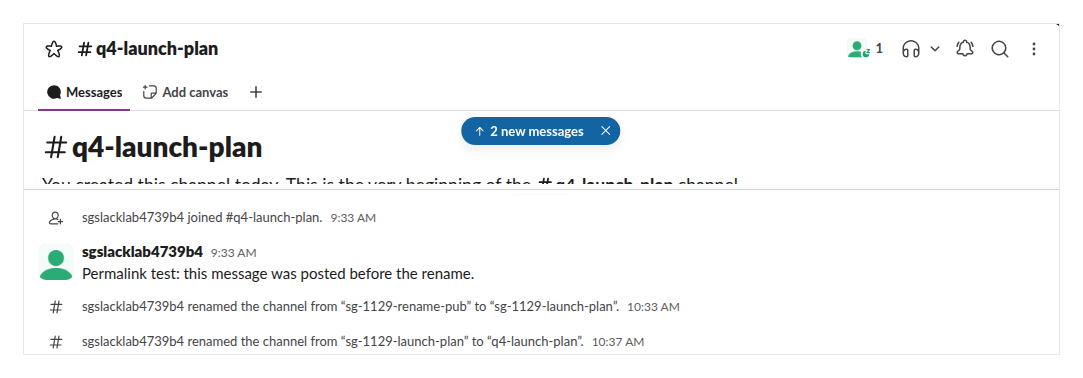
Everything else stays put. We checked before and after with conversations.info and chat.getPermalink:
C0CMU7ACPFB both times), so integrations, workflows and bots that store the ID keep working./archives/C0CMU7ACPFB/p1795944824176619.conversations.info now lists the old name under previous_names.sg-1129-rename-pub seconds after renaming the original away from it, and Slack allowed it.The one thing that breaks is text: anyone who typed "#old-name" in a doc or a bookmark outside Slack now points at a name that no longer exists, or at a different channel if someone reuses the name.
Renaming an archived channel
An archived channel can still be renamed if you are allowed to, through the API as well as the dialog (our archive test used the Edit link). We archived a channel we created, then called conversations.rename on it: it answered ok, the archived channel took the new name, and no rename message was posted. A new channel could then take the old name. This is the clean way to free a name held by an old archived channel without unarchiving it. On an archived channel the owner created, the same call returned not_authorized.
Rename a private channel or #general
A private channel renames the same way as a public one, from its name > Edit, and the rename message is visible only to its members. Renaming does not change who can see it; to switch between public and private, see public vs private channels. A Member cannot rename the default #general channel (not_authorized in our test), so that one needs a workspace owner or admin. Our page on the #general channel covers what else is special about it.
FAQ
Can I rename a direct message or group DM?
No. DMs and group DMs have no name to edit. Convert a group DM to a private channel first, then name it.
Can I undo a rename?
Rename it back. The ID never changed, so nothing else needs fixing, but both renames stay in the channel history.
Stop Jiggling Your Mouse.
Join hundreds of remote workers who never worry about their Slack status. Set it up once, stay green forever.
Related Articles
Slack Bolt app.message: Strings, Regex and context.matches Tested
We sent 9 test messages to the same listeners in Bolt Python and Bolt JS. Strings match anywhere and are case sensitive, regex groups land in context.matches, and edits and /me messages behave differently in each.
Slack OAuth Errors: invalid_scope, Invalid Permissions Requested and bad_redirect_uri
We broke a Slack OAuth install on purpose six ways and recorded each error page, the error code your redirect URL receives, and the oauth.v2.access answers, including the one that burns your code.
Slack Attachments vs Blocks: What Still Works in Each
We posted the same alert as legacy attachments, as blocks, and as blocks inside an attachment. Here is what renders, what Slack ignores now, and when the color bar still needs an attachment.