
Slack Attachments vs Blocks: What Still Works in Each
We posted the same alert as legacy attachments, as blocks, and as blocks inside an attachment. Here is what renders, what Slack ignores now, and when the color bar still needs an attachment.
Use blocks for message content and keep an attachment only when you need the colored bar down the side. Legacy attachments still post and render in full today, but they are the older format, and the only thing blocks cannot do on their own is that color bar. You can have both by putting blocks inside an attachment.
We posted the same deploy alert five ways with chat.postMessage and a bot token on 29 November 2026, then looked at each in the Slack web app. None of the five calls returned an error or a warning in response_metadata.
Legacy attachment, with and without mrkdwn_in
This is the classic payload. The second post is identical except for "mrkdwn_in": ["text", "fields"].
{
  "attachments": [{
    "color": "#e01e5a",
    "title": "Deploy failed",
    "text": "Deploy *api-v2* to `prod` failed after 3 retries.\n<https://example.com/runs/42|Open run 42>",
    "fields": [
      {"title": "Service", "value": "*api-v2*", "short": true},
      {"title": "Env", "value": "prod", "short": true}
    ],
    "footer": "ci-bot",
    "ts": 1795948800
  }]
}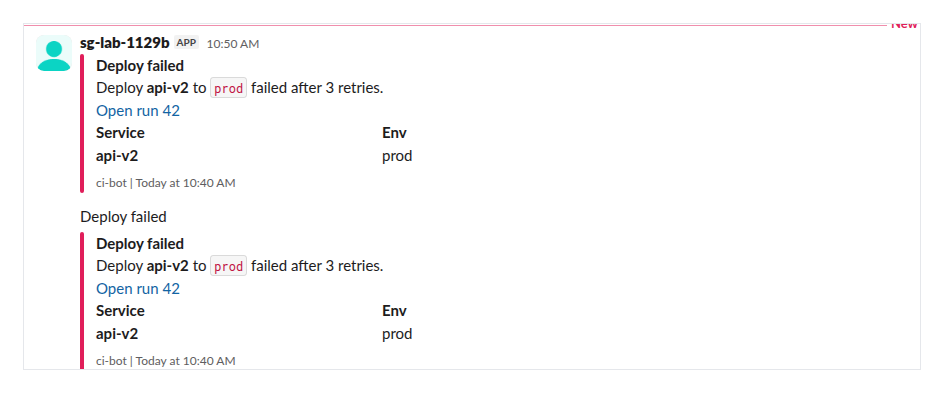
They render the same. Without mrkdwn_in, *api-v2* was still bold, ` prod was still code and the link still worked, in the text and in the field value. So in the current web client mrkdwn_in` changes nothing you can see. Old guides that tell you to add it to get bold text are out of date; it does no harm to leave it in.
Other things we saw in the stored message:
- • Slack filled in
fallbackfor us. For the attachment above it was the title, "Deploy failed". - • The
tsfield became the "Today at 10:40 AM" next to the footer. - •
pretext,author_name,image_urland an old-styleactionsbutton all still rendered (the button is in the next screenshot).
Blocks, and blocks inside an attachment
Here is the same alert as blocks: a header, a section with two fields, and a context line.
{
  "text": "Deploy failed: api-v2 to prod",
  "blocks": [
    {"type": "header", "text": {"type": "plain_text", "text": "Deploy failed"}},
    {"type": "section",
     "text": {"type": "mrkdwn", "text": "Deploy *api-v2* to `prod` failed after 3 retries.\n<https://example.com/runs/42|Open run 42>"},
     "fields": [
       {"type": "mrkdwn", "text": "*Service*\napi-v2"},
       {"type": "mrkdwn", "text": "*Env*\nprod"}
     ]},
    {"type": "context", "elements": [{"type": "mrkdwn", "text": "ci-bot"}]}
  ]
}
To get the color bar back, wrap the same blocks in an attachment: "attachments": [{"color": "#e01e5a", "blocks": [ ...same blocks... ]}].
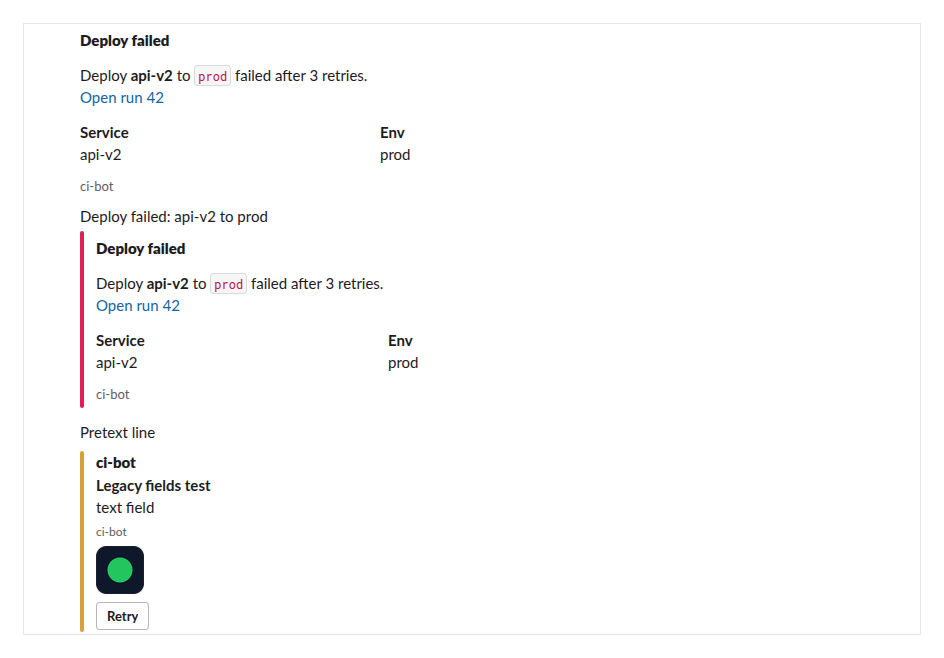
Look at the line "Deploy failed: api-v2 to prod" in the screenshot. It is the top-level text, and it shows up in only one of the two posts:
text is hidden. Slack uses it for notifications and screen readers, not on screen.text is shown above the attachment, as a normal message line.So when you move blocks into an attachment for the color bar, shorten the top-level text or it reads like a duplicate heading. Also note the stored fallback for blocks inside an attachment: Slack set it to [no preview available], so give the top-level text real content.
Never appear "away" on Slack again
Cloud-based. No downloads. Works 24/7 even when your laptop is off.
Which to use
| You need | Use |
|---|---|
| Buttons, menus, date pickers, inputs | Blocks (actions or input blocks) |
| Headers, dividers, images, rich layout | Blocks |
| The colored side bar | An attachment with color, containing blocks |
| A quick log line with fields from an old script | Legacy attachment still works |
Slack's docs call legacy attachment fields "secondary" content and steer new apps to blocks. Nothing we posted was refused, but new features (rich text, tables, the newer markdown block) exist only as blocks. For the color values and how the bar looks, see Slack attachment colors; for building the block JSON by hand, see the Block Kit Builder guide; and if Slack refuses your blocks, invalid_blocks lists the causes we reproduced.
FAQ
Can I put both blocks and attachments in one message?
Yes. We sent blocks and attachments in one chat.postMessage call: it returned ok, the blocks rendered first and the attachment below them, and the top-level text stayed hidden because blocks were present.
Stop Jiggling Your Mouse.
Join hundreds of remote workers who never worry about their Slack status. Set it up once, stay green forever.
Related Articles
Slack Bolt app.message: Strings, Regex and context.matches Tested
We sent 9 test messages to the same listeners in Bolt Python and Bolt JS. Strings match anywhere and are case sensitive, regex groups land in context.matches, and edits and /me messages behave differently in each.
Slack OAuth Errors: invalid_scope, Invalid Permissions Requested and bad_redirect_uri
We broke a Slack OAuth install on purpose six ways and recorded each error page, the error code your redirect URL receives, and the oauth.v2.access answers, including the one that burns your code.
Slack Workspace vs Channel: What Each One Is
A workspace is the whole Slack account your team signs in to; a channel is one conversation inside it. Screenshots and API IDs from a real workspace show where each one lives.