
Slack Workspace vs Channel: What Each One Is
A workspace is the whole Slack account your team signs in to; a channel is one conversation inside it. Screenshots and API IDs from a real workspace show where each one lives.
A Slack workspace is the whole space your team signs in to, with its own URL, members, plan and settings. A channel is one conversation inside that workspace, with its own name, members and messages. You join a workspace once; inside it you can be in many channels.
We labeled a real Free workspace to show where each one sits on screen, then read both through the Slack API to show how Slack itself tells them apart (29 November 2026).
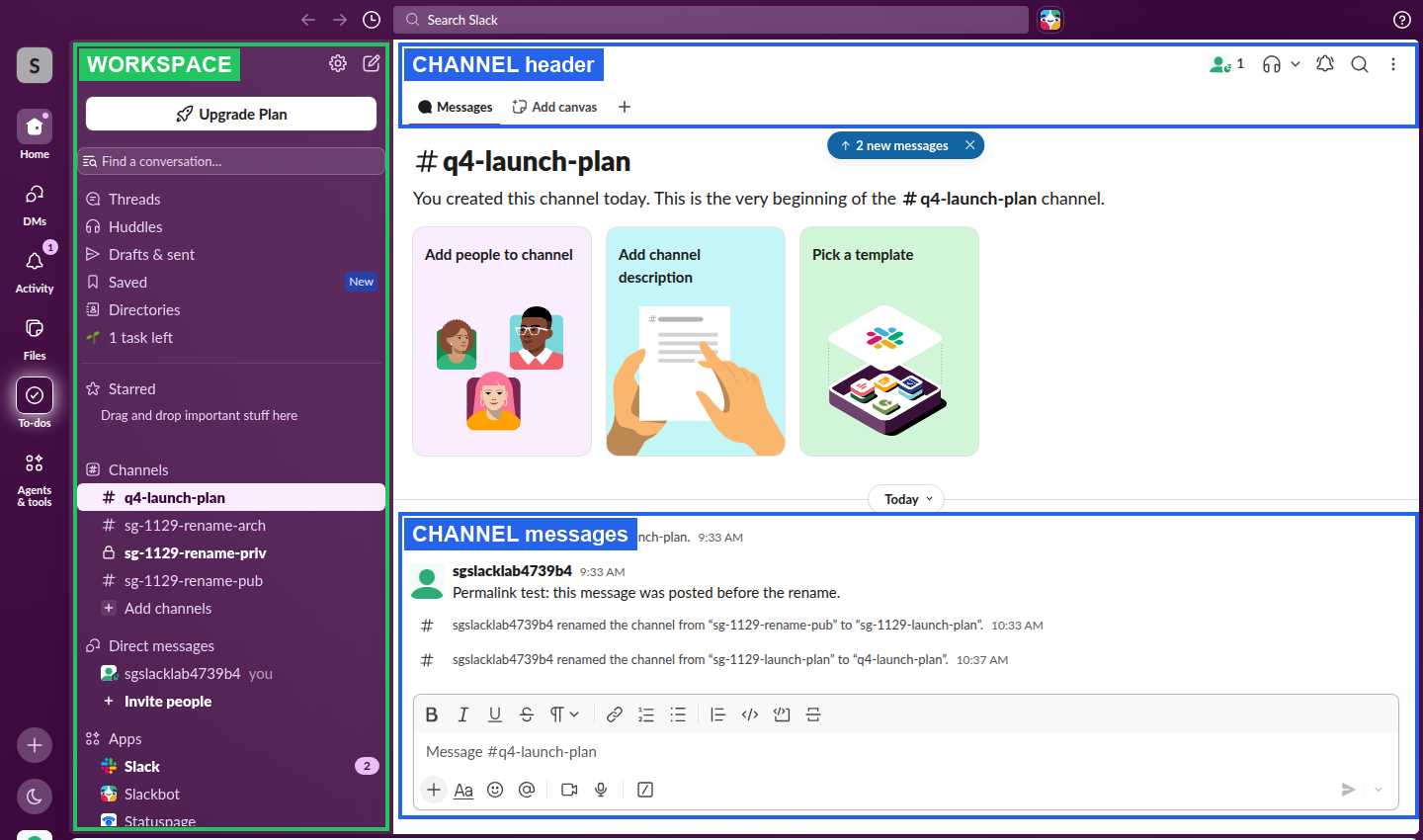
Green: everything that belongs to the workspace. Blue: the one channel that is open.
Workspace vs channel at a glance
| Workspace | Channel | |
|---|---|---|
| What it is | The team's whole Slack space | One conversation inside a workspace |
| ID prefix in the API | T (ours: T0B7JBCDKC1) | C (ours: C0CMU7ACPFB); DMs start with D |
| Address | its own URL, like name.slack.com | #channel-name inside that URL |
| Who is in it | everyone invited to the workspace (4 people in ours) | only people who joined the channel |
| Who manages it | workspace owners and admins | whoever created it, plus admins |
| Plan and billing | set here (Free, Pro, Business+) | inherits the workspace plan |
| How many | usually one per company | as many as you need (5 public ones in ours) |
Both IDs came from the API: team.info returned the workspace ID and domain, and conversations.info on the channel returned its own C ID plus context_team_id: T0B7JBCDKC1, the workspace it lives in. A private channel uses a C ID as well (ours was C0CMU7AME49); our own DM was D0CE3F1CBTK.
What belongs to the workspace
Click the workspace name at the top left and you get the workspace menu. Everything in it applies to every channel at once: the plan, invitations, preferences and sign-out.
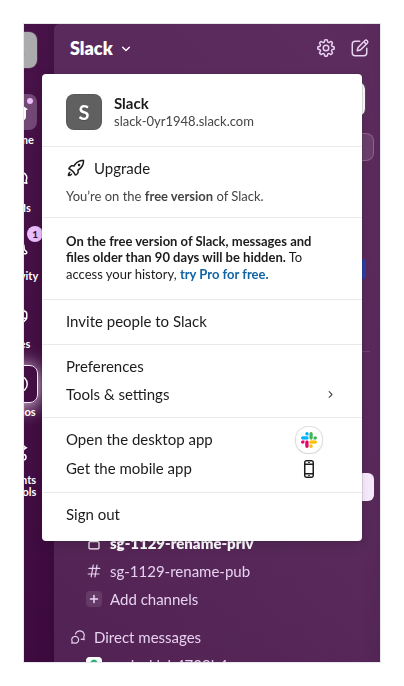
Note the line about history: on the Free plan, messages and files older than 90 days are hidden. That limit is set per workspace, so it hits every channel the same way. Inviting someone also happens here; they join the workspace first and pick channels after. Our guides on creating a workspace and the workspace URL cover the workspace side in more depth.
What belongs to the channel
Click the channel name in the header and you get the channel's own settings: its name, topic, description, members, tabs and notification level. Changing these affects that one channel only. A channel can be public (anyone in the workspace can find and join it) or private (invite only); see public vs private channels for the difference.
Never appear "away" on Slack again
Cloud-based. No downloads. Works 24/7 even when your laptop is off.
Opening a channel from the wrong workspace
Channel links only work inside the workspace that owns the channel. We tried both cases:
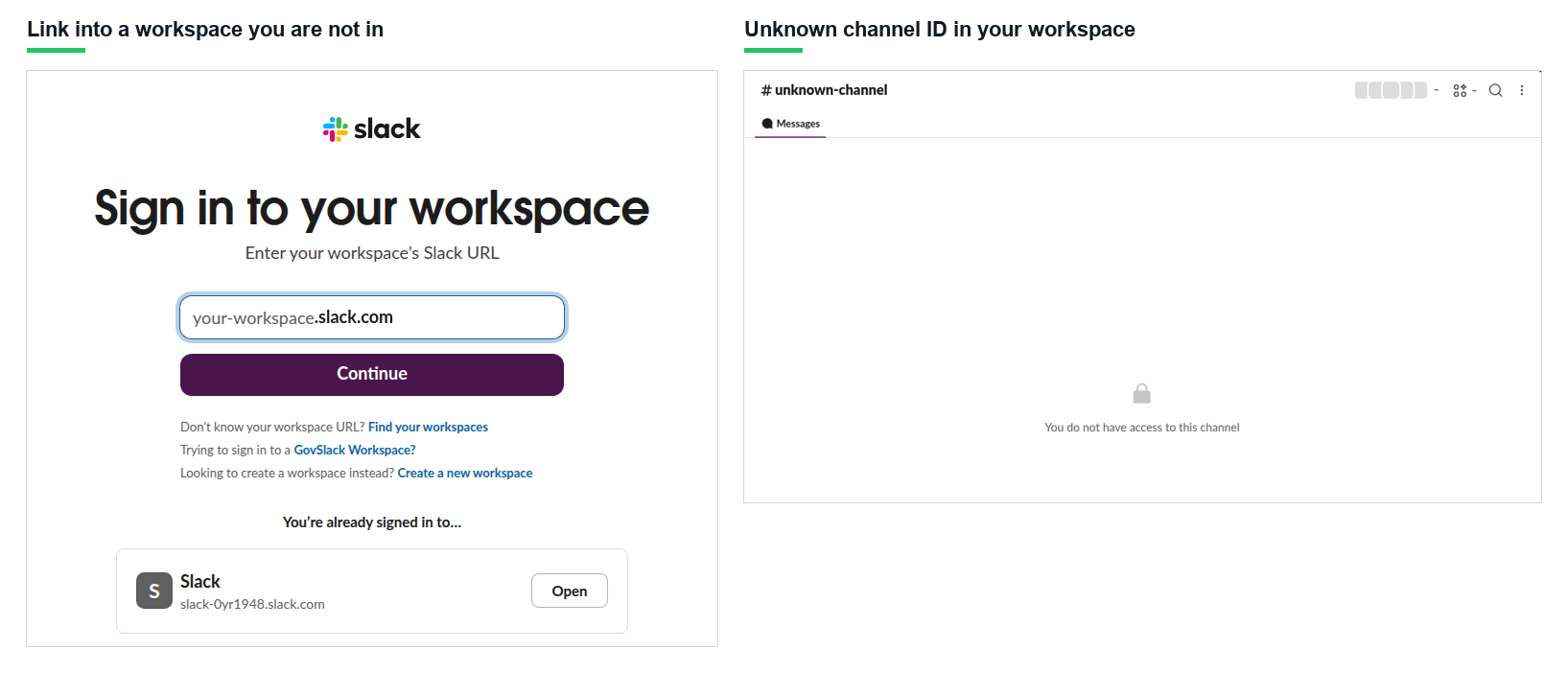
- • A link into a workspace you are not signed in to sends you to Sign in to your workspace, with the workspaces you are already in listed below.
- • A channel ID that is not in your workspace opens as #unknown-channel with "You do not have access to this channel". The API gives
channel_not_foundfor the same ID. - • Organization: on Enterprise Grid, one organization holds several workspaces. On Free, Pro and Business+ there is no organization level; the workspace is the top.
- • Team: the old name for a workspace. The API still says
team(team.info,team_id, IDs starting withT). - • Group: the old API name for a private channel (
groups.*methods). Today a private channel is just a channel withis_private: true. - • User group: a named set of people you can @mention, like
@design. It is not a channel and has no messages.
This is also why you cannot move a channel to another workspace by changing a link: the channel belongs to one workspace. If you are in several, see using multiple Slack workspaces.
Workspace vs organization, team and group
FAQ
Can one channel be in two workspaces?
Only through Slack Connect, which shares a channel between separate companies on paid plans. Without it, every channel belongs to exactly one workspace.
Do I need a new workspace for a new project?
Usually not. A new channel is enough when the same people need a place for one topic. A new workspace makes sense only for a separate group of people with separate admins and billing.
Stop Jiggling Your Mouse.
Join hundreds of remote workers who never worry about their Slack status. Set it up once, stay green forever.
Related Articles
Slack Bolt app.message: Strings, Regex and context.matches Tested
We sent 9 test messages to the same listeners in Bolt Python and Bolt JS. Strings match anywhere and are case sensitive, regex groups land in context.matches, and edits and /me messages behave differently in each.
Slack OAuth Errors: invalid_scope, Invalid Permissions Requested and bad_redirect_uri
We broke a Slack OAuth install on purpose six ways and recorded each error page, the error code your redirect URL receives, and the oauth.v2.access answers, including the one that burns your code.
Slack Attachments vs Blocks: What Still Works in Each
We posted the same alert as legacy attachments, as blocks, and as blocks inside an attachment. Here is what renders, what Slack ignores now, and when the color bar still needs an attachment.