
Slack OAuth Errors: invalid_scope, Invalid Permissions Requested and bad_redirect_uri
We broke a Slack OAuth install on purpose six ways and recorded each error page, the error code your redirect URL receives, and the oauth.v2.access answers, including the one that burns your code.
"Invalid permissions requested" on Slack's install page, and error=invalid_scope_requested on your redirect URL, mean that one of the scopes in your authorize link is not a real bot scope. Usually it is a typo, or a user scope such as search:read placed in scope= instead of user_scope=. Fix the scope list in the link and the same app installs normally.
We built a throwaway Slack app on 29 November 2026 and opened its https://slack.com/oauth/v2/authorize link as a normal workspace member, changing one thing at a time. Then we exchanged codes with oauth.v2.access to see which mistakes cost you the code.
The authorize errors, side by side
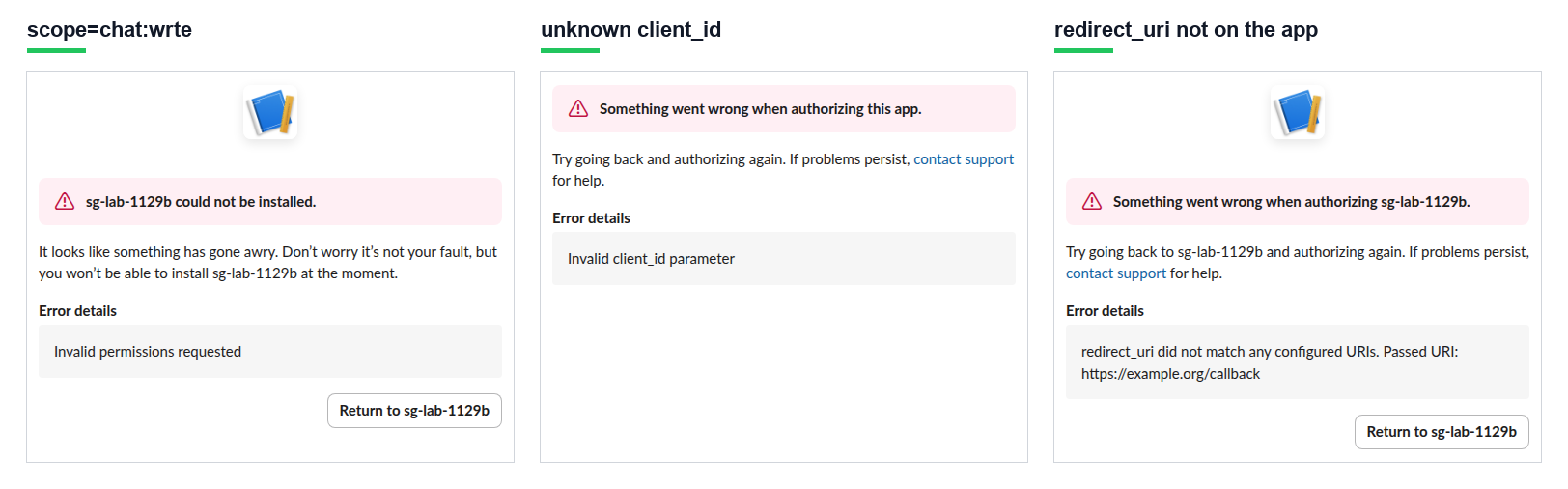
| What we changed in the link | Page shows | Where "Return" goes |
|---|---|---|
scope=chat:wrte (typo) | Invalid permissions requested | your-redirect?error=invalid_scope_requested |
scope=search:read (a user scope in the bot list) | Invalid permissions requested | your-redirect?error=invalid_scope_requested |
user_scope=chat:wrte (typo in the user list) | Invalid permissions requested | your-redirect?error=invalid_scope_requested |
no scope at all | Invalid permissions requested, No scopes requested | your-redirect?error=invalid_scope_requested |
client_id that does not exist | Invalid client_id parameter | no return button |
redirect_uri not listed on the app | redirect_uri did not match any configured URIs. Passed URI: ... | the app's settings page |
Two things the table shows that the docs do not say plainly:
- • The scope check happens before the user sees anything. Your redirect URL receives
error=invalid_scope_requestedonly if the user clicks Return to your app; if they close the tab, your server hears nothing. - • A bad
redirect_urinever reaches your server at all, so you cannot catch it there. Slack shows the exact URI it received, which is the fastest way to spot a trailing slash orhttpvshttps. - Copy the
scope=anduser_scope=values out of your authorize link. - Check each name against the app's OAuth & Permissions page. Bot scopes go in
scope, user scopes inuser_scope, comma separated with no spaces. - Move any user-only scope (like
search:read) touser_scope, or drop it. - Make sure
scopeis not empty. An app with no bot scopes needs at least one user scope instead.
Fix "Invalid permissions requested"
If your scopes are valid but a method still fails after install with missing_scope, the problem is the other way round: the scope was never requested. See Slack missing_scope for that, and bot scopes for which scope each method needs.
Never appear "away" on Slack again
Cloud-based. No downloads. Works 24/7 even when your laptop is off.
What the user sees when the link is right
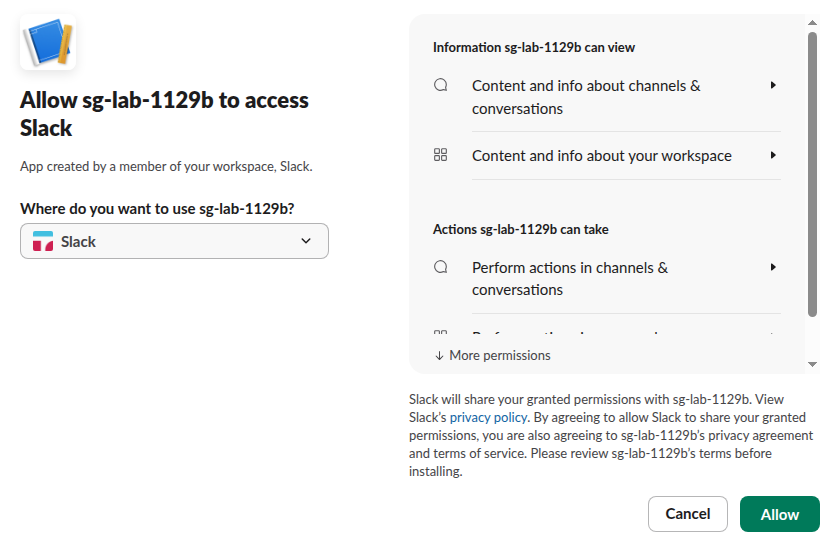
With a valid link, Slack shows this consent screen. Our two clicks returned:
Cancel -> https://example.com/sg-writer-1129b?error=access_denied&state=sg1129
          &error_description=The+user+has+denied+access+to+the+scope(s)+requested+by+the+client+application.
Allow  -> https://example.com/sg-writer-1129b?code=11256386461409.1273...&state=sg1129
So handle access_denied as a normal outcome, not a crash, and always check that state matches what you sent.
oauth.v2.access errors, and the one that burns the code
After Allow, your server swaps the code for a token. We sent each mistake first and the correct call second, with the same code:
made-up code                          -> invalid_code
wrong client_secret, then correct     -> bad_client_secret, then ok (code still good)
wrong redirect_uri, then correct      -> bad_redirect_uri, then invalid_code (code gone)
no redirect_uri in the exchange       -> ok
code used a second time               -> invalid_code
The bad_redirect_uri row is the trap. The exchange must send the same redirect_uri that was in the authorize link, or none at all, and one wrong try uses up the code. After that, retrying with the right value only gets invalid_code, which looks like a different bug. Send the user through the authorize link again to get a fresh code. Our oauth.v2.access guide has the full exchange, and testing OAuth on localhost covers redirect URLs during development.
FAQ
Is invalid_scope the same as invalid_scope_requested?
Slack's v2 install flow sends invalid_scope_requested to the redirect URL. Libraries and older guides often shorten it to invalid_scope; both mean a scope name Slack does not accept in that list.
Why does Slack say "could not be installed" instead of showing the consent screen?
Because the scope check runs first. Slack never asks the user for permissions it cannot grant, so a single bad scope stops the whole install.
Stop Jiggling Your Mouse.
Join hundreds of remote workers who never worry about their Slack status. Set it up once, stay green forever.
Related Articles
Slack Bolt app.message: Strings, Regex and context.matches Tested
We sent 9 test messages to the same listeners in Bolt Python and Bolt JS. Strings match anywhere and are case sensitive, regex groups land in context.matches, and edits and /me messages behave differently in each.
Slack Attachments vs Blocks: What Still Works in Each
We posted the same alert as legacy attachments, as blocks, and as blocks inside an attachment. Here is what renders, what Slack ignores now, and when the color bar still needs an attachment.
Slack Workspace vs Channel: What Each One Is
A workspace is the whole Slack account your team signs in to; a channel is one conversation inside it. Screenshots and API IDs from a real workspace show where each one lives.