
Slack Channel Manager: What the Role Can Do (Tested)
We created channels as a regular member of a Free Slack workspace and checked who becomes Channel Manager, what the role unlocks, and why the Make Channel Manager option was missing.
A Channel Manager is Slack's per-channel role, the closest thing Slack has to a channel owner. Whoever creates a channel becomes its Channel Manager automatically, and a Workspace Owner or Admin, or an existing Channel Manager, can add more people from the channel's member list with Make Channel Manager, up to 100 per channel. On the Free plan the role still exists, but nobody can add a second manager: the menu item is missing and the API answers feature_not_enabled.
We tested this on 26 November 2026 in a Free workspace, signed in as a regular Member (not an Owner or Admin). We created a private channel, let a test app create another one, and tried each channel action as the manager and as a plain member.
Who is the Channel Manager of a channel
The channel details window on Free does not show the role anywhere. The About tab lists who created the channel, but not who manages it:
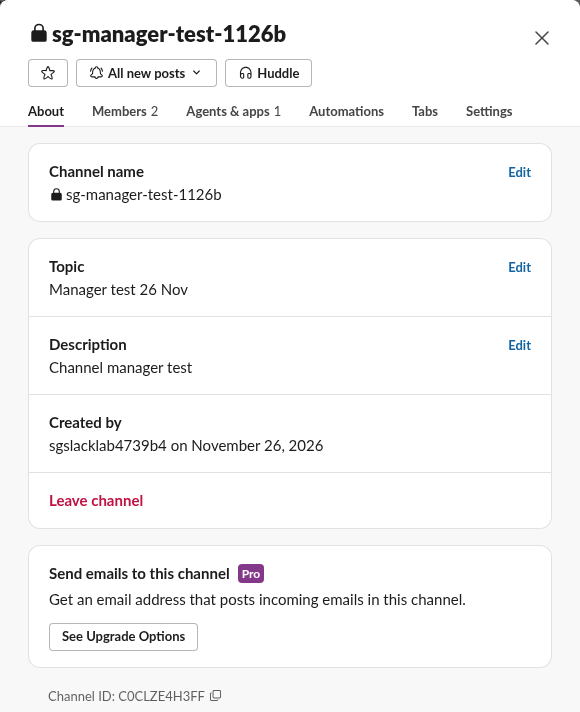
The role is still stored. The Slack web client reads it with admin.roles.entity.listAssignments, and that method worked with the member's own session. It showed that the creator holds role Rl0A on the channel we made, and that the workspace owner holds it on #all-slack, which he created with the workspace. When our test app created a private channel, the app's bot user became its manager.
admin.roles.entity.listAssignments  entity_id=<channel the member created>
{"ok": true, "role_assignments": [{"role_id": "Rl0A", "users": ["U0C...(the member)"]}]}

admin.roles.entity.listAssignments  entity_id=<#all-slack>
{"ok": true, "role_assignments": [{"role_id": "Rl0A", "users": ["U0B...(the workspace owner)"]}]}

admin.roles.addAssignments  role_id=Rl0A  entity_ids=[channel]  user_ids=[a second member]
{"ok": false, "error": "feature_not_enabled"}
Adding a Channel Manager
On a paid plan you add one from the channel's member list: click the channel name, open Members, open the menu on a person and pick Make Channel Manager. The web client's confirmation reads "This person will be able to manage all aspects of the channel.", and the limit message is "Channels can only have 100 Channel Managers."
On our Free workspace that item was not there. The menu on another member showed only View profile, Message, Copy name, Copy display name and Copy link. Calling the method the client uses, admin.roles.addAssignments with role Rl0A, returned feature_not_enabled. So on Free a channel keeps exactly one manager, its creator.
Never appear "away" on Slack again
Cloud-based. No downloads. Works 24/7 even when your laptop is off.
What the manager could do that a member could not
We ran each action on two private channels: one the member created (member is manager), and one our test app created and then invited the member to (member is not manager).
| Action (Free plan, private channel) | Channel Manager | Member, not manager |
|---|---|---|
| Rename the channel | Allowed | not_authorized; the Channel name row is missing from Settings |
| Set the topic or description | Allowed | Allowed |
| Remove a member | Allowed | Allowed (the member even removed the app that was the manager) |
| Archive the channel | Allowed | Allowed |
| Change to a public channel | "You don't have permission" (restricted_action) | Same |
| Add another Channel Manager | Not offered (feature_not_enabled) | Not offered |
Renaming was the only thing the role decided on Free. The two Settings tabs, manager first:
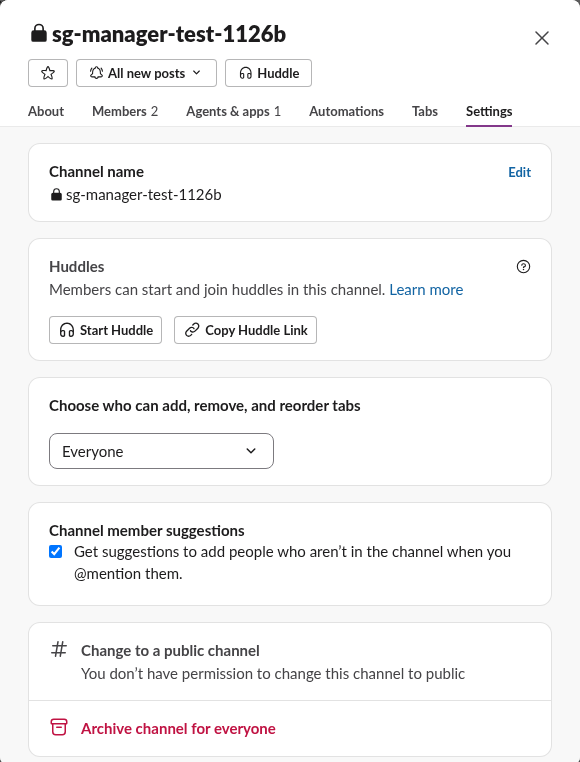
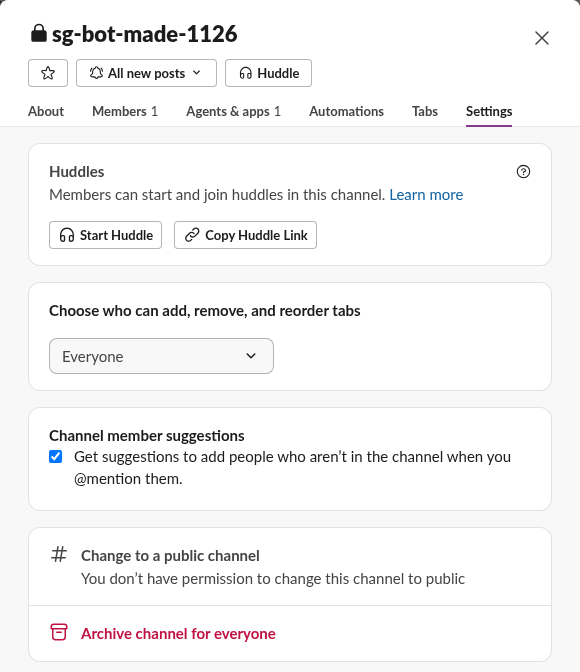
Removing people and archiving followed workspace settings, not the role: on this workspace any member of a private channel could do both. On paid plans, admins can hand those two choices to channel managers, and the client has a notice for it: "Channel Managers can now control who can archive channels they manage." and the same for inviting people. Converting a private channel to public needs an Owner or Admin on Free, as our private-to-public guide shows.
One setting is shown on Free and belongs to managers: Choose who can add, remove, and reorder tabs, with the choices Everyone and Channel Managers. Our channel tabs guide covers what those tabs hold.
Transferring channel ownership
Slack has no transfer button. On a paid plan the way to hand a channel over is to make the new person a Channel Manager and then remove yourself with Remove from Channel Managers in the same menu. On Free you cannot add the new manager, so the creator stays manager until the channel is archived, and an Owner or Admin can still do everything a manager can. How the workspace roles compare is in Slack workspace owner vs admin.
FAQ
Can I see who the Channel Manager is on the Free plan?
Not in the app; the About tab shows only who created the channel, and that person is the manager. A script can read it with admin.roles.entity.listAssignments and the channel ID.
Does a Channel Manager get admin rights over the workspace?
No. The role covers one channel only. It does not let you change workspace settings, see other private channels or manage members of the workspace.
What happens when the Channel Manager leaves the workspace?
The channel keeps working. Owners and Admins can manage it, and on paid plans they can name a new Channel Manager.
Stop Jiggling Your Mouse.
Join hundreds of remote workers who never worry about their Slack status. Set it up once, stay green forever.
Related Articles
Slack Canvas Notifications: What Notifies You and What Does Not
We edited a Slack canvas twice from a test app on 28 November 2026, once plainly and once with an @mention, and watched what the other member got. Only the mention notified.
Can You Have More Than One Canvas in a Slack Channel?
We tried to add a second canvas to a channel on a Free Slack workspace on 28 November 2026, from the channel menu and through the API. Both refused. Here is what each route said and what works instead.
Slack Huddle Sounds: Every Sound, What Triggers It, How to Mute
We read the Slack web client and the Mac app on 28 November 2026 and matched every huddle sound to the event that plays it, from the join chime to the Boop Plus ringtone and the 12 lounge music tracks.