
Can You Have More Than One Canvas in a Slack Channel?
We tried to add a second canvas to a channel on a Free Slack workspace on 28 November 2026, from the channel menu and through the API. Both refused. Here is what each route said and what works instead.
On a paid Slack plan, yes: a channel can hold several canvases, each in its own tab next to Messages. On the Free plan, no. A Free channel gets exactly one canvas, and Slack blocks a second one in the app and in the API. Standalone canvases, the kind that do not belong to a channel, are paid-only too.
We tested this on 28 November 2026 in a Free test workspace, as a regular member (not an admin) in the web app and with a throwaway app's bot token on the API.
What a Free channel shows when you add a second canvas
After the first canvas, the channel's tab bar shows Messages, the canvas tab, and a + button. On Free, that menu lists Canvas under "Do more with Pro":
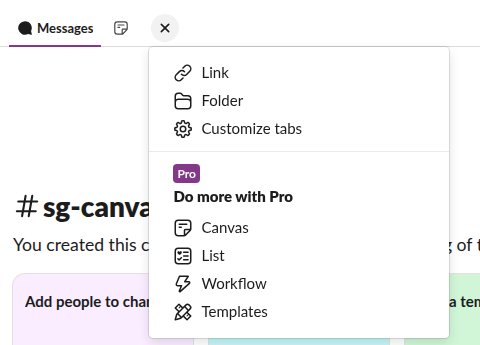
Link and Folder still work, so a Free channel can carry bookmarks and folders in its tab bar, just not a second canvas. Clicking Canvas opened a plan picker for Pro ($7.25 per person per month) and Business+ ($15), each with a 30-day trial. Our channel tabs guide covers what else goes in that bar.
What the API says
The API draws the same line, and its error names are clearer than the app. These are the responses we got with the bot token:
conversations.canvases.create  (first canvas in the channel)
  {"ok": true, "canvas_id": "F0CMPLBRX25"}

conversations.canvases.create  (second canvas, same channel)
  {"ok": false, "error": "free_team_canvas_tab_already_exists"}

canvases.create  with channel_id set to the same channel
  {"ok": false, "error": "free_team_canvas_tab_already_exists"}

canvases.create  with no channel (a standalone canvas)
  {"ok": false, "error": "free_teams_cannot_create_standalone_canvases"}
So on Free there is no way around it from code either. The first canvas became the channel's canvas tab, labeled "Untitled", because a # Heading in the markdown does not set the canvas title. Set title in the call, or rename the tab afterwards. Our Slack canvas API guide has the full set of calls.
Never appear "away" on Slack again
Cloud-based. No downloads. Works 24/7 even when your laptop is off.
Channel canvas vs canvas tab
The words mean slightly different things in Slack's code. The channel canvas is the one canvas a channel has had since 2023, opened from the channel header. A canvas tab is any canvas pinned in the tab bar; the channel's conversations.info stores it under properties.tabs as {"type": "canvas", "data": {"file_id": ...}}. On a paid plan you add canvas tabs one by one, and each can be any canvas you can open. On Free, the one canvas tab is the channel canvas, and that is the limit.
How to move a canvas to another channel
There is no Move. A canvas stays attached to the channel it was made in, and you share it instead:
- Open the canvas, click the ⋮ menu, then Share this canvas, and pick the other channel. Or post the canvas link with Copy link in that channel.
- From code, call
canvases.access.setwithchannel_idsandaccess_levelset toreadorwrite. We gave a second channel read access this way:files.infothen listed both channels for the canvas, but the second channel got no tab. Its members open the canvas from the shared link.
To really move the content, copy it: our guide on how to copy a Slack canvas shows how, and export a Slack canvas covers saving it outside Slack.
FAQ
How many canvases can a paid Slack channel have?
Slack does not publish a separate canvas limit. The tab bar has one: our 26 November check of the web client found a cap of 100 tabs, folders and pinned items per channel, with a "TooManyTabs" error past it.
Where do I find a canvas I lost?
Open the Files tab in the left rail; it lists the files and canvases you can open. See how to find a canvas in Slack.
Stop Jiggling Your Mouse.
Join hundreds of remote workers who never worry about their Slack status. Set it up once, stay green forever.
Related Articles
Slack MSI Installer: Gone After 4.48.102, Use MSIX
Slack's last MSI is 4.48.102 from March 2026; every later version 404s. We read both old MSIs and the current MSIX package to show what each installs and how to move a deployment to MSIX.
Slack LaTeX and Math: What Renders, What Doesn't, What Works
Slack shows LaTeX as raw text in messages and canvases, even though its web client ships KaTeX. We tested every route and give the two that work: Unicode math and a formula rendered to an image with 15 lines of Python.
Slack Canvas Images: Add, Size and Insert Them by API
We inserted a PNG, an animated GIF and a 6000 px image into a Slack canvas with canvases.edit. Slack files rendered; an outside image URL became a link card even though the API said ok.