
Slack Huddle Sounds: Every Sound, What Triggers It, How to Mute
We read the Slack web client and the Mac app on 28 November 2026 and matched every huddle sound to the event that plays it, from the join chime to the Boop Plus ringtone and the 12 lounge music tracks.
Slack plays a short chime when you join or leave a huddle, a different one when someone else joins or leaves, a soft blip for emoji reactions, a knock sound when someone asks to join, and a 15-second ringtone called Boop Plus for an incoming huddle invite. If you sit in a huddle alone for 60 seconds, it starts lounge music, Smooth Jazz by default. To turn them all off, open Preferences, then Notifications, and tick "Mute all huddle sounds from Slack".
We did not guess any of this. On 28 November 2026 we read the Slack web client code that the Slack desktop app keeps in its cache, found the function that plays each sound, and measured every audio file. The Mac app (Slack 4.52.182) ships the same files in its app bundle, byte for byte.
Every huddle sound and the event that plays it
| What happens | File | Length |
|---|---|---|
| You join a huddle | you_joined_call_v2.mp3 | 1.44 s |
| Someone else joins | they_joined_call_v2.mp3 | 1.15 s |
| You leave | you_left_call_v2.mp3 | 1.44 s |
| Someone else leaves | they_left_call_v2.mp3 | 1.15 s |
| You mute with the keyboard shortcut | channel_message.mp3 | 0.21 s |
| You unmute with the keyboard shortcut | channel_message_2x.mp3 | 0.34 s |
| Someone reacts with an emoji | bop_soft.mp3 | 0.18 s |
| Someone sends a reaction effect | save_and_checkout.mp3 | 1.93 s |
| Someone uses the gong effect | gong.mp3 | 4.05 s |
| Someone uses the duck effect | ducks.mp3 | 4.83 s |
| Someone asks to join (knock) | b2.mp3 | 1.96 s |
| A join request expires | alert.mp3 | 1.15 s |
| AI notes turn on (English) | notes_on_en.mp3 | 4.56 s |
| AI notes turn off (English) | notes_off_en.mp3 | 3.60 s |
| Incoming huddle invite (default) | boop_remix.mp3 | 15.23 s |
Two details from the code explain why you sometimes hear fewer sounds than you expect. Join and leave chimes are throttled: after one plays, the next one is skipped for 7 seconds, so five people joining at once sound like one chime. Reaction sounds play at a quarter of full volume and at most once every 5 seconds. The mute and unmute sounds play only when you use the keyboard shortcut, not when you click the mic button.
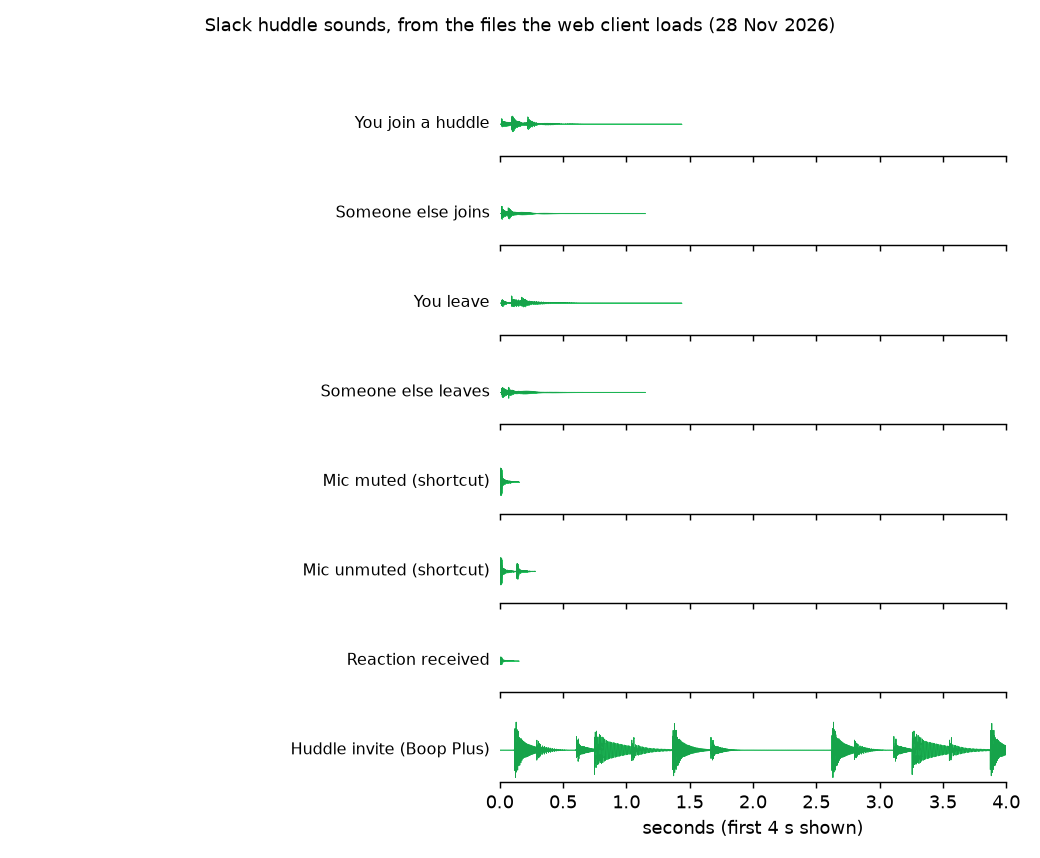
Here is what the most common ones look like. Join and leave are short two-note chimes, your own a little longer than someone else's, while the invite ringtone keeps ringing:
How to change the Slack huddle ringtone
The ringtone for incoming huddles has its own setting, separate from the message sound. In Preferences, then Notifications, scroll to Sounds & appearance:
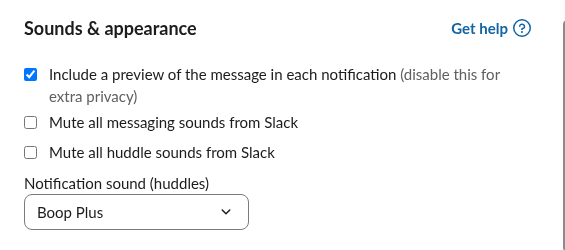
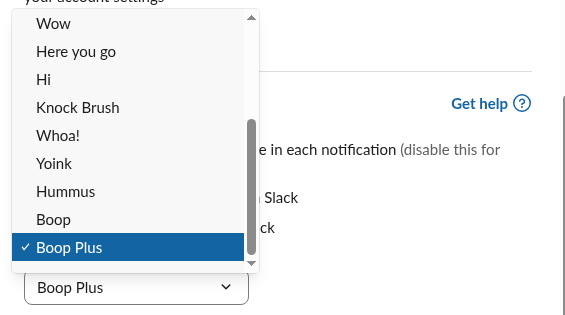
"Notification sound (huddles)" defaults to Boop Plus (boop_remix.mp3). The list offers the 13 message sounds plus Boop Plus: Ding, Boing, Drop, Ta-da, Plink, Wow, Here you go, Hi, Knock Brush, Whoa!, Yoink, Hummus and Boop. The setting is saved to your account as huddle_invite_sound_v2, so it follows you to every computer. There is no option for your own audio file; for message sounds, our guide to changing the Slack notification sound covers the rest.
Never appear "away" on Slack again
Cloud-based. No downloads. Works 24/7 even when your laptop is off.
Slack huddle music when you are alone
If you start a huddle and nobody joins, Slack waits and then plays lounge music. The wait comes from the account setting huddles_play_music_timeout, 60 seconds by default, and music plays only while you are the last person in the huddle. The default track is Smooth Jazz. Slack has 12 tracks:
| Track name in Slack | File | Length |
|---|---|---|
| Smooth Jazz (default) | waiting_muzak.mp3 | 2:27 |
| Waiting Room | waiting_room.mp3 | 3:58 |
| Subway Music | subway_music.mp3 | 0:57 |
| Whistle Tune | whistle_tune.mp3 | 1:01 |
| Focus Beats | focus_beats.mp3 | 3:54 |
| Happy Bass | disco_party.mp3 | 3:58 |
| Sound Bath | moment_of_zen.mp3 | 4:05 |
| Nature Meditation | nature_meditation.mp3 | 4:01 |
| Piano Concerto | piano_concerto.mp3 | 3:25 |
| So What by Miles Davis | so_what.mp3 | 9:25 |
| Freddie Freeloader by Miles Davis | freddie_freeloader.mp3 | 9:49 |
| All Blues by Miles Davis | all_blues.mp3 | 11:36 |
The three Miles Davis tracks are behind a feature switch in the code, so not every workspace shows them. The tracks play one after another, and the one you pick is saved as huddles_music_player_song_key. Clicking stop in the huddle window ends the music for that huddle.
How to turn off Slack huddle sounds
- • All huddle sounds: Preferences, Notifications, Sounds & appearance, tick "Mute all huddle sounds from Slack". This sets
mute_huddle_soundsand silences join, leave, reaction, knock and invite sounds. It does not mute the other people in the call. - • Only the ringtone: keep the sounds on and set "Notification sound (huddles)" to a short one such as Plink (0.71 s) instead of the 15-second Boop Plus.
- • Do not disturb: while DND is on, the invite ringtone does not play, because the code checks DND before it plays the invite sound.
If you hear nothing at all, including people talking, the problem is your audio device, not these settings; see Slack huddle not working. Others can hear your join chime too, which is one of the signals covered in can people see when you join a Slack huddle.
FAQ
Can I download the Slack huddle sounds?
They are plain MP3 files. The web client loads them from Slack's own server, a.slack-edge.com, and the Mac app keeps the call sounds in Slack.app/Contents/Resources (calls_you_joined_call_v2.mp3 and the rest). They are Slack's files, so use them for reference, not in your own product.
Why didn't I hear a sound when someone joined my huddle?
Most often because another join or leave chime played in the last 7 seconds, or because "Mute all huddle sounds from Slack" is ticked. Join and leave chimes do not depend on DND.
Stop Jiggling Your Mouse.
Join hundreds of remote workers who never worry about their Slack status. Set it up once, stay green forever.
Related Articles
Slack MSI Installer: Gone After 4.48.102, Use MSIX
Slack's last MSI is 4.48.102 from March 2026; every later version 404s. We read both old MSIs and the current MSIX package to show what each installs and how to move a deployment to MSIX.
Slack LaTeX and Math: What Renders, What Doesn't, What Works
Slack shows LaTeX as raw text in messages and canvases, even though its web client ships KaTeX. We tested every route and give the two that work: Unicode math and a formula rendered to an image with 15 lines of Python.
Slack Canvas Images: Add, Size and Insert Them by API
We inserted a PNG, an animated GIF and a 6000 px image into a Slack canvas with canvases.edit. Slack files rendered; an outside image URL became a link card even though the API said ok.