
Slack Canvas Notifications: What Notifies You and What Does Not
We edited a Slack canvas twice from a test app on 28 November 2026, once plainly and once with an @mention, and watched what the other member got. Only the mention notified.
Slack sends a canvas notification when someone @mentions you in a canvas. A plain edit does not notify anyone: no Activity entry, no badge, no message in the channel. Canvases also have no notification setting of their own. The mention shows up in Activity as "Mention in" plus the canvas name, the same way a mention in a message does.
We tested this on 28 November 2026 in a Free test workspace. A throwaway app made a channel canvas and then edited it twice with canvases.edit, 20 seconds apart. The first edit added a plain line. The second @mentioned a member of the channel. We watched that member's Activity tab and the channel in the web app.
What each edit did
| Edit | Activity entry for the member | Message in the channel |
|---|---|---|
| Edit 1: a plain line, no mention | none | none |
| Edit 2: a line that @mentions the member | "Mention in Untitled", unread badge | none |
The mention arrived within seconds. In the member's Activity tab it looked like this:
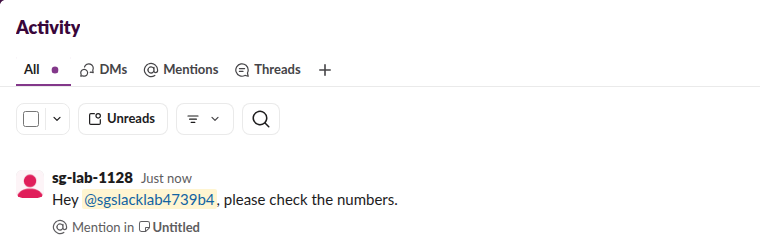
"Untitled" is the canvas name; the app set no title. Because Slack files it as a mention, it should follow your mention settings for desktop and mobile banners.
From code, the mention is an image-style link with the user ID, in the canvas markdown:
{
"canvas_id": "F0CMPLBRX25",
"changes": [{
"operation": "insert_at_end",
"document_content": {
"type": "markdown",
"markdown": "## Edit 2 by the bot\nHey , please check the numbers."
}
}]
}Our Slack canvas API guide covers the other operations.
There is no canvas notification setting
We looked in both places a setting could be. The canvas's own ⋮ menu has Copy link, Share this canvas, View file details, Add to saved, Add to to-do, Move to section, Add cover image, Show all threads, View version history, Print canvas, Accessibility, Change system font and Open in split view. None of them is about notifications:
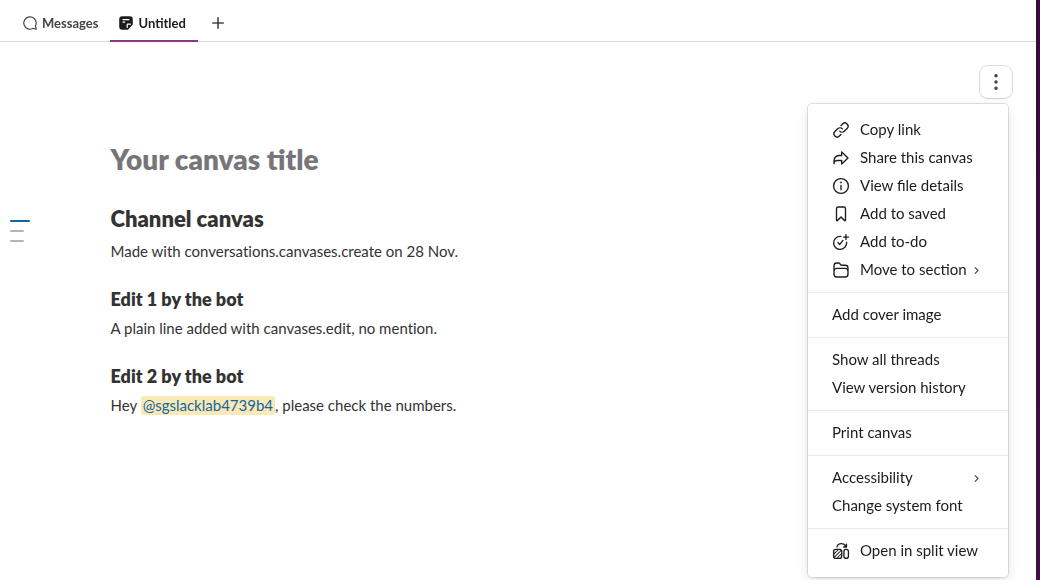
Preferences, then Notifications, has no canvas option either, and the member's saved preferences (users.prefs.get) hold no canvas notification key. What the web client code does have is a message type for canvas updates, tabbed_canvas_updated, and a message menu action "Mute canvas updates". So where Slack posts a "canvas updated" message into the channel, you can mute those messages from the message's menu. Our two bot edits did not produce one.
Never appear "away" on Slack again
Cloud-based. No downloads. Works 24/7 even when your laptop is off.
How to get notified when a canvas changes
Since edits alone stay silent, these are the ways to hear about them:
- Ask editors to mention people. An @mention in the canvas is the one thing that reliably notifies, as the test shows.
- Comment threads. A comment on a canvas section opens a thread; replies follow your thread notification settings. Show all threads in the canvas menu lists them.
- Version history. View version history in the canvas menu shows who changed what and when; see Slack canvas version history.
- A bot. An app can listen for the
file_changeevent on the canvas file and post its own message, which is how teams that need a ping on every edit do it.
FAQ
Does Slack notify when someone edits a canvas I made?
Not in our test. The plain edit produced nothing for the other member of the channel, and the channel got no message. Only the mention did.
Do canvas mentions show in the Mentions tab?
We saw it in Activity under All, labeled "Mention in" with the canvas name, next to message mentions. If you have muted the channel, check your Slack notification settings for mentions in muted channels.
Stop Jiggling Your Mouse.
Join hundreds of remote workers who never worry about their Slack status. Set it up once, stay green forever.
Related Articles
Can You Have More Than One Canvas in a Slack Channel?
We tried to add a second canvas to a channel on a Free Slack workspace on 28 November 2026, from the channel menu and through the API. Both refused. Here is what each route said and what works instead.
Slack Huddle Sounds: Every Sound, What Triggers It, How to Mute
We read the Slack web client and the Mac app on 28 November 2026 and matched every huddle sound to the event that plays it, from the join chime to the Boop Plus ringtone and the 12 lounge music tracks.
Slack API Methods List: All 359 Methods, Counted
We pulled every Web API method from docs.slack.dev on 28 November 2026 and compared it with Slack's OpenAPI spec. The docs list 359 methods; the spec, archived since 2021, has 174.