
PowerToys Awake Managed by Your Organization: What It Means
PowerToys shows 'This setting is managed by your organization' when your IT team set a group policy for Awake. A value of 0 forces Awake off and greys out the toggle; 1 forces it on. How to see which policy applies with one reg query, why Awake exits when started from the command line, and what you can still do.
"This setting is managed by your organization" on PowerToys Awake means your IT team set a PowerToys group policy. The policy for Awake is ConfigureEnabledUtilityAwake. A value of 0 forces Awake off and greys out its toggle, and a value of 1 forces it on. A policy that turns off all PowerToys utilities has the same effect. You cannot change it from PowerToys, and Awake refuses to start from the command line too. Only an administrator can remove the policy.
You can see which policy applies without admin rights, with one reg query command below. We read the policy logic in the PowerToys source code (src/common/utils/gpo.h), the message text in its Settings strings, and Microsoft Learn's "PowerToys Group Policy configuration" page on 28 September 2026.
Many people turn to Awake to keep Slack or Teams green, and Awake never did that: it stops sleep, not the away timer. The details are in does PowerToys Awake keep Slack or Teams active.
Why PowerToys says Awake is managed by your organization
Since version 0.64, PowerToys ships administrative templates (ADMX files) so companies can manage each utility through Group Policy or Intune. Each utility has a "Configure enabled state" policy. For Awake it is Awake: Configure enabled state. Microsoft Learn describes the effect:
- • Enabled: "the utility will be always enabled and the user won't be able to disable" it.
- • Disabled: "the utility will be always disabled and the user won't be able to enable" it.
- • Not configured: you choose.
When a policy applies, PowerToys Settings shows the string This setting is managed by your organization. next to the greyed-out toggle. If only some utilities are managed, the dashboard says Some settings are managed by your organization.
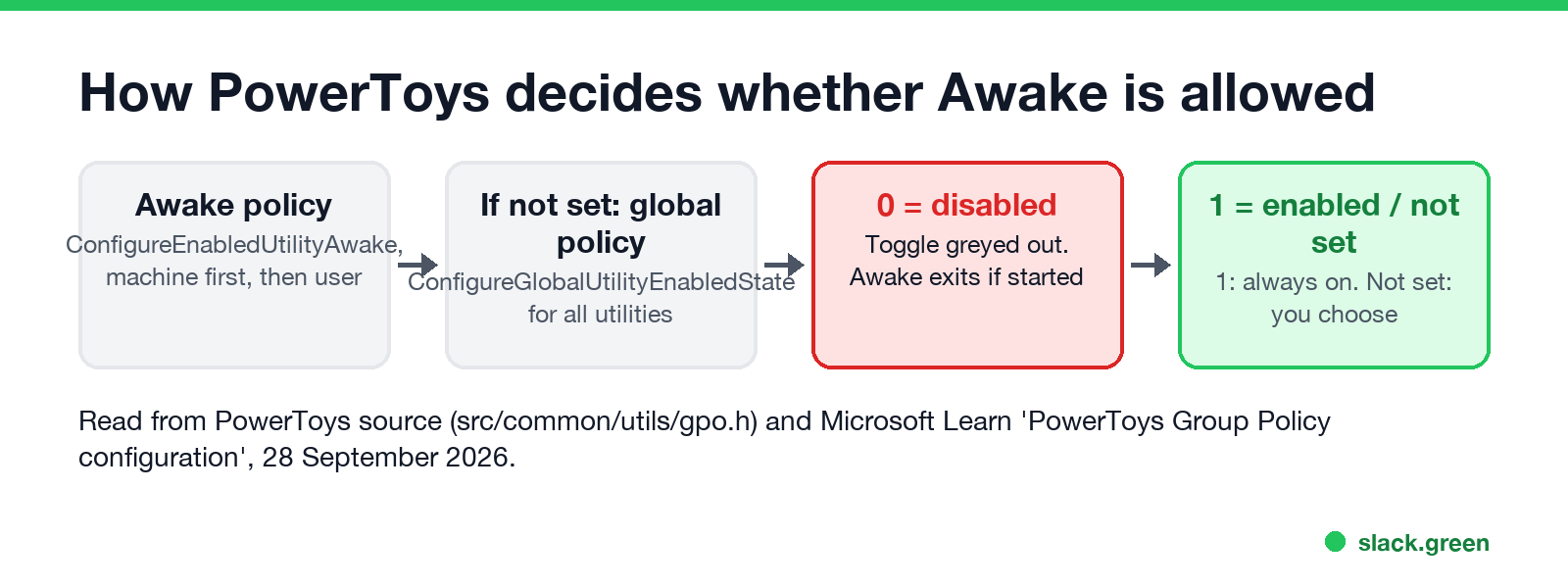
There is also a policy for all utilities at once, Configure global utility enabled state (ConfigureGlobalUtilityEnabledState, PowerToys 0.75 or later). PowerToys reads the Awake value first and uses the global value only when the Awake value is not set. For each value it looks in the machine policies (HKLM) first, then the user policies (HKCU).
Check which policy blocks Awake
Open Command Prompt or PowerShell as yourself, no admin needed, and run:
reg query HKLM\SOFTWARE\Policies\PowerToys
reg query HKCU\SOFTWARE\Policies\PowerToys
Look for these two values:
ConfigureEnabledUtilityAwake          REG_DWORD    0x0
ConfigureGlobalUtilityEnabledState    REG_DWORD    0x0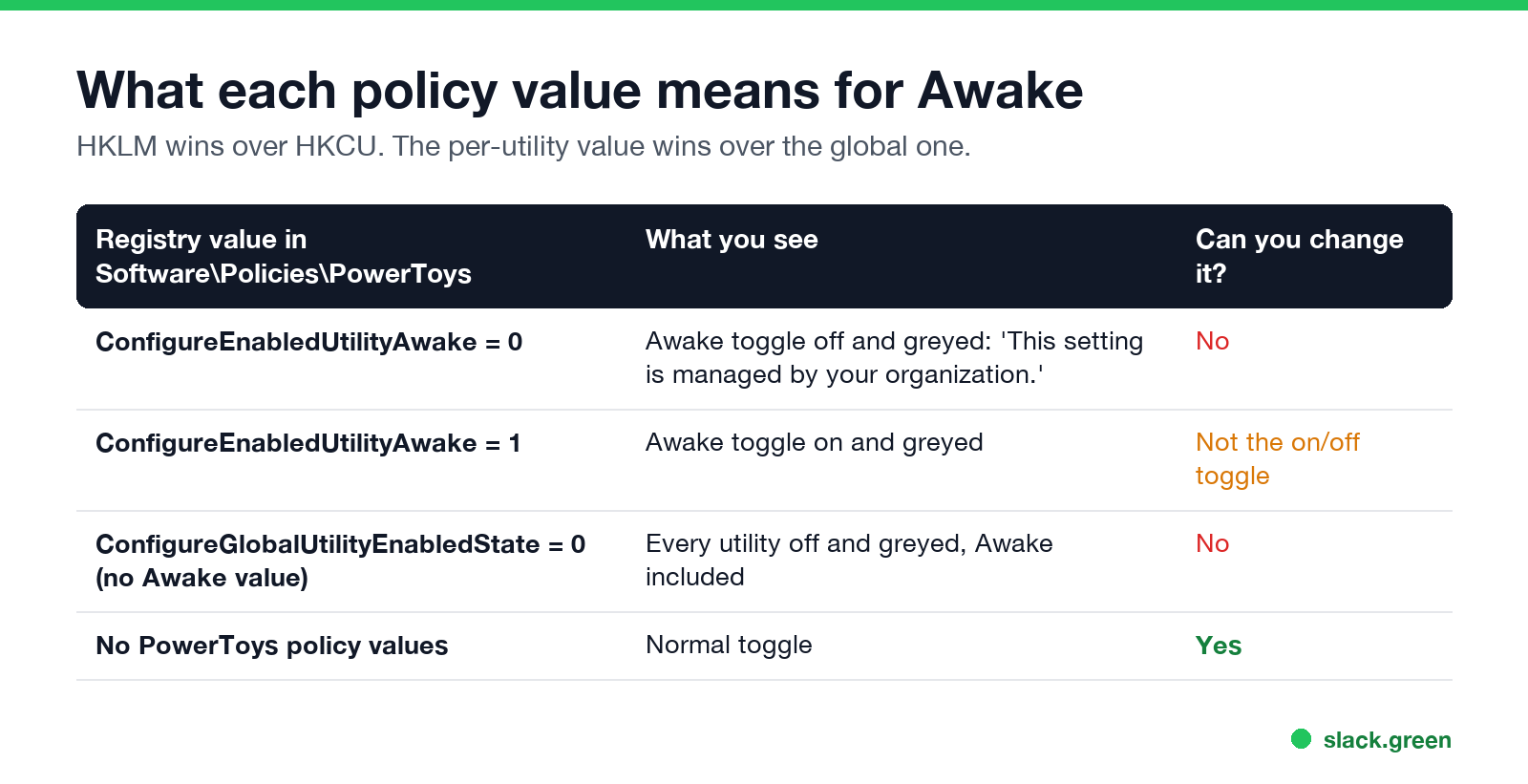
| Value | Effect on Awake |
|---|---|
ConfigureEnabledUtilityAwake = 0 | Always off, toggle greyed |
ConfigureEnabledUtilityAwake = 1 | Always on, toggle greyed |
ConfigureGlobalUtilityEnabledState = 0 and no Awake value | All utilities off, Awake included |
| Neither value present | Not managed; you can turn Awake on |
If reg query says "The system was unable to find the specified registry key or value", there is no PowerToys policy in that scope. If both scopes have no PowerToys values, no PowerToys policy applies to you.
Why Awake will not start from the command line either
PowerToys.Awake.exe checks the same policy when it starts. With the Awake policy set to disabled, it logs "PowerToys.Awake tried to start with a group policy setting that disables the tool. Please contact your system administrator." and exits. Running the executable directly, or with its command-line options, does not get around the policy.
Changing the registry value needs admin rights for HKLM, and on a managed PC the policy is written back at the next Group Policy or Intune refresh. The policy is a company decision; treat it as one.
Never appear "away" on Slack again
Cloud-based. No downloads. Works 24/7 even when your laptop is off.
What you can still do when Awake is blocked
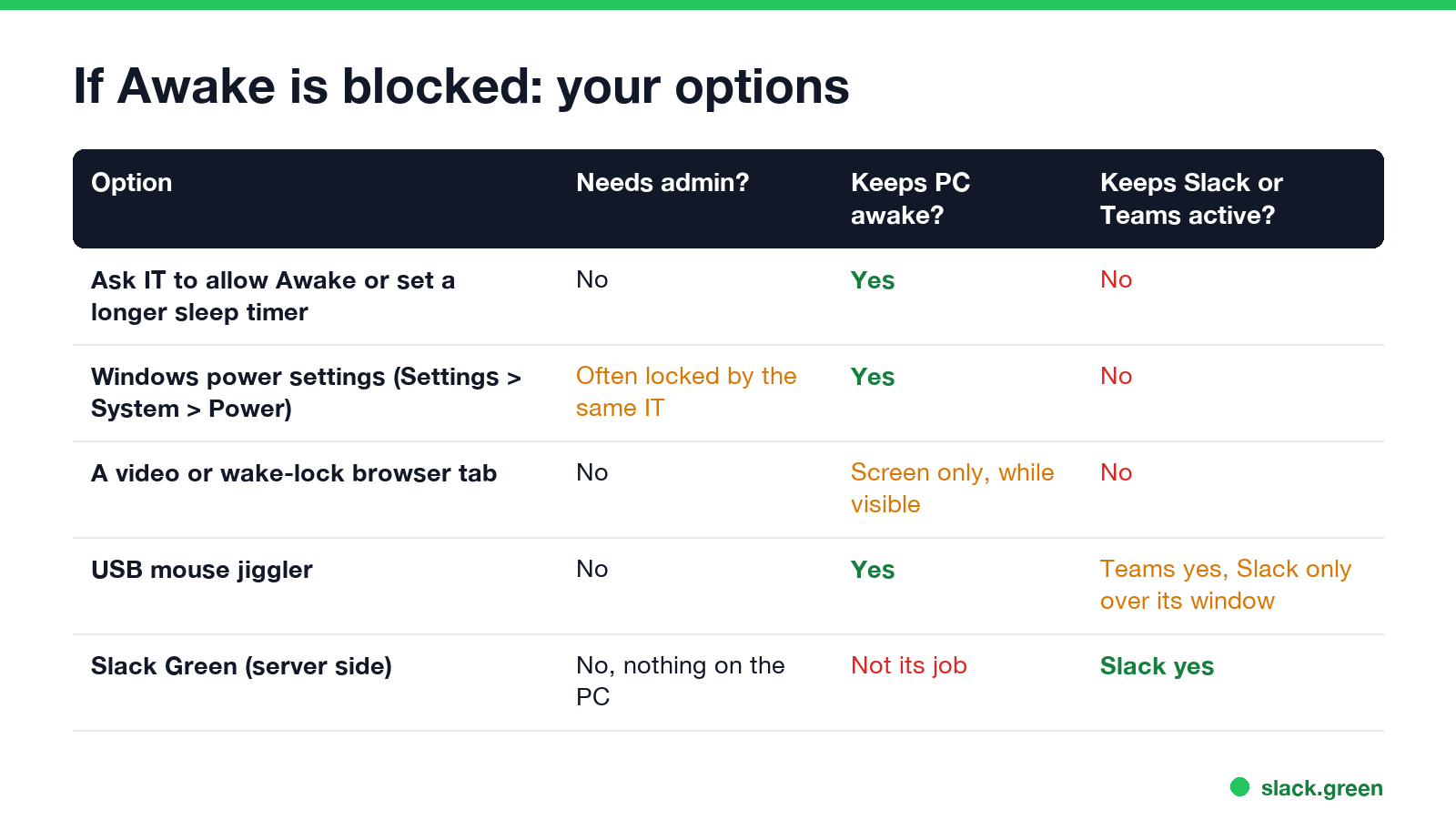
SetThreadExecutionState, so a company that blocks Awake may block them too.Two limits apply whatever you use. A screen lock enforced by IT policy is separate from sleep, and no keep-awake tool overrides it; see how to stop Windows 11 from locking. And keeping the PC awake does not keep Slack or Teams active.
Awake, Slack and Teams
Awake keeps Windows from sleeping. It creates no mouse or keyboard input, so Microsoft Teams still sets you to Away after about 5 minutes, and Slack after 10 minutes without input in the Slack window. If the reason you wanted Awake is a green dot, a blocked Awake costs you nothing. For Slack on Windows in general, see keep Slack active on Windows.
FAQ
How do I fix "This setting is managed by your organization" in PowerToys?
You cannot fix it from PowerToys. An administrator set a PowerToys group policy. Ask your IT team to change the Awake policy to Not configured or Enabled.
Why is PowerToys Awake greyed out?
A policy forces its state. ConfigureEnabledUtilityAwake set to 0 forces it off, set to 1 forces it on, and a global value of 0 turns off all utilities.
Where is the PowerToys group policy in the registry?
HKEY_LOCAL_MACHINE\SOFTWARE\Policies\PowerToys and HKEY_CURRENT_USER\SOFTWARE\Policies\PowerToys. The machine value wins.
Can I run PowerToys Awake from the command line if it is disabled by policy?
No. PowerToys.Awake.exe checks the policy at start and exits with a message to contact your system administrator.
Does PowerToys Awake keep Teams green?
No. It stops sleep but creates no input, so Teams still shows Away after about 5 minutes. See does PowerToys Awake keep Slack or Teams active.
Stop Jiggling Your Mouse.
Join hundreds of remote workers who never worry about their Slack status. Set it up once, stay green forever.
Related Articles
How to Make an Emoji From a Video (Slack and Discord)
To make an emoji from a video, cut 1 to 2 seconds, crop it to a square, scale it to 128 x 128 and save it as a GIF under 128 KB for Slack or 256 KB for Discord. One tested ffmpeg command, the frame rate and color settings that decide the file size, and a free browser tool that shrinks the GIF for you.
How to Make a Custom Emoji for Discord (From Any Image)
To make a custom Discord emoji, crop an image to a square, keep it under 256 KB, name it with letters, numbers and underscores, and upload it with Add Emoji in the emoji picker or Server Settings, Emoji. How to make one from a photo, a GIF or text for free, add animation, and use it in other servers.
Can Slack Messages Be Subpoenaed? Yes, Here Is How It Works
Yes. Slack messages, including DMs, can be requested in a lawsuit or an investigation. Most requests go to the company that owns the workspace, which exports them. Slack itself gives out message content only with a search warrant and tells the company first. Slack's own policy, its disclosure numbers, legal holds, and what deleted messages mean.