
Slack 'Also Send to Channel': What It Does, How to Undo It, and Why It Unticks
We replied in a Slack thread with Also send to channel ticked, removed the channel copy, deleted another, and sent one through the API. Here is what each step did.
Also send to #channel is the tick box under a Slack thread reply. When it is ticked, your reply stays in the thread and also shows in the channel, with a "replied to a thread" line above it. It is one message, not two. If you sent it by mistake, open the message menu on the channel copy and pick Remove reply from channel. The reply then stays in the thread only. On 9 October 2026 we tested this in Slack web on the Free plan, in a test channel called #w1-thread-test.
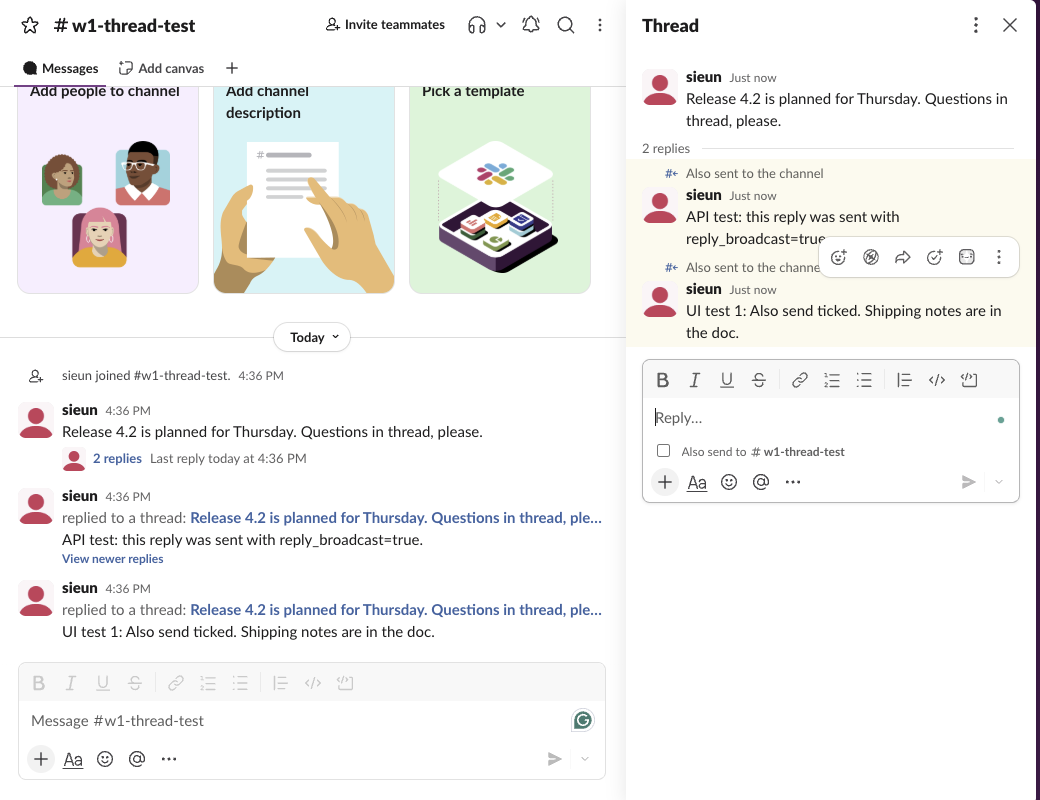
What happens when you tick the box
We posted a message in the channel, opened its thread, ticked Also send to w1-thread-test, and sent "UI test 1". The screenshot above shows the result. In the channel, the reply appears at the bottom with "replied to a thread:" and the first line of the parent message as a link. In the thread, the same reply has a small "Also sent to the channel" label.
The API shows that this is one message in two places. Both conversations.history (the channel) and conversations.replies (the thread) returned the reply with the same ts, 1791531416.122349, and the subtype thread_broadcast. Nothing was copied, so an edit or a reaction on the reply is on the one message both views show.
People who only read the channel see the reply without opening the thread. That is the point of the box: use it when the thread reached a result the whole channel needs, such as a decision or a date. If the thread is a side talk, leave the box empty. A channel full of thread replies is the most common complaint in the Reddit threads that rank for this query.
How to undo Also send to channel
There are two ways, and they do different things.
| What you do | Channel copy | Thread copy | Tested result |
|---|---|---|---|
| Message menu > Remove reply from channel | Gone | Stays | Same ts, subtype thread_broadcast removed |
Message menu > Delete message (or chat.delete) | Gone | Gone | Message gone from both lists |
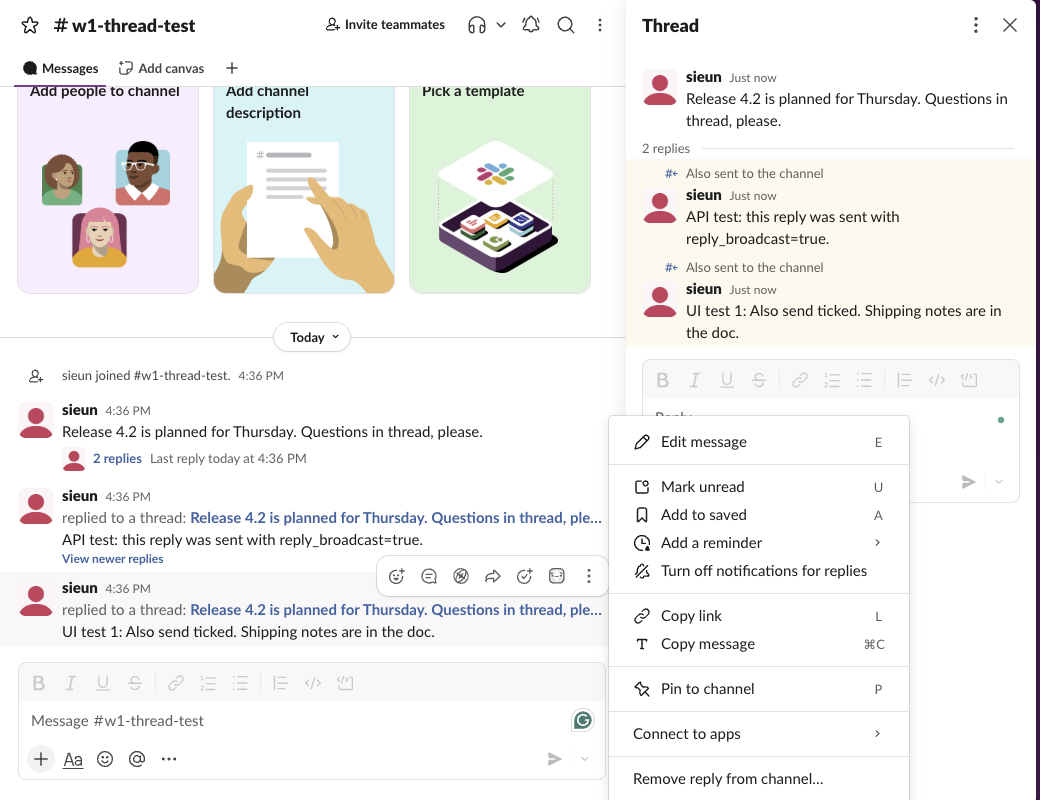
Remove reply from channel is in the message menu (the three dots) of a reply that was sent to the channel. We opened it on the channel copy:
Slack asks once before it acts. The dialog says "The original reply will still be visible in its thread."
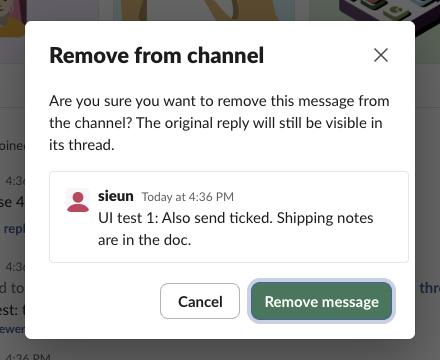
After we clicked Remove message, the API showed the reply in the thread with the same ts and no subtype, and the channel list no longer had it. We then deleted a second broadcast reply with chat.delete. That one disappeared from the thread too. So if you only want the channel copy gone, do not use Delete. If you want the reply gone everywhere, see what Slack keeps after a delete.
Never appear "away" on Slack again
Cloud-based. No downloads. Works 24/7 even when your laptop is off.
Can Also send to channel be on by default?
No. We sent three replies in a row. After the first reply, which we sent with the box ticked, the box was empty again. We ticked it for the second reply, and after that send it was empty again. The third reply, sent without touching the box, went to the thread only (conversations.replies showed it with no thread_broadcast subtype). After a page reload the box was still unticked. Slack web did not remember the last choice in any of these cases.
The tools that keep it ticked are browser extensions: the top results for "also send to channel default" are two Chrome Web Store extensions and a GitHub project that tick the box for you when the thread opens. We did not test them. An extension that changes Slack's page can break when Slack changes its HTML, and an extension with access to app.slack.com can read your messages, so check what it asks for before you install it.
Sending a thread reply to the channel with the API
Bots and scripts use chat.postMessage with thread_ts (the parent message's ts) and reply_broadcast=true. Our test, with a user token:
curl -s https://slack.com/api/chat.postMessage \
  -H "Authorization: Bearer $SLACK_TOKEN" \
  -d channel=C0C7TKGD411 \
  -d thread_ts=1791531397.051919 \
  -d reply_broadcast=true \
  --data-urlencode "text=API test: this reply was sent with reply_broadcast=true."
The response, shortened:
{
  "ok": true,
  "channel": "C0C7TKGD411",
  "ts": "1791531397.428729",
  "message": {
    "subtype": "thread_broadcast",
    "thread_ts": "1791531397.051919",
    "root": { "reply_count": 1, "text": "Release 4.2 is planned for Thursday. Questions in thread, please." },
    "text": "API test: this reply was sent with reply_broadcast=true."
  }
}
The message carries a root object with the parent's text and reply count. Its subtype is thread_broadcast, so a bot that skips every message with a subtype will skip these replies too. Our thread_ts guide covers how to find the parent ts.
FAQ
Does Also send to channel notify the whole channel?
It posts in the channel like any message, so it follows each member's channel notification setting. It does not mention anyone unless the text has a mention. For pings to everyone, see @channel and @here.
Stop Jiggling Your Mouse.
Join hundreds of remote workers who never worry about their Slack status. Set it up once, stay green forever.
Related Articles
Does Slack Compress Images? We Uploaded a PNG, JPEG, HEIC and MP4 to Check
We uploaded four files to Slack and downloaded them again. The PNG and MP4 came back byte for byte, the JPEG came back re-encoded without its EXIF, and the chat only ever shows a 1024 px preview.
Can You Have a GIF Profile Picture on Slack? We Uploaded One
We set a 12-frame animated GIF as a Slack profile photo and downloaded every size Slack made. All of them were still images, frame 1 only.
How to Clear Slack Search History (Recent Searches)
Slack keeps your recent searches on its servers, so they follow you to every device. We found where to delete them, and the one way the delete button worked for us.