
Slack Bolt vs Slack SDK: Same Bot Built Both Ways
We built the same Slack bot with plain slack_sdk and with Bolt for Python, ran both in a real workspace, and counted what the SDK made us do by hand.
Bolt is Slack's app framework, and it is built on top of the Slack SDK. slack_sdk (Python) or @slack/web-api (JavaScript) gives you a client for the Web API plus the raw Socket Mode and webhook pieces. Bolt adds the app layer: it acknowledges events, routes each event, button click and slash command to the right function, checks request signatures and gives you say() and respond(). Use plain slack_sdk when your code only calls the API, such as a script or a cron job that posts messages. Use Bolt as soon as Slack has to call you.
To show the difference, we built one small bot twice on 25 November 2026, with slack_sdk 3.48.0 and slack_bolt 1.30.0, as a throwaway Socket Mode app in a Free test workspace. A second member mentioned the bot, the bot replied in the thread with a Ship button, and a click on the button changed the reply. Both versions worked:
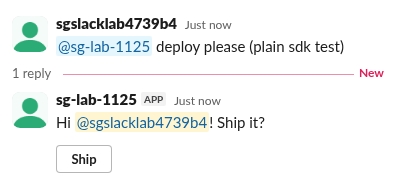
The plain slack_sdk version
import os, time
from slack_sdk import WebClient
from slack_sdk.socket_mode import SocketModeClient
from slack_sdk.socket_mode.request import SocketModeRequest
from slack_sdk.socket_mode.response import SocketModeResponse

web = WebClient(token=os.environ["SLACK_BOT_TOKEN"])
sock = SocketModeClient(app_token=os.environ["SLACK_APP_TOKEN"], web_client=web)

def button(user):
    return [
        {"type": "section", "text": {"type": "mrkdwn", "text": f"Hi <@{user}>! Ship it?"}},
        {"type": "actions", "elements": [
            {"type": "button", "action_id": "ship", "text": {"type": "plain_text", "text": "Ship"}, "value": "v1"}]},
    ]

def handle(client: SocketModeClient, req: SocketModeRequest):
    # every envelope must be acknowledged by hand, within 3 seconds
    client.send_socket_mode_response(SocketModeResponse(envelope_id=req.envelope_id))
    if req.retry_attempt:
        print("retry", req.retry_attempt, req.retry_reason)  # Slack resent it; skip duplicates yourself
        return
    p = req.payload
    if req.type == "events_api" and p["event"]["type"] == "app_mention":
        ev = p["event"]
        web.chat_postMessage(channel=ev["channel"], thread_ts=ev["ts"], text="Ship it?", blocks=button(ev["user"]))
        print("mention ->", time.strftime("%X"))
    elif req.type == "interactive" and p["type"] == "block_actions":
        act = p["actions"][0]
        if act["action_id"] == "ship":
            web.chat_update(channel=p["channel"]["id"], ts=p["message"]["ts"],
                            text=f"Shipped {act['value']} by <@{p['user']['id']}>", blocks=[])
            print("click ->", time.strftime("%X"))

sock.socket_mode_request_listeners.append(handle)
sock.connect()
print("plain sdk connected")
while True:
    time.sleep(1)
The Bolt version
import os, time
from slack_bolt import App
from slack_bolt.adapter.socket_mode import SocketModeHandler

app = App(token=os.environ["SLACK_BOT_TOKEN"])

def button(user):
    return [
        {"type": "section", "text": {"type": "mrkdwn", "text": f"Hi <@{user}>! Ship it?"}},
        {"type": "actions", "elements": [
            {"type": "button", "action_id": "ship", "text": {"type": "plain_text", "text": "Ship"}, "value": "v1"}]},
    ]

@app.event("app_mention")
def on_mention(event, say):
    say(text="Ship it?", blocks=button(event["user"]), thread_ts=event["ts"])
    print("mention ->", time.strftime("%X"))

@app.action("ship")
def on_ship(ack, body, client, action):
    ack()
    client.chat_update(channel=body["channel"]["id"], ts=body["message"]["ts"],
                       text=f"Shipped {action['value']} by <@{body['user']['id']}>", blocks=[])
    print("click ->", time.strftime("%X"))

if __name__ == "__main__":
    print("bolt connected")
    SocketModeHandler(app, os.environ["SLACK_APP_TOKEN"]).start()
Bolt's version is 23 lines of code against 34, and the gap grows with every new event type, because each one is a decorator instead of another branch in one handler.
What the plain SDK made us do by hand
| Job | Plain slack_sdk | Bolt for Python |
|---|---|---|
| Lines of code for the same feature (no blank lines or comments) | 34 | 23 |
| Acknowledge each event within 3 seconds | By hand: send_socket_mode_response for every envelope | Done for you for events; you call ack() in action, command and view handlers |
| Route events and button clicks | By hand: if req.type == ... and p["actions"][0]["action_id"] | @app.event("app_mention"), @app.action("ship") |
| Reply in the same place | web.chat_postMessage(channel=..., thread_ts=...) | say(...) already knows the channel |
| Slack retries you did not ack | You see retry_attempt 1, 2 and must skip duplicates | None in our run, because Bolt acked the event |
| Request signature check (HTTP mode) | By hand with SignatureVerifier | Built in when you pass signing_secret |
| Warning when you forget the ack | None; Slack just retries | Logs on_ship didn't call ack() |
The acknowledgement is the part people get wrong. Slack expects every Socket Mode envelope to be acknowledged within 3 seconds. We ran the plain version once more with the send_socket_mode_response line removed and mentioned the bot one time. Slack sent the same event three times:
got events_api retry_attempt 0  16:35:06
mention -> 16:35:06
got events_api retry_attempt 1 timeout 16:35:09
got events_api retry_attempt 2 timeout 16:36:12
The first retry came 3 seconds later and the second 63 seconds later, both with retry_reason timeout. Without the if req.retry_attempt check, the bot would have replied three times. Slack Events API retries covers the headers and how to drop duplicates in HTTP mode.
Bolt acks events for you, but not interactive payloads: a button handler must still call ack(). When we removed ack() from the Bolt button handler, the message still updated, but Bolt printed this:
on_ship didn't call ack()
Unhandled request ({'type': 'block_actions', 'block_id': '1Eo/D', 'action_id': 'ship'})
---
[Suggestion] You can handle this type of event with the following listener function:

@app.action("ship")
def handle_some_action(ack, body, logger):
    ack()
    logger.info(body)
Never appear "away" on Slack again
Cloud-based. No downloads. Works 24/7 even when your laptop is off.
Bolt still uses the SDK inside
You do not lose the Web API by choosing Bolt. app.client in Bolt, and the client argument every listener gets, is the same slack_sdk.WebClient, so every method such as chat_update or conversations_history works the same way in both versions above. That also means a project can start as a plain WebClient script and move to Bolt later without rewriting its API calls. Our Bolt Python example builds a fuller app, and Socket Mode in Python explains the app-level token both versions need.
When to pick which
- • Only sending messages or reading data (a script, a cron job, a CI step): plain
slack_sdkWebClient. Bolt adds nothing there. - • Anything Slack calls: events, buttons, slash commands, modals or shortcuts. Use Bolt, because you would rebuild its acks, routing and signature check by hand.
- • You need full control of the transport, such as one process that already runs its own web server: the SDK's
SignatureVerifierandSocketModeClientlet you do it yourself, at the cost of the table above.
FAQ
Is Bolt slower than the plain SDK?
We did not benchmark them. In our runs both replied within a few seconds of the mention, and the work per event is the same WebClient call underneath.
Can I use slack_sdk WebClient inside a Bolt app?
Yes, and you already do: the client passed to each Bolt listener is a slack_sdk.WebClient.
Does Bolt for JavaScript differ?
The split is the same: @slack/bolt sits on @slack/web-api and @slack/socket-mode. We ran the Python pair here.
Stop Jiggling Your Mouse.
Join hundreds of remote workers who never worry about their Slack status. Set it up once, stay green forever.
Related Articles
Slack Public File Link: How to Share a File Outside Slack
A normal Slack file link only opens for people signed in to your workspace. A public link needs an admin setting and a user token. Our signed-out tests and API errors.
How to Get People to Use Threads in Slack (With a Bot That Nudges)
Slack cannot force replies into threads. A visible rule plus a small bot that privately nudges channel replies does it; code and test results included.
How to Bulk Delete Slack Messages (Tested Script)
The Slack app deletes one message at a time. We ran a script that deleted 120 of our messages in 108 seconds and handled the rate limits.