
Send a Slack DM From a Bot: channel=U or conversations.open, Tested
A Slack bot can DM a user by passing the user ID as the channel in chat.postMessage, or by opening the DM with conversations.open first. We ran both, recorded where each message landed, and reproduced messages_tab_disabled and 'Sending messages to this app has been turned off'.
To send a direct message from a Slack bot, call chat.postMessage with the bot token and put the user's ID (U...) in channel. Slack opens the DM between the bot and that user and posts there. The other way is to call conversations.open with users=U... first and post to the D... ID it returns. We ran both on 1 October 2026 in our test workspace, and both messages landed in the same DM. Our app had the chat:write and im:write bot scopes.
The two ways, side by side
This is the script we ran with slack_sdk:
import os
from slack_sdk import WebClient
from slack_sdk.errors import SlackApiError

bot = WebClient(token=os.environ["SLACK_BOT_TOKEN"])
USER_ID = "U0B7L4YK420"

# 1. Post with the user ID as the channel
r1 = bot.chat_postMessage(channel=USER_ID, text="Hi from the bot (channel=U...)")
print("channel=U ->", r1["channel"], r1["ts"])

# 2. Open the DM first, then post to its D ID
im = bot.conversations_open(users=USER_ID)
print("conversations.open ->", im["channel"]["id"], "already_open:", im.get("already_open"))
r2 = bot.chat_postMessage(channel=im["channel"]["id"], text="Hi from the bot (channel=D...)")
print("channel=D ->", r2["channel"], r2["ts"])

# 3. A user ID that does not exist
for call in ("postMessage", "open"):
    try:
        if call == "postMessage":
            bot.chat_postMessage(channel="U0123456789", text="x")
        else:
            bot.conversations_open(users="U0123456789")
    except SlackApiError as e:
        print(call, "unknown user ->", e.response["error"])
Output:
channel=U -> D0C5UMYKNKG 1790840151.022449
conversations.open -> D0C5UMYKNKG already_open: True
channel=D -> D0C5UMYKNKG 1790840151.658939
postMessage unknown user -> channel_not_found
open unknown user -> user_not_found
Both calls returned the same DM ID, D0C5UMYKNKG, the Messages tab of our app. The chat.postMessage response always tells you the D ID, so you can store it from the first post and skip conversations.open.
conversations.open reported already_open: true because Slack had created the DM when we installed the app. With return_im=true it returned more of the channel object:
{
  "ok": true,
  "no_op": true,
  "already_open": true,
  "channel": {
    "id": "D0C5UMYKNKG",
    "is_im": true,
    "user": "U0B7L4YK420"
  }
}
Use conversations.open when you need the D ID before posting, for example to read the DM's history or to post a file there. Otherwise channel=U... is one call fewer.
Other recipients we tried
channel in chat.postMessage (bot token) | Result |
|---|---|
| The user's ID | ok, posted in the app's DM with the user |
The DM's D ID | ok, same DM |
U0123456789, a user that does not exist | channel_not_found |
USLACKBOT | ok, a new DM D0C5RDMEZL5 |
| The bot's own user ID | ok, a new DM D0C5YLT20NM |
| A deleted bot user | ok, a new DM D0C6R3WUZ1N |
conversations.open was stricter: it returned user_not_found for the made-up ID and cannot_dm_bot for the deleted bot user. The unknown-user case is the one you will hit in practice. channel_not_found from chat.postMessage does not say whether the ID is wrong or the channel is private; our channel_not_found page lists the other causes, and Slack member ID shows where to copy a real U ID.
A user token posts as the person, not the bot. With our user token, chat.postMessage to our own user ID landed in our self-DM, D0B7D4VDCUD, not in the app's DM.
Never appear "away" on Slack again
Cloud-based. No downloads. Works 24/7 even when your laptop is off.
When the user cannot reply
The App Home settings decide whether the DM works at all. We changed them with apps.manifest.update and reloaded Slack:
features.app_home | What the user saw | Bot chat.postMessage to the user |
|---|---|---|
messages_tab_enabled: true | Home, Messages and About tabs | ok |
messages_tab_enabled: false | Home and About only | {"ok": false, "error": "messages_tab_disabled"} |
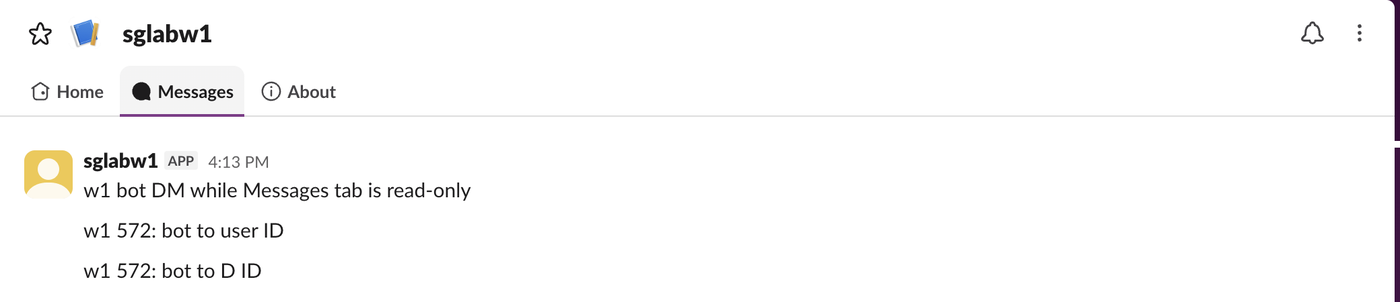
messages_tab_enabled: true, messages_tab_read_only_enabled: true | Messages tab without a composer | ok |
With the Messages tab off, the app has no DM tab at all:

In read-only mode the bot's message arrives, and the composer is replaced by one line:

So if your users report "Sending messages to this app has been turned off", the app has messages_tab_read_only_enabled on. Turn it off under App Home, or in the manifest, if you want replies. In that mode our user token's own post to the DM returned restricted_action_read_only_channel. The App Home tab guide has the rest of those settings.
FAQ
How do I DM several users at once?
chat.postMessage takes one channel per call, so loop over the user IDs and post once per user. Our test workspace has one human member, so we ran it for one. For posting to a channel instead, see sending a Slack message from Python.
Where does a bot DM show up for the user?
Under Agents & apps in the sidebar, in the app's Messages tab. That is where both of our test messages appeared.
Stop Jiggling Your Mouse.
Join hundreds of remote workers who never worry about their Slack status. Set it up once, stay green forever.
Related Articles
Slack Interactivity Payload: Real block_actions JSON and response_url Limits
We clicked a button, a static_select and a datepicker in Slack on 1 October 2026 and logged the block_actions payloads our app received. Then we measured response_url: 5 posts, then used_url; it worked at 29:50 and was dead at 30:10.
Slack unfurl_links and unfurl_media: What Each Flag Does, Tested
We posted a web page, a YouTube video and an image with every combination of unfurl_links and unfurl_media on 1 October 2026, then built a custom preview with link_shared and chat.unfurl. The flags do not split the way the names suggest.
Slack Scheduled Message Didn't Send? 5 Cases We Tested
We scheduled five messages for 4:40 PM on 1 October 2026, then archived, left and deleted their channels and deleted a thread parent before the send time. Two sent, three never did, and Slack gave no notice about the three.