
Slack "This Browser Is No Longer Supported": Versions We Tested
Slack blocks a browser by its version, not just its name. We tested over 50 browser version strings against the web app: Chrome 137, Firefox 139, Edge 136 and Safari 26 load it; older ones get a block page.
Slack shows "This browser is no longer supported" when your browser's version is below its cut-off. In our test on 29 November 2026 the web app loaded for Chrome 137 or newer, Firefox 139 or newer, Edge 136 or newer and Safari 26 or newer, and blocked everything older. Update the browser, or use the desktop app, and the page goes away.
To find the cut-offs we requested the Slack web app (app.slack.com/client/...) while signed in to a Free workspace, once per browser version, changing only the User-Agent header. We then opened the block pages in a real Chrome with the same User-Agent to take the screenshots below.
Which browser versions Slack lets in
| Browser | Loads Slack | Blocked | Slack's help page asks for |
|---|---|---|---|
| Chrome (Windows, Mac, Linux) | 137 and newer | 136 and older | 143 or above |
| Firefox | 139 and newer (140 ESR loads) | 138 and older (115 ESR blocked) | 145 or above |
| Microsoft Edge | 136 and newer | 135 and older | 143 or above |
| Safari on Mac | 26.0 and newer | 18.7 and older | 26 or above |
| Opera 124 | no | old block page | not listed |
| Internet Explorer 11, legacy Edge 18 | no | old block page | not listed |
| iPhone, iPad and Android browsers | no | sent to "Get the Slack app" | use the app |
The last column is from Slack's "Minimum requirements" help page on the same day. The real gate is a few versions looser than the help page, so Chrome 140 still loads even though Slack says it wants 143. Expect the gate to move up over time; a browser that loads today can be blocked after a few releases.
The sign-in page (slack.com/signin) is not gated. Every version we tried, including Internet Explorer 11, got the normal sign-in page. The block appears only after sign-in, when the app itself loads, which is why people see it right after they type their password.
The two block pages
Slack serves two different pages. Recent but too-old versions of Chrome, Firefox, Edge and Safari get the newer one; Internet Explorer, the old Edge and, in our test, Opera get the older one.
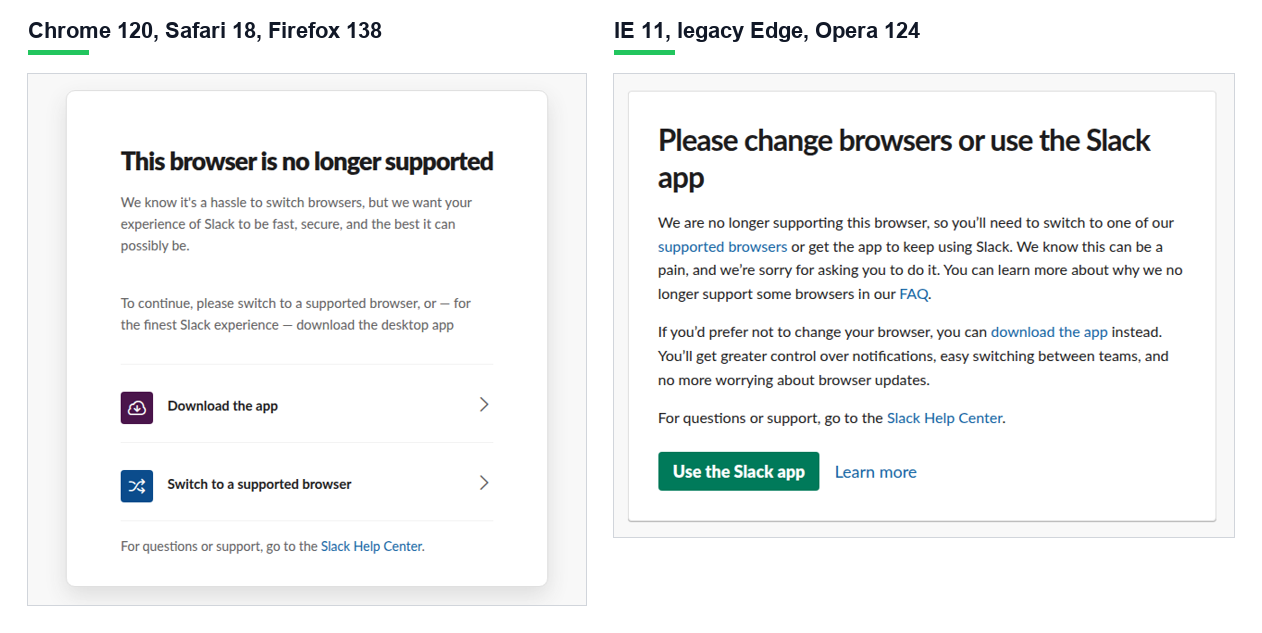
Left: what Chrome 120, Safari 18 and Firefox 138 get. Right: what Internet Explorer 11, legacy Edge 18 and Opera 124 get.
The "Switch to a supported browser" link goes to Slack's minimum requirements article, and "Download the app" goes to the desktop download page. Neither page lets you continue anyway.
Never appear "away" on Slack again
Cloud-based. No downloads. Works 24/7 even when your laptop is off.
How to fix "This browser is no longer supported"
- Update the browser. In Chrome, open
chrome://settings/help; in Edge,edge://settings/help; in Firefox, Help > About Firefox. Each one checks for and installs the update, then asks for a restart. - On a Mac, update macOS for Safari. Safari updates come with macOS updates, so an old macOS that is stuck on Safari 18 cannot run the Slack web app in Safari. Use Chrome or Firefox there, or the desktop app. Our page on the desktop app vs the browser covers what changes when you switch.
- Use Firefox ESR 140, not 115. Company machines on the older ESR track are blocked.
- Check for a spoofed User-Agent. Some privacy extensions and "request desktop site" modes send an old or fake version string. Slack decides only from that string, so a current browser with a fake old version is blocked too. Turn the extension off for slack.com.
- Opera and other less common browsers: in our test Opera 124 was blocked even though it is built on a recent Chromium. Use Chrome, Edge or Firefox for Slack.
Slack in a phone browser
Phone and tablet browsers do not get the web app at all. Opening a workspace link in Safari on an iPhone or iPad, or Chrome on Android, redirects to a "Get the Slack app" page with an App Store or Play Store button and an Open Slack button.
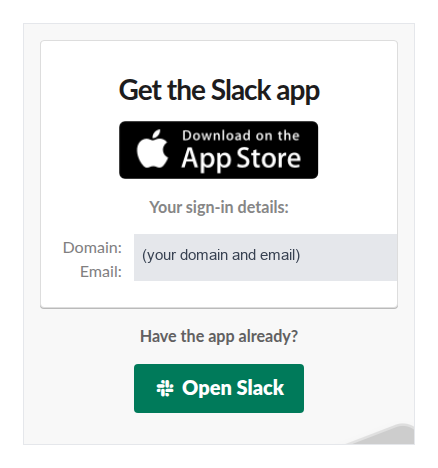
There is no mobile web version to switch to. If you cannot install the app, the only route is a desktop browser.
FAQ
Does Slack work in Safari?
Yes, Safari 26 and newer loaded the Slack web app in our test, and Safari 18 did not. Huddles are another matter: Slack's help page says only Chrome and Firefox support huddles in a browser. If a huddle fails in Safari, see Slack huddle not working.
Why did Slack suddenly say my browser is not supported?
Because Slack raised its minimum version and your browser did not update. Restarting the browser to finish a pending update is often enough.
Stop Jiggling Your Mouse.
Join hundreds of remote workers who never worry about their Slack status. Set it up once, stay green forever.
Related Articles
Slack Bolt app.message: Strings, Regex and context.matches Tested
We sent 9 test messages to the same listeners in Bolt Python and Bolt JS. Strings match anywhere and are case sensitive, regex groups land in context.matches, and edits and /me messages behave differently in each.
Slack OAuth Errors: invalid_scope, Invalid Permissions Requested and bad_redirect_uri
We broke a Slack OAuth install on purpose six ways and recorded each error page, the error code your redirect URL receives, and the oauth.v2.access answers, including the one that burns your code.
Slack Attachments vs Blocks: What Still Works in Each
We posted the same alert as legacy attachments, as blocks, and as blocks inside an attachment. Here is what renders, what Slack ignores now, and when the color bar still needs an attachment.