
Slack File ID: Where to Find It, and files.info Tested
A Slack file ID starts with F, like F0CJMEW9BGW. We uploaded two files on 18 November 2026 and found the ID in the copied file link, two Events API payloads, files.list and files.info, then recorded what a deleted file returns.
A Slack file ID is the code that starts with F, such as F0CJMEW9BGW. In the app, open the file, click the ⋯ menu and choose Copy link to file: the ID is the part of the link after your user ID, /files/U.../F0CJMEW9BGW/name.png. In code, it is file_id in the file_shared event, files[].id in the message event, and id in files.list and files.info. We uploaded a PNG and a CSV to a test channel on 18 November 2026 and read the ID from each of these places.
Find the file ID in the Slack app
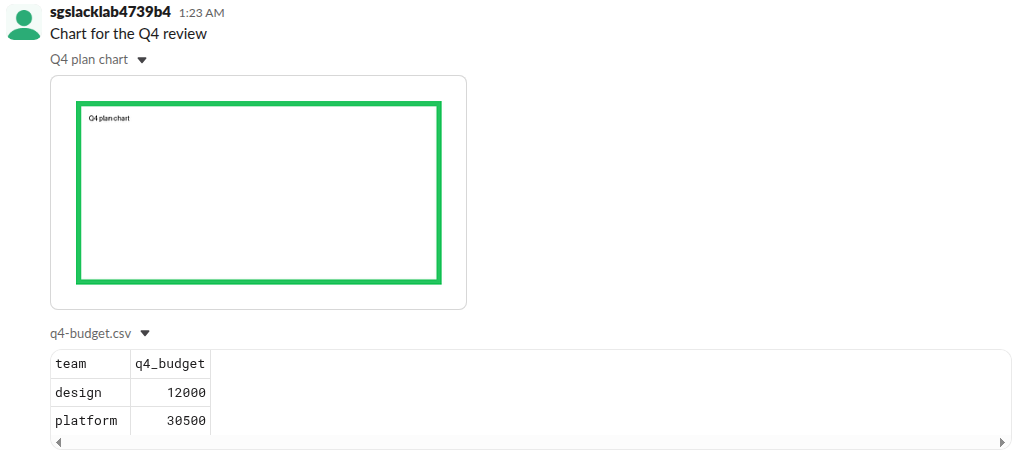
The two files arrived as one message: an image with a preview and a CSV that Slack showed as a small table.
The message's own ⋯ menu has Copy link, but that copies a link to the message, not the file. To get the file's link, click the image to open the viewer, then click ⋯ at the bottom right:
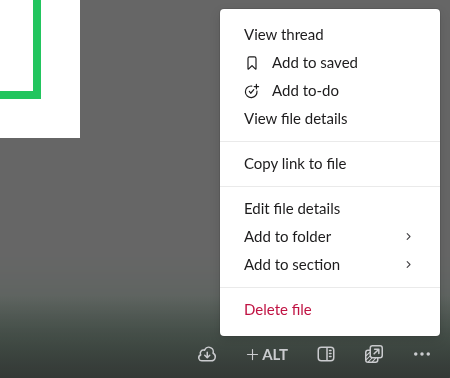
Copy link to file put this on the clipboard (workspace name replaced):
https://your-workspace.slack.com/files/U0CDVBA6TMZ/F0CJMEW9BGW/q4-plan-chart.pngThe parts are the user ID, the file ID and the file name. The user ID is the person who copied the link, not always the uploader: files.info called with our bot token returned the same link with the bot's user ID in that place.
The file ID in Events API payloads
With the file_shared and message.channels events turned on, each upload sent our app two events. The first names only the file:
{
  "type": "file_shared",
  "file_id": "F0CJMEW9BGW",
  "file": {"id": "F0CJMEW9BGW"}
}
The second is the message, with full file objects in files:
{
  "type": "message",
  "subtype": "file_share",
  "text": "Chart for the Q4 review",
  "files": [{"id": "F0CJMEW9BGW", "name": "q4-plan-chart.png", "...": "..."}],
  "upload": true,
  "user": "U0CDVBA6TMZ",
  "ts": "1794964988.414719"
}
Never appear "away" on Slack again
Cloud-based. No downloads. Works 24/7 even when your laptop is off.
The file ID in files.list
files.list with channel set returns the files in a channel. Our first call, about 3 seconds after the uploads, came back with "total": 0; a call 10 seconds later listed both files. If you list right after an upload, retry before you decide a file is missing.
files.info: the whole file object
With the ID, files.info returns the file object. Trimmed to the useful fields:
{
 "id": "F0CJMEW9BGW",
 "created": 1794964987,
 "name": "q4-plan-chart.png",
 "title": "Q4 plan chart",
 "mimetype": "image/png",
 "filetype": "png",
 "user": "U0CDVBA6TMZ",
 "size": 2474,
 "mode": "hosted",
 "url_private": "https://files.slack.com/files-pri/T0B7JBCDKC1-F0CJMEW9BGW/q4-plan-chart.png",
 "url_private_download": "https://files.slack.com/files-pri/T0B7JBCDKC1-F0CJMEW9BGW/download/q4-plan-chart.png",
 "permalink": "https://your-workspace.slack.com/files/U0CJJ3D6V9B/F0CJMEW9BGW/q4-plan-chart.png",
 "channels": [
  "C0CJT39N2UC"
 ],
 "shares": {
  "public": {
   "C0CJT39N2UC": [
    {
     "ts": "1794964988.414719",
     "share_user_id": "U0CDVBA6TMZ"
    }
   ]
  }
 }
}
user is the uploader. Slack's docs say url_private and url_private_download need your token in an Authorization header to download. shares lists every channel the file was posted in, with the message ts, which is how you get from a file back to its message. Our bot token had the files:read scope for both calls.
What files.info returns for a deleted file
We deleted the CSV with files.delete and called files.info again:
file sent | Answer |
|---|---|
F0CKHQVRB24, the deleted CSV, with the bot token | file_deleted |
| The same ID with the uploader's own session | file_deleted |
F0NOTREAL00, an ID that never existed | file_not_found |
So file_deleted means the ID was real. The message that held the file also changed: our app got a message_deleted event in which the file had become a tombstone.
{
  "type": "message",
  "subtype": "message_deleted",
  "hidden": true,
  "previous_message": {
    "files": [{"id": "F0CKHQVRB24", "mode": "tombstone"}],
    "upload": true,
    "user": "U0CDVBA6TMZ"
  }
}
Uploads by API now go through files.getUploadURLExternal and files.completeUploadExternal, which is also where an uploaded file gets its ID first; our page on files.upload being retired walks through both calls. To find where those files live and how long Slack keeps them, see where Slack files are stored.
We deleted both test files and archived the channel after the run.
Stop Jiggling Your Mouse.
Join hundreds of remote workers who never worry about their Slack status. Set it up once, stay green forever.
Related Articles
Slack App Configuration Token: Generate, Rotate and Revoke
An app configuration token lets a script create Slack apps from manifests. We generated one, rotated it five times and tested it again 28 hours later.
Slack App Collaborators: Add, Remove and Transfer Ownership
Collaborators are the people who can edit a Slack app. We added and removed one on 20 November 2026 as a regular member of a test workspace, recorded who can be added and what Slack asks you to do after a removal, and wrote down the hand-over path Slack documents.
Slack Bolt Middleware: Global and Listener, Tested
Global middleware runs for every request and listener middleware for one listener. We ran both in Bolt for Python and Bolt for JavaScript on 20 November 2026 and logged what Slack did when next() was skipped: Python answered 404 and Slack sent the event again.