
Slack Screen Sharing Not Working on Mac? Fix the Permission
On a Mac, Slack can share your screen in a huddle only with the Screen & System Audio Recording permission, and macOS applies it only after Slack restarts. The steps, what a wallpaper-only share means, how to reset the permission, and the browser case.
If Slack screen sharing is not working on your Mac, open System Settings > Privacy & Security > Screen & System Audio Recording and turn on Slack. Then quit Slack with Cmd+Q and open it again, because macOS applies the new permission only to a freshly started app. Until you do both, a share either fails or shows your coworkers nothing but your desktop wallpaper and menu bar. If Slack is missing from the list, add it with the + button, or reset the permission so macOS asks again. In Slack in a browser, the browser needs the same permission instead.
A long screen share has a side effect on your status: you are presenting, not typing in Slack, and Slack shows you away 10 minutes after your last input in its window. Slack Green keeps your status green from a server during the hours you set.
What you see and what it means
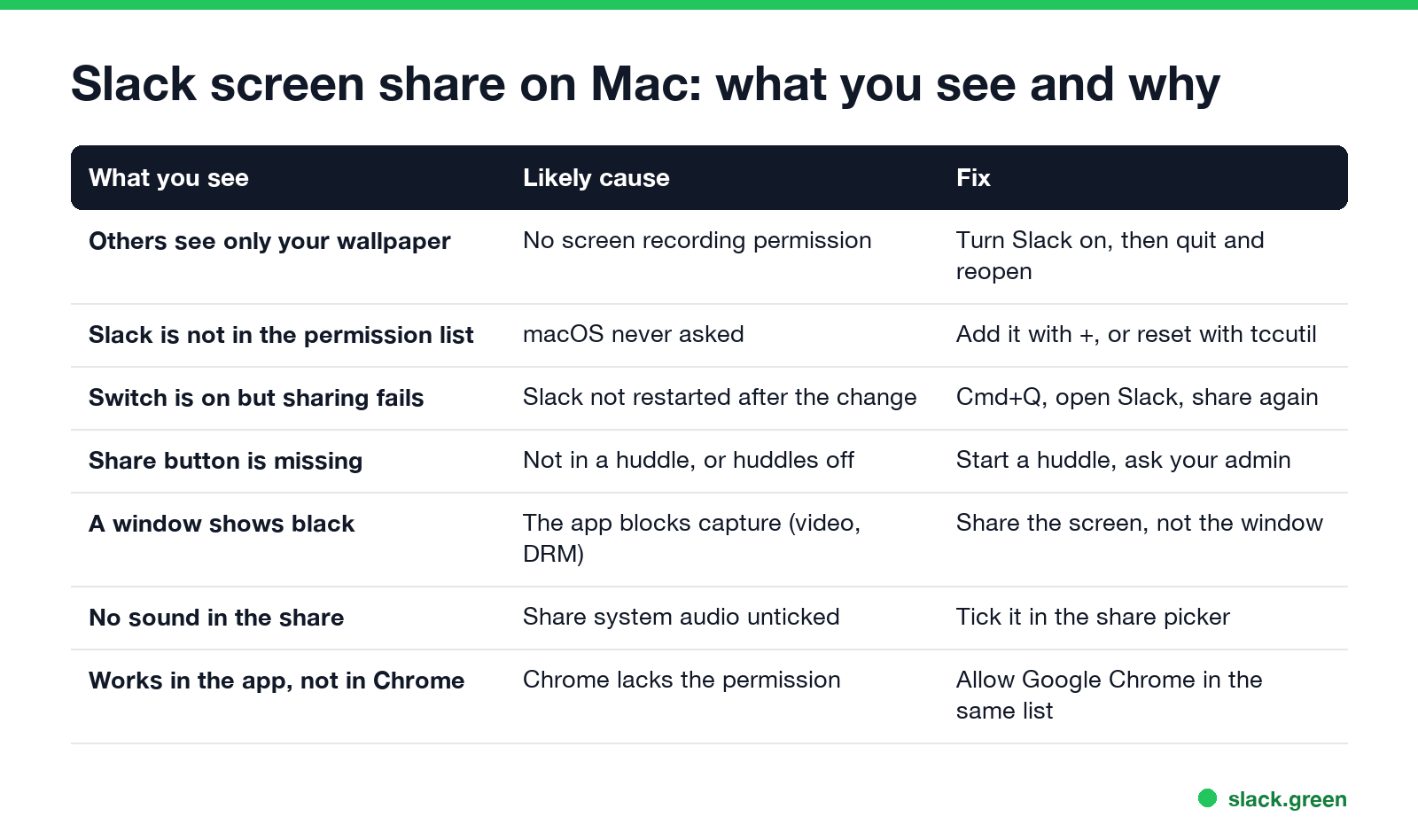
| What you see | Likely cause | Fix |
|---|---|---|
| Others see only your wallpaper and menu bar | No screen recording permission | Fix 1 |
| Slack is not in the permission list | macOS never asked | Fix 2 |
| The switch is on, sharing still fails | Slack was not restarted | Fix 1, step 3 |
| The share screen button is missing | Not in a huddle, or huddles are off | Fix 3 |
| One window shows black | That app blocks capture | Fix 4 |
| No sound comes through | Share system audio was not ticked | Fix 5 |
| Works in the app, not in Chrome | The browser has no permission | Fix 6 |
The wallpaper symptom is specific to macOS. Without the permission, macOS still lets an app capture the desktop background and menu bar, but not the windows on top. Coworkers see an empty desktop and assume the share froze.
Fix 1: allow Slack to record the screen
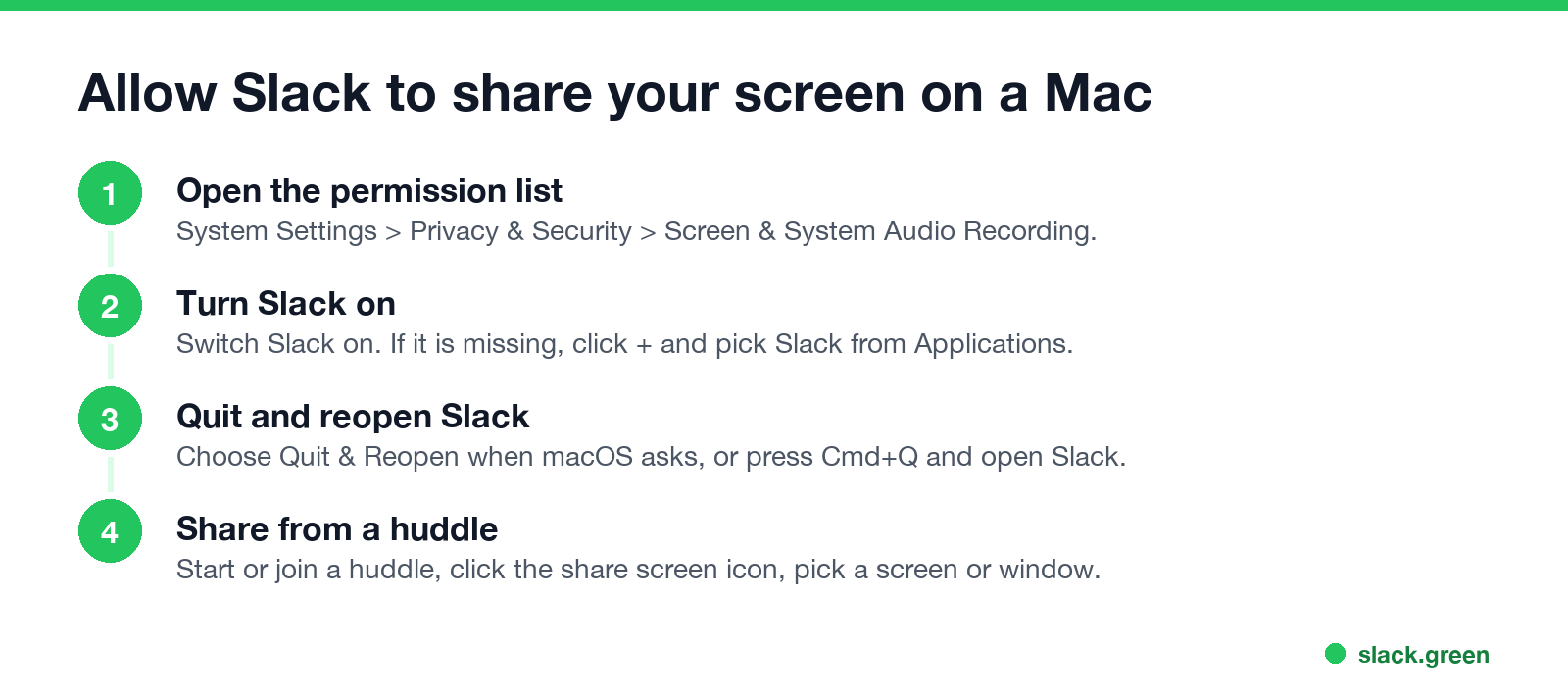
- Open System Settings > Privacy & Security.
- Scroll to Screen & System Audio Recording (called Screen Recording before macOS 15) and click it.
- Turn on Slack. macOS asks to quit and reopen Slack; choose Quit & Reopen. If it does not ask, press Cmd+Q in Slack and open it again.
- Join a huddle and share again.
You need to be able to change privacy settings, which on some work Macs needs an admin password. On a managed Mac, IT can also grant or block this permission for you; if the switch is greyed out, ask IT. How to read which apps IT allowed to record the screen is in how to check if your work Mac is being monitored.
macOS 15 and later also ask again from time to time whether Slack may keep recording the screen. If you click Don't Allow in that prompt, sharing stops working until you turn the switch back on.
Fix 2: Slack is missing from the list, or the switch does nothing
Never appear "away" on Slack again
Cloud-based. No downloads. Works 24/7 even when your laptop is off.
Click the + under the list, choose Slack in Applications, and turn it on. If Slack is in the list and on but sharing still fails, the saved permission may be stale after an update or a move to a new Mac. Reset it so macOS asks from scratch:
# clear Slack's screen recording permission; macOS asks again on the next share
tccutil reset ScreenCapture com.tinyspeck.slackmacgap

# open the Screen Recording settings page
open "x-apple.systempreferences:com.apple.preference.security?Privacy_ScreenCapture"
com.tinyspeck.slackmacgap is Slack's bundle ID, which we read from the app's Info.plist on Slack 4.52. After the reset, quit Slack, open it, start a share, and click Open System Settings when macOS asks.
Fix 3: the share screen button is missing
Slack shares screens in huddles. Start or join one with the headphones icon in a channel or DM, then look for the share screen icon in the huddle window. If huddles are missing everywhere, your workspace admin may have turned them off. Slack calls and huddles compared with Zoom are in Slack huddles vs Zoom.
Fix 4: a shared window is black
Some apps block screen capture of their windows: video players showing protected content (Netflix, Apple TV), some password managers, and banking apps. Other people see a black box where the window is. Share the whole screen instead of the window, or accept that protected video will not show. If the whole share is black, not one window, go back to Fix 1.
Fix 5: no sound in the screen share
Never appear "away" on Slack again
Cloud-based. No downloads. Works 24/7 even when your laptop is off.
In the share picker, tick Share system audio before you click Share. The macOS permission is the same Screen & System Audio Recording switch. Echo, doubled sound and music playback are covered in how to share audio in a Slack huddle.
Fix 6: screen sharing in Slack in the browser
In Chrome, Edge, Firefox or Safari, the browser shares the screen, so the browser needs the permission: turn on Google Chrome (or your browser) in the same Screen & System Audio Recording list, then quit and reopen the browser. The browser also shows its own picker; choose Entire screen, Window or Tab there. If sharing works in the desktop app but not the browser, it is this permission. The differences between the two are in Slack desktop app vs browser.
Still not working
FAQ
Never appear "away" on Slack again
Cloud-based. No downloads. Works 24/7 even when your laptop is off.
How do I give Slack permission to share my screen on a Mac? Open System Settings > Privacy & Security > Screen & System Audio Recording, turn on Slack, and quit and reopen Slack.
Why do people only see my wallpaper when I share in Slack? Slack has no screen recording permission. macOS then shows only the desktop background and menu bar.
Why is Slack not in the Screen Recording list? macOS never asked. Add Slack with the + button, or run tccutil reset ScreenCapture com.tinyspeck.slackmacgap.
Why is my Slack huddle screen share black? The shared window blocks capture, or the permission is missing. Share the whole screen, then check the permission.
Does Slack screen sharing work in Chrome on a Mac? Yes, if Chrome has the Screen & System Audio Recording permission.
Stop Jiggling Your Mouse.
Join hundreds of remote workers who never worry about their Slack status. Set it up once, stay green forever.
Related Articles
Why Is Slack So Slow on Mac? Causes and Fixes in Order
Slack slows down on a Mac when memory runs short, when you run the Intel build on Apple silicon, with many workspaces or animated emoji, or when the app has been open for days. How to check each one in Activity Monitor and Terminal, and the fix for each.
Slack App Not Opening? How to Fix It on Windows and Mac
When the Slack app will not open, it is usually already running with no window, or its window sits on a monitor you unplugged. End every Slack process and open it again. If that fails: reset the app data, reinstall, and check what the sign-in link does. Steps for Windows 11 and Mac.
Slack Keeps Crashing? How to Fix It on Mac, Windows and Phone
Slack crashes or closes by itself for a handful of reasons: an old version, a corrupt cache, the graphics driver, broken app data, or on Android the System WebView. The fixes in order for Mac, Windows, iPhone and Android, with the commands to reset Slack without losing messages.