
Teams Status Message for Delayed Responses: 28 Templates
A Teams status message for delayed responses says replies will be slow, until when, and what to do if something is urgent, such as 'In workshops all day, replies after 5 PM. Urgent: call me.' 28 templates by reason, including time zones and no-hello requests, and how to set one that clears itself.
A Teams status message for delayed responses tells people three things before they message you: replies will be slow, until when, and what to do if it cannot wait. For example: "In workshops all day, replies after 5 PM. Urgent: call my mobile." Teams shows the message at the top of a chat with you when you turn on Show when people message me, so people see it before they type. Set it to clear at the end of the day, and pair it with Busy or Do not disturb if you also want fewer notifications.
We build Slack Green, which keeps your Slack status green from our servers during the hours you set. For longer absences, see Teams status message for leave.
Delayed-response status messages by reason
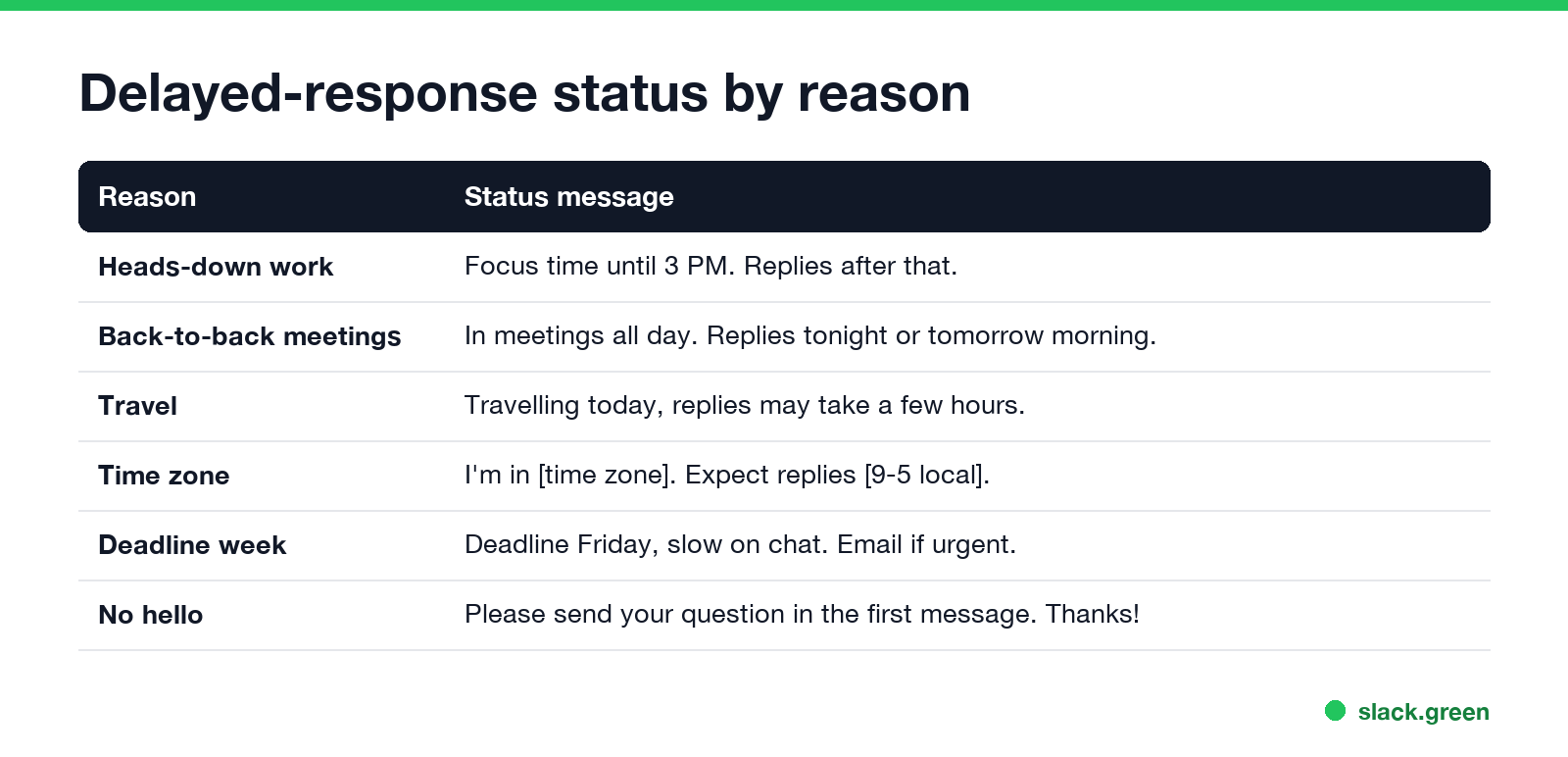
Each one fits in Teams' 280-character limit. Replace the words in brackets.
Focus time and heads-down work
Focus time until [3 PM]. I'll reply after that.
Heads down on [project] today. Replies may be delayed.
Deep work block until [noon]. Urgent: call me.
Checking messages at [11 AM] and [4 PM] today.
Working on a deadline, slow to reply. @mention me if it's urgent.
Meetings and workshops
In meetings all day. Replies tonight or tomorrow morning.
In workshops [9-5], checking messages at breaks.
Back-to-back calls until [4 PM]. Chat replies after.
At an offsite today. Replies may take a few hours.
Presenting this morning, online from [1 PM].
Travel and time zones
Travelling today. Replies may take a few hours.
On a flight until [time]. I'll catch up when I land.
I'm in [Singapore] (UTC+8). Expect replies [9 AM-6 PM] my time.
Working from [London] this week. Replies may be delayed by time zone.
Different time zone this week, replies during my morning.
Busy weeks
Deadline Friday, slow on chat. Email for anything urgent.
Quarter-end week. Replies within a day.
Covering for [name] this week, responses may be slower.
Limited availability today. For [area], contact [name].
Catching up after time off. Thanks for your patience.
Short on time today. Please put everything in one message.
No hello and better messages
Please send your question in the first message, not just "hi". Thanks!
No need to say hello first. Just ask, I'll reply when I can.
Async by default. Send details and I'll answer when I'm free.
For quick answers, include the link and the deadline.
Please post questions in [channel] so the team can help too.
Replies within a few hours. If it's urgent, @mention me in [channel].
Tip: ask the full question in one message and you'll get a faster answer.
For lighter wording, see funny Teams status messages. For busy time without a message, how to look busy on Teams covers the status options.
How to set a delayed-response status in Teams
- Select your profile picture at the top right of Teams.
- Select Set status message and paste your message.
- Turn on Show when people message me.
- Under Clear status message after, pick Today, or a custom time such as the end of your focus block.
- Select Done.
The status message does not change your dot. To cut notifications during the same time, select your profile picture, choose your current presence, and pick Busy or Do not disturb. The difference is in Teams Busy vs In a meeting.
Status message or Busy, Do not disturb?
Never appear "away" on Slack again
Cloud-based. No downloads. Works 24/7 even when your laptop is off.
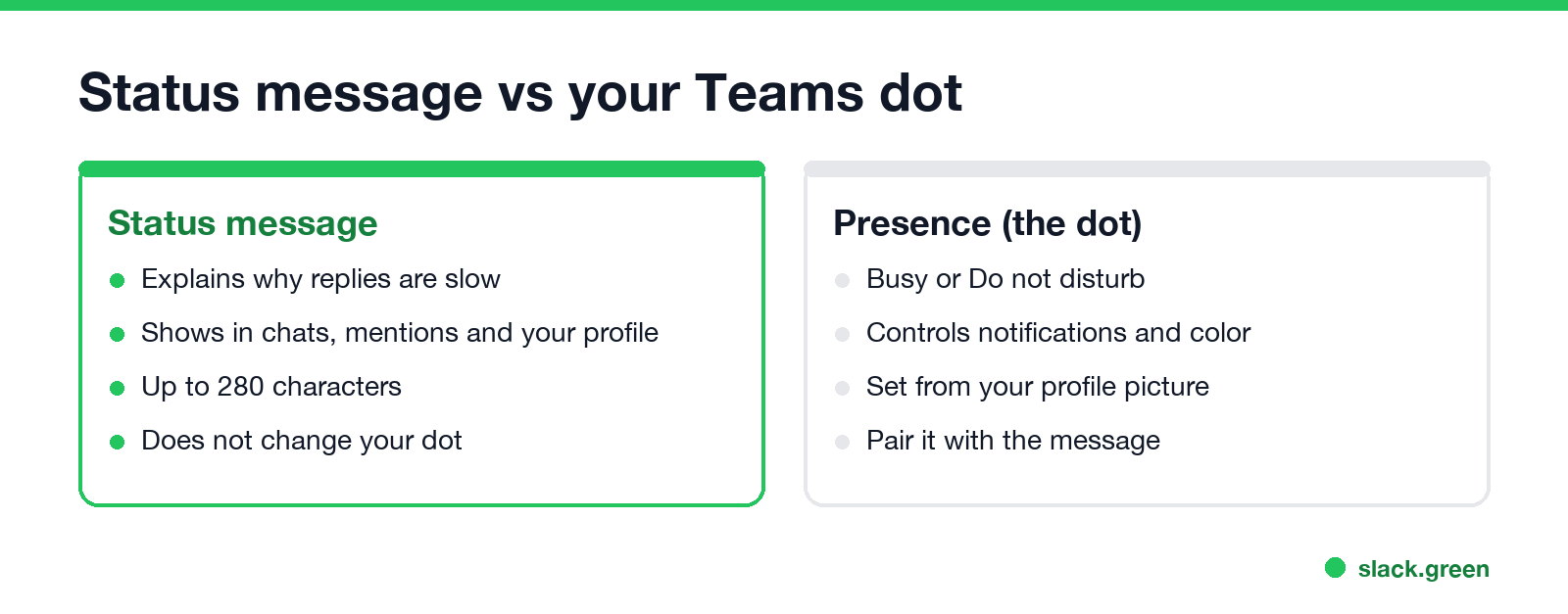
Use both. The presence, Busy or Do not disturb, sets the color of your dot and how Teams handles notifications. The status message tells people why you are slow and what to do meanwhile. A red dot with no message makes people guess; a message with a green dot makes them expect a quick answer.
Tips for a delayed-response status
FAQ
What should my Teams status say if I'm busy and will reply late? That replies are delayed, until when, and an urgent contact. Example: "In workshops until 5 PM. Urgent: call me."
How do I show a status message when someone messages me in Teams? Turn on Show when people message me when you set the status message.
Does a Teams status message change my availability? No. Set Busy or Do not disturb separately.
How long can a Teams status message be? Up to 280 characters.
Stop Jiggling Your Mouse.
Join hundreds of remote workers who never worry about their Slack status. Set it up once, stay green forever.
Related Articles
Slack Status for a Doctor Appointment: 24 Statuses and Emoji
A Slack status for a doctor appointment says you are out and when you are back, such as 🏥 'At an appointment, back at 2 PM.' You do not have to say what kind. 24 statuses for doctor, dentist and other appointments, the emoji codes, and how to schedule the status so it clears by itself.
Slack Status for Limited Availability: 30 Statuses to Copy
A Slack status for limited availability says you are around but slow, until when, and how to reach you if it is urgent, such as ⏳ 'Limited availability today, replies after 3 PM. Urgent: @mention me.' 30 statuses for busy days, slow replies and catching up, the emoji to use, and when to pause notifications too.
Slack Emoji for Condolences: What to React With, and What to Say
The right Slack emoji for condolences are ❤️ :heart:, 🙏 :pray:, 🤗 :hugging_face:, 💐 :bouquet:, 🕯️ :candle: and 🕊️ :dove_of_peace:. Avoid 👍, ✅ and 👀, which read as 'noted'. Add a few words in the thread or a DM. Short condolence messages, get-well emoji, and custom 'thinking of you' emoji.