
How to Search for Images in Slack, Including Text Inside Them
To find an image in Slack, search, switch the results from Messages to Files and set File type to Images, or type type:images. We tested 6 images: Slack also found words written inside PNGs, but not inside JPGs.
To search for images in Slack, type a word in the search bar, press Enter, switch the results from Messages to Files, and set File type to Images. You can also type type:images in the search bar to list every image you can see, and add in:#channel to keep it to one channel. On 3 November 2026 we uploaded 6 test images to a Free-plan workspace and searched for each one, and Slack also found words that appeared only inside the picture of a PNG, such as the title on a whiteboard photo, but not inside a JPG.

Step by step: find an image in Slack search
- Click the search bar at the top of Slack and type a word from the image's file name, from the message it came with, or from text written in the image.
- Press Enter. Slack opens the Messages results first, and a message search does not list files on their own.
- Click the Messages menu at the left of the filter row and choose Files. The menu shows how many results each tab has, so you can see at once whether a file matched.
- Click File type and choose Images to drop PDFs, documents and other files.
- Use From, In and Date to narrow it down, for example to one person or one channel.
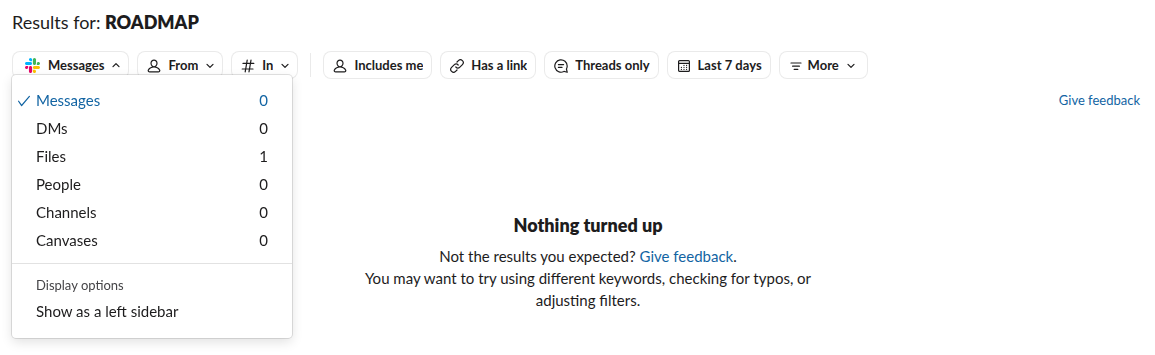
Step 2 is where most searches go wrong. When we searched for ROADMAP, the Messages tab said Nothing turned up, while the menu showed Files with 1 result.
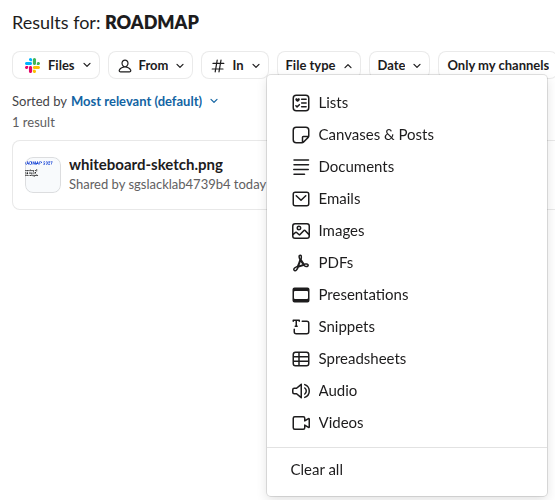
The fast way: type:images
The search bar understands type:images. As we typed it, Slack turned it into a small token with an image icon, and the results opened on Files with the Images filter already on.
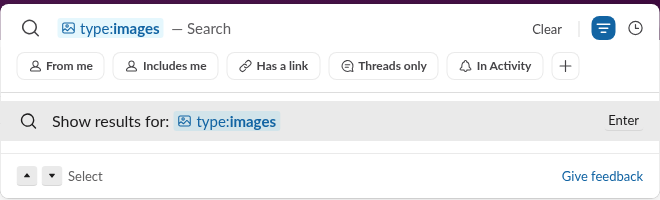
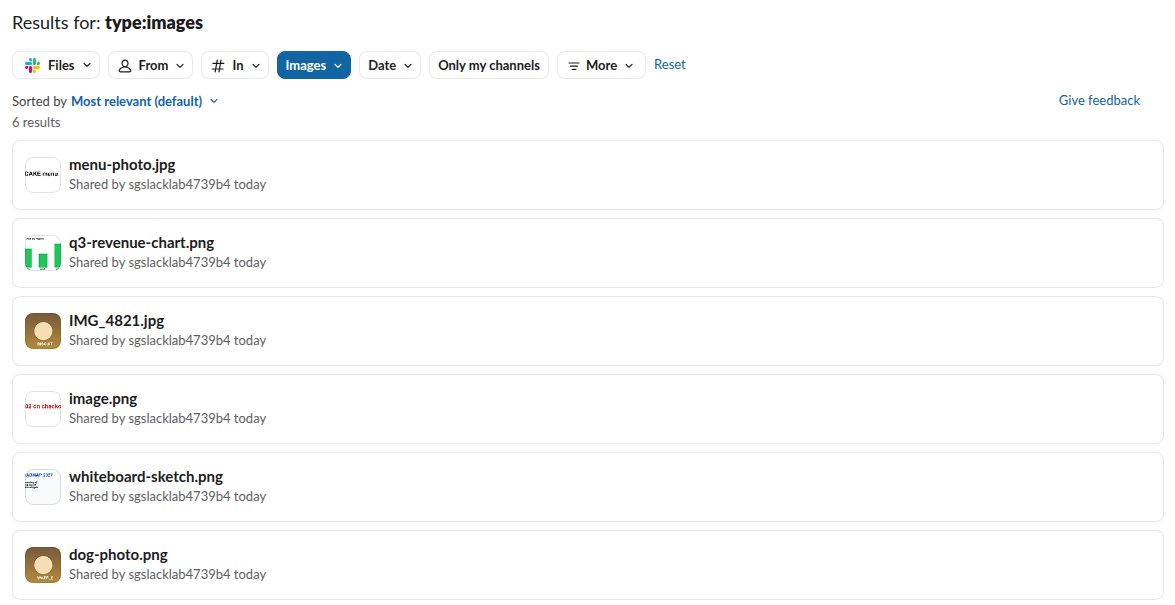
With no other words, type:images listed all 6 of our test images. Combine it with other words and modifiers:
type:images ROADMAP
type:images in:#design
type:images from:@maria
in:#sg-1103-private-test type:images
type:images ROADMAP returned only the whiteboard image, and in:#sg-1103-private-test type:images returned all 6 images in that channel. The modifier has:image, which some guides suggest, returned nothing at all in our test, so use type:images instead. More modifiers are in our list of Slack search operators.
Does Slack search the text inside images?
For PNG images it did. We made 6 images with known words in them, posted them in one channel, and searched for each word in the Files results about a minute later and again after 5 minutes. We searched for the two JPG words once more 13 minutes after the last upload, and 24 minutes after the first. A word counted as found inside the image only if it was not in the file name or in any message.
| Image | Format | Word only inside the image | Found by search? |
|---|---|---|---|
| Bar chart titled "Q3 revenue by region" | PNG | region, EMEA, AMER | Yes |
| Whiteboard with "ROADMAP 2027" and a list | PNG | ROADMAP, onboarding, billing, widgets | Yes |
| Screenshot pasted from the clipboard, "Error 502 on checkout" | PNG | 502, checkout | Yes |
| Photo-style image, white "WAFFLE" on brown | PNG | WAFFLE | Yes |
| Photo-style image, white "BISCUIT" on brown | JPG | BISCUIT | No |
| Black "PANCAKE menu" on white | JPG | PANCAKE | No |
The two JPGs are the interesting part. "PANCAKE" was black text on a plain white background, the easiest possible case, and it was still not found, while the same kind of text in a PNG was. So the difference was the file format, not how readable the text was. A file name search worked for both JPGs: IMG_4821 found the brown photo and menu found the menu image, because menu is in its file name. Photos from a phone are almost always JPG or HEIC, so search those by file name, sender, channel and date rather than by what is written on them.
Never appear "away" on Slack again
Cloud-based. No downloads. Works 24/7 even when your laptop is off.
Search by file name, and the image.png problem
Slack matches parts of a file name, so sketch found whiteboard-sketch.png and png found every PNG. A screenshot pasted from the clipboard is different: we pasted one into the message box, and Slack kept the name the browser gave it, image.png. Every pasted screenshot can end up with that same name, so a search for image.png finds all of them at once. When you share a screenshot you will need again, add a few words in the message or rename the file first.
Other ways to find an image
If you know the channel, open it and use the Files & links tab in the channel header, which lists what was shared there without a search. A screenshot someone shared is a normal file, so the same steps find it; whether Slack notifies people about screenshots is a separate question. On the Free plan, search only reaches messages and files from the last 90 days, as the Free plan limits explain, so an older image will not turn up however you search.
FAQ
Do deleted images show up in search?
No. We deleted dog-photo.png after the test, and 20 seconds later searches for WAFFLE and dog returned nothing. A deleted image cannot be found by search.
Can I search by what is in a photo, like a dog or a logo?
Not in our test. Slack matched written words in our PNGs, but a search for dog found only the file named dog-photo.png and not IMG_4821.jpg, which shows the same picture. We found no filter or modifier for objects or faces, so search by file name, sender, channel or date.
Stop Jiggling Your Mouse.
Join hundreds of remote workers who never worry about their Slack status. Set it up once, stay green forever.
Related Articles
How to Resolve or Close a Slack Thread (and Who Can Lock One)
Slack has no Resolve or Close button for threads. We checked every thread menu as a member, found the admin-only lock in Slack's code, and tested the workarounds that do work: a checkmark, a to-do you mark complete, and muting replies.
Lock Icon Next to a Slack Channel? What the Lock and Grey Text Mean
A padlock next to a Slack channel means it is private. Grey text with a crossed-out bell means you muted it. We made a private, muted, archived and unread channel and screenshot each one in the sidebar.
Download Slack for Mac Without the App Store: DMG, PKG or App Store?
Click Download, not Download on the Mac App Store, on slack.com/downloads/mac and you get the universal DMG. We downloaded all four direct installers for 4.53.276, measured them, checked their signatures and read the code paths that differ in the App Store build.