
Slack Block Kit Input Block: Modal Fields, state.values and Inline Errors, Tested
We opened a modal with seven input blocks in a test workspace and captured every payload: what Slack checks before your app sees anything, the exact view_submission state.values, response_action errors, dispatch_action, and input blocks in messages.
A Block Kit input block holds one form field, such as a plain_text_input, number_input, email_text_input or url_text_input, with a label above it. You use input blocks in modals, where Slack sends the values to your app when the user clicks Submit, and Slack also accepted them in a message. On 7 October 2026 we opened a modal with seven input blocks from a slash command in our free-plan test workspace, ran a Socket Mode app with Python slack_sdk, and logged every payload. Slack checked required fields, number ranges and email format in the browser and sent nothing to the app until they passed; it did not check the URL field.
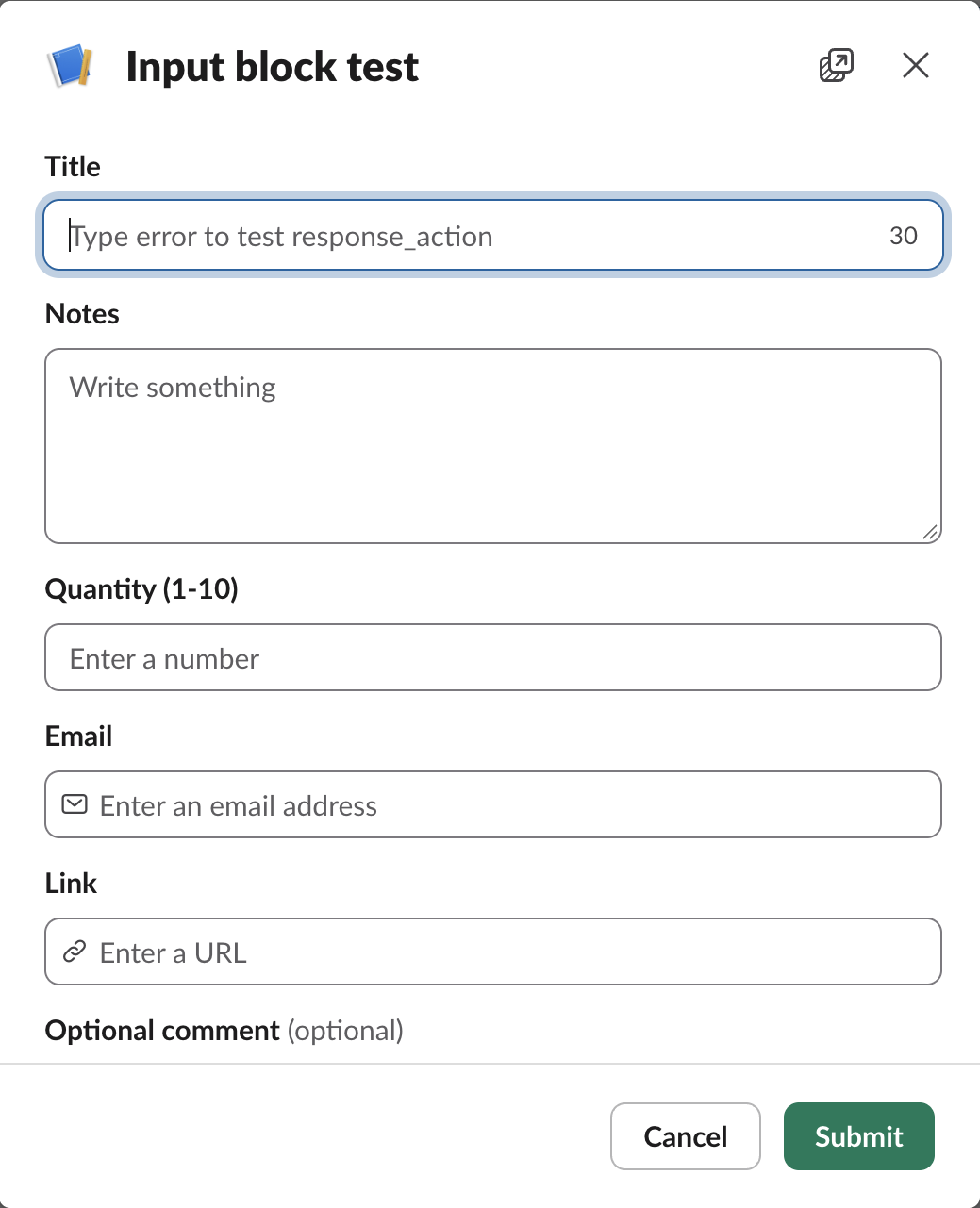
The blocks we used
This is the blocks array of the modal, opened with views.open from the slash command's trigger_id:
[
  {
    "type": "input",
    "block_id": "title_b",
    "label": {
      "type": "plain_text",
      "text": "Title"
    },
    "element": {
      "type": "plain_text_input",
      "action_id": "title_a",
      "max_length": 30
    }
  },
  {
    "type": "input",
    "block_id": "notes_b",
    "label": {
      "type": "plain_text",
      "text": "Notes"
    },
    "element": {
      "type": "plain_text_input",
      "action_id": "notes_a",
      "multiline": true
    }
  },
  {
    "type": "input",
    "block_id": "qty_b",
    "label": {
      "type": "plain_text",
      "text": "Quantity (1-10)"
    },
    "element": {
      "type": "number_input",
      "action_id": "qty_a",
      "is_decimal_allowed": false,
      "min_value": "1",
      "max_value": "10"
    }
  },
  {
    "type": "input",
    "block_id": "email_b",
    "label": {
      "type": "plain_text",
      "text": "Email"
    },
    "element": {
      "type": "email_text_input",
      "action_id": "email_a"
    }
  },
  {
    "type": "input",
    "block_id": "url_b",
    "label": {
      "type": "plain_text",
      "text": "Link"
    },
    "element": {
      "type": "url_text_input",
      "action_id": "url_a"
    }
  },
  {
    "type": "input",
    "block_id": "opt_b",
    "optional": true,
    "label": {
      "type": "plain_text",
      "text": "Optional comment"
    },
    "element": {
      "type": "plain_text_input",
      "action_id": "opt_a"
    }
  },
  {
    "type": "input",
    "block_id": "dispatch_b",
    "dispatch_action": true,
    "label": {
      "type": "plain_text",
      "text": "Search (press Enter)"
    },
    "element": {
      "type": "plain_text_input",
      "action_id": "dispatch_a",
      "dispatch_action_config": {
        "trigger_actions_on": [
          "on_enter_pressed"
        ]
      }
    }
  }
]
Every input block needs a label, and the field goes in element. Slack filled in grey placeholders we did not set: "Write something" for text fields, "Enter a number", "Enter an email address" and "Enter a URL". With max_length: 30 the Title box showed a live counter. The block_id and action_id values come back as the two keys in state.values, so set both yourself instead of letting Slack generate random ones.
What Slack checks before your app sees anything
We clicked Submit with every field empty, then with bad values. Slack showed the errors in the modal and our app received no event at all for either attempt.
| What we entered | Message under the field | Sent to the app? |
|---|---|---|
| Required text field left empty | "Please complete this required field." | No |
| Email left empty | "An email address is required" | No |
11 in a number field with max_value 10 | "Number cannot be greater than 10." | No |
not-an-email in the email field | "You must enter a valid email address" | No |
example in the URL field | none | Yes, value "example" |
| Optional field left empty | none | Yes, value null |
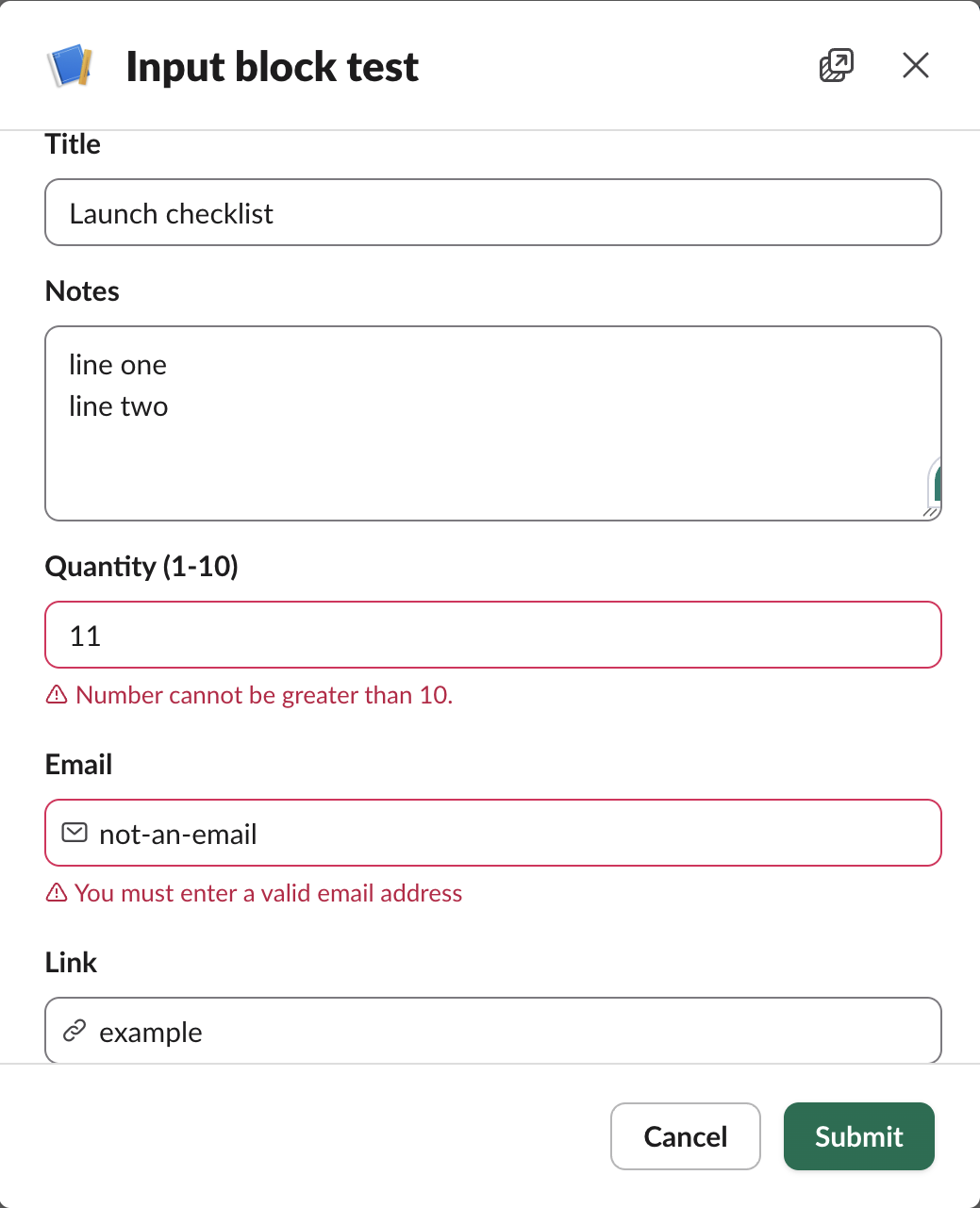
The URL field did not check anything. example, with no scheme and no dot, reached our app as-is, so validate URLs on your side. Only fields marked "optional": true may be left empty; every other input block is required by default, and the label shows "(optional)" next to the optional ones.
The view_submission payload
When the values passed Slack's checks, our app got an interactive envelope with type: view_submission. This is view.state.values from that submission, copied from our log:
{
  "title_b": {
    "title_a": {
      "type": "plain_text_input",
      "value": "error"
    }
  },
  "notes_b": {
    "notes_a": {
      "type": "plain_text_input",
      "value": "line one\nline two"
    }
  },
  "qty_b": {
    "qty_a": {
      "type": "number_input",
      "value": "3"
    }
  },
  "email_b": {
    "email_a": {
      "type": "email_text_input",
      "value": "jane@example.com"
    }
  },
  "url_b": {
    "url_a": {
      "type": "url_text_input",
      "value": "example"
    }
  },
  "opt_b": {
    "opt_a": {
      "type": "plain_text_input",
      "value": null
    }
  },
  "dispatch_b": {
    "dispatch_a": {
      "type": "plain_text_input",
      "value": "q4 roadmap"
    }
  }
}
Three things to handle in code. The number arrives as a string ("3"), not a number. The multiline text keeps its line break as \n. An empty optional field is null, not an empty string. The outer key is the block_id and the inner key is the action_id, so read a value as values["qty_b"]["qty_a"]["value"].
Never appear "away" on Slack again
Cloud-based. No downloads. Works 24/7 even when your laptop is off.
Returning errors with response_action
To reject a submission and keep the modal open, answer the view_submission with response_action: "errors" and a map of block_id to message. This is the part of our handler that did it:
def handle(client, req):
    p = req.payload
    if req.type == "interactive" and p["type"] == "view_submission":
        vals = p["view"]["state"]["values"]
        title = vals["title_b"]["title_a"]["value"]
        if title == "error":
            body = {"response_action": "errors",
                    "errors": {"title_b": "Title cannot be 'error'.",
                               "email_b": "We only accept work emails."}}
            client.send_socket_mode_response(
                SocketModeResponse(envelope_id=req.envelope_id, payload=body))
            return
    client.send_socket_mode_response(SocketModeResponse(envelope_id=req.envelope_id))
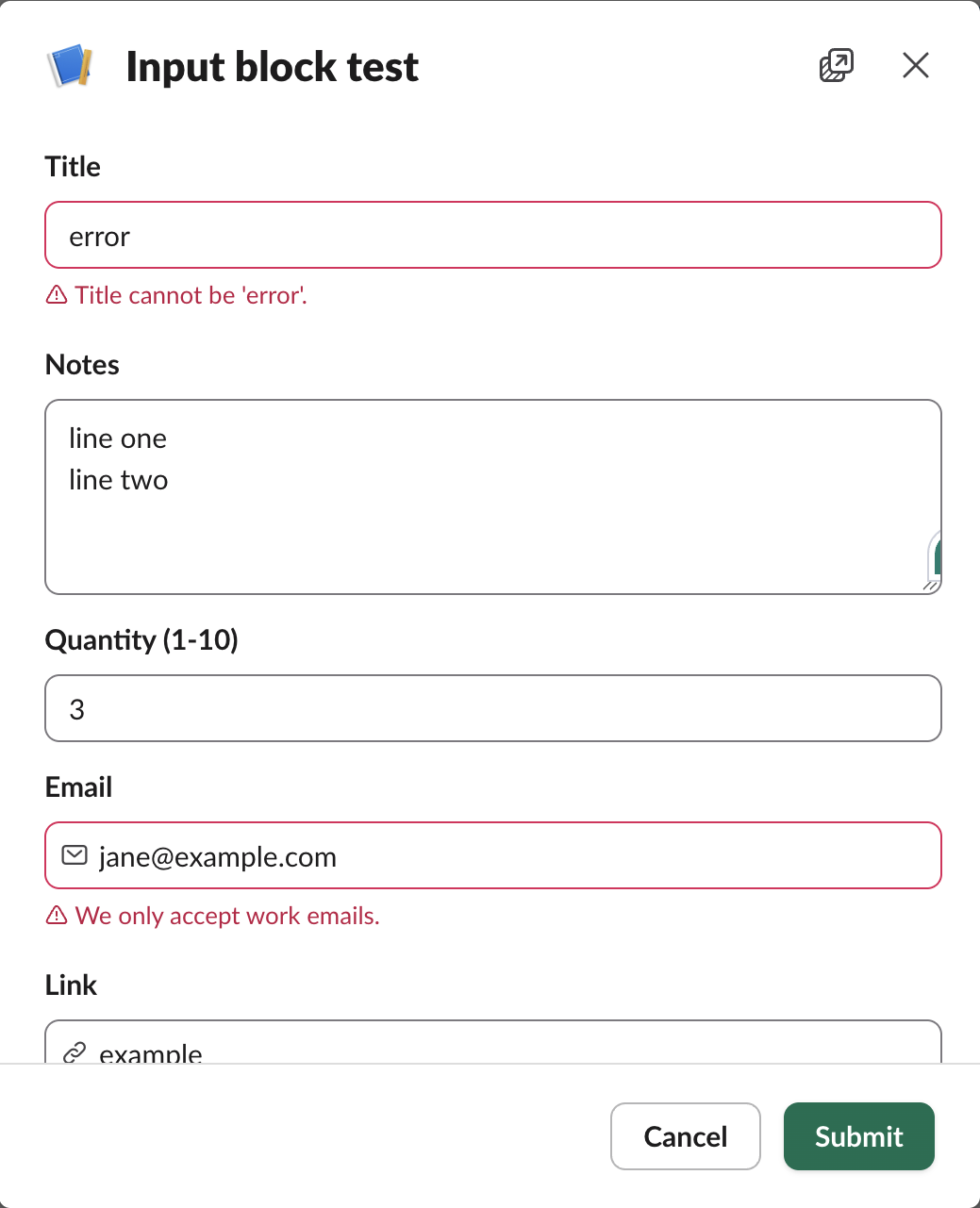
We typed error as the title and clicked Submit. The modal stayed open and showed our two messages in red under the Title and Email fields, the same style as Slack's own checks. A plain acknowledgement with no body closed the modal. The views.update and views.push guide covers the other response_action values, update, push and clear.
dispatch_action: get the value on Enter
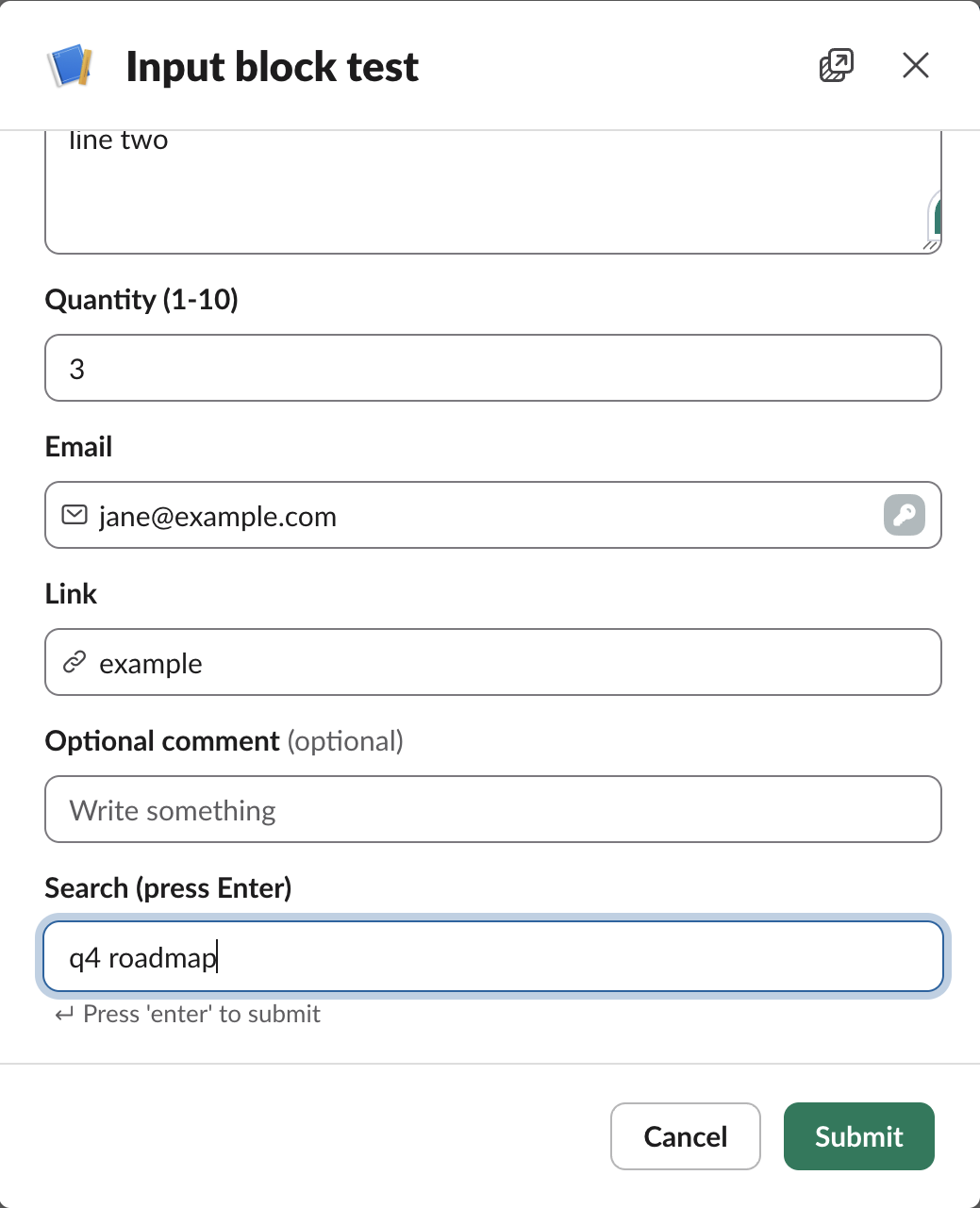
An input block with "dispatch_action": true sends a block_actions payload when the user presses Enter, without submitting the modal. Slack drew a hint under the field: "Press 'enter' to submit". We typed q4 roadmap and pressed Enter. Our app got this in actions, and the payload also carried the current view.state.values of every field in the modal:
[
  {
    "type": "plain_text_input",
    "block_id": "dispatch_b",
    "action_id": "dispatch_a",
    "value": "q4 roadmap",
    "action_ts": "1791339281.161906"
  }
]
Input blocks in messages
We posted an input block with chat.postMessage and a bot token, and Slack accepted it (ok: true) and drew a text box in the channel. Slack added dispatch_action_config with on_enter_pressed to the stored block on its own. The difference is what reaches your app:
| Block in a message | Typed Ada or Grace, pressed Enter |
|---|---|
Input block, dispatch_action false (default) | Nothing was sent to the app |
Input block, dispatch_action true | block_actions with the value, state.values and container.type: message |
plain_text_input inside an actions block | Not postable: invalid_blocks, "unsupported type: plain_text_input" |
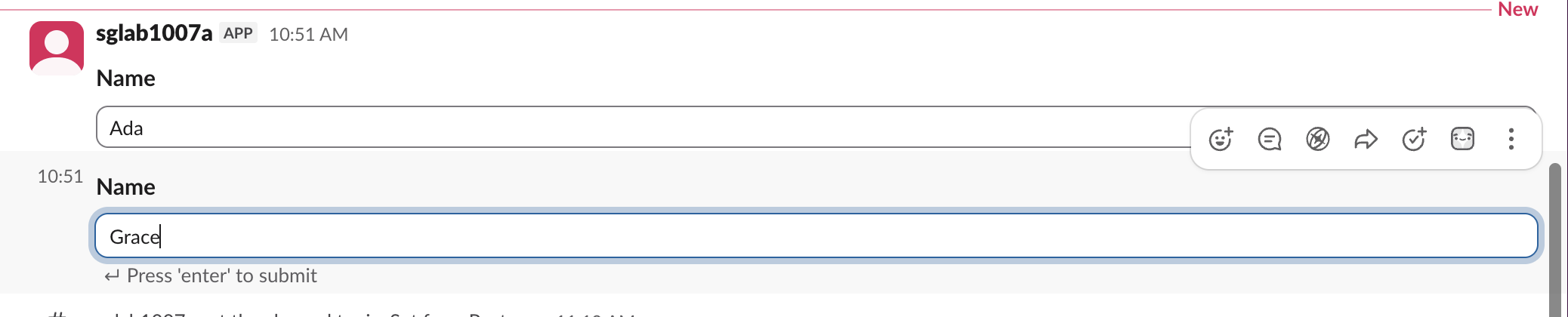
So in a message, set dispatch_action: true, or the user can type into the box and nothing happens. A select menu is the other way to collect a choice in a message; our select menu test covers static_select and external_select. If views.open fails before the modal shows, the trigger_id may have expired; we measured how long it lasts.
Stop Jiggling Your Mouse.
Join hundreds of remote workers who never worry about their Slack status. Set it up once, stay green forever.
Related Articles
Slack API in Postman: A 16-Request Collection We Ran With Newman, and the Errors It Catches
How to call the Slack Web API from Postman with a bearer token and variables, plus a 16-request collection we ran against a real workspace with newman: 16 requests, 17 assertions, 0 failures, and the five mistakes it checks.
Slack Spell Check Not Working: The Setting, and the Grammarly Conflict We Measured
Slack has one spell check switch, under Preferences > Language & region. In our test browser it was on, yet Slack web showed no red underlines: the Grammarly extension had set spellcheck to false on the message box. How to check yours.
Slack Workspace Icon: Size, Crop and Transparency, Tested on a Real Workspace
We uploaded six workspace icons to a test Slack workspace: 100 px, 1024 px, a wide image, a transparent PNG and two oversize files. What Slack accepted, what it stored, and how to remove an icon.