
Mouse Jiggler Video: Does It Work, and How to Use One
A mouse jiggler video is a long YouTube video of a moving pattern. You play it on a phone, set an optical mouse on the screen, and the mouse reads the pattern as motion, so your computer does not go idle. How to set it up, why it often fails, and what it does for Teams and Slack.
A mouse jiggler video is a long YouTube video, usually 2 to 12 hours, of a moving pattern. It works only one way: play it on a phone or tablet, then set an optical mouse that is plugged into your computer on top of the screen. The mouse sensor reads the moving image as motion, so the pointer on your computer twitches and the computer does not go idle. Played on the computer itself, the video moves nothing. It only keeps the screen on while it plays.
Whether the mouse picks up the pattern depends on the mouse and the screen, and many people report that it does not. When it does work, the movement is real mouse input, so Microsoft Teams stays Available. Slack is stricter: it counts only input inside its own window, so the video keeps Slack active only while the pointer sits over Slack.
For a no-install way to keep only the screen on, the free online mouse jiggler runs in a browser tab.
What a mouse jiggler video is
On 28 September 2026 we searched YouTube for "mouse jiggler video". The top results are all the same idea, a moving pattern on a dark background, and differ mainly in length:
| Video (channel) | Length | Views |
|---|---|---|
| Mouse Jiggler, Mover, Keep Computer Awake (Simple Things) | 2:00:31 | 2.1M |
| Mouse Jiggler 8.5 Hours, Keep Computer Awake (JTTechie) | 8:43:33 | 1.9M |
| Mouse Jiggler 12 Hours (ALMOST) (JTTechie) | 11:55:50 | 1.1M |
| Mouse Jiggler 5 Hours, Keep Computer Awake (JTTechie) | 5:01:39 | 890K |
| Mouse Jiggler or Mover, Keep PC/Mac Alive 2 Hours & 30 Minutes (WR Ambiance) | 2:30:18 | 359K |
| MOUSE Performance enhancer, Version 14 (Samaya Arts) | 8:25:16 | 192K |
The "10 hours" and "12 hours" searches lead to the same kind of video. None of them move your pointer by themselves; a web page or video cannot control the mouse. The optical mouse on top does the moving.
How to use a mouse jiggler video
The uploader of the 8.5-hour video gives these steps in its description: play the video on your smartphone or tablet, put the optical mouse in the center of the screen, and set the screen brightness to maximum ("very important!").
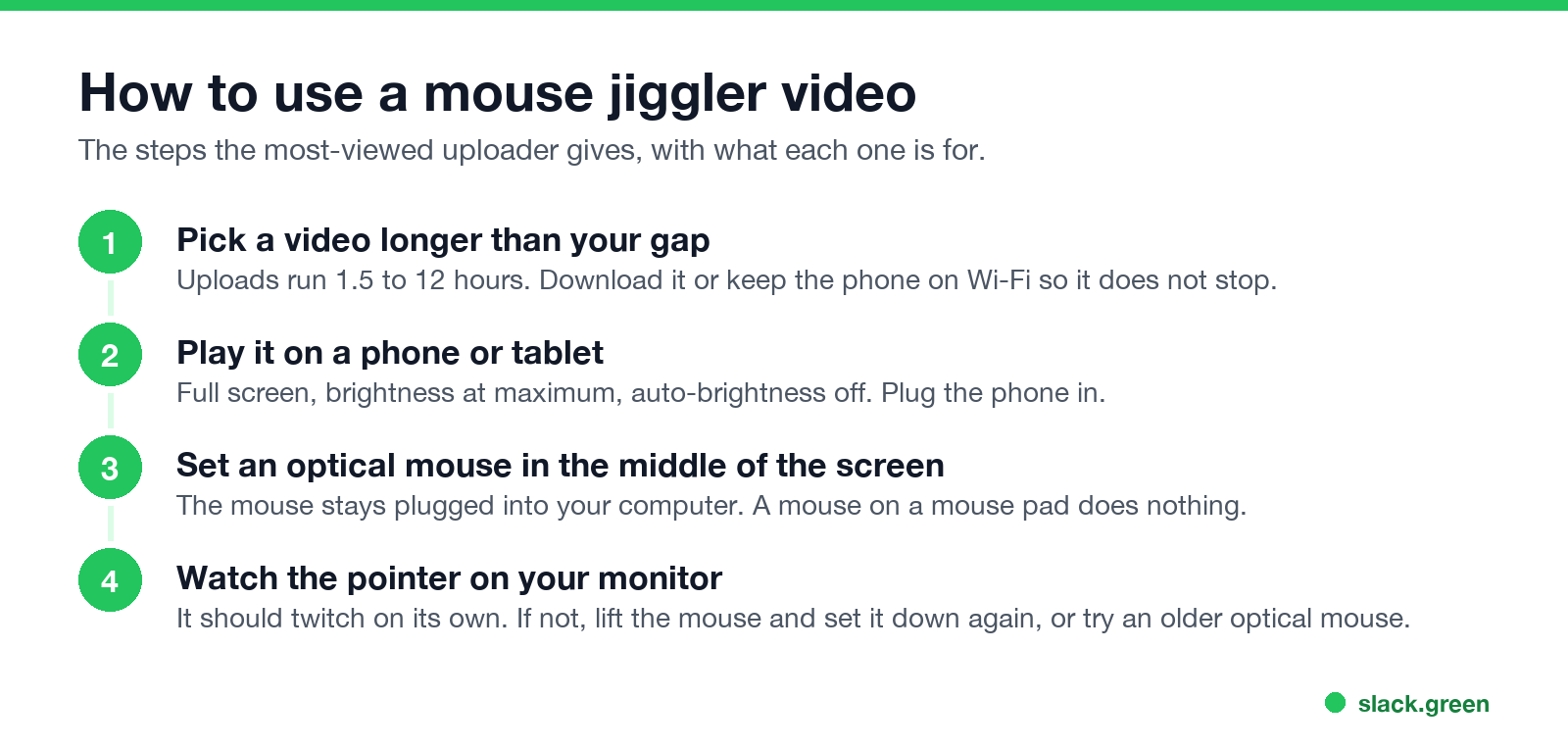
- Pick a video longer than the time you will be away. When it ends, the pointer stops. Keep the phone on Wi-Fi so it does not buffer, and close other apps so nothing interrupts playback.
- Play it full screen on a phone or tablet. Turn auto-brightness off and set brightness to maximum. Plug the phone in, because hours at full brightness drain the battery.
- Set the mouse flat in the middle of the screen. The mouse stays connected to your computer by cable or wireless receiver.
- Check the pointer on your monitor. It should twitch every second or two. The same uploader says it can take five or more tries of lifting the mouse and setting it back down.
- • The screen is too dim. Auto-brightness or low battery mode caps brightness. Turn both off.
- • The mouse cannot track on glass. The uploader's advice is to "try an older laser mouse instead of the newer models". Many current mice stop tracking when lifted a millimeter or on shiny surfaces, which is how a phone screen looks to the sensor.
- • The mouse sits at the edge. The same uploader tried edge and corner placements and found they did not work; put it in the center.
- • The video stopped. An ad, a buffering pause or the end of the video stops the pattern. Some YouTube videos also pause after a while and ask "Video paused. Continue watching?".
- • You played it on the computer. Then there is no mouse on top, and nothing moves.
Why a mouse jiggler video does not work for you
A mouse jiggler video is the least reliable kind of jiggler, because it depends on the mouse sensor reading an image through the glass of a screen. The usual reasons it fails:
If you need it to work every time, a jiggler app or a USB jiggler is more reliable. How to use a mouse jiggler covers each type, and the best mouse jigglers compares them.
Never appear "away" on Slack again
Cloud-based. No downloads. Works 24/7 even when your laptop is off.
Playing the video on your computer only keeps the screen on
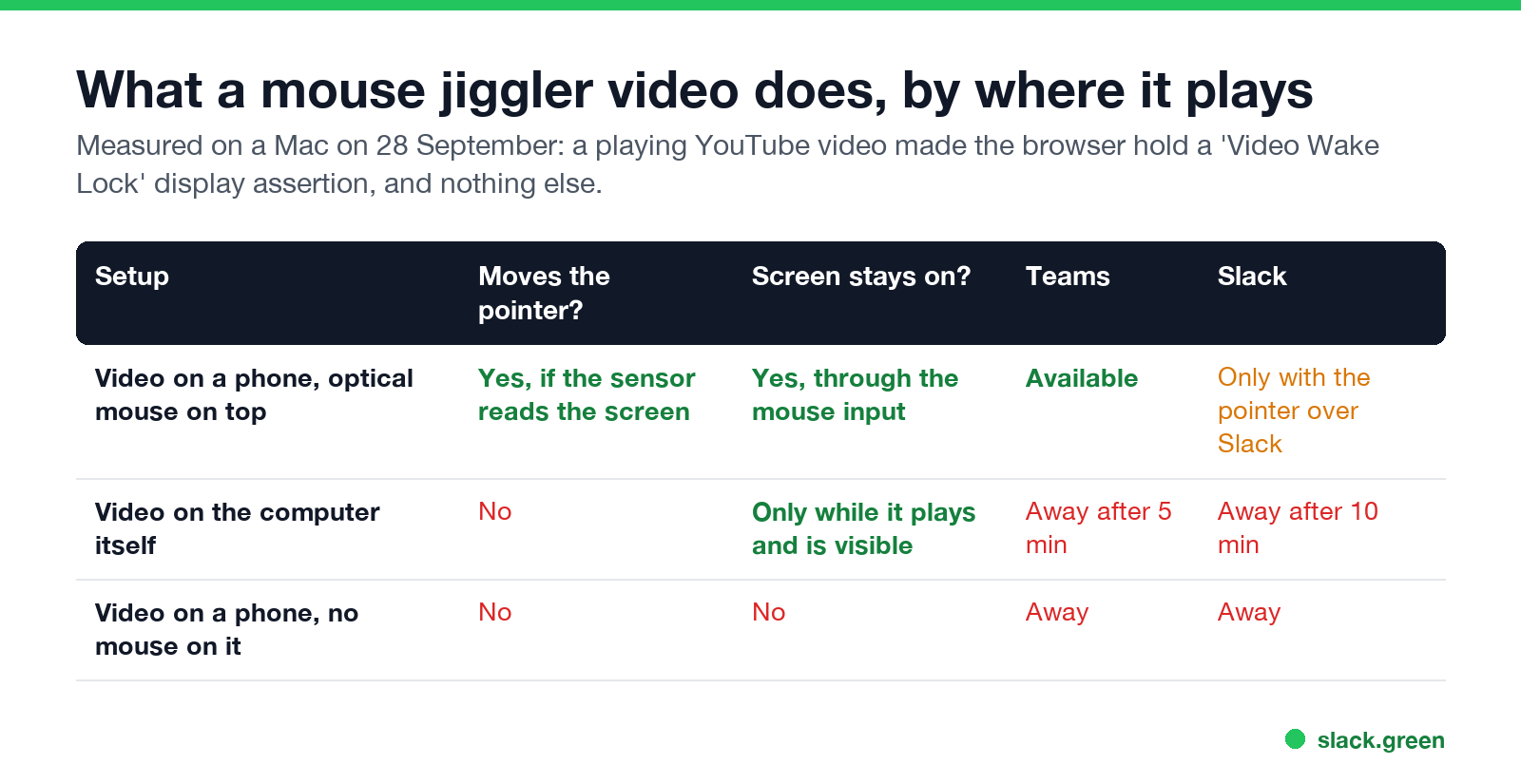
Many people play a "mouse jiggler" video on the computer they want to keep awake. That creates no mouse or keyboard input. We checked this on a Mac on 28 September: while the 8.5-hour video played in a browser, pmset -g assertions showed the browser holding a display sleep assertion named "Video Wake Lock", and nothing that counts as input. So the screen stays on while the video plays and is visible, and that is all. Teams still sets you Away after about 5 minutes without input, and Slack after 10. The details are in does playing a video keep your computer awake.
Our online mouse jiggler does the same honest job without a video: it asks the browser to keep the screen awake while the tab is open, and it tells you whether the browser granted it.
Does a mouse jiggler video work for Teams and Slack?
When the mouse on the phone does move the pointer, the computer receives ordinary mouse input from your own mouse.
Mouse jiggler video vs jiggler app vs USB jiggler
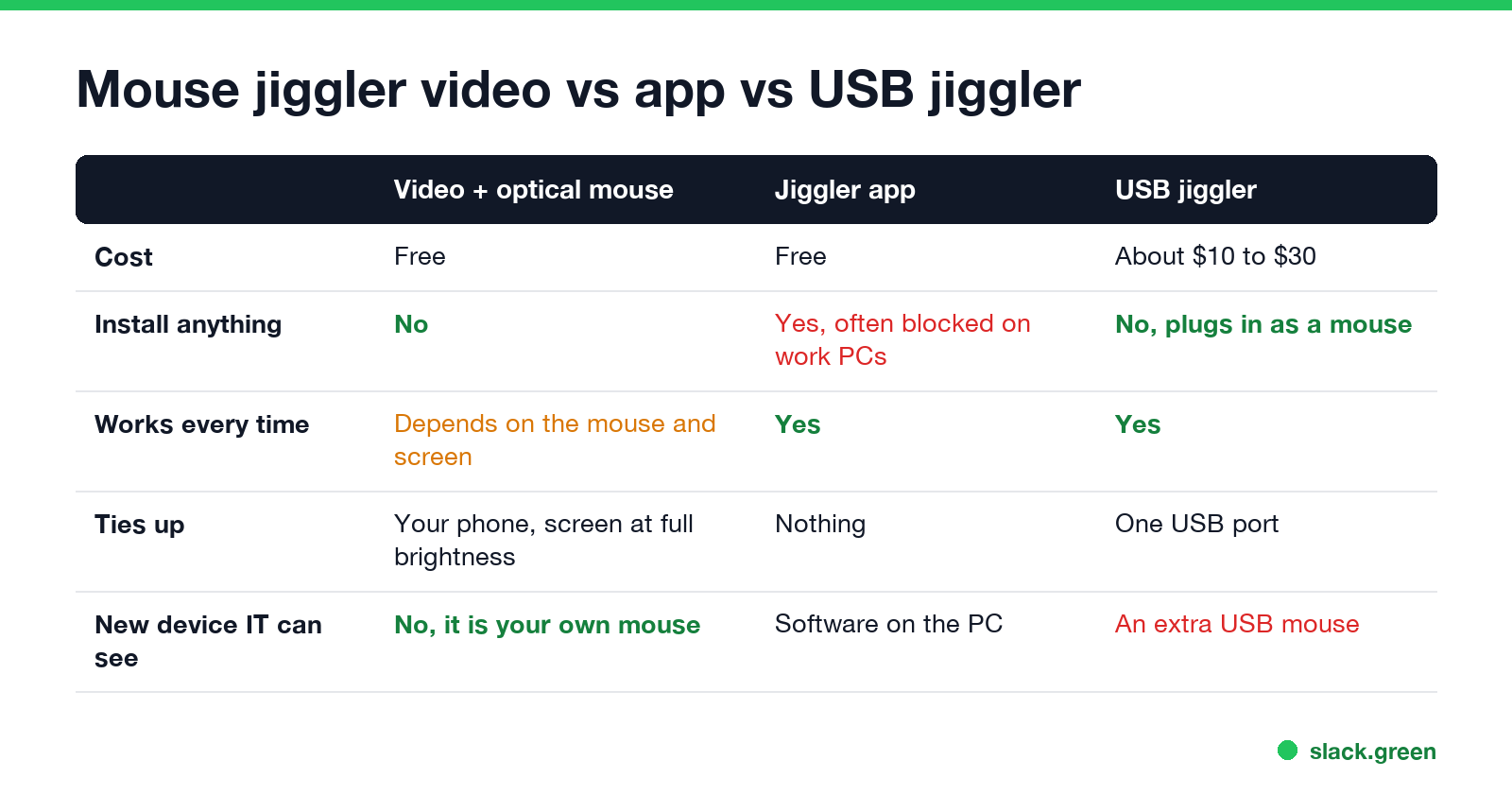
The video costs nothing and installs nothing, which is why people try it on a locked-down work laptop. In exchange it ties up your phone at full brightness and works only with some mice. An app works every time but often needs admin rights; keep a work computer awake without admin rights lists the options that do not. A USB jiggler works every time and installs nothing, but it is an extra device. For Slack, each of the three helps only while the pointer sits over the Slack window.
FAQ
Does a mouse jiggler video actually work?
Sometimes. It works when an optical mouse on the phone screen reads the moving pattern and moves your pointer. It depends on the mouse and on screen brightness, and it does nothing when the video plays on the computer itself.
Is there a 10 or 12 hour mouse jiggler video?
Yes. On YouTube, "Mouse Jiggler 12 Hours (ALMOST)" runs 11 hours 55 minutes, and several others run 5 to 8 hours. They work the same way as the shorter ones.
Why is my mouse jiggler video not working?
The usual causes are low screen brightness, a mouse that does not track on glass, a mouse placed at the edge of the screen, or a video that paused. Set brightness to maximum, put the mouse in the center, and try another optical mouse.
Can I play a mouse jiggler video on my laptop?
You can, but it only keeps the screen on while it plays. It does not move the pointer, so Teams and Slack still show you as away.
Does a mouse jiggler video keep Slack active?
Only if the pointer moves over the Slack window, because Slack counts only input inside its own window.
Stop Jiggling Your Mouse.
Join hundreds of remote workers who never worry about their Slack status. Set it up once, stay green forever.
Related Articles
How to Make an Emoji From a Video (Slack and Discord)
To make an emoji from a video, cut 1 to 2 seconds, crop it to a square, scale it to 128 x 128 and save it as a GIF under 128 KB for Slack or 256 KB for Discord. One tested ffmpeg command, the frame rate and color settings that decide the file size, and a free browser tool that shrinks the GIF for you.
How to Make a Custom Emoji for Discord (From Any Image)
To make a custom Discord emoji, crop an image to a square, keep it under 256 KB, name it with letters, numbers and underscores, and upload it with Add Emoji in the emoji picker or Server Settings, Emoji. How to make one from a photo, a GIF or text for free, add animation, and use it in other servers.
Can Slack Messages Be Subpoenaed? Yes, Here Is How It Works
Yes. Slack messages, including DMs, can be requested in a lawsuit or an investigation. Most requests go to the company that owns the workspace, which exports them. Slack itself gives out message content only with a search warrant and tells the company first. Slack's own policy, its disclosure numbers, legal holds, and what deleted messages mean.