
n8n Slack Credentials: Bot Token, User Token or OAuth2, Tested
We ran 8 Slack node operations in n8n with a bot token, a user token and the OAuth2 credential. What each one can do, the errors you get, and two traps: the OAuth2 callback and the status expiration time zone.
n8n has two Slack credentials: Slack API, which takes an access token you paste, and Slack OAuth2, which signs you in through Slack. Paste a bot token (xoxb-) into Slack API for most workflows. It can send, update, read history, react, upload and look up users. Setting a status and searching messages need a user token, either pasted (xoxp-) or from the OAuth2 credential, and both post as you instead of as the bot. On 6 October 2026 we ran the same 8 operations with all three in n8n 2.41.7, against a throwaway app in our free-plan test workspace.
Results for 8 operations
| Operation | Bot token | User token | OAuth2 |
|---|---|---|---|
| Message > Send (text) | ok, posts as the app | ok, posts as you | ok, posts as you |
| Message > Send (blocks) | ok | ok | ok |
| Message > Update | ok | ok | ok |
| Channel > History | ok | ok | ok |
| Reaction > Add | ok | ok | ok |
| File > Upload | ok | ok | ok |
| User > Get | ok | ok | ok |
| User > Update Profile (status) | n8n error: "This Slack operation requires a user token" | ok | ok |
| Message > Search | n8n error, see below | missing scope until we added search:read | ok |
Our bot had chat:write, channels:history, reactions:write, files:write, users:read and a few read scopes. The user token started with 8 user scopes, none of them for search. Message > Search with the bot token failed in two ways, depending on the node version: version 2.3 said This Slack operation requires a user token, and version 2.7 (the default for new nodes) said Your Slack credential is missing required Oauth Scopes. Version 2.7 calls Slack's assistant.search.context instead of search.messages, and Slack answered our bot token with missing_scope, needed search:read.public.
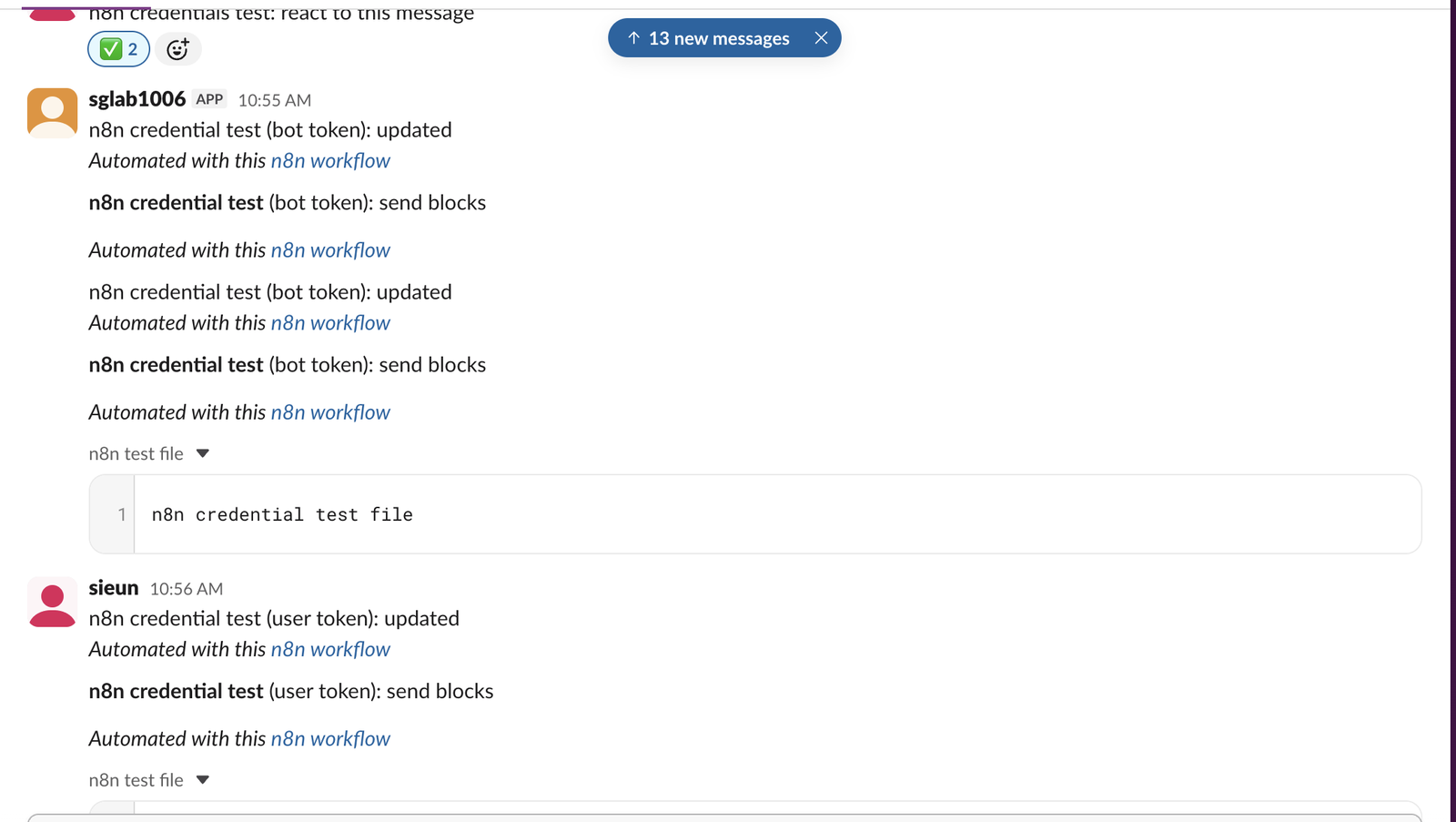
This is how the messages looked in Slack. The bot token posts as the app, with the APP label. The user token and OAuth2 both post as the person who connected them:
The line n8n adds to every message
Every message we sent ended with Automated with this n8n workflow, a link back to the workflow in our n8n instance. The Send and Update operations add it by default. To remove it, open Add option on the node and turn off Include Link to Workflow. Turn it off for anything people outside your team read, because the link shows your n8n address.
Which credential to pick
- • Bot token in Slack API. Use it for alerts, reports and anything that should come from an app. It is also the only one the Slack Trigger accepts; see our n8n Slack Trigger test. Get the token from OAuth & Permissions after you install the app, as shown in our bot token guide.
- • User token in Slack API. Use it when a workflow has to act as you: set your status, search, or post where the bot is not a member. Add the scopes on the app's User Token Scopes list, reinstall, and copy the User OAuth Token. Each missing scope gives the same "missing required Oauth Scopes" error.
- • Slack OAuth2. It also gives you a user token. n8n asks Slack for 28 user scopes and no bot scopes, so everything posts as you. Use it if you do not want to copy tokens, or if several people each connect their own account.
One more thing we saw: the OAuth2 sign-in added its 28 scopes to the user token we had pasted earlier. After it, that token's x-oauth-scopes header listed 29 scopes instead of 8, and search worked with it. Slack keeps one user token per person per app, so connecting OAuth2 changes what your pasted user token can do.
Never appear "away" on Slack again
Cloud-based. No downloads. Works 24/7 even when your laptop is off.
Two traps we hit
The OAuth2 window said "Error: Unauthorized". We had started n8n with WEBHOOK_URL set to a public tunnel, but signed in to the editor at http://localhost:5678. n8n's OAuth Redirect URL then pointed at the tunnel. Slack sent us back there, where the browser had no n8n session, and the window showed Error: Unauthorized and Failed to connect. The window can be closed now. After we signed in to the editor through the tunnel address and clicked Connect again, the credential showed Account connected. Open the editor on the same address that the OAuth Redirect URL shows, and add that exact URL to the app's Redirect URLs.
The status expired 4 hours late. In User > Update Profile we set Status Expiration to 2026-10-06T02:10:50, meant as UTC. Slack stored the expiration as 06:10:50 UTC. n8n reads that date in the instance time zone, which was America/New_York, the default when GENERIC_TIMEZONE is not set. Set GENERIC_TIMEZONE to your zone, or enter the time in the instance's zone. On our second run we entered the time in New York time, and Slack stored the exact second we planned.
File upload needs a binary file
The File > Upload operation wants a file from an earlier node. With nothing before it, it stopped with This operation expects the node's input data to contain a binary file 'data', but none was found. We put a Code node in front that returns the file as binary data, and the upload worked with all three credentials:
return [{
  json: {},
  binary: {
    data: {
      data: Buffer.from('n8n credential test file').toString('base64'),
      mimeType: 'text/plain',
      fileName: 'n8n-test.txt',
    },
  },
}];
In real workflows the file usually comes from an HTTP Request or a Read Files node.
FAQ
Why does n8n say "This Slack operation requires a user token"?
You used a bot token for an operation that only works for a person, such as setting a status. Create a second Slack API credential with a user token (xoxp-) or connect the OAuth2 credential, and pick it on that node only.
Can one credential hold both tokens?
No. Each Slack credential holds one token. A workflow can use the bot credential on some nodes and a user credential on others.
Stop Jiggling Your Mouse.
Join hundreds of remote workers who never worry about their Slack status. Set it up once, stay green forever.
Related Articles
Alertmanager Slack Config: slack_configs Example and Templates, Tested
A tested alertmanager.yml for Slack, the messages Prometheus alerts produced, a custom title and text template, and what send_resolved, group_by and color changed. Plus a typo amtool did not catch.
Grafana Slack Alerts: Webhook vs Bot Token, Templates, Tested
We sent Grafana alerts to Slack through both kinds of contact point, then replaced the default message with a notification template. The messages Slack showed, the delays, the template we used and the errors Grafana logged.
Jenkins Slack Notification: slackSend Pipeline Tested with a Bot Token
We ran the Jenkins Slack Notification plugin against a real Slack app: the pipeline that worked, the botUser setting that makes slackSend fail with a 404, threads, Block Kit, and the errors for channels the bot cannot see.