
Slack agent_view vs assistant_view: Both Tested Side by Side
We switched one Slack app from assistant_view to agent_view and recorded what the user sees, which events arrive, and which status and title calls still work.
agent_view and assistant_view are the two manifest features that turn a Slack app into an AI app. With assistant_view, the app's DM gets Chat and History tabs and every conversation is its own thread, announced by an assistant_thread_started event. With agent_view, the DM stays a normal message list, your app receives plain message.im events, and Slack opens a thread panel when your app starts an agent session. On 5 October 2026 we ran one throwaway app in our free-plan test workspace with assistant_view, then switched it to agent_view with apps.manifest.update, and did the same steps in each.
The manifest change
The two features cannot sit in one manifest. With both in features, apps.manifest.validate answered invalid_manifest. This is the whole difference in our app's manifest:
"features": {
  "bot_user": {"display_name": "sglab1005", "always_online": false},
  "app_home": {"messages_tab_enabled": true, "messages_tab_read_only_enabled": false},
  "assistant_view": {"assistant_description": "Throwaway test assistant for view tests"}
}
became
"features": {
  "bot_user": {"display_name": "sglab1005", "always_online": false},
  "app_home": {"messages_tab_enabled": true, "messages_tab_read_only_enabled": false},
  "agent_view": {"agent_description": "Throwaway test agent for view tests"}
}
plus agent_session_stopped in the bot events, which gives the user a stop button on a running session. apps.manifest.update returned ok and the change showed after a page reload, with no reinstall. The bot scopes were chat:write, im:history, im:read, im:write and assistant:write, among others. Both versions worked on the free plan; we saw no upgrade prompt.
While the app had assistant_view, its settings page on api.slack.com showed a banner: "The agentic app experience is changing. You'll need to update your app to the new experience."
What the user sees
With assistant_view, the app's DM had three tabs, Chat, History and About, plus a new-chat button. The Chat tab opened on the app's name, an AGENT label, the description from the manifest and a "How to use sglab 1005am?" prompt:
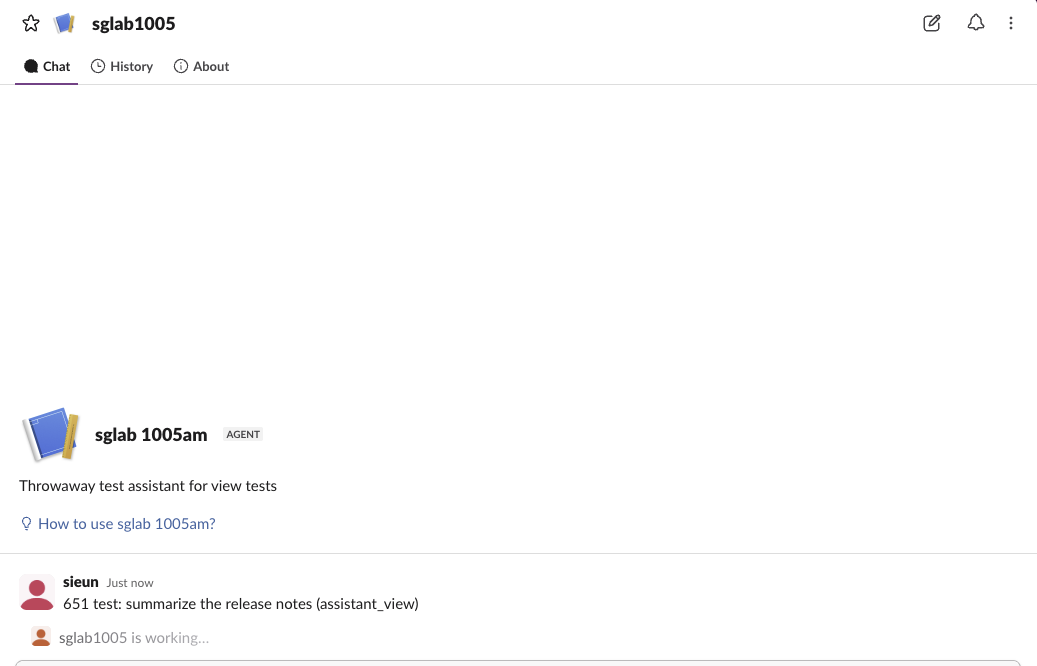
History listed each earlier conversation as its own entry, including every plain DM the bot had sent before, so a busy bot's History fills up fast.
With agent_view, the same DM had only Messages and About. Earlier messages showed as one normal DM list. When our app called agents.sessions.setStatus on the user's message, Slack opened a thread panel on its own, titled with the session title:
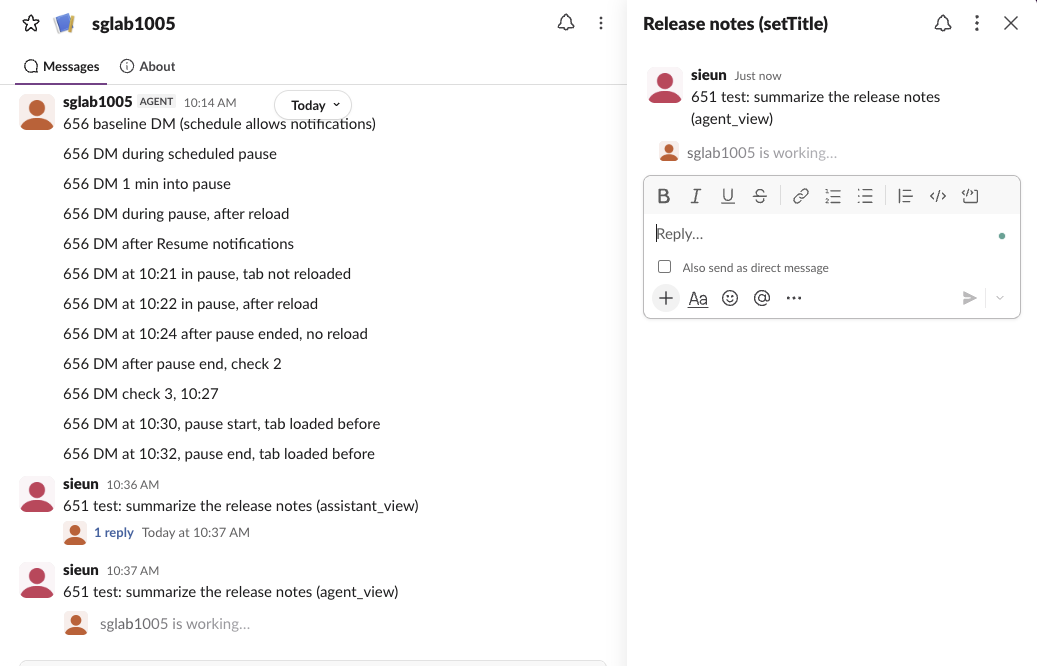
Both versions showed the AGENT label next to the app name, and both listed the app under Agents & apps in the sidebar.
The events your app receives
Same user, same DM, one manifest change apart:
| Step | assistant_view | agent_view |
|---|---|---|
| User opens the DM | app_home_opened | app_home_opened, three times within 2 seconds of loading |
| User starts a new chat | assistant_thread_started with thread_ts and context | No such button |
| User sends a message | message.im inside a thread, with thread_ts, parent_user_id = your bot and an assistant_thread.action_token | message.im at the top level, no thread_ts |
| After the first message | message_changed on the parent: subtype assistant_app_thread, title set to the user's first message | Nothing extra |
The assistant_thread_started event looked like this:
{
  "type": "assistant_thread_started",
  "assistant_thread": {
    "user_id": "U0B7L4YK420",
    "context": {"channel_id": "D0C6QECGPEV", "team_id": "T0B7JBCDKC1", "enterprise_id": null,
                "thread_entry_point": "chat", "force_search": false},
    "channel_id": "D0C6QECGPEV",
    "thread_ts": "1791164216.508749"
  }
}
So the code change is in your message handler. Under assistant_view you reply to event.thread_ts, which Slack created. Under agent_view the user's message has no thread, so you reply in a thread on the message's own ts, and that ts is the key for the session calls below.
Never appear "away" on Slack again
Cloud-based. No downloads. Works 24/7 even when your laptop is off.
Status, title and prompt calls on each
We called four methods with the bot token on the user's message in each version:
| Call | assistant_view | agent_view |
|---|---|---|
assistant.threads.setStatus | ok | ok |
agents.sessions.setStatus (processing, title "Release notes") | ok, plus warning missing_agent_session_stopped_event_subscription | ok |
assistant.threads.setTitle | ok | ok |
assistant.threads.setSuggestedPrompts | ok | ok |
Two details from those runs. The warning came only because the assistant_view manifest had no agent_session_stopped subscription; the call still worked. And assistant.threads.setTitle renamed the agent session too: the thread panel showed "Release notes (setTitle)", and closing the session afterwards returned that title, not the "Release notes" we passed to agents.sessions.setStatus.
In an earlier test on 2 October, on an app with neither feature, agents.sessions.setStatus returned not_authorized while assistant.threads.setStatus worked. The full session lifecycle, the stop button and the error list are in assistant.threads.setStatus vs agents.sessions.setStatus. To stream the reply into the thread, see chat.startStream.
Which one to build on
Pick agent_view for a new app. Slack's own banner pushes assistant_view apps toward it, every call we made worked on it, and its DM looks like any other conversation, which suits an agent that also posts reports or alerts there. Keep assistant_view only if your users rely on the History tab of separate chats. When you switch, move your reply logic from thread_ts to the message ts, subscribe to agent_session_stopped, and reload Slack to see the new layout.
FAQ
Do I need a paid Slack plan for agent_view?
Not in our test. Both features, the events and all four status and title calls worked in a free-plan workspace.
Does a user token work for agents.sessions.setStatus?
No. In our 2 October test both status methods returned not_allowed_token_type with a user token. Use the bot token.
Where do I get the bot token for these calls?
From the app's OAuth & Permissions page after you install it. Token types are explained in Slack bot token.
Stop Jiggling Your Mouse.
Join hundreds of remote workers who never worry about their Slack status. Set it up once, stay green forever.
Related Articles
Slack Jump to Date: Where the Menu Is and What Each Option Does
Slack's Jump to date menu hides in the date divider above messages. We tested it in a 500-message channel and an older channel: which options appear, how far back the calendar goes, and how to do it by API.
Slack API Unread Messages: last_read, unread_count and conversations.mark, Tested
Slack's Web API has no single unread-messages call. We tested what conversations.info returns for channels and DMs, counted unreads from last_read, and moved the sidebar badge with conversations.mark.
Slack Themes: Custom Theme Strings That Import, Tested
Slack's custom theme now takes 4 colors. We pasted old 8-color strings, Slack's own Share output and our own themes into Import, and logged which ones Slack accepted.