
Slack chat.update: Edit a Message With the API, Tested
We called chat.update with a bot token and a user token on 1 October 2026: the response, every error we hit, the 4,000-character cap, and what an edit shows and notifies in Slack.
To edit a Slack message from code, call chat.update with the channel ID, the message's ts and the new text or blocks. The token must belong to whoever posted the message: a bot can edit only its own messages, and a user token only that person's. We ran every call below on 1 October 2026 in a test workspace, with a throwaway app that had chat:write as a bot scope and as a user scope.
The call and the response
import os
from slack_sdk import WebClient
from slack_sdk.errors import SlackApiError

client = WebClient(token=os.environ["SLACK_BOT_TOKEN"])
channel = os.environ["CHANNEL"]          # channel ID, C...

sent = client.chat_postMessage(channel=channel, text="Build #813: running")
ts = sent["ts"]                          # keep this: it is the message ID

done = client.chat_update(channel=channel, ts=ts, text="Build #813: passed")
print(done["ok"], done["ts"] == ts, done["message"]["edited"])

try:
    client.chat_update(channel=channel, ts=ts, text="x" * 4001)
except SlackApiError as e:
    print(e.response["error"])
Output:
True True {'user': 'U0C5UH0S0E6', 'ts': '1790817997.000000'}
msg_too_long
The raw response to an earlier update, with bot_profile and blocks left out:
{
  "ok": true,
  "channel": "C0C5UGC0Q4A",
  "ts": "1790817762.570339",
  "text": "Build #812: passed (412 of 412 tests)",
  "message": {
    "user": "U0C5UH0S0E6",
    "type": "message",
    "edited": {
      "user": "U0C5UH0S0E6",
      "ts": "1790817766.000000"
    },
    "bot_id": "B0C5PCLT7HB",
    "app_id": "A0C5PB7LM9T",
    "text": "Build #812: passed (412 of 412 tests)",
    "team": "T0B7JBCDKC1"
  }
}
The ts does not change, and the message stays where it was in the channel. The edited object records who edited it and when. Store the ts that chat.postMessage returns; it is the only handle you get. If you lost it, read it back with conversations.history, as shown in get messages from a channel.
Errors we triggered
| What we did | Error |
|---|---|
| Bot token edits a message a person posted | cant_update_message |
| User token edits a message the bot posted | cant_update_message |
ts that does not exist in the channel | message_not_found |
Channel name #api-lab-1001 instead of the ID | channel_not_found |
channel and ts only, no text or blocks | no_text |
text of 4,001 characters or more | msg_too_long |
cant_update_message means the token does not own the message. Use the token that posted it. An admin's user token did not help either: the test account is the workspace's primary owner, and its token still got cant_update_message on the bot's message. For channel_not_found, pass the C... ID; the channel_not_found page covers the other causes we measured. We did not trigger edit_window_closed: this workspace allows edits at any time. Slack documents it for user tokens when the workspace limits how long people can edit.
The 4,000-character limit on edits
chat.update refused anything over 4,000 characters. A binary search between 4,000 and 40,000 put the cut-off exactly there: 4,000 worked, 4,001 returned msg_too_long.
chat.postMessage behaves differently. It accepted 40,001 characters with ok: true and no warning, then split the text into several messages:
| Text sent to chat.postMessage | Messages in the channel | Length of each |
|---|---|---|
| 4,001 characters | 1 | 4,001 |
| 5,000 | 2 | 4,000 and 1,000 |
| 12,000 | 3 | 4,000 each |
| 40,000 | 10 | 4,000 each |
| 40,001 | 10 | nine of 4,000, the last 4,001 |
The ts in the response is the last part's ts. So if you post a long report and later call chat.update on that ts, you edit only the final chunk. Keep messages you plan to edit under 4,000 characters, or post each part yourself and keep every ts. An incoming webhook was stricter: it posted at most four 4,000-character messages and dropped the rest of a 20,000-character text while still answering ok. Slack's published limits are on the message character limit page.
Never appear "away" on Slack again
Cloud-based. No downloads. Works 24/7 even when your laptop is off.
Text, blocks, and what replaces what
- • Sending
blockswithouttextworked, with no warning in the response. Slack copied the section's text into the message'stextfield. - • A later update with
textonly dropped our section block. Slack rebuilt the message as plain text. Sendblocksagain on every update if the message uses them. Block limits and their errors are on the invalid_blocks page. - •
blocks: []with newtextalso returnedok, and the message became plain text.
What people see after an edit
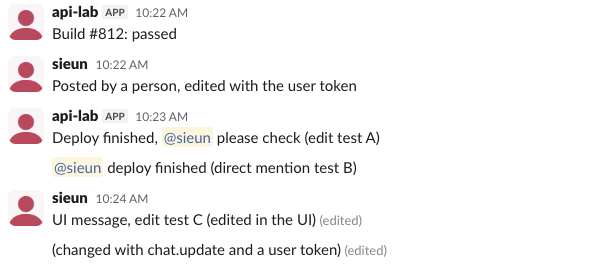
The "(edited)" label depends on where the message came from. Messages first posted through the API showed no label after chat.update, both the bot's ("Build #812: passed") and the one posted with the user token. A message typed in Slack's own box got "(edited)" after an edit in the UI, and also after chat.update with the user token. In all cases the API response carried the edited object. More on how the label works for people is in does Slack show edited messages.
Does an edit notify anyone
Yes, if the edit adds a mention. We posted "Deploy finished (edit test A)" with no mention, then used chat.update to add <@U0B7L4YK420>. The mentioned person got a Mention item in Activity, the same as for a message posted with the mention from the start:
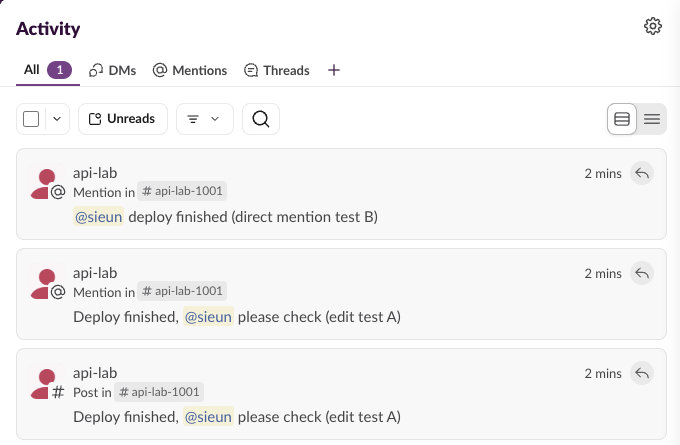
So do not use edits to quietly fix a mention after the fact; the new name gets pinged. An edit that changes other text sent no new notification in our run.
FAQ
Which scope does chat.update need?
The same chat:write scope that posted the message. Scope errors and how to read them are on the missing_scope page.
Can I edit an ephemeral message?
Not with chat.update. chat.postEphemeral returned a message_ts, and chat.update on that value returned message_not_found. Ephemeral messages from an interaction are replaced through the interaction's response_url instead.
How do I edit a message from a webhook?
You cannot. An incoming webhook returns only ok, with no ts. Post with chat.postMessage and a bot token if you need to edit later.
Stop Jiggling Your Mouse.
Join hundreds of remote workers who never worry about their Slack status. Set it up once, stay green forever.
Related Articles
Slack OAuth Redirect URL on localhost: What Slack Accepts, Tested
We added localhost, 127.0.0.1, https, custom-scheme and tunnel redirect URLs to a Slack app on 1 October 2026, then ran the OAuth flow against a local server. What was accepted, how Slack matches the URL, and the PKCE rules.
Slack App Manifest Example: YAML and JSON That Worked, Tested
A Slack app manifest we used to create a working app on 1 October 2026, in YAML and JSON, plus the validation errors from broken versions and real output from apps.manifest.validate, export, create and update.
Slack chat.delete API: Who Can Delete What, Tested
chat.delete removes a message by channel and ts. We deleted bot messages, a person's messages, a thread parent and an already deleted message with bot and user tokens, and list every response, including cant_delete_message and the tombstone a thread parent leaves.