
Does Slack Show Edited Messages? Yes, With an (edited) Label
Yes. When you edit a Slack message, everyone sees the new text with an (edited) label, and nobody gets a new notification. Coworkers cannot view the old version, but notifications, apps in the channel and a save-edits retention setting can keep it. What others see, what admins can see, and how to fix a typo without a label.
Yes. When you edit a message in Slack, everyone in the channel or DM sees the new text with a small (edited) label after it. Slack does not send a new notification for the edit, and coworkers cannot open the earlier version, because Slack has no edit history for members. The original can still survive in three places: notifications that already showed it, apps installed in the channel, and your company's data if the workspace owner chose to save edits. To fix a typo with no label, unsend the message within 15 seconds instead of editing it.
Slack also shows when you are around, through the green or grey dot next to your name, which turns grey after 10 minutes without input in the Slack window. Slack Green keeps your status active during the hours you set, from the cloud.
What others see when you edit, unsend or delete
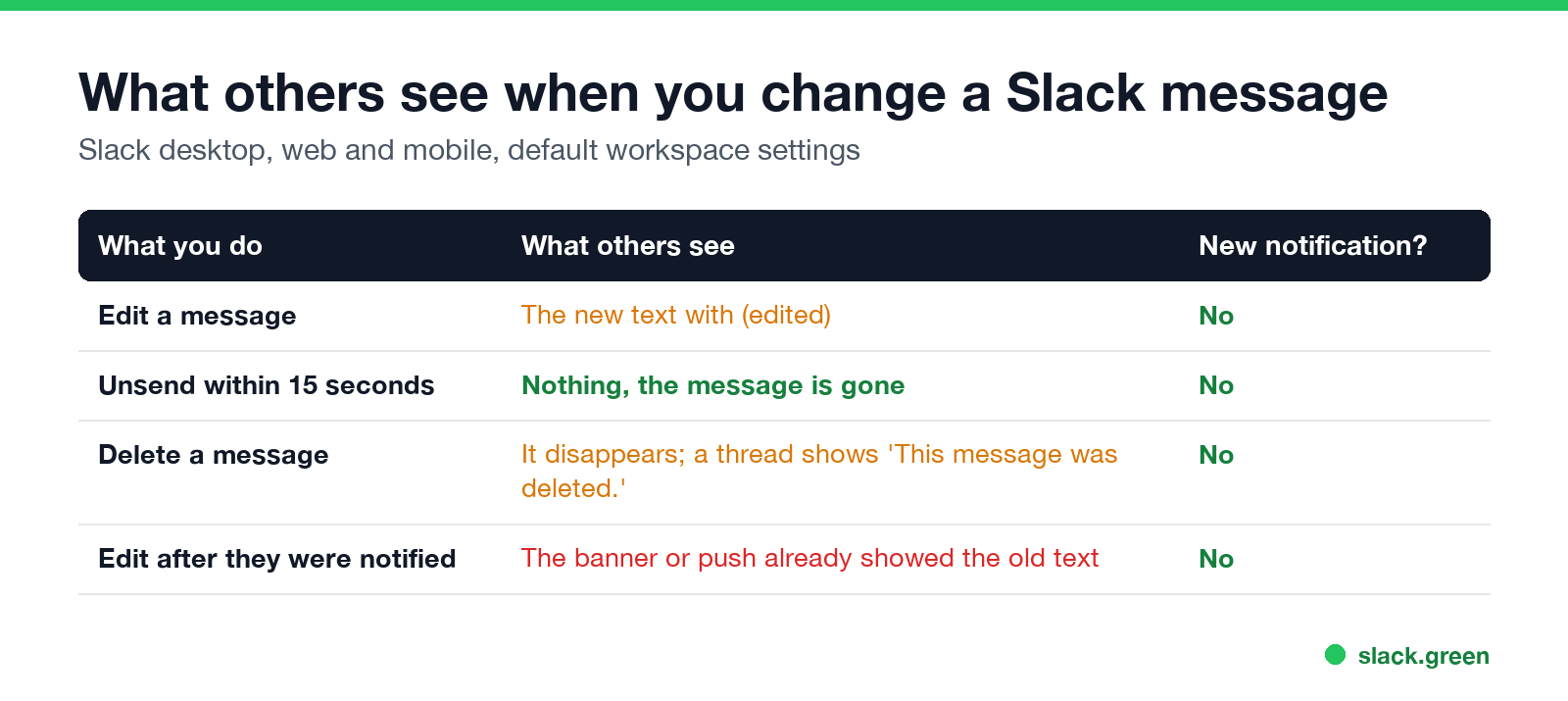
| What you do | What others see | New notification? |
|---|---|---|
| Edit a message | The new text with (edited) after it | No |
| Unsend within 15 seconds | Nothing; the message is gone | No |
| Delete a message | The message disappears. A deleted thread parent shows "This message was deleted." | No |
| Edit after they got a banner or push | The notification already showed the old text | No |
The (edited) label shows in channels, DMs, group DMs and threads, on desktop, web and mobile. It does not say what changed. How long ago someone read the message does not matter either: Slack has no read receipts, so an edit is the same for someone who read the original and someone who did not. More on that in does Slack have read receipts.
Can others see Slack edit history?
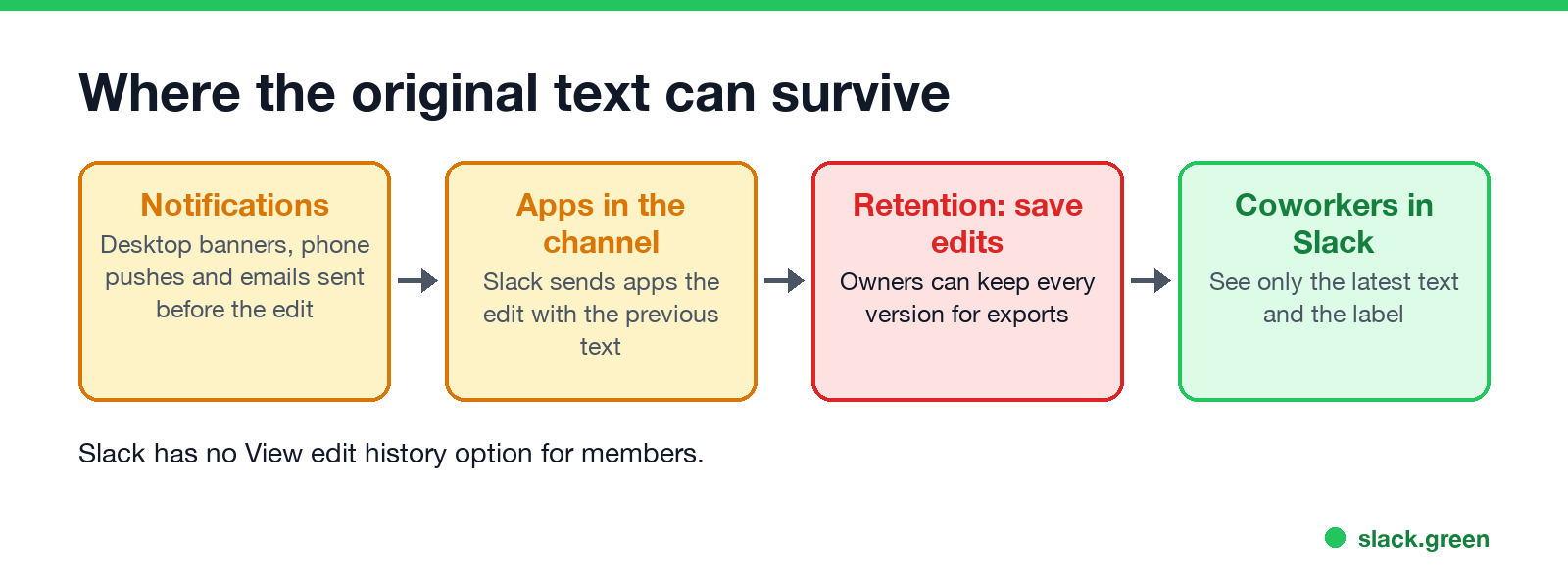
Not in Slack. Members have no "view edit history" option, and people have asked for one on the r/Slack subreddit for years. A coworker sees the latest text and the label, nothing else.
The old text can still be around:
- • Notifications. A desktop banner, a phone push or an email notification that went out before your edit shows the text as you first sent it. Editing does not recall them.
- • Apps in the channel. When a message changes, Slack sends apps that can read the channel a
message_changedevent with both the new message and theprevious_message. A bot or integration that logs messages can keep the original. - • Screenshots and quotes. Anyone who copied or captured the message has the original. Slack does not report screenshots; see does Slack notify screenshots.
Can Slack admins see edited messages?
Never appear "away" on Slack again
Cloud-based. No downloads. Works 24/7 even when your laptop is off.
It depends on the retention setting the workspace owner picked. Slack's help center lists these options on paid plans:
Admins read that data through exports, and on Enterprise plans through the Discovery API and eDiscovery tools. Even without saved edits, the message record carries an edited field with who edited it and when. What admins can see in DMs, and how exports work on each plan, is in can Slack admins see DMs. For deleted messages, see can Slack see deleted messages.
Does Slack notify people when you edit a message?
No. An edit changes the message in place and sends no new banner, push or email. That cuts both ways. A correction does not reach anyone who already read the original in a notification, and a fix to a date or a link can go unnoticed.
Adding an @mention in an edit is a common trap. Slack does not document that an edit notifies a newly mentioned person, so do not rely on it. Post a thread reply that mentions them, or send a new message.
How to edit, and how to avoid the label
Edit a message: hover over it, click the three dots, choose Edit message, change the text and click Save Changes. On a phone, tap and hold the message and choose Edit Message. On desktop, pressing the up arrow in an empty message box edits your last message.
Avoid the label with Unsend: on desktop, press Cmd+Z (Mac) or Ctrl+Z (Windows) within 15 seconds of sending, while you are still in the conversation and the message box is empty, then choose Unsend. The message goes back into the box for you to fix and resend, with no label and no trace for others. Unsend is desktop only.
If you cannot edit at all: owners and admins can limit editing to never, any time, or a set window after posting. If the Edit option is missing, the window has passed or editing is off in your workspace.
Slack vs Teams on edited messages
Never appear "away" on Slack again
Cloud-based. No downloads. Works 24/7 even when your laptop is off.
Microsoft Teams works the same way for users: an Edited label, no notification, no edit history for coworkers, and earlier versions kept for compliance under a retention policy. The details are in does Teams show edited messages.
FAQ
Can people see what you edited on Slack? They see the new text and an (edited) label, not the old text. The old text can survive in notifications they already got.
Does Slack show when a message was edited? It shows that it was edited with the (edited) label. The message record also stores the edit time, which admins can see in exports.
Can Slack admins see edited messages? Yes, if the workspace keeps messages with the save-edits setting, or on Enterprise plans with legal holds and the Discovery API.
How do I edit a Slack message without it saying edited? Unsend it within 15 seconds with Cmd+Z or Ctrl+Z on desktop, fix it, and send it again. After that, any change shows the label.
Does editing a Slack message notify people? No. Nobody gets a new notification for an edit.
Stop Jiggling Your Mouse.
Join hundreds of remote workers who never worry about their Slack status. Set it up once, stay green forever.
Related Articles
How to Change Sleep Settings on a Mac (Ventura to Tahoe)
On macOS Ventura and newer, the Mac's sleep timer is its display timer: set it in System Settings > Lock Screen, under Turn display off on battery and on power adapter when inactive. The Mac sleeps about a minute after the display turns off, unless you turn on Prevent automatic sleeping in Battery > Options, or in Energy on a desktop Mac. Every setting, where it lives by macOS version, and the pmset commands.
Caffeine vs KeepingYouAwake: Which Mac Keep-Awake Cup to Use
Caffeine and KeepingYouAwake are both free, open-source coffee cups for the Mac menu bar. KeepingYouAwake runs on macOS 10.13 and newer, wraps Apple's caffeinate, and can let the display sleep or stop on low battery. Caffeine needs macOS 14.6 and adds an optional cursor nudge that keeps Teams green. Which to pick.
Can My Employer See My Google Chat Messages? Yes, in Vault
On a work Google account, yes. Workspace admins can search, export and keep your Google Chat DMs, group chats and spaces with Google Vault, often including messages you deleted. Messages sent with history off are not covered: they disappear after 24 hours. A personal Google account is out of your employer's reach.