
Can My Employer See Me Through My Laptop Camera?
Your employer can see you through the laptop camera during video calls, and only through software that turns the camera on. How to tell when the camera is on in Windows 11 and macOS, which monitoring tools take webcam photos, and what the law allows.
Your employer can see you through your laptop camera during video calls, and at other times only if software on the laptop turns the camera on. Standard IT tools such as Intune or Jamf manage settings and apps; they do not stream your webcam. A small number of employee monitoring products can take webcam photos or recordings, and those have to be installed on the laptop. On almost every modern laptop the camera light turns on whenever the camera is in use, and Windows 11 and macOS both keep a record of which apps used the camera.
Much of the monitoring people worry about is done through work accounts, not cameras. Slack, for example, never uses your camera outside a huddle where you turn video on, and it shows only whether you are active or away. If that dot is what you care about, Slack Green keeps your Slack status active from its own servers during your working hours, with nothing installed on the laptop.
When your employer can see you on camera
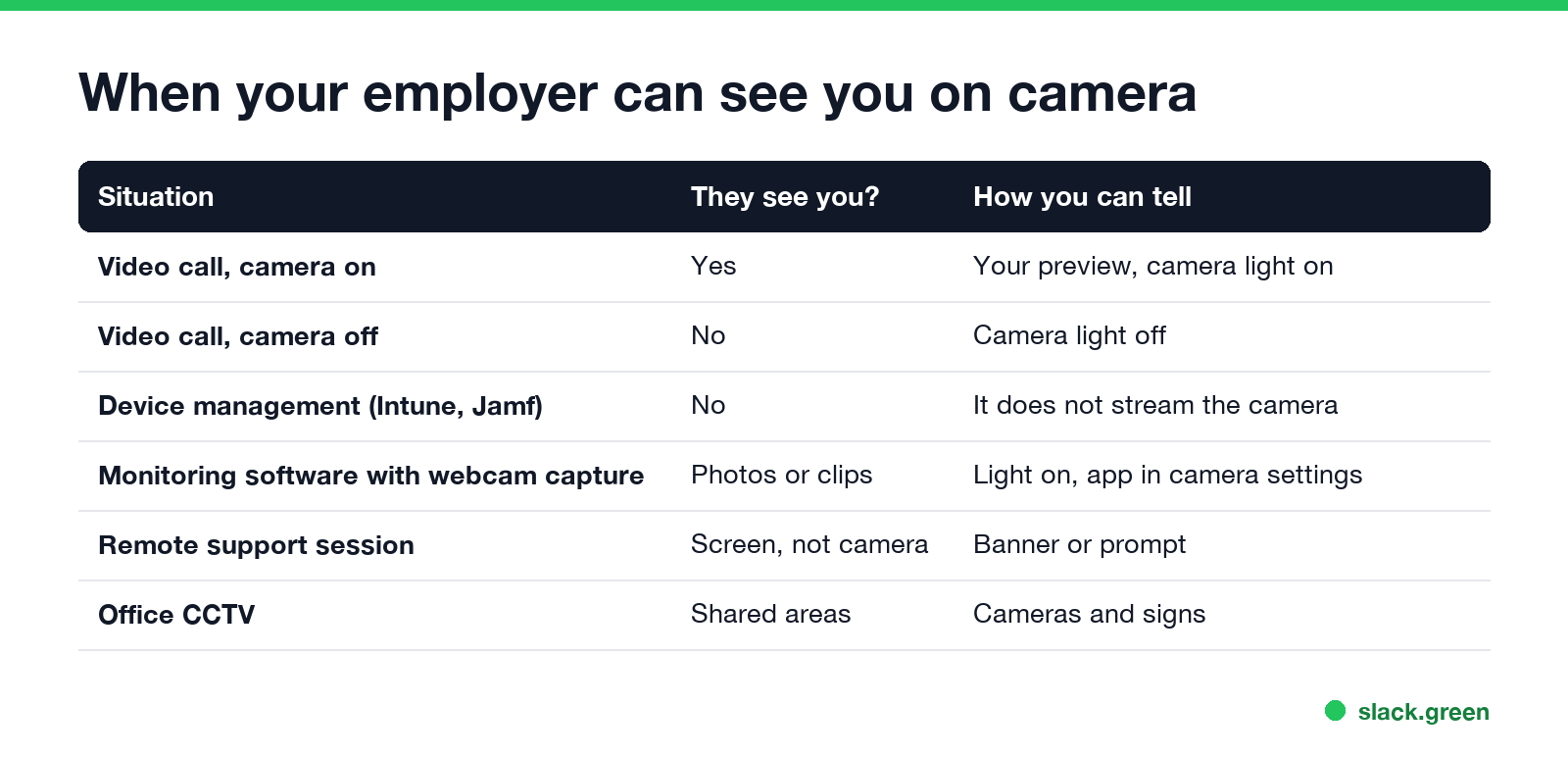
| Situation | Can they see you? | How you can tell |
|---|---|---|
| Video call with camera on (Zoom, Teams, Meet, Slack huddle) | Yes, everyone in the call | Your own preview, camera light on |
| Video call with camera off | No | Camera light off |
| Device management (Intune, Jamf) | No, it does not stream the camera | Nothing to see |
| Monitoring software with webcam capture | Yes, as photos or clips | Camera light on, app listed in camera privacy settings |
| Remote support session | They see your screen, not your camera | A banner or prompt for the session |
| Office CCTV | Yes, in shared areas | Cameras and signs on the wall |
Can monitoring software turn on the camera?
Yes, if it is installed and has permission. Most well-known time trackers and monitoring tools capture screenshots, apps and websites, not the webcam. A few products do offer webcam snapshots at set intervals, or a photo when you sign in, often sold as proof that the right person is at the keyboard. Employers must turn the feature on, and it runs as a program on the laptop.
That program has to ask the operating system for camera access, like any other app:
- • Windows 11 lists every app with camera access under Settings, Privacy & security, Camera. The Recent activity section shows which apps used the camera in the last 7 days.
- • macOS lists apps under System Settings, Privacy & Security, Camera. A green dot appears in the menu bar while the camera is on, and Control Center names the app that is using it.
On a company-managed Mac, Apple lets device management block camera access for apps, but not grant it silently; the camera permission needs a click from the user. The camera light and the green menu bar dot still turn on when the camera runs.
How to tell if your laptop camera is on
Never appear "away" on Slack again
Cloud-based. No downloads. Works 24/7 even when your laptop is off.
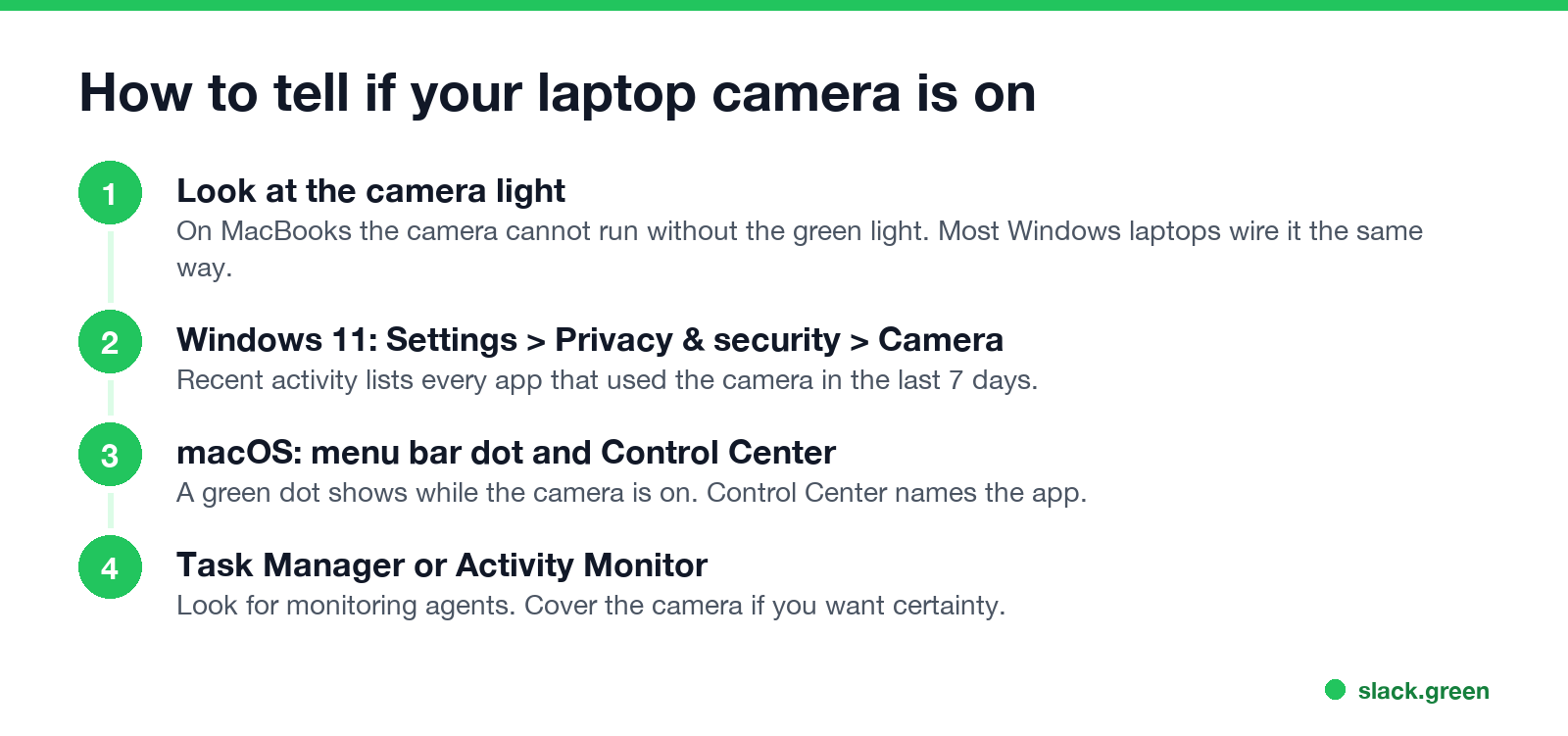
To block the camera completely, use the laptop's camera shutter or a slide cover. On many laptops a function key turns the camera off in hardware.
Can my employer watch me on camera all day?
In the US, an employer can generally require cameras on during meetings and can monitor company devices, especially with written notice. New York, Connecticut and Delaware require employers to tell employees about electronic monitoring. Recording audio is stricter: in states such as California, recording a conversation needs everyone's consent.
Outside the US, all-day webcam watching is hard to justify. In 2022 a Dutch court ruled that US company Chetu wrongly fired a remote worker who refused to keep his webcam on for the whole workday, and ordered it to pay him about $75,000. The court said constant camera monitoring breached his right to privacy. In the EU and UK, data protection law requires monitoring to be necessary and proportionate, and regulators treat continuous webcam recording at home as rarely acceptable. This is general information, not legal advice.
Office CCTV: what is allowed
Cameras in shared office areas, entrances and car parks are legal in most countries, usually with signs. Cameras in bathrooms, changing rooms and similar private spaces are not. Audio recording on CCTV is restricted in many places, and the UK regulator's guidance says audio should normally be off. If you do not know whether a camera records sound, your employer's CCTV or privacy policy should say so.
What employers watch more often than your camera
Never appear "away" on Slack again
Cloud-based. No downloads. Works 24/7 even when your laptop is off.
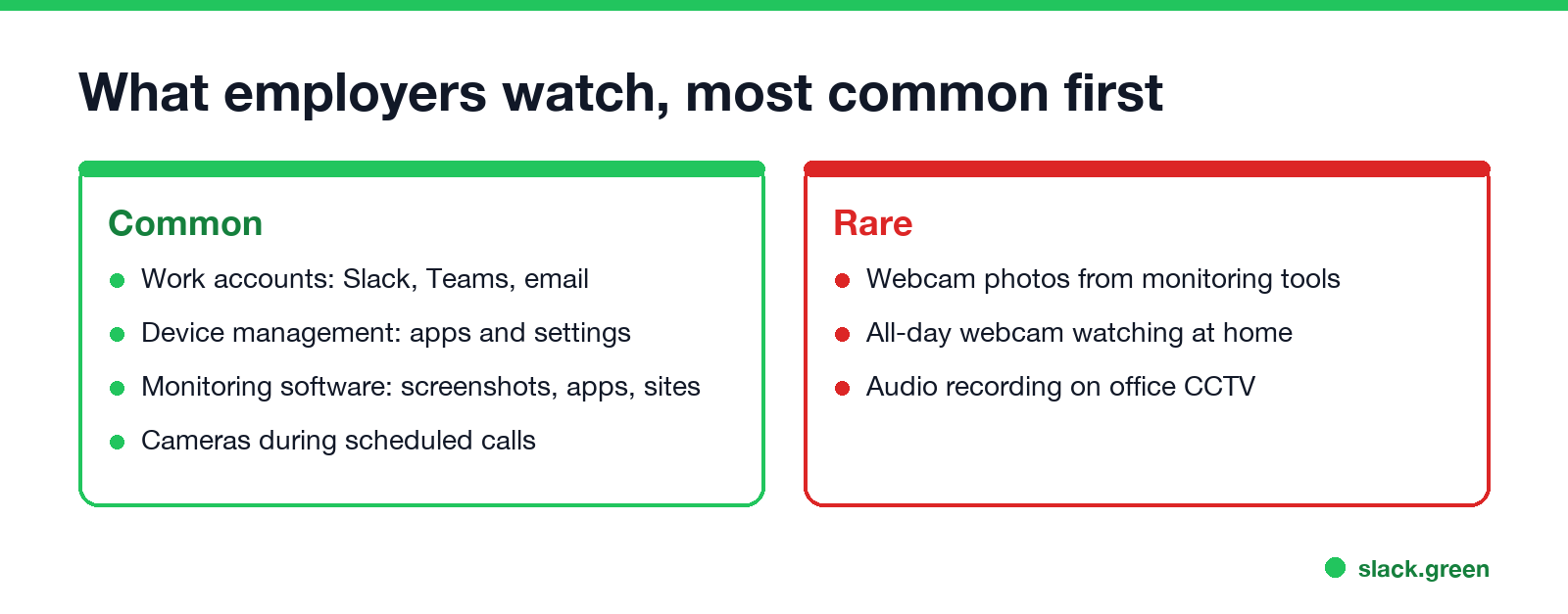
Cameras are the rarest form of monitoring. More common, in order:
The full breakdown, including what each layer can and cannot see, is in how do employers monitor remote workers. For your phone, see can my employer see what I do on my phone.
FAQ
Can my work computer camera be turned on remotely? Only by software on the computer, such as a monitoring agent or a remote access tool that runs a program. Device management alone does not stream it. The camera light and the camera privacy settings show when it runs.
Can my employer see me when my camera is off in a meeting? No. With your video off, meeting apps do not send your camera image.
Can my boss see me through my laptop camera on my personal laptop? Only if you installed their monitoring software on it, or you are in a video call with the camera on.
Does Slack use my camera? Only when you turn on video in a huddle or call. Slack never takes photos to decide whether you are active; that comes from your input in the Slack window.
Stop Jiggling Your Mouse.
Join hundreds of remote workers who never worry about their Slack status. Set it up once, stay green forever.
Related Articles
How to Keep Skype Status Active: Skype for Business Idle Timers
To keep your Skype for Business status active, open Options, Status, and raise both idle timers, Inactive and then Away, from 5 minutes to as much as 360 minutes each. Consumer Skype shut down on May 5, 2025 and Skype for Business Online in 2021, so for most people the real question is now Teams. What still works, status icons, Outlook, and status not updating.
Is It Legal for My Employer to Monitor Me? US, EU and UK Rules
In the US it is mostly legal for an employer to monitor company devices, accounts and premises, often without asking. The limits are state notice laws in New York, Connecticut and Delaware, consent rules for audio recording and biometrics, bans on cameras in restrooms, and your personal devices. The EU, UK and parts of Canada and Australia add notice and proportionality rules.
Can My Employer See My Personal Email on My Work Computer?
Your employer cannot sign in to your Gmail, and doing so without permission can break the Stored Communications Act. But on a work computer, screenshot and keystroke monitoring, browser history, HTTPS inspection and Outlook's local cache can all expose personal email. Work email is fully visible, deleted messages included. Case by case, with what to do.