
Can Teramind Detect a Mouse Jiggler? Yes, Through OMNI and Recordings
Yes. Teramind says its OMNI feature detects mouse jigglers and automated key-pressing, listed under activity falsification as inorganic mouse activity, and a manager can then replay the screen recording from that time. A USB jiggler hides the app but not the unchanging screen, the empty keystroke log or the flat app history. How each signal works and what a jiggler changes.
Yes, Teramind can detect a mouse jiggler. Teramind's own guide, "How to Detect Employees Using Mouse Jigglers with AI", says its OMNI feature "detects instances of mouse jigglers and automated key-pressing". Managers filter OMNI's feed by activity falsification, then inorganic mouse activity, to see "synthetic mouse or keyboard movements", and they can open the session player to watch the screen recording from the time the jiggler ran. A USB jiggler leaves no app to find, but the recording still shows a screen where nothing happens, the keystroke log stays empty, and the list of apps and websites stops changing.
So a jiggler does not make Teramind count you as working. More often it creates a record that you used one.
Most people reach for a jiggler to keep a chat status green, not to fool Teramind. For Slack there is a way that puts nothing on the computer: Slack Green keeps your Slack presence active from a server during the hours you set. It creates no input, so Teramind records only what you really do.
How Teramind detects a mouse jiggler
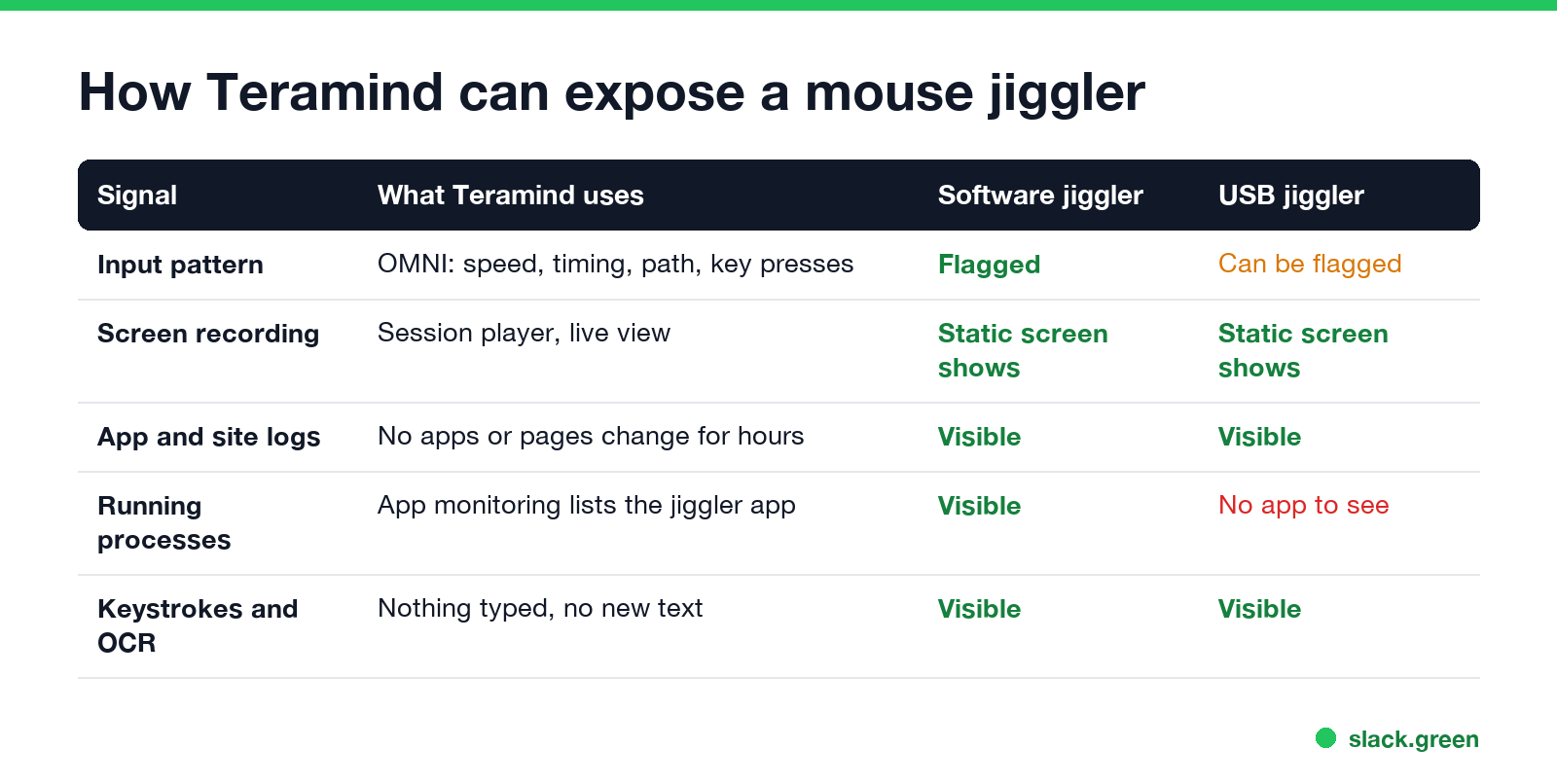
| Signal | What Teramind looks at | Software jiggler | USB jiggler |
|---|---|---|---|
| Input pattern | OMNI compares speed, acceleration, click rate and cursor path with normal human input | Flagged | Can be flagged |
| Screen recording | Session player and live view show the screen | The screen does not change | The screen does not change |
| App and website logs | Which apps, windows and sites were in use | Nothing changes for hours | Nothing changes for hours |
| Running applications | Application monitoring lists programs | The jiggler app is listed | No app to list |
| Keystrokes and OCR | Keystroke logging and text read from the screen | No typing, no new text | No typing, no new text |
OMNI and the input pattern. Teramind's guide says human mouse use "tends to reflect inconsistent direction and timing", while jigglers "create unnaturally consistent and repetitive activity", and it names speed, acceleration, click rate and cursor trajectory as the data points. OMNI is Teramind's machine-learning layer that surfaces outliers as cards in a feed. It covers automated key presses too, so a keyboard jiggler that presses F15 every minute is in scope; the scripts people use are in keyboard jiggler.
The screen recording. This is the check a jiggler cannot pass. Teramind records the screen, and a manager who sees an OMNI card can replay that period. A cursor drifting across an unchanged window for an hour is obvious to a person, whatever the input pattern looks like.
The logs around it. Teramind tracks active and idle time, apps, websites, emails and chat apps. A jiggler turns idle time into active time on the raw clock, but the same hour shows no app changes, no new pages and no keystrokes.
USB jigglers and Teramind
A USB jiggler plugs in as an ordinary mouse, so application monitoring has no program to find. Teramind's materials describe finding jigglers by input pattern and recordings, not by the device's hardware ID. That does not make a USB jiggler invisible:
- • the input can still be flagged as inorganic, depending on how random its movement is;
- • the screen recording and the flat app history look the same as with a software jiggler;
- • IT tools outside Teramind, such as endpoint security, log every USB device that connects. See can CrowdStrike detect a mouse jiggler.
Sellers of "undetectable" jigglers and fake-activity apps promise to beat the input check. None of them can make a recorded screen show work that did not happen.
What a jiggler changes in Teramind, and what it does not
Never appear "away" on Slack again
Cloud-based. No downloads. Works 24/7 even when your laptop is off.
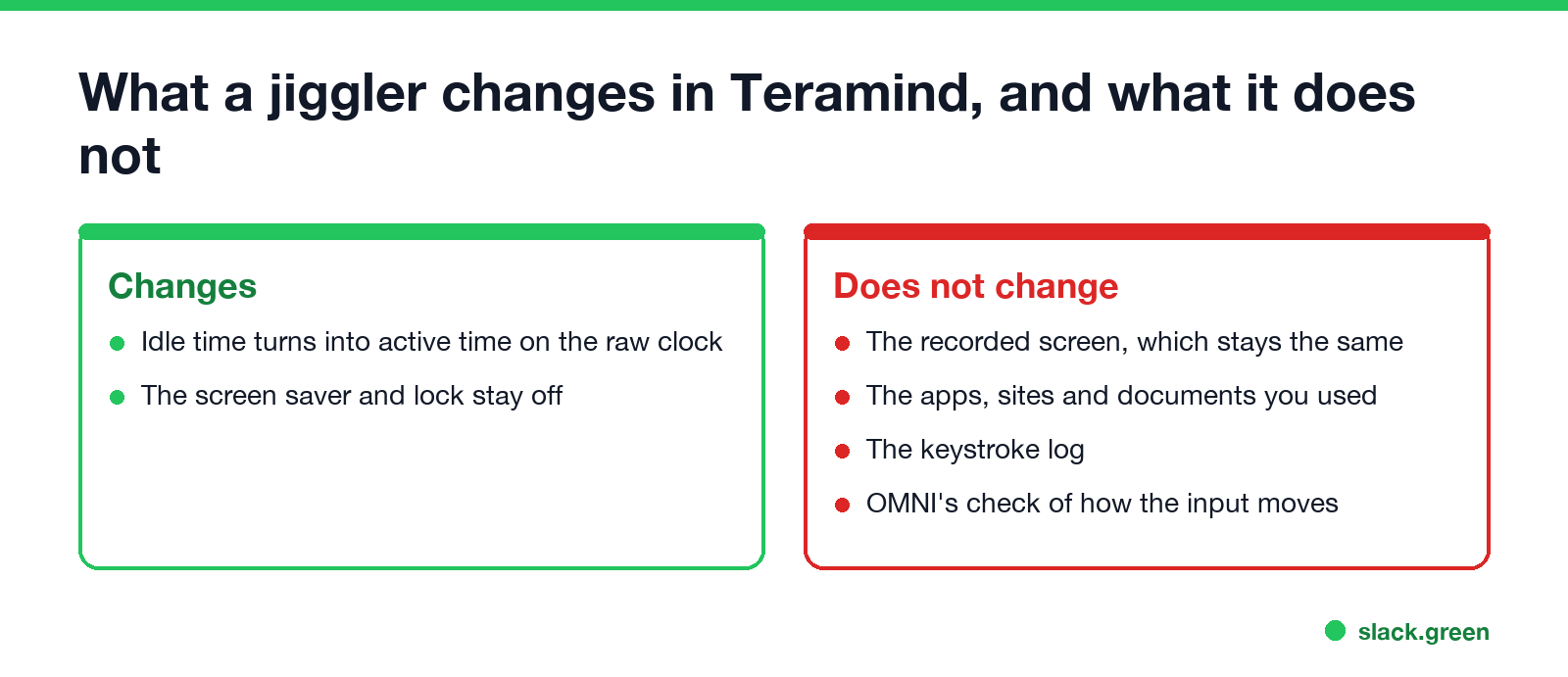
A jiggler keeps the computer from going idle, which keeps the screen saver and lock off and turns idle minutes into active minutes on Teramind's basic clock. It does not change anything Teramind records about your work: the screen, the apps, the keystrokes. Teramind's guide tells employers to add a written policy against jigglers and to set consequences, so being flagged can be a disciplinary matter, not only a data point.
How the other monitoring tools compare
| Tool | Detects jigglers? | How |
|---|---|---|
| Teramind | Yes | OMNI input anomalies, screen recordings |
| ActivTrak | Yes | Known jiggler apps, repetitive input, 45+ minutes on one screen |
| Hubstaff | Yes | Known jiggler apps, automated-looking input, 50+ minutes of mouse with no keyboard |
| Insightful | Software jigglers only | Known apps and repetitive input; its FAQ says USB jigglers are not detected |
Details for each: can ActivTrak detect a mouse jiggler, can Hubstaff detect a mouse jiggler, can Insightful detect a mouse jiggler, and the general answer in can a mouse jiggler be detected.
FAQ
Does Teramind detect a mouse jiggler? Yes. Its OMNI feature flags inorganic mouse and keyboard input, and screen recordings show the period in question.
Can Teramind detect a USB mouse jiggler? It has no app to find, but the input pattern can still be flagged, and the recording and logs show that no work happened.
Does Teramind track mouse movement? Yes. Mouse and keyboard activity decide active and idle time, and OMNI analyzes how the mouse moves.
How do I know if Teramind is on my computer? Look for Teramind agent processes or a tray icon, and read your company's monitoring policy. How to tell if you are being monitored at work lists the signs.
Stop Jiggling Your Mouse.
Join hundreds of remote workers who never worry about their Slack status. Set it up once, stay green forever.
Related Articles
Can My Employer See What I Watch on YouTube at Work?
On a work laptop or the office network, your employer can see that you used YouTube, when, and for how long. With HTTPS inspection or monitoring software, they can see which videos, because the video address and the browser tab title both name it. On your own phone on mobile data, they see nothing.
Can My Employer See My iMessages on a Work Mac?
Not through device management or the network: Jamf or Intune cannot read Messages, and iMessage is end-to-end encrypted. But if you sign in to Messages on a work Mac, your texts are stored on that Mac, where monitoring screenshots, backups and admin access can reach them. How to check, and how to take iMessage off the Mac without deleting it from your iPhone.
Can My Boss See My Private Outlook Calendar Events?
Usually not the details. When you mark an Outlook event Private, someone who can read your calendar sees only Private appointment, the time and a lock. The exceptions are delegates you gave Can view private items, the people invited to the event, anyone with full access to your mailbox in new Outlook or the web, and compliance admins. How to check who has which access, and what Private does not hide.