
Does Teams Show Away When Minimized? Desktop, Web and Mobile
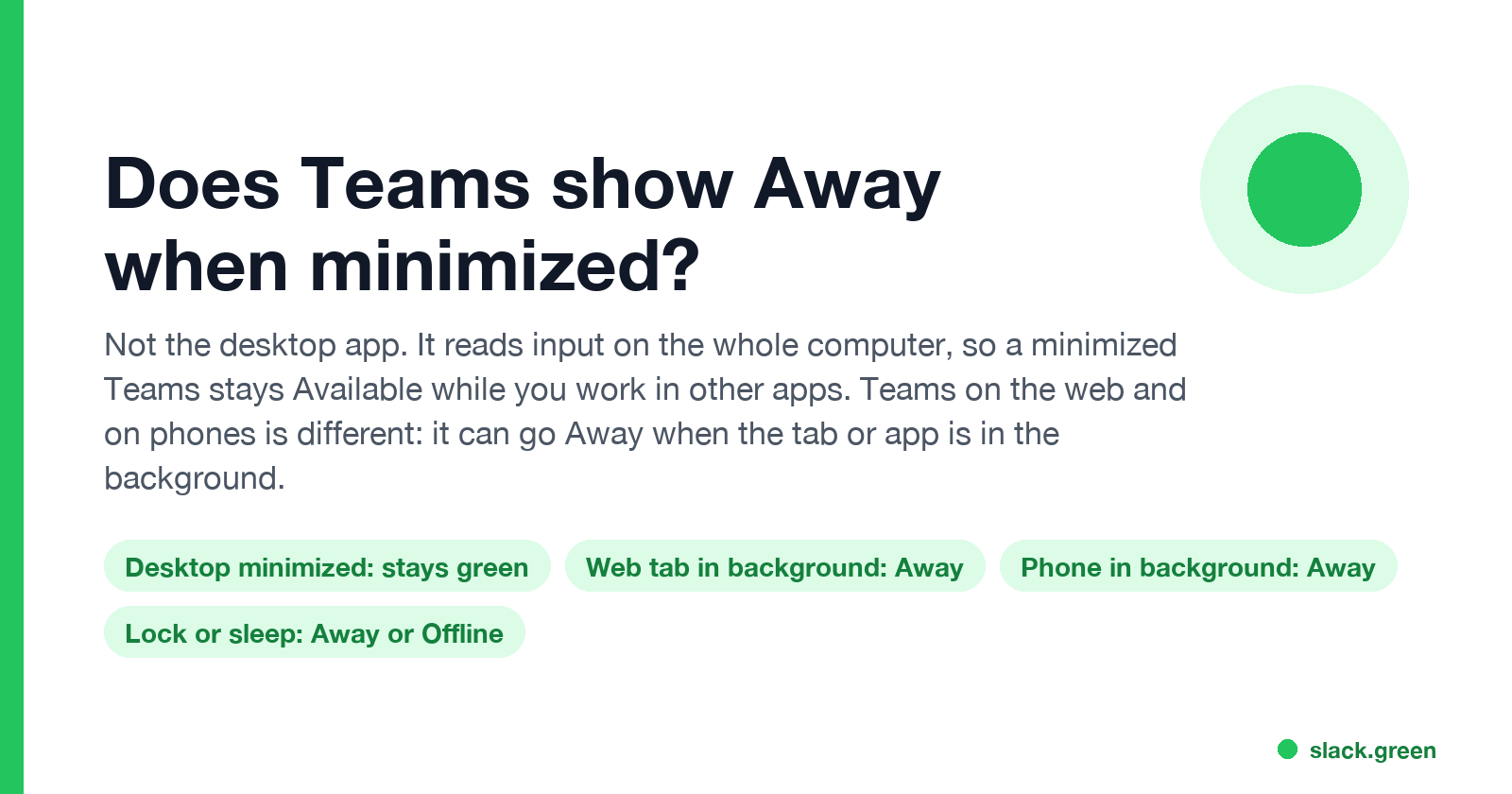
No, not in the Teams desktop app. It reads keyboard and mouse input on the whole computer, so a minimized Teams stays Available while you work in other apps. Teams on the web can show Away when its tab is in the background, unless you turn on its activity detection setting, and the phone app shows Away as soon as it goes to the background.
No. The Microsoft Teams desktop app does not show you as Away when you minimize it. It reads keyboard and mouse input on the whole computer, so you stay Available while you work in Outlook, Excel or a browser. It sets Away only after about 5 minutes with no input anywhere, or when you lock the computer. Teams on the web is different: in a browser it can see only activity inside its own tab, so it can show Away while you work in another tab or app. A setting added in late 2025 fixes that. The phone app shows Away as soon as it goes to the background.
We build Slack Green, which keeps your Slack status active from a server during the hours you set. It does not change Teams. Many of our users run both, and the two apps treat a minimized window in opposite ways, so the Slack answer is at the end.
Teams desktop vs web vs mobile status
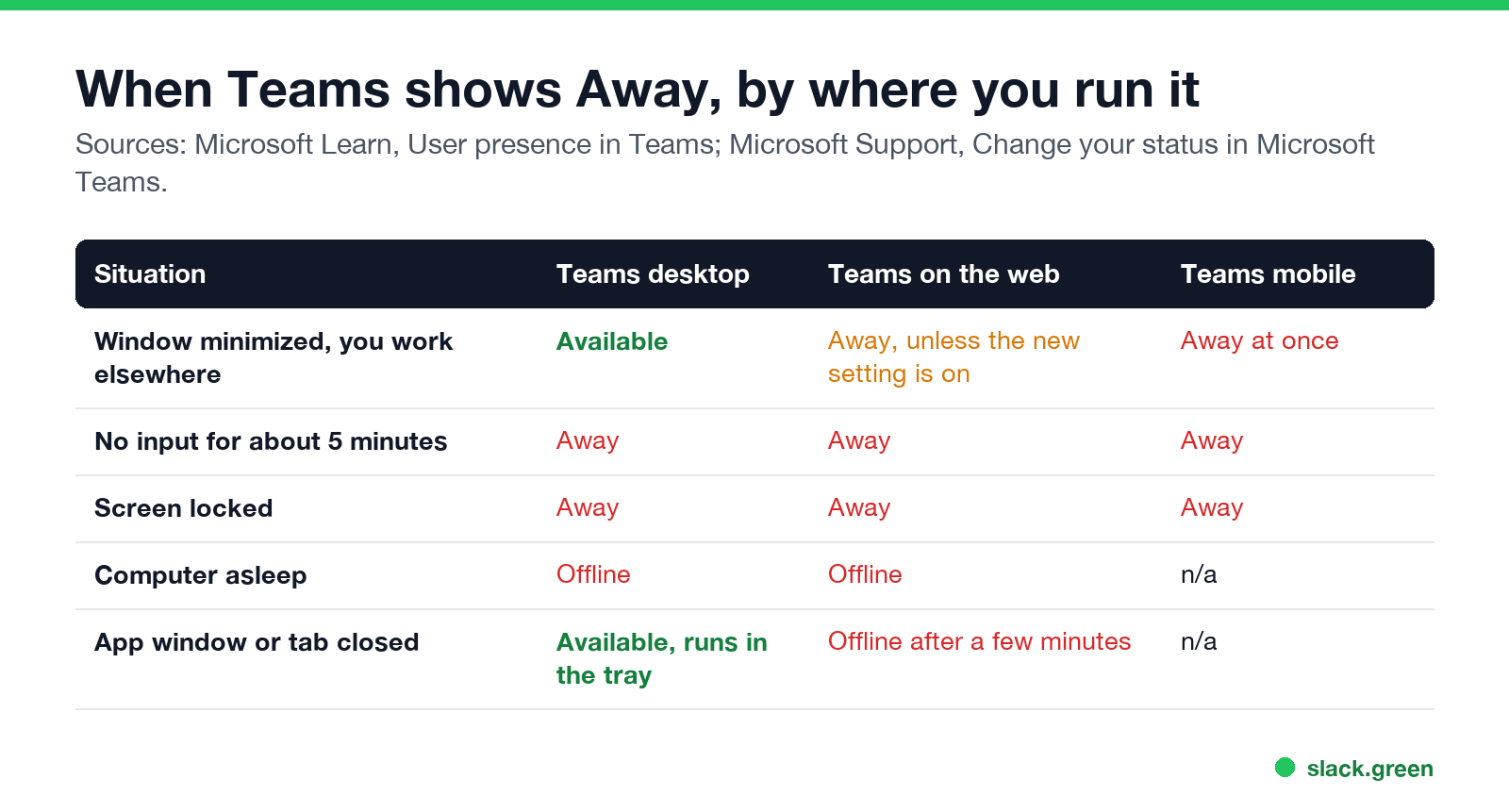
| Situation | Teams desktop | Teams on the web | Teams mobile |
|---|---|---|---|
| Window minimized, you work in other apps | Available | Away, unless the activity setting is on | Away at once |
| No input for about 5 minutes | Away | Away | Away |
| Screen locked | Away | Away | Away |
| Computer asleep | Offline | Offline | n/a |
| App window or tab closed | Available, still running in the tray | Offline after a few minutes | n/a |
Microsoft's admin guide, "User presence in Teams", says that on a computer "a user's presence becomes Away automatically if they're inactive for a few minutes or if the computer is locked; and it becomes Offline when the computer enters sleep mode". On a mobile device, presence "becomes Away whenever the Teams app is in the background". Minimizing a desktop window is not on the list.
Why the desktop app stays green when minimized
The Teams desktop app asks the operating system how long it has been since the last keyboard or mouse input. That count covers every app, not only Teams. As long as you keep typing or moving the mouse somewhere, Teams sees recent input and keeps you Available, whether its window is minimized, behind other windows or on another screen.
Closing the Teams window with the X does not quit it either. New Teams keeps running in the system tray or menu bar and keeps your status. You go Offline only when you quit Teams from the tray, sign out, or the computer sleeps.
If the desktop app shows Away while you are working, the cause is something other than minimizing. The common ones, with fixes, are in Teams status stuck on Away: another signed-in device setting your status, a status you set by hand, or stale presence that needs a restart.
Why Teams on the web shows Away
Never appear "away" on Slack again
Cloud-based. No downloads. Works 24/7 even when your laptop is off.
A web page cannot read input from other apps. Until late 2025, Teams in a browser saw only clicks and keys inside its own tab. Work in another tab or in a desktop app for a few minutes, and Teams on the web set you Away.
Microsoft added a per-user setting that uses the browser's idle detection permission. With it on, Teams checks whether the device is in use, not what you are doing. It works in Chrome 94 or later and Edge 114 or later, and it is off by default.
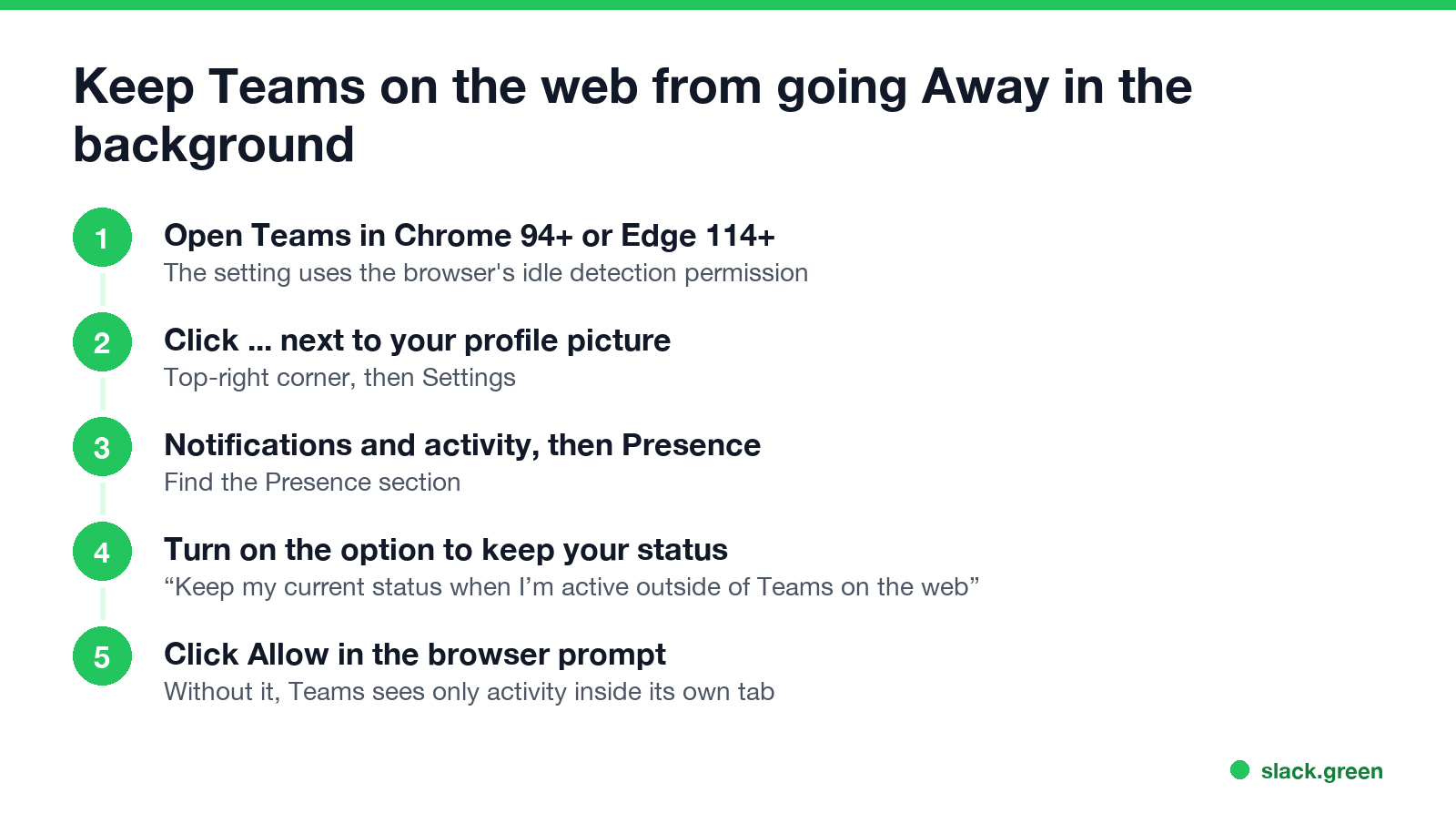
- Open Teams in Chrome or Edge.
- Click ... next to your profile picture, then Settings.
- Open Notifications and activity, then the Presence section.
- Turn on Keep my current status when I'm active outside of Teams on the web.
- Click Allow when the browser asks for permission.
If you turn the setting on but block the permission, Teams still cannot see activity outside its tab and still shows Away. If your company manages the browser, IT may block the permission.
Teams web status unknown
Status unknown means Teams could not load a person's presence. You see it most for people outside your organization when presence is not shared between the two companies, and during connection problems. If your own status shows as unknown, sign out and back in, or reload the page. Microsoft lists Status unknown as a state Teams sets, not one you can choose.
Does Teams show Away on your phone when the app is in the background?
Yes, right away. The phone app shows Available only while it is on screen. When it goes to the background, Teams shows Away, and after 24 hours without use it shows Offline. If you are signed in on both a computer and a phone, Teams uses the device you used most recently, so a background phone app can make you look Away after your computer goes idle. Details are in does Teams stay green on mobile.
Slack works the other way
Slack counts only input inside its own window. Minimize Slack, work in other apps, and your Slack dot turns grey 10 minutes after your last input in Slack. The desktop and browser versions of Slack follow the same rule. So the same habit, keeping chat minimized while you work, keeps you green in Teams and turns you away in Slack. How Slack decides is in how Slack decides when you are away, and the browser case is in keep Slack active in the browser. Slack Green keeps your Slack status active from a server on your schedule, so a minimized or closed Slack does not matter.
For Teams timers side by side, see how long before Teams shows Away. For ways to stay Available through breaks, see how to keep your Teams status Available.
FAQ
Never appear "away" on Slack again
Cloud-based. No downloads. Works 24/7 even when your laptop is off.
Does Teams show Away when minimized?
Not the desktop app. It stays Available while you use other apps. It shows Away after about 5 minutes with no input anywhere, or when you lock the computer.
Why does Teams on the web show me as Away?
In a browser, Teams sees only activity inside its tab. Turn on "Keep my current status when I'm active outside of Teams on the web" in Settings, Notifications and activity, and allow the browser permission.
Does closing Teams make you Away?
Closing the window does not; Teams keeps running in the tray. Quitting Teams or signing out makes you Offline after a few minutes, unless you are active on another device.
Does Teams show Away when the screen is locked?
Yes, at once, in every version.
Does Teams show Away if I am on another screen?
No. The desktop app counts input on any screen and in any app.
Stop Jiggling Your Mouse.
Join hundreds of remote workers who never worry about their Slack status. Set it up once, stay green forever.
Related Articles
Can My Employer See My Browsing If I Use a VPN? It Depends Whose
A personal VPN hides the sites you visit from the office network, but not from monitoring software, a managed browser or IT on a work laptop. The company VPN shows your employer every site it carries. What each setup hides.
Teams Status on Multiple Devices: The Last Device You Used Wins
Signed in to Teams on a computer and a phone? Your status comes from the device you used most recently. That is why a quick look at your phone can turn you Away, and why a phone in your pocket shows Away instead of Offline at night.
Zoom Do Not Disturb: How to Turn It On, Schedule It, and What It Blocks
To turn on Do not disturb in Zoom, click your profile picture, point at your status and choose Do not disturb, then a time from 20 minutes to 24 hours, or Custom for a daily schedule. It blocks pop-up notifications for Zoom Team Chat and Zoom Phone calls. Busy, by contrast, mutes nothing. How the two differ, and how to keep a Zoom meeting free of pop-ups.