
How to Create a Slack Webhook URL in 4 Steps
Create a Slack app at api.slack.com/apps, turn on Incoming Webhooks, click Add New Webhook to Workspace and pick a channel. Slack gives you a hooks.slack.com URL that posts to that channel. Private channels, DMs, several channels, the Workflow Builder alternative, and the errors you may see.
To create a Slack webhook, make a Slack app and turn on incoming webhooks. Go to api.slack.com/apps, click Create New App, choose From scratch and pick your workspace. Open Incoming Webhooks, switch Activate Incoming Webhooks on, click Add New Webhook to Workspace, choose the channel and click Authorize. Slack shows a URL like https://hooks.slack.com/services/T000/B000/XXXX. Anything you POST to it as JSON appears in that channel.
Each URL posts to one channel. You cannot change the channel, name or icon per message; Slack's docs say those always come from the app. For a private channel you must be a member first.
We build Slack Green. Our free Markdown to Slack converter turns standard markdown into the mrkdwn a webhook message expects.
Create the webhook URL
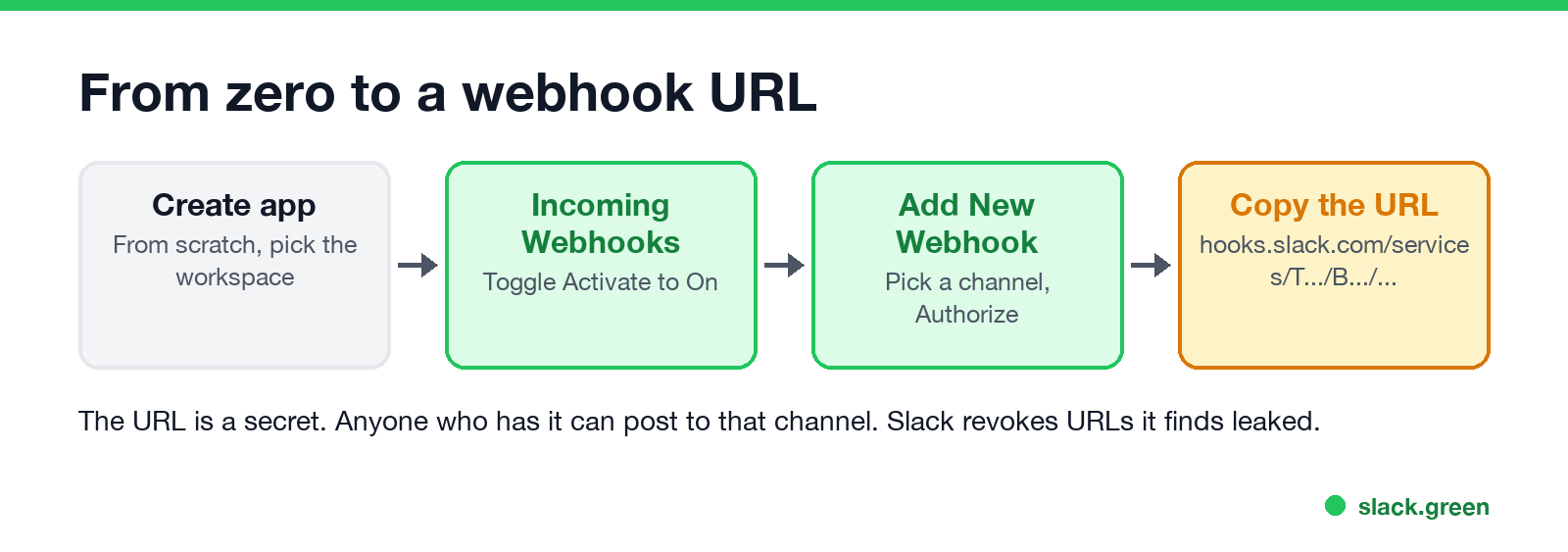
- Create an app. Open api.slack.com/apps, click Create New App, then From scratch. Name it after what will post, such as "Deploy bot", and pick the workspace.
- Turn on incoming webhooks. In the app settings, click Incoming Webhooks in the left menu and switch Activate Incoming Webhooks to On.
- Add a webhook. Click Add New Webhook to Workspace at the bottom. Pick the channel and click Authorize. If your workspace requires admin approval for apps, the request goes to an admin first.
- Copy the URL from Webhook URLs for Your Workspace.
Test it from a terminal:
curl -X POST -H 'Content-type: application/json' \
  --data '{"text":"Hello from my webhook"}' \
  https://hooks.slack.com/services/T000/B000/XXXX
Slack answers ok with HTTP 200 and the message appears in the channel, posted by your app.
Treat the URL like a password. Slack's docs warn that it contains a secret and that Slack searches for leaked webhook URLs and revokes them. Keep it in an environment variable or a secrets store, not in a public repository.
Private channels, DMs and several channels
If you need to pick the channel per message, or edit and delete messages later, use a bot token and chat.postMessage instead. Webhooks cannot delete a message once it is posted.
App webhook or Workflow Builder webhook?
Never appear "away" on Slack again
Cloud-based. No downloads. Works 24/7 even when your laptop is off.
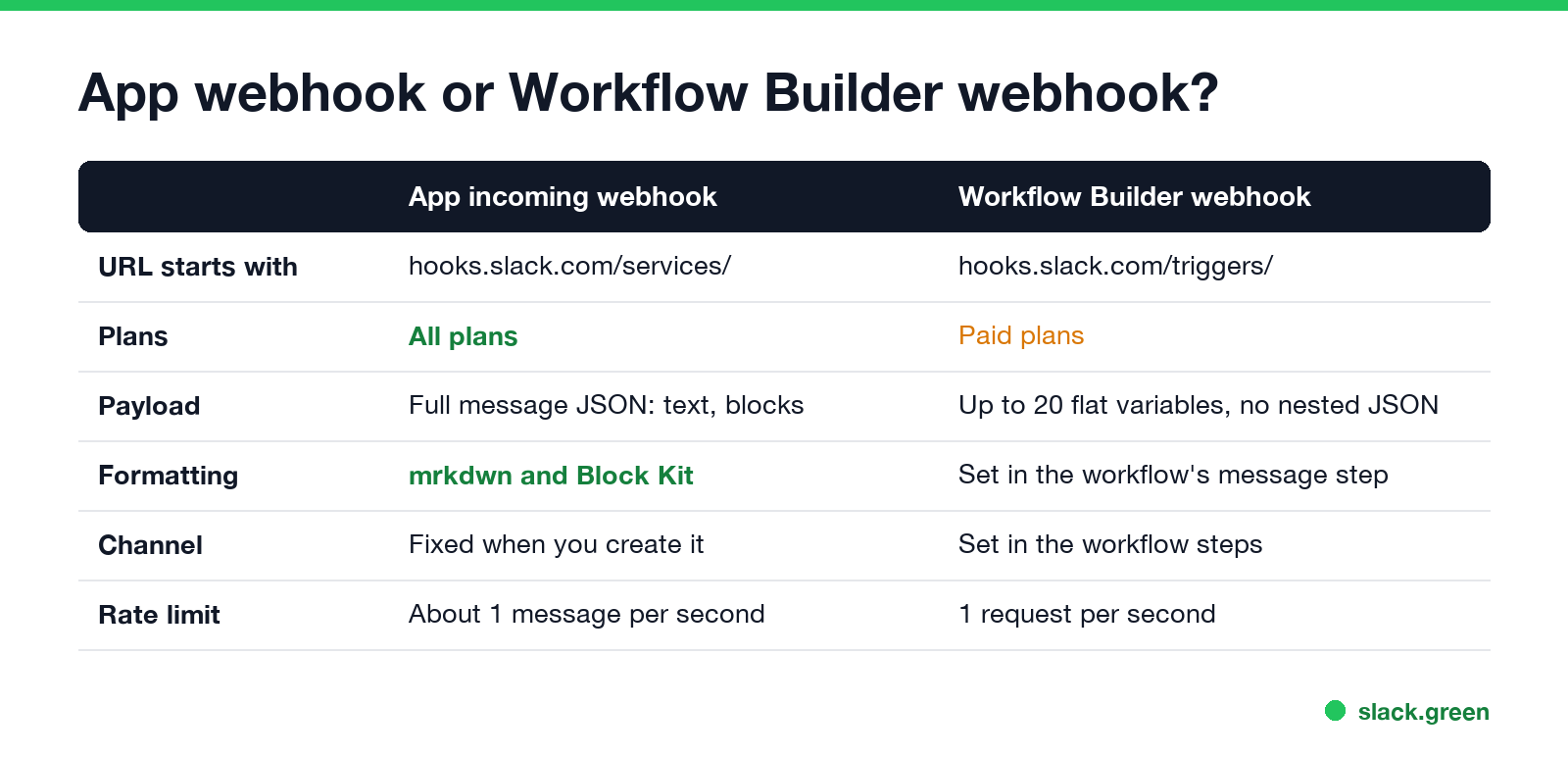
Slack has a second kind of webhook that needs no app. In Workflow Builder, start a workflow From a webhook. Slack gives you a URL starting with https://hooks.slack.com/triggers/, and the workflow's steps decide what to post and where.
| App incoming webhook | Workflow Builder webhook | |
|---|---|---|
| URL | hooks.slack.com/services/... | hooks.slack.com/triggers/... |
| Plans | All plans | Paid plans |
| Payload | Full message JSON, including Block Kit | Up to 20 flat variables, no nested JSON |
| Who can make it | Anyone allowed to install apps | Members, unless admins restrict webhook workflows |
| Rate limit | About 1 message per second | 1 request per second |
Pick Workflow Builder when a non-developer should own the message text. Pick an app webhook when your code builds the message. Ideas for workflows are in Slack Workflow Builder examples.
Send a formatted message
A webhook accepts the same JSON as other Slack messages: text for the notification and fallback, and blocks for the layout.
{
  "text": "Deploy finished",
  "blocks": [
    {
      "type": "section",
      "text": { "type": "mrkdwn", "text": "*Deploy finished* for `web`\n<https://example.com/runs/42|Open the run>" }
    }
  ]
}
Tested curl, Python and Node.js senders, with retries for 429, are in Slack webhook curl example. Links use <url|text> in webhook messages, not [text](url). The syntax for bold, lists, mentions and the markdown block is in Slack Block Kit markdown, and a ready GitHub setup is in how to send a Slack message from GitHub Actions. To put a new line in the text, send \n; more in how to add a new line in Slack.
Webhook errors
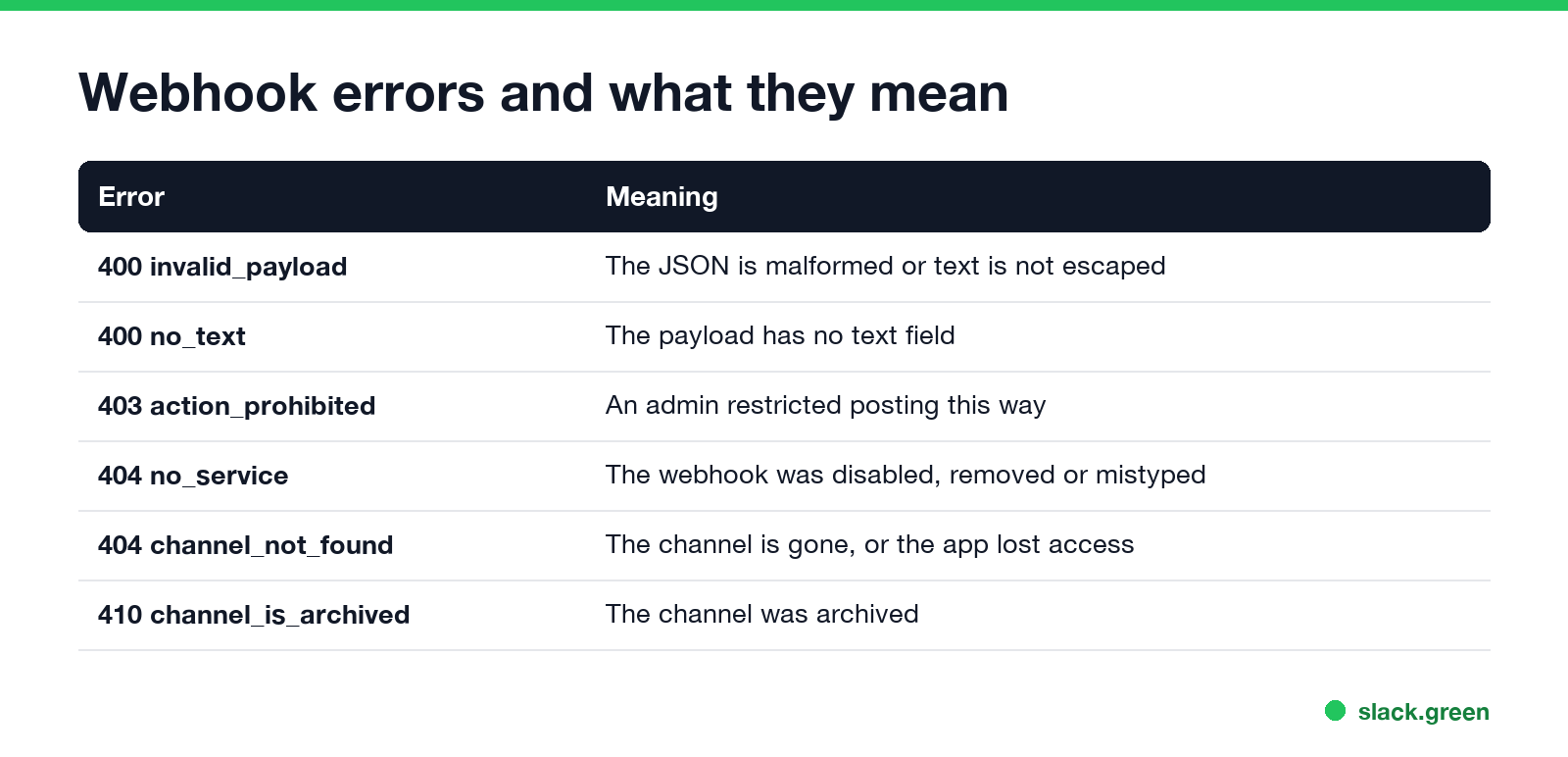
| Response | Meaning |
|---|---|
400 invalid_payload | The JSON is malformed, or text is not escaped |
400 no_text | The payload has no text |
403 action_prohibited | An admin restricted posting this way |
403 posting_to_general_channel_denied | Only some people may post in #general |
404 no_service | The webhook was disabled, removed or mistyped |
404 channel_not_found | The channel is gone or the app lost access |
410 channel_is_archived | The channel was archived |
Slack's docs say an invalid_payload should not be retried without a fix. For no_service, create a new webhook; the old URL will not come back.
FAQ
Never appear "away" on Slack again
Cloud-based. No downloads. Works 24/7 even when your laptop is off.
How do I get a Slack webhook URL? Create an app at api.slack.com/apps, activate Incoming Webhooks, click Add New Webhook to Workspace and choose a channel.
Can a Slack webhook post to a private channel? Yes, if you are a member of the channel when you create the webhook.
Can one webhook post to several channels? No. Create one webhook per channel under the same app.
Can a Slack webhook send a DM? Yes. Pick a person, such as yourself, in the channel picker when you add the webhook.
Is a Slack webhook free? App incoming webhooks work on every plan. Workflow Builder webhooks need a paid plan.
Stop Jiggling Your Mouse.
Join hundreds of remote workers who never worry about their Slack status. Set it up once, stay green forever.
Related Articles
Slack Webhook curl Example, Plus Python and Node.js
Send a Slack message with one curl command: POST a JSON body with a text field to your incoming webhook URL, and Slack answers ok. Tested examples for curl, jq, Block Kit, Python with retries and Node.js, how to escape quotes and new lines, and what 400 invalid_payload and 429 mean in code.
Slack Huddle API: What Apps Can Read and Do
Slack has no API to start, join or record a huddle. Apps can read whether a user is in one from huddle_state on the user profile, see which channel from huddle_state_channel_id, and get the user_huddle_changed event when it changes. Code for both, plus audit log events on Enterprise.
Slack Markdown File Preview: How to Read .md Files in Slack
Slack shows an uploaded .md file as raw text, with the # and ** characters visible. To read it formatted, paste the rendered text into a canvas, create the canvas from markdown with the API, or send it in a markdown block. HTML files and Mermaid diagrams do not render either; the workarounds are below.