
Slack Daily Standup Without a Paid Bot: /remind, Workflow Builder and a Script
We set up a weekday 9:30 standup in a free Slack workspace three ways: a /remind reminder, Workflow Builder, and a short script that posts the questions and collects the thread replies.
You can run a daily standup in Slack without a paid bot. The quickest way is a recurring reminder: /remind #standup "Standup: yesterday, today, blockers?" every weekday at 9:30am. Slack posts the question in the channel each weekday and people answer in a thread. On 8 October 2026 we set up a weekday 9:30 standup in a free-plan test workspace three ways. The reminder worked, Workflow Builder asked for a paid plan, and a short script did what the paid bots do: post the questions on schedule and gather the answers.
The three free ways compared
| Way | Free plan | Collects answers | Time zone | Setup |
|---|---|---|---|---|
/remind in the channel | Works | No, people reply in a thread | The creator's | One line |
| Workflow Builder form | Blocked: "Select a premium plan to get new workflows" | Yes, on a paid plan | ||
Script with chat.scheduleMessage | Works | Yes, reads the thread | Any, set in the script | A Slack app and a token |
Option 1: a /remind reminder
Type this in the standup channel:
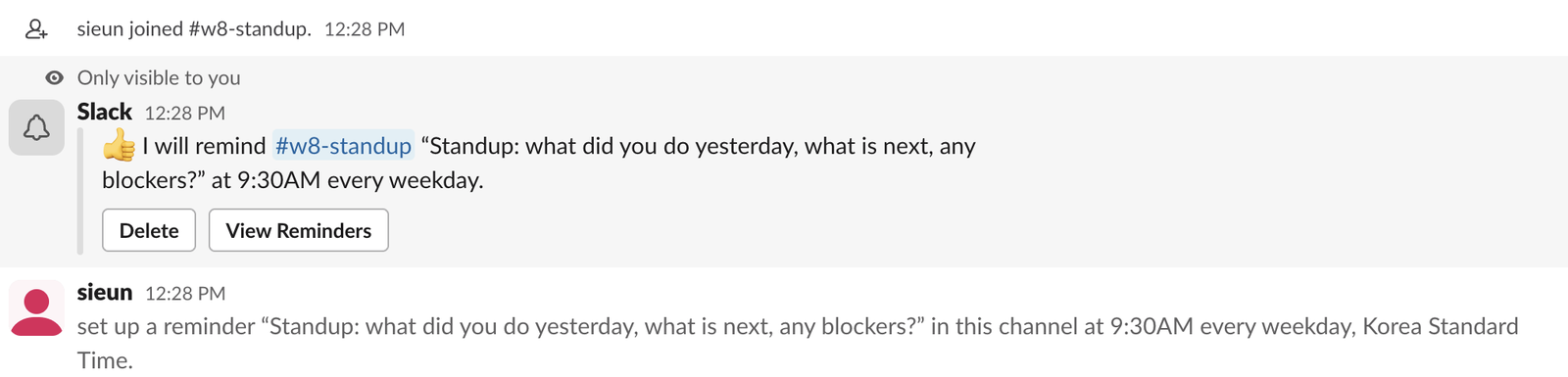
/remind #w8-standup "Standup: what did you do yesterday, what is next, any blockers?" every weekday at 9:30amSlackbot answered with a note only we could see: "I will remind #w8-standup ... at 9:30AM every weekday", with Delete and View Reminders buttons. Slack also posted a line that everyone in the channel sees: "set up a reminder ... in this channel at 9:30AM every weekday, Korea Standard Time." That last part matters for remote teams. The line names the creator's time zone, so the 9:30 is the creator's 9:30, not each reader's. If your team spans zones, have someone in the main zone create it.
reminders.list showed it as a recurring reminder for the channel. To change the text or time, delete it and make a new one; our /remind examples cover the phrasings Slack accepts, and the /remind builder writes the command for you.
What a reminder cannot do is count answers or chase people who skipped. For that you need a bot or the script below.
Option 2: Workflow Builder needs a paid plan
A Workflow Builder form is the usual no-code standup: a scheduled workflow sends a form and posts each answer. On our Free workspace, the + tab menu put Workflow under "Do more with Pro". Clicking it opened a plan page.

The prices shown were $7.25 USD per person per month for Pro and $15 for Business+, after a 30-day trial. If your workspace is already paid, our Workflow Builder examples include a standup form.
Never appear "away" on Slack again
Cloud-based. No downloads. Works 24/7 even when your laptop is off.
Option 3: a script that posts and collects
This script does two jobs. schedule books the standup message for the next 5 weekdays at 9:30 with chat.scheduleMessage, skipping Saturday and Sunday. collect finds today's standup message and prints every reply in its thread. It needs a Slack app with a bot token that has chat:write, channels:history and channels:join.
import os, sys, time, datetime as dt
from zoneinfo import ZoneInfo
import requests

TOKEN = os.environ["SLACK_BOT_TOKEN"]          # xoxb- with chat:write, channels:history, channels:join
CHANNEL = os.environ["STANDUP_CHANNEL"]        # channel ID, e.g. C0123456789
TZ = ZoneInfo(os.environ.get("STANDUP_TZ", "Asia/Seoul"))
QUESTIONS = "Standup :wave: Reply in this thread: 1) yesterday 2) today 3) blockers"
API = "https://slack.com/api/"

def call(method, **params):
    r = requests.post(API + method, headers={"Authorization": "Bearer " + TOKEN}, data=params, timeout=30)
    return r.json()

def schedule(days=5, hour=9, minute=30):
    call("conversations.join", channel=CHANNEL)       # the bot must be a member to read replies
    day = dt.datetime.now(TZ).date()
    done = 0
    while done < days:
        day += dt.timedelta(days=1)
        if day.weekday() >= 5:                       # skip Saturday and Sunday
            continue
        post_at = int(dt.datetime(day.year, day.month, day.day, hour, minute, tzinfo=TZ).timestamp())
        r = call("chat.scheduleMessage", channel=CHANNEL, text=QUESTIONS, post_at=post_at)
        print(day, r.get("scheduled_message_id") or r.get("error"))
        done += 1

def collect():
    hist = call("conversations.history", channel=CHANNEL, limit=50)["messages"]
    post = next(m for m in hist if m.get("text", "").startswith("Standup"))
    replies = call("conversations.replies", channel=CHANNEL, ts=post["ts"])["messages"][1:]
    print(f"{len(replies)} answers to the standup posted at {post['ts']}")
    for m in replies:
        print(f"- <@{m['user']}>: {m['text']}")

{"schedule": schedule, "collect": collect}[sys.argv[1]]()
We ran it with the token, channel ID and time zone in environment variables:
$ uv run --with requests python standup.py schedule
2026-10-09 Q0C7KQFQ0Q6
2026-10-12 Q0C7FGPTEM9
2026-10-13 Q0C7GEGUSBX
2026-10-14 Q0C7KQG6430
2026-10-15 Q0C7KQFHBQW
The output skipped 10 and 11 October, a Saturday and a Sunday. To check that a scheduled message really goes out on time, we booked one 75 seconds ahead. It posted 0.94 seconds after the requested time. We answered it twice in its thread, then ran the second job:
$ uv run --with requests python standup.py collect
2 answers to the standup posted at 1791430243.941599
- <@U0B7L4YK420>: Yesterday: fixed the cert alert. Today: release notes. Blockers: none
- <@U0B7L4YK420>: Today: on call. Blocker: waiting on DB access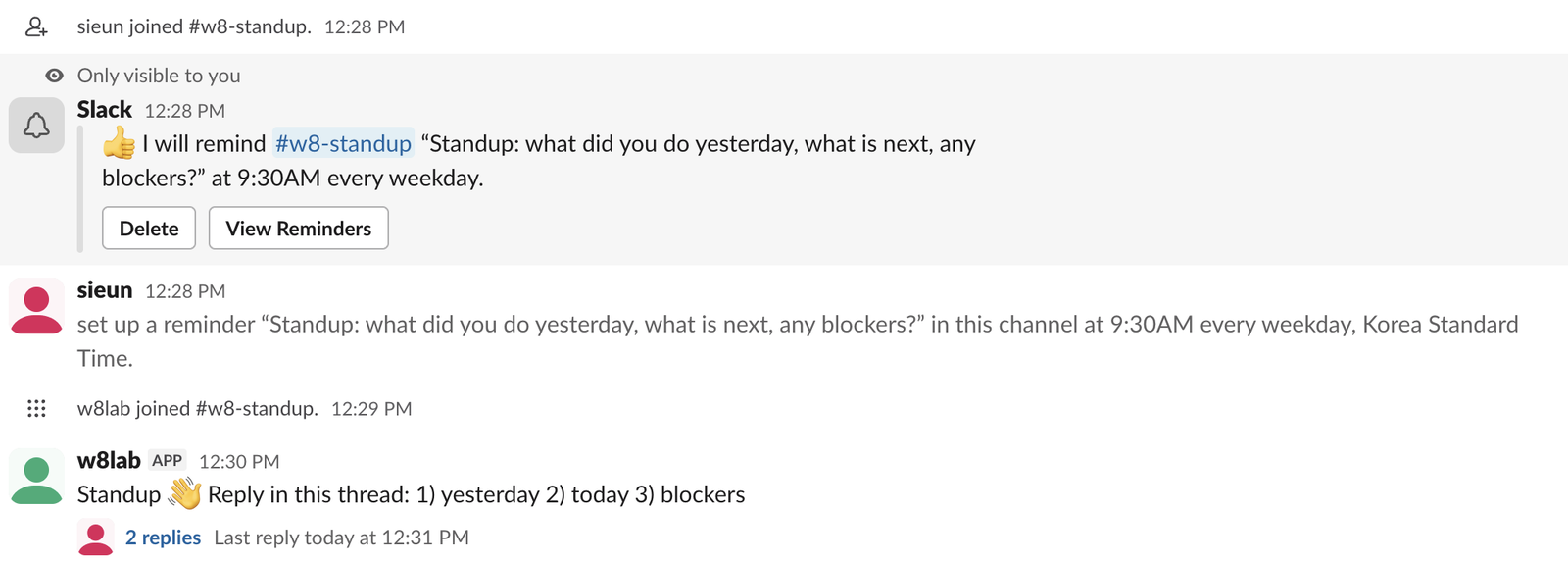
Run schedule once a week, for example from cron on Friday. collect could post a summary back with chat.postMessage, or DM people who have not answered by 10:00.
Two traps we hit. The bot must be a member of the channel to read replies, which is why schedule calls conversations.join first. And messages scheduled through the API do not show in anyone's Drafts & sent > Scheduled tab; our Slack drafts test found only messages scheduled in the app listed there. List or cancel them with chat.scheduledMessages.list and chat.deleteScheduledMessage; see our scheduled message API test.
Which one to pick
For a small team that answers in a thread anyway, the /remind line is enough. If you need a record of who answered, and you are on the Free plan, the script costs nothing but a place to run it. On a paid plan, Workflow Builder does both without code.
FAQ
Can a standup reminder skip holidays?
Not with/remind; "every weekday" means Monday to Friday. With the script, skip the dates you want before calling chat.scheduleMessage.Stop Jiggling Your Mouse.
Join hundreds of remote workers who never worry about their Slack status. Set it up once, stay green forever.
Related Articles
Slack Tabs Under a Channel Name: What Each One Is and How to Edit Them
We added, renamed, moved, hid and deleted the tabs under a channel name in Slack web on the Free plan, and compared them with the tabs in a DM.
Leave Multiple Slack Channels at Once: 4 Ways Timed, Plus a Script
Slack has no bulk leave button. We made 12 test channels and left them with the sidebar menu, the channel browser, /leave and a 30-line script, and timed each way.
How to Delete Someone Else's Message in Slack, Tested as Workspace Owner
As the owner of a free-plan workspace we deleted an app's message, a webhook message and two system messages, in Slack web and with the API, and checked which settings exist.