
What Does Do Not Disturb Do on Discord? What It Silences and What It Doesn't
Do Not Disturb on Discord sets a red status and silences Discord's desktop pop-ups and sounds, including mentions, DMs and the call ring. Messages and calls still arrive, unread badges still count, and Discord says mobile push notifications still come through. How to set it with a timer, how it differs from Invisible and Idle, and why it can turn on by itself.
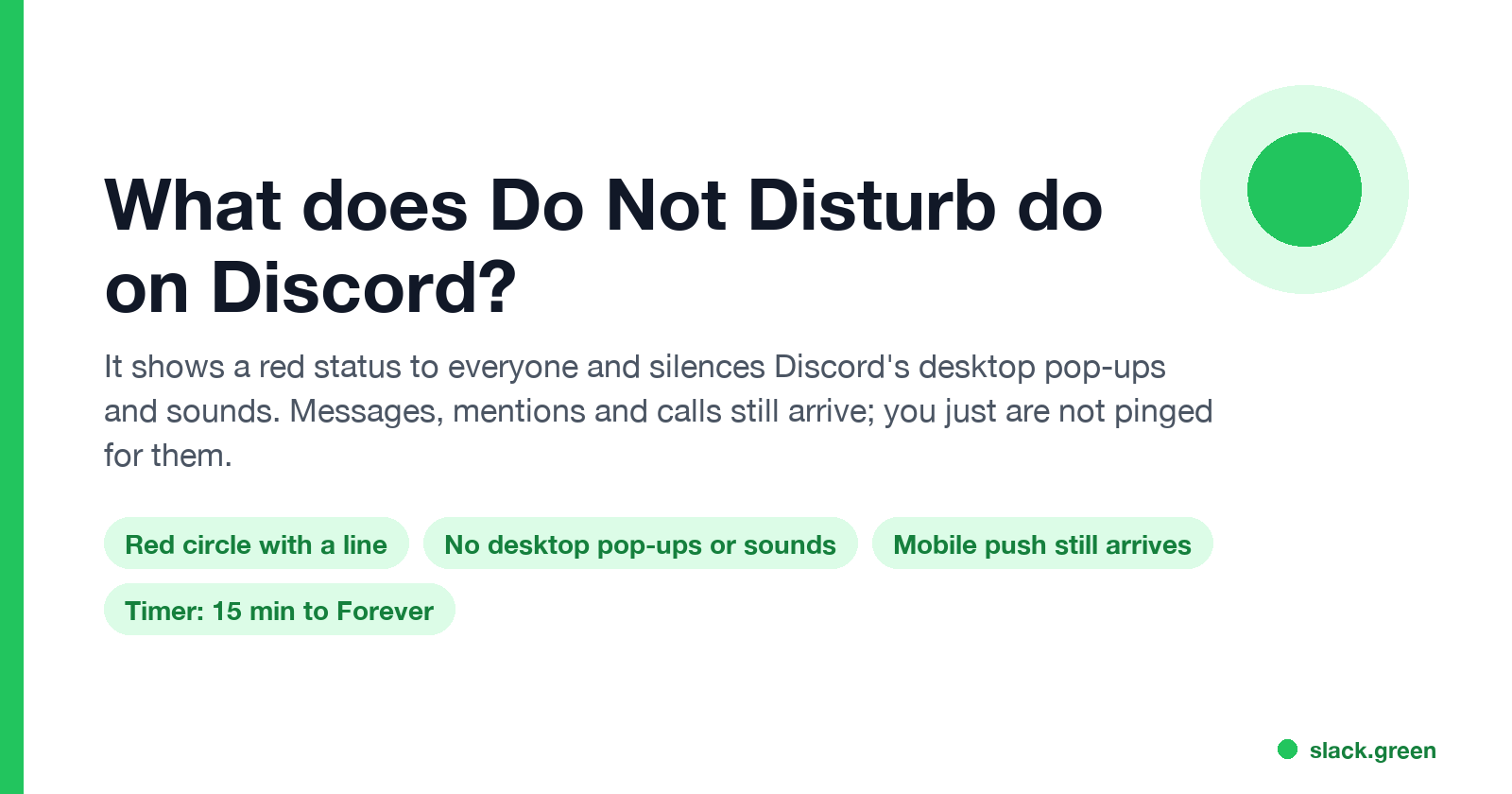
Do Not Disturb on Discord does two things. It shows a red circle with a line on your profile picture, so people can see you are busy. And it silences Discord on your side: no desktop pop-ups and no sounds for messages, mentions or incoming calls. Nothing is blocked. People can still message and call you, your unread badges still count up, and you see it all when you open Discord. Discord's own notification guide adds one exception: on a phone, DND silences the sounds inside the app, but "you'll still get mobile push notifications".
DND is the only Discord status that changes your notifications. Idle and Invisible only change how you look to others.
Work chat apps have the same feature under the same name, with different rules. In Slack, Do Not Disturb pauses notifications but leaves your dot as it is, and the dot turns grey after 10 minutes without input in the Slack window. Slack Green keeps that Slack dot green during the working hours you set, from the cloud. Slack's version is covered in Slack Do Not Disturb. Zoom's version is in Zoom Do not disturb.
What Discord Do Not Disturb silences, and what still gets through
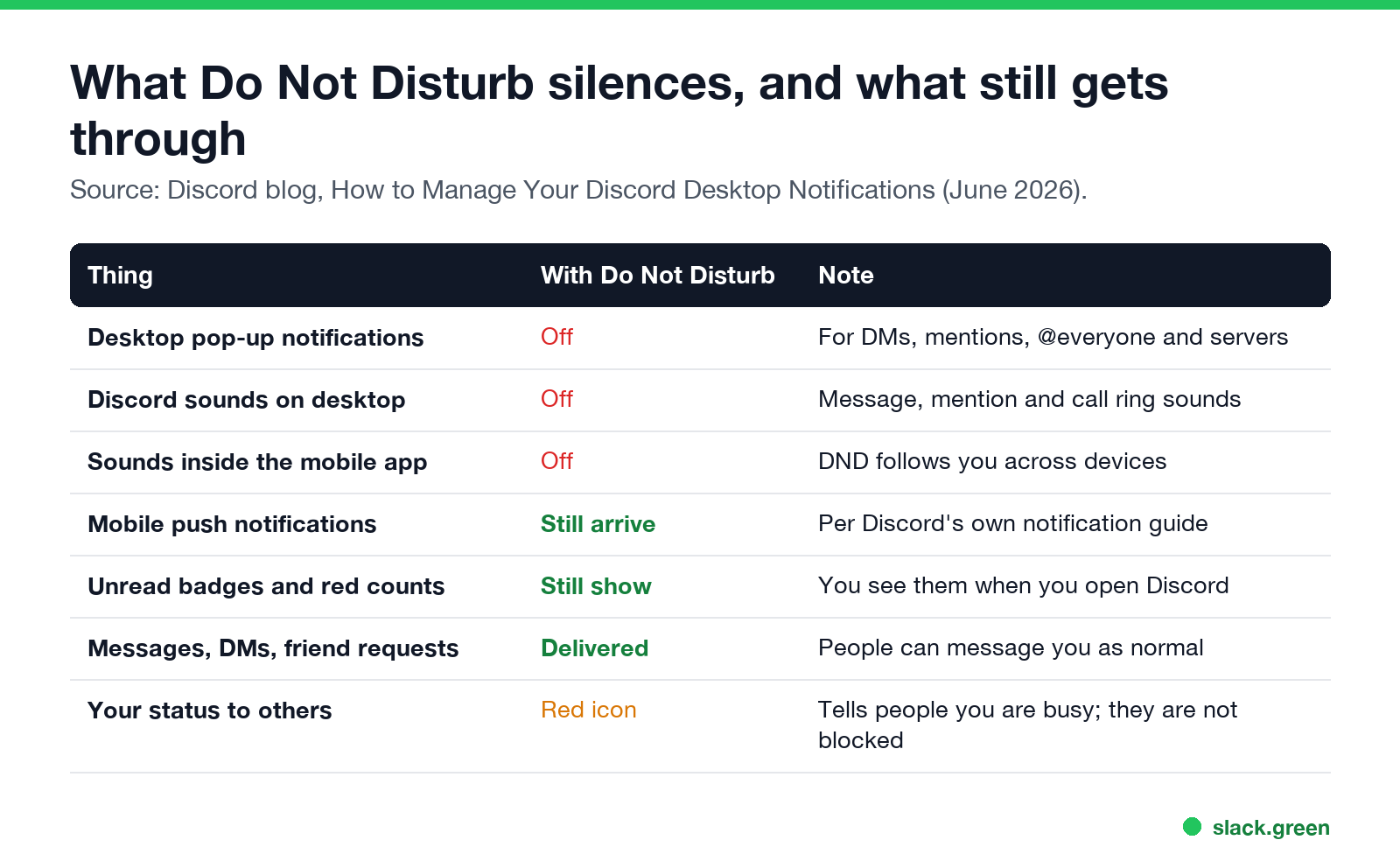
| Thing | With Do Not Disturb | Note |
|---|---|---|
| Desktop pop-up notifications | Off | DMs, mentions, @everyone, server messages |
| Discord sounds on desktop | Off | Message, mention and call ring sounds |
| Sounds inside the mobile app | Off | DND follows you across devices |
| Mobile push notifications | Still arrive | Per Discord's notification guide |
| Unread badges and red counts | Still show | You see them when you open Discord |
| Messages, DMs, friend requests | Delivered | Nothing is held back or blocked |
| Your status to others | Red icon | A signal, not a block |
Discord describes it in How to Manage Your Discord Desktop Notifications as the status that "silences ALL notifications across Discord", and notes that "Do Not Disturb is the only status that actually silences your sounds".
If you want silence on your phone too, set the phone's own Focus or Do Not Disturb mode, or turn off Discord push notifications in User Settings, Notifications.
Does Do Not Disturb mute calls on Discord?
It mutes the ring, not the call. When someone calls you in a DM while you are on DND, the call still reaches you and shows in the DM, but Discord does not play the ringtone or send a desktop pop-up. You can join it if you notice it. If you miss it, the DM shows a missed call.
DND also does not mute a voice channel you are already in. People in the channel hear you, and you hear them. To stop hearing a channel, use Deafen (the headphones icon).
Discord Do Not Disturb vs Invisible vs Idle
Never appear "away" on Slack again
Cloud-based. No downloads. Works 24/7 even when your laptop is off.
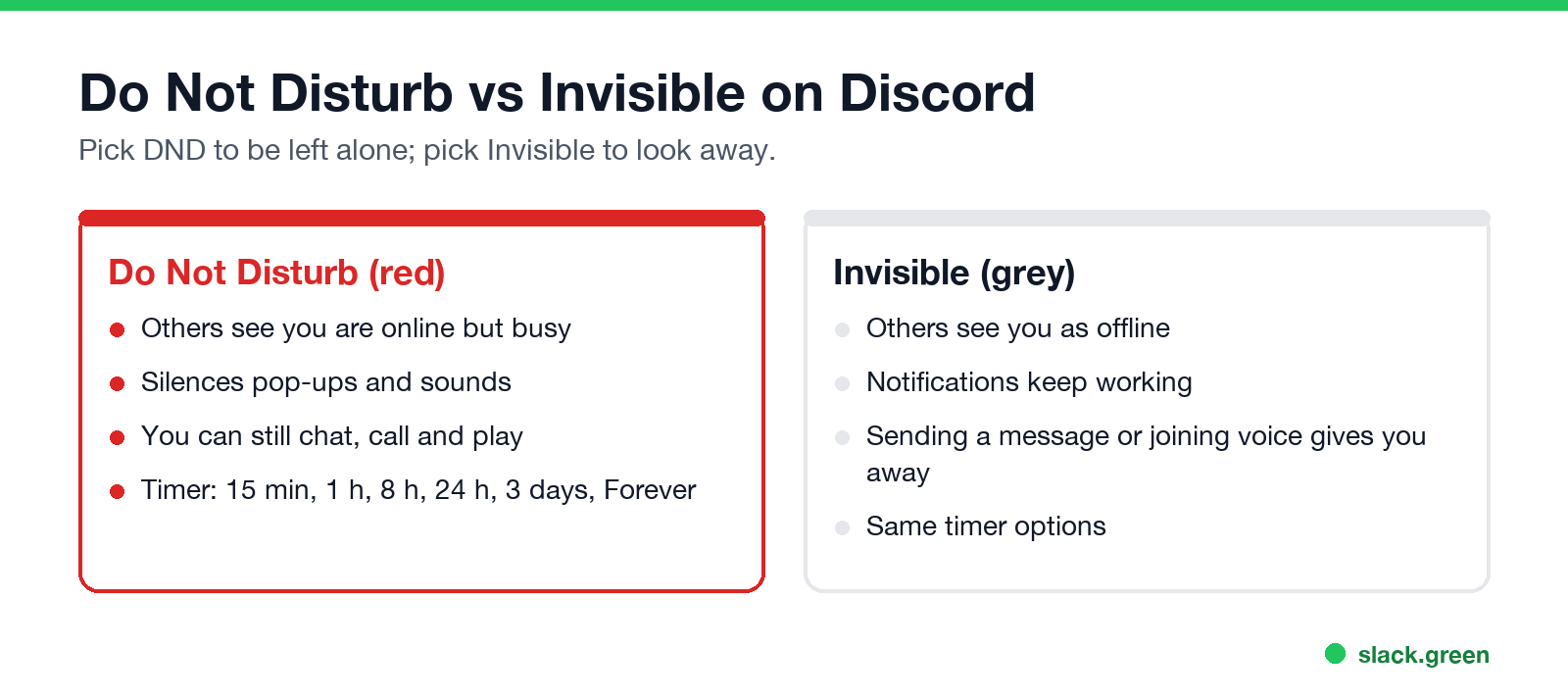
| Status | Icon | What others see | Your notifications |
|---|---|---|---|
| Online | Green dot | You are here | On |
| Idle | Yellow moon | You are away for now | On |
| Do Not Disturb | Red circle with a line | You are here but busy | Silenced |
| Invisible | Grey, like offline | You look offline | On |
Pick Do Not Disturb when you want to be left alone and do not mind people knowing you are online. Pick Invisible when you want to look offline but still get pinged. Invisible has a catch: sending a message or joining a voice channel shows you are there, as covered in Discord Invisible vs Offline. To hide from one person only, see how to appear offline to one person on Discord.
Idle is set by Discord after about 10 minutes without input on your computer, or as soon as you leave the mobile app. It does not change notifications. The details are in what does Idle mean on Discord.
How to turn on Do Not Disturb on Discord, with a timer
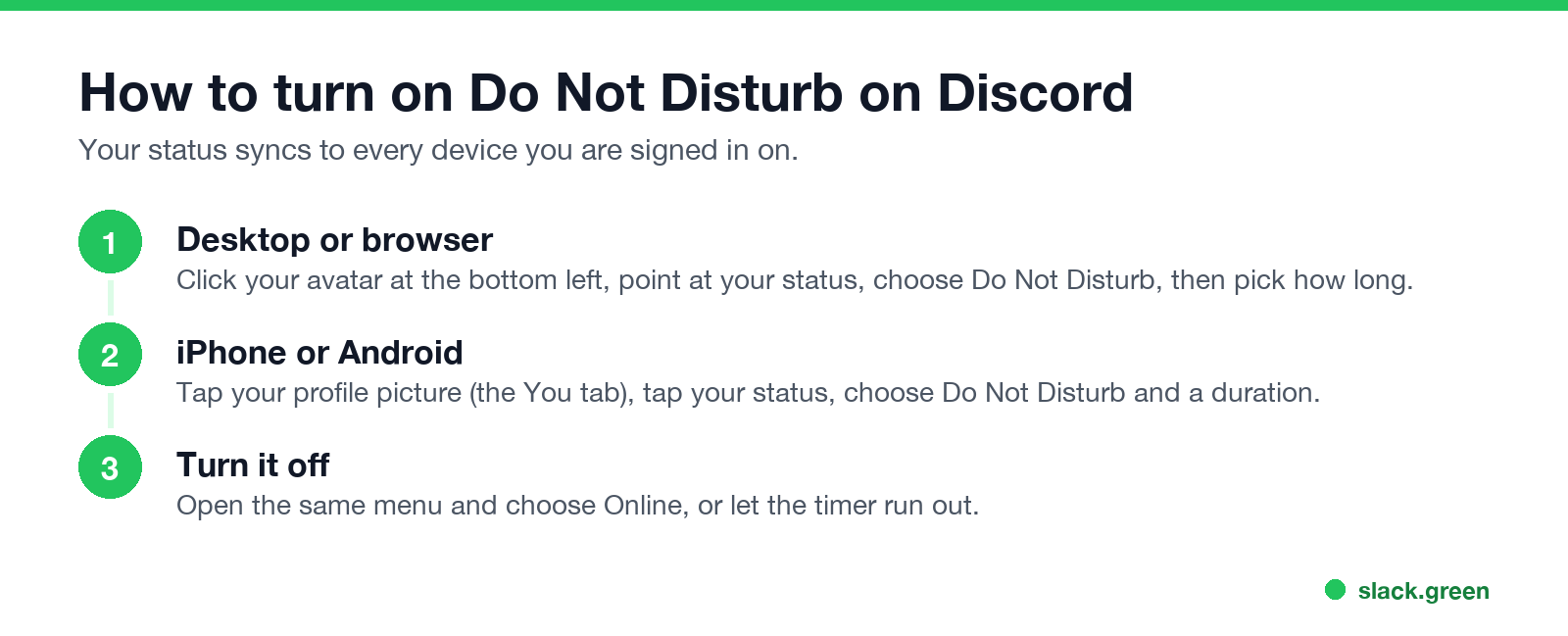
- Desktop app or browser. Click your avatar at the bottom left, point at your current status, and choose Do Not Disturb. Pick a duration: 15 minutes, 1 hour, 8 hours, 24 hours, 3 days, or Forever.
- iPhone or Android. Tap your profile picture (the You tab), tap your status, and choose Do Not Disturb and a duration.
- Turn it off. Open the same menu and choose Online, or let the timer run out. Discord switches you back to Online by itself.
- • You set it on another device. Status syncs across your phone, desktop and browser. A tap on the phone last night shows on the PC today.
- • The duration was Forever. DND set to Forever stays until you change it, across restarts.
- • An app or bot changed it. Third-party clients and status-changing tools can set your status. Remove any you do not recognize under User Settings, Authorized Apps.
Your status is the same on every device. Set DND on your phone and your desktop shows it too.
Why Discord turns on Do Not Disturb automatically
Discord has no DND schedule, so it does not switch you to DND at a set time. When people see DND "turn on by itself", the usual causes are:
A separate case looks the same from your side: notifications stop, but your status is Online. That is usually Windows Focus or macOS Focus hiding pop-ups for every app, or a muted server. Discord's guide lists both checks.
Does Do Not Disturb tell people you are ignoring them?
Never appear "away" on Slack again
Cloud-based. No downloads. Works 24/7 even when your laptop is off.
No. The red icon tells people you are busy. Discord does not tell anyone that their message arrived while you were on DND, and it does not auto-reply. Read indicators do not exist in Discord DMs, so nobody can see whether you opened their message.
Quick answers
Can people still message me on Do Not Disturb? Yes. Messages, DMs and friend requests arrive as normal.
Will I get @everyone and @mention pings on DND? Not as pop-ups or sounds on desktop. The mention badge still shows in the server list.
Does Discord DND work on mobile? It silences sounds in the app. Discord says push notifications still arrive; turn them off in the phone's settings for full quiet.
Does DND stop game invites and Activities? They arrive without a sound or pop-up, like messages.
Stop Jiggling Your Mouse.
Join hundreds of remote workers who never worry about their Slack status. Set it up once, stay green forever.
Related Articles
Can My Employer See My Browsing If I Use a VPN? It Depends Whose
A personal VPN hides the sites you visit from the office network, but not from monitoring software, a managed browser or IT on a work laptop. The company VPN shows your employer every site it carries. What each setup hides.
Teams Status on Multiple Devices: The Last Device You Used Wins
Signed in to Teams on a computer and a phone? Your status comes from the device you used most recently. That is why a quick look at your phone can turn you Away, and why a phone in your pocket shows Away instead of Offline at night.
Zoom Do Not Disturb: How to Turn It On, Schedule It, and What It Blocks
To turn on Do not disturb in Zoom, click your profile picture, point at your status and choose Do not disturb, then a time from 20 minutes to 24 hours, or Custom for a daily schedule. It blocks pop-up notifications for Zoom Team Chat and Zoom Phone calls. Busy, by contrast, mutes nothing. How the two differ, and how to keep a Zoom meeting free of pop-ups.