
How to Find a Canvas in Slack: 3 Places It Shows Up
A channel canvas shows up as a tab at the top of the channel, in Files > Canvases, and in search under the Canvases filter. We made one on the Free plan on October 27, 2026 and timed how long search took to find a word from its body.
To find a canvas in Slack, look in three places: the tab row at the top of the channel it belongs to, Files > Canvases in the left rail, and the search results page with the type set to Canvases. On October 27, 2026 we made a channel canvas in our Free test workspace and checked each place. All three found it, but search needed about 3 minutes before it matched a word from the canvas body.
1. The tab at the top of the channel
A channel canvas lives as a tab next to Messages. The tab takes the canvas title. Ours was called Lab release checklist:
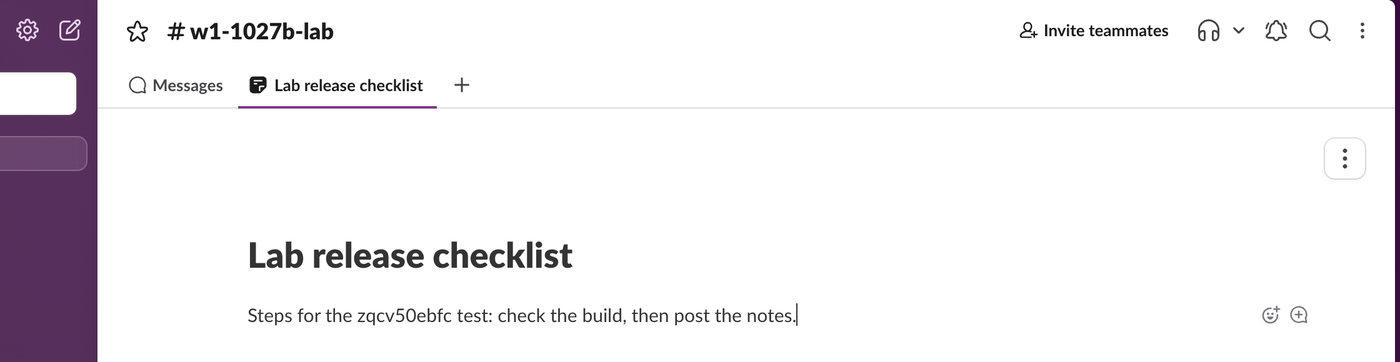
If the channel has no canvas yet, the same spot reads Add canvas. Clicking it offered three choices in our test: New blank canvas, Add existing canvas and Start with a template. Slack also posted "sieun made updates to Lab release checklist" in the channel, with a link to the canvas, so you can find it from the message history too.
2. Files > Canvases
Click Files in the left rail, then Canvases. This list shows every canvas you made or can open, including Slack's templates:
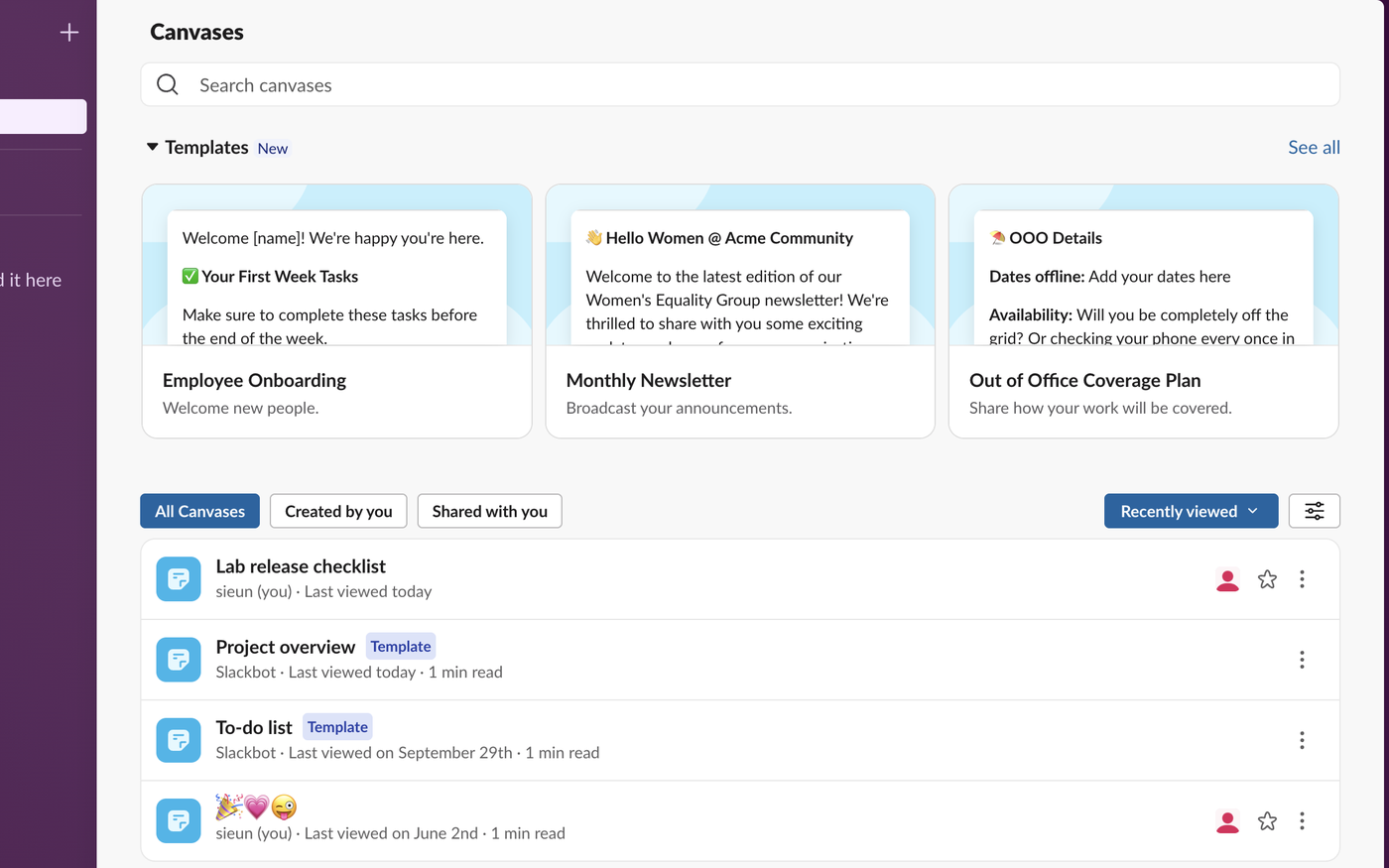
The filters at the top of the list are All Canvases, Created by you and Shared with you, and the list is sorted by Recently viewed. The search box above it is the fastest way to find a canvas by its title: release checklist found ours about 2 minutes after we made it.
3. Search with the Canvases filter
The main search bar at the top of Slack also covers canvases, but results open on Messages first. We searched for a made-up word that appeared only in the canvas body, zqcv50ebfc. The page said "Nothing turned up" until we opened the type menu, which showed the canvas under Canvases:

So if search seems to miss a canvas, switch the type from Messages to Canvases before you give up. The result showed the matching line from the canvas body with the word highlighted.
Never appear "away" on Slack again
Cloud-based. No downloads. Works 24/7 even when your laptop is off.
How long search took to find canvas text
| Where we searched | Time after we typed the text | Result |
|---|---|---|
| Files > Canvases box, body word | 77 s | No results |
| Main search, type Canvases, body word | 174 s | Found, 1 result |
| Files > Canvases box, body word | 209 s | Found |
| Files > Canvases box, title words | about 2 min | Found |
If you have just written a canvas, wait a few minutes before you search for words inside it. Messages index faster: in our Slack search not working test, new messages took 20 to 31 seconds.
Where you cannot make a canvas on Free
On the Free plan, the canvas we could make was a channel canvas. The + button in Files showed Canvas and List with a Pro badge, and the + on the tab row of a DM put Canvas, List and Workflow under "Do more with Pro":
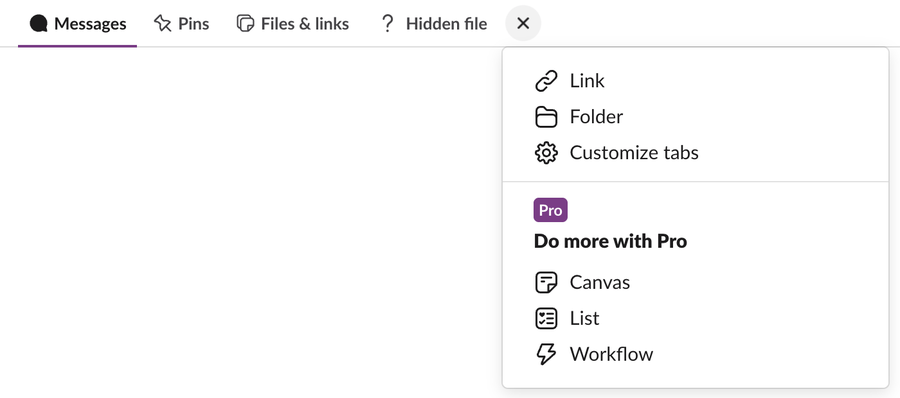
So on Free, look for canvases in channels first. Slack canvas vs lists compares what each plan allows, and are Slack canvases private shows who else can open each kind.
If a canvas disappeared
Files has a Deleted section. In our workspace it said "You can restore deleted canvases or lists within 24 hours of deletion," and listed a canvas another test had deleted 6 hours earlier, with a restore button. After 24 hours the canvas is gone for good. To keep a copy outside Slack, export the canvas to PDF or Markdown.
FAQ
How do I save a canvas in Slack?
Canvases save as you type; there is no save button. To keep one handy, open Files > Canvases and click the star on it. Starred canvases show under Starred in Files.
Why can't I see a canvas someone mentioned?
You only see canvases you have access to. A canvas in a channel you are not in, or one shared with specific people, will not show in your list or your search results.
Stop Jiggling Your Mouse.
Join hundreds of remote workers who never worry about their Slack status. Set it up once, stay green forever.
Related Articles
How to Mark a Message Urgent in Slack (There Is No Flag)
Slack has no urgent or priority flag on messages. On October 27, 2026 we checked every menu in the Free plan's message box and message menu and found none. What works instead: a DM, @here or @channel, a reminder on the message, and the reader's VIP and keyword settings.
How to Delete a Thread in Slack (Parent and Replies)
Slack has no delete-thread button. Deleting the first message leaves 'This message was deleted.' with the replies still attached; the thread only disappears once every reply is deleted too. We tested both in the app and through the API on October 27, 2026.
How to Delete Files in Slack (Deleting the Message Is Not Enough)
Delete a Slack file from Files or from the file's own menu with Delete file. In our October 27, 2026 test, Delete message on a file post removed the post but left the file on Slack's servers. We also deleted files in bulk with a short script.