
Is Slack AI Worth It? What It Costs Now and What You Get
Slack no longer sells Slack AI as an add-on. Pro includes AI summaries and huddle notes; search answers, recaps, translations and Slackbot come with Business+, at $7.75 more per user a month. What each AI feature does, who it pays off for, and what it does with your data.
Slack AI is worth paying for if your team spends a lot of time catching up: long channels, many threads, meetings in huddles. There is no longer a separate Slack AI price. Pro ($7.25 a user a month, paid yearly) includes AI conversation summaries and huddle notes. The rest, AI search answers, daily recaps, file summaries, translations and the Slackbot agent, comes with Business+ at $15, which is $7.75 more per user than Pro. The free plan has no AI features beyond a limited Slackbot preview.
AI summaries help you catch up after time away. They do not change how Slack shows you while you are away: your dot still goes grey 10 minutes after your last input in Slack. Slack Green keeps it green during the working hours you set, from the cloud.
What is Slack AI?
Slack AI is the set of AI features built into Slack. It uses the messages and files you already have access to: public channels, and the private channels and DMs you are in. Its answers never include content you could not open yourself. Owners and admins can turn each feature on or off.
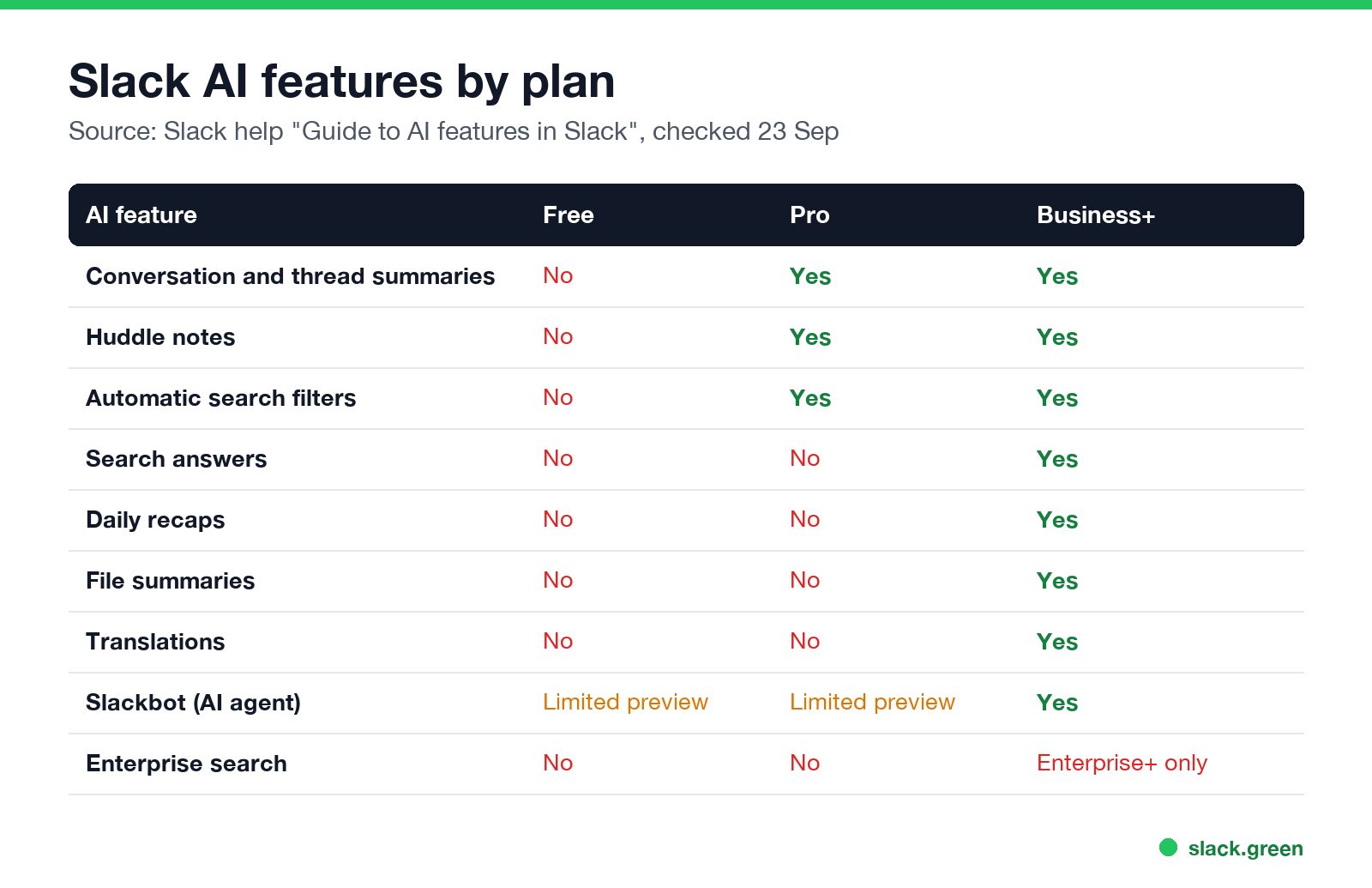
| AI feature | What it does | Pro | Business+ |
|---|---|---|---|
| Conversation summaries | Summarizes a channel, DM or thread: unread, last 7 days or a date range | Yes | Yes |
| Huddle notes | Takes notes, a transcript and action items during a huddle | Yes | Yes |
| Automatic search filters | Turns a plain-language search into filters | Yes | Yes |
| Search answers | Answers a question in the search bar, with citations | No | Yes |
| Recaps | A daily digest of the channels you pick | No | Yes |
| File summaries | Summarizes shared documents | No | Yes |
| Translations | Translates messages and AI results | No | Yes |
| Workflow automation | Builds a workflow from a prompt | No | Yes |
| Slackbot | A personal AI agent that works across your conversations and files | Limited preview | Yes |
| Enterprise search | Searches connected apps and systems | No | Enterprise+ only |
Source: Slack's help center, "Guide to AI features in Slack" and "Updates to feature availability and pricing for Slack plans", checked on 23 September.
How much does Slack AI cost per month?
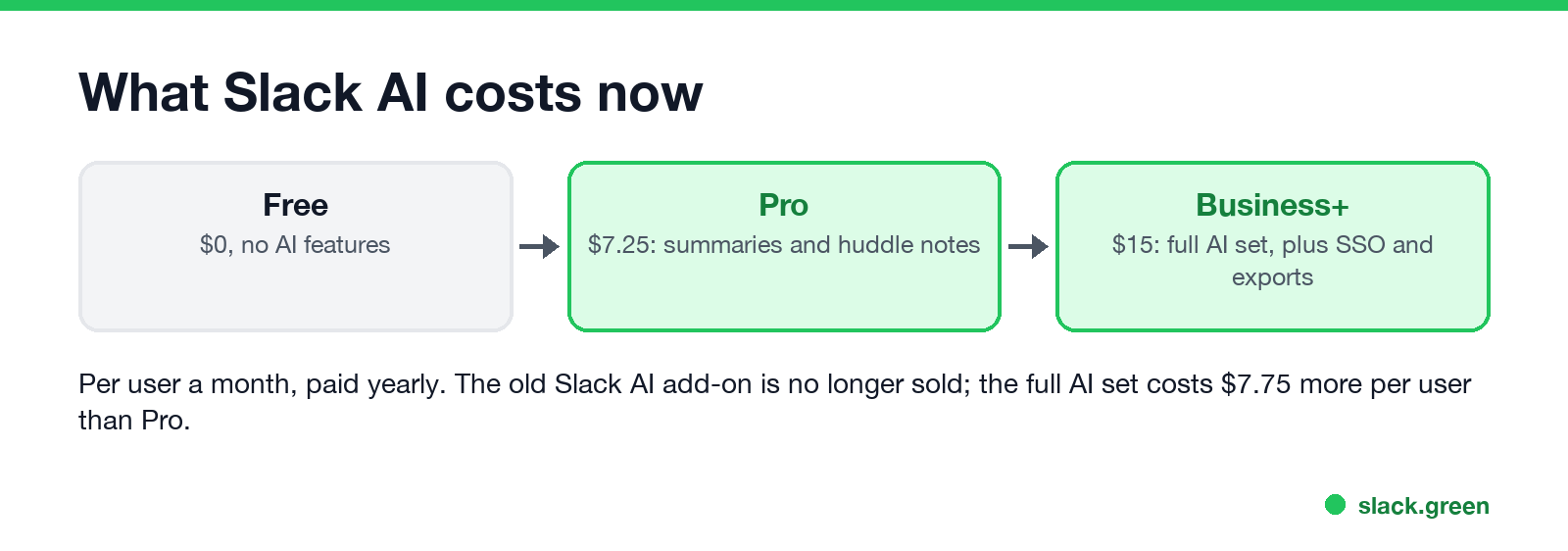
In June 2025 Slack stopped selling the Slack AI add-on and moved AI into its plans. Customers who had the add-on kept it until their first renewal after August 17, 2025. Today:
- • Free: $0, no AI features. Slackbot may be available to try in a limited preview.
- • Pro: $7.25 a user a month paid yearly ($8.75 monthly), with summaries and huddle notes.
- • Business+: $15 a user a month paid yearly ($18 monthly), with the full AI set.
So the real price of full Slack AI is the $7.75 a user a month between Pro and Business+. For 20 people that is $1,860 a year. Business+ also adds SAML single sign-on, full data exports and faster support, so part of that price buys non-AI features. See is Slack Pro worth it for the Pro side.
Is Slack AI free?
Nunca mais apareça como "ausente" no Slack
Na nuvem. Sem downloads. Funciona 24/7 mesmo com seu notebook desligado.
On the free plan, no. Slack's pricing page says free and Pro users will be able to try Slackbot in a limited trial, and ongoing Slackbot access stays with Business+ and Enterprise+. If you are on Pro, you already have summaries and huddle notes at no extra cost.
Is Slack AI worth it? Who it pays off for
Worth it for:
Not worth it for:
Reddit reviews of Slack AI mostly agree: summaries and huddle notes are the features people keep using, and the add-on price was the main complaint before Slack folded it into the plans.
What Slack AI does with your data
From Slack's pricing FAQ and help center:
If you want to know what your employer can see in general, see can Slack admins see DMs.
FAQ
Nunca mais apareça como "ausente" no Slack
Na nuvem. Sem downloads. Funciona 24/7 mesmo com seu notebook desligado.
Is Slack AI worth it?
For busy workspaces with long channels and many huddles, yes. Summaries and huddle notes come with Pro. The full set costs $7.75 more per user a month on Business+.
How much does Slack AI cost per month?
There is no separate price. Summaries and huddle notes come with Pro at $7.25 a user a month, paid yearly. Everything else comes with Business+ at $15.
Can I still buy the Slack AI add-on?
No. Slack stopped selling it on its website in 2025.
What is a Slack AI recap?
A daily digest of the channels you choose, delivered in Slack. Recaps need Business+ or Enterprise+.
Does Slack AI read my DMs?
Only to answer you. It uses DMs you are part of for your own summaries and answers, and never shows others content they cannot access.
Pare de Mexer o Mouse.
Centenas de trabalhadores remotos não se preocupam mais com o status do Slack. Configure uma vez, fique verde para sempre.
Related Articles
Slack Lists Tutorial: Create, Organize and Share a List
Slack lists are tables of tasks inside Slack, with fields, assignees, due dates, a board view and a comment thread on every item. How to create a list from scratch or a template, set up fields, turn it into a kanban board, add messages to it, share it, and what the plan limits are.
Slack Jira Integration: Setup, /jira Commands and Notifications
Install the Jira Cloud for Slack app, type /jira connect in a channel to send a Jira space's updates there, /jira notify for personal notifications as DMs, and create work items from any message with More actions. Every /jira command, Jira automation to Slack, and fixes when previews or notifications stop.
How to Create a Slack Workspace, on Desktop or Phone
Go to slack.com/get-started, enter your email, type the confirmation code, and click Create a Workspace. It is free to start, you become the Primary Owner, and it takes about five minutes. Steps for desktop, iPhone and Android, and what to set up next.