
Slack Status for Sick Days: Examples to Copy and How to Set Them
The simplest sick status is Slack's own Out sick with the thermometer emoji, set to clear Today. Copyable statuses for sick, sick but working, appointments, vacation, and leave, and the settings that go with each.
For a sick day, use Slack's built-in Out sick status with the thermometer emoji (:face_with_thermometer:) and set it to clear Today. If you are fully off, also tick Pause notifications, so work pings wait until you are back. If you are sick but still working, keep notifications on and say replies will be slow.
Below are 12 statuses you can copy for sick days, appointments, vacation, and leave, the four clicks to set one, and one thing a sick status does not change: your green dot.
We build Slack Green, which manages the other half of what coworkers see, your green or grey presence dot. We also run a free Slack status ideas generator if none of the examples below fits.
Slack statuses for sick days
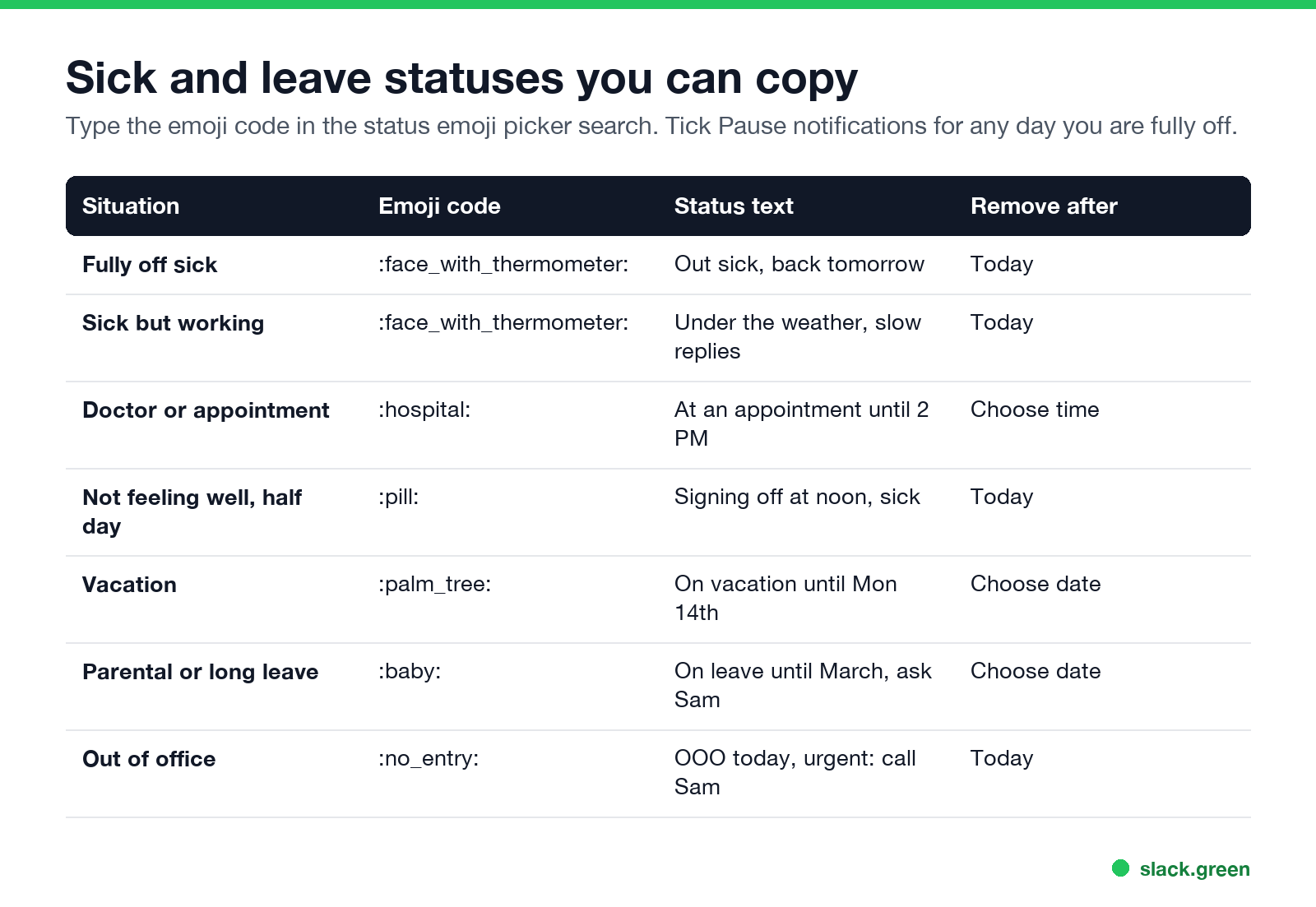
Type the emoji code into the emoji search in the status box. The status text has a 100-character limit.
Fully off sick
- •
:face_with_thermometer:Out sick today, back tomorrow - •
:face_with_thermometer:Out sick. For anything urgent, ask Sam - •
:sneezing_face:Off sick, not checking Slack - •
:face_with_thermometer:Under the weather, replies will be slow - •
:tea:Working from bed today, async only - •
:mute:Sick, no calls today, messages OK - •
:hospital:At a doctor's appointment until 2 PM - •
:pill:Signing off at noon, not feeling well - •
:palm_tree:On vacation until Monday the 14th - •
:baby:On parental leave until March, ask Sam - •
:no_entry:Out of office today, urgent: text me - •
:airplane:Travelling, back online Thursday - Click your profile photo in the sidebar.
- Click Update your status.
- Choose the suggested Out sick status, or type your own text and pick an emoji.
- Under Remove status after, choose Today.
- Tick Pause notifications if you are fully off, then click Save.
Sick but working
Appointments and half days
Vacation, leave, and out of office
Name a backup person when you can. It is the line coworkers need most and the one most statuses skip. For longer absences, a Slack out of office message is covered in how to set up an out of office message on Slack.
How to set a sick status on Slack
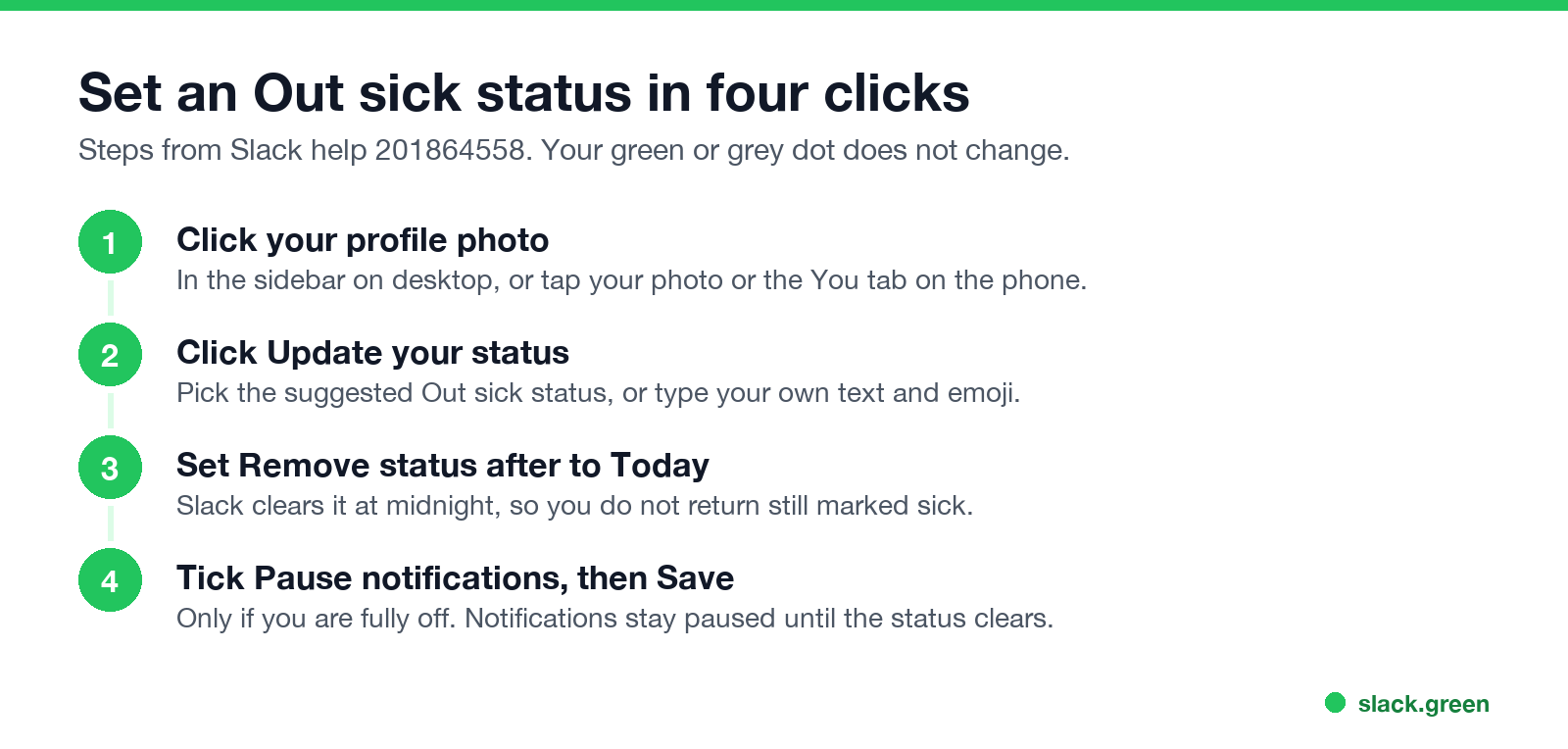
On desktop:
On the phone, tap your profile photo or the You tab, then Update your status. The options are the same.
Setting the clear time matters. If you leave it at "Don't clear", you come back the next day still showing as sick. More on every status option is in how to change your status on Slack.
Sick but working: what to set
Больше никогда не показывать "отошёл" в Slack
Облачное решение. Без загрузок. Работает 24/7 даже при выключенном ноутбуке.
If you are working while unwell, three settings tell people what to expect:
Your status text does not keep your dot green. Slack still turns you grey after 10 minutes with no input in Slack, even if your status says you are working. If people read the grey dot as "gone", how Slack active status works explains why it happens.
Plan leave ahead with a scheduled status
For vacation or a planned procedure, schedule the status in advance. Slack lets you set a start and end time, and you can queue up to five scheduled statuses:
The status turns on and off by itself. The full steps, plus ways to link it to your calendar, are in how to schedule a Slack status.
What a sick status changes, and what it does not
| Setting | What coworkers see | What it changes |
|---|---|---|
| Status emoji and text | The emoji next to your name, the text on hover and in your profile | Nothing else |
| Pause notifications | A snooze Z on your dot | No alerts until the pause ends |
| Set yourself as away | A hollow grey dot | Only the dot, until you set yourself active |
| Nothing | Green while you use Slack, grey after 10 minutes without input | Nothing |
If you want to look offline for the day while still reading messages, set yourself as away. The steps are in how to appear offline on Slack. If the opposite is the problem and you want to stay green on days you work from bed, Slack Green keeps your dot green on a schedule without you touching Slack. How to keep Slack active compares all the options.
FAQ
Больше никогда не показывать "отошёл" в Slack
Облачное решение. Без загрузок. Работает 24/7 даже при выключенном ноутбуке.
What is a good Slack status for being sick?
:face_with_thermometer: Out sick today, back tomorrow. Set it to clear Today and tick Pause notifications.
What should my Slack status say if I am sick but working?
Say how you will work: "Under the weather, replies will be slow" or "Sick, no calls today, messages OK". Keep notifications on.
Does a sick status stop Slack notifications?
Only if you tick Pause notifications when you set it. Then notifications stay paused until the status clears.
Can I set a sick status on my phone?
Yes. Tap your profile photo or the You tab, then Update your status. The emoji, clear time, and Pause notifications options are the same as on desktop.
Does a Slack status keep me active?
No. The status text and the green dot are separate. Your dot follows your activity in Slack.
Хватит Двигать Мышкой.
Сотни удалённых работников больше не беспокоятся о статусе Slack. Настройте один раз, оставайтесь зелёными навсегда.
Related Articles
How to Connect Slack and Microsoft Teams: Calls, Messages and Status
Slack and Teams do not connect natively for chat. You can start Teams calls from Slack with the free Microsoft Teams Calls app, relay messages with a paid bridge such as Mio, and sync your Teams status to Slack with a short script. Every option, what it costs, and the setup steps.
Slack Active on Multiple Devices: Which One Sets Your Status?
When you use Slack on a phone and a computer at once, one active device is enough to keep you green, and a manual away on any device sets you away on all of them. The rule, common cases, and how notifications pick a device.
Keep Awake Chrome Extension: What It Does, and Why Slack Still Goes Away
A keep-awake Chrome extension stops your screen from dimming and your computer from sleeping through Chrome's power API. It does not type or click, so Slack still shows you away after 10 minutes and Teams after a few. How the Keep Awake modes work, which platforms they suit, and what to use instead.