
Halloween Slack Emojis and Holiday Emoji Codes to Copy
Slack's built-in Halloween emojis are :jack_o_lantern:, :ghost:, :bat:, :spider_web:, :candy: and :zombie:. Christmas has :christmas_tree:, :santa: and :gift:. Every holiday code checked in Slack, custom holiday emoji ideas, where to get packs, and how to make your own in a minute.
The built-in Halloween emojis in Slack are 🎃 :jack_o_lantern:, 👻 :ghost:, 💀 :skull:, 🦇 :bat:, 🕸️ :spider_web:, 🍬 :candy:, 🧟 :zombie: and 🧙 :mage:. For Christmas, type 🎄 :christmas_tree:, 🎅 :santa: or 🎁 :gift:. Type the code in any message box, or send +:jack_o_lantern: to react to the latest message. For anything Slack does not have, such as a pumpkin with your logo or an animated BOO, add a custom emoji; our free Slack emoji maker makes one in the browser.
We checked every code on this page two ways on 28 September: against emoji-data, the open-source set Slack's emoji picker uses, and by typing the codes into Slack's own message box, where each one came up as a suggestion.
Holiday weeks are when Slack dots go grey. Slack sets you to away after about 10 minutes without input in the Slack window. Slack Green keeps your dot green from a server during the hours you set.
Halloween Slack emojis
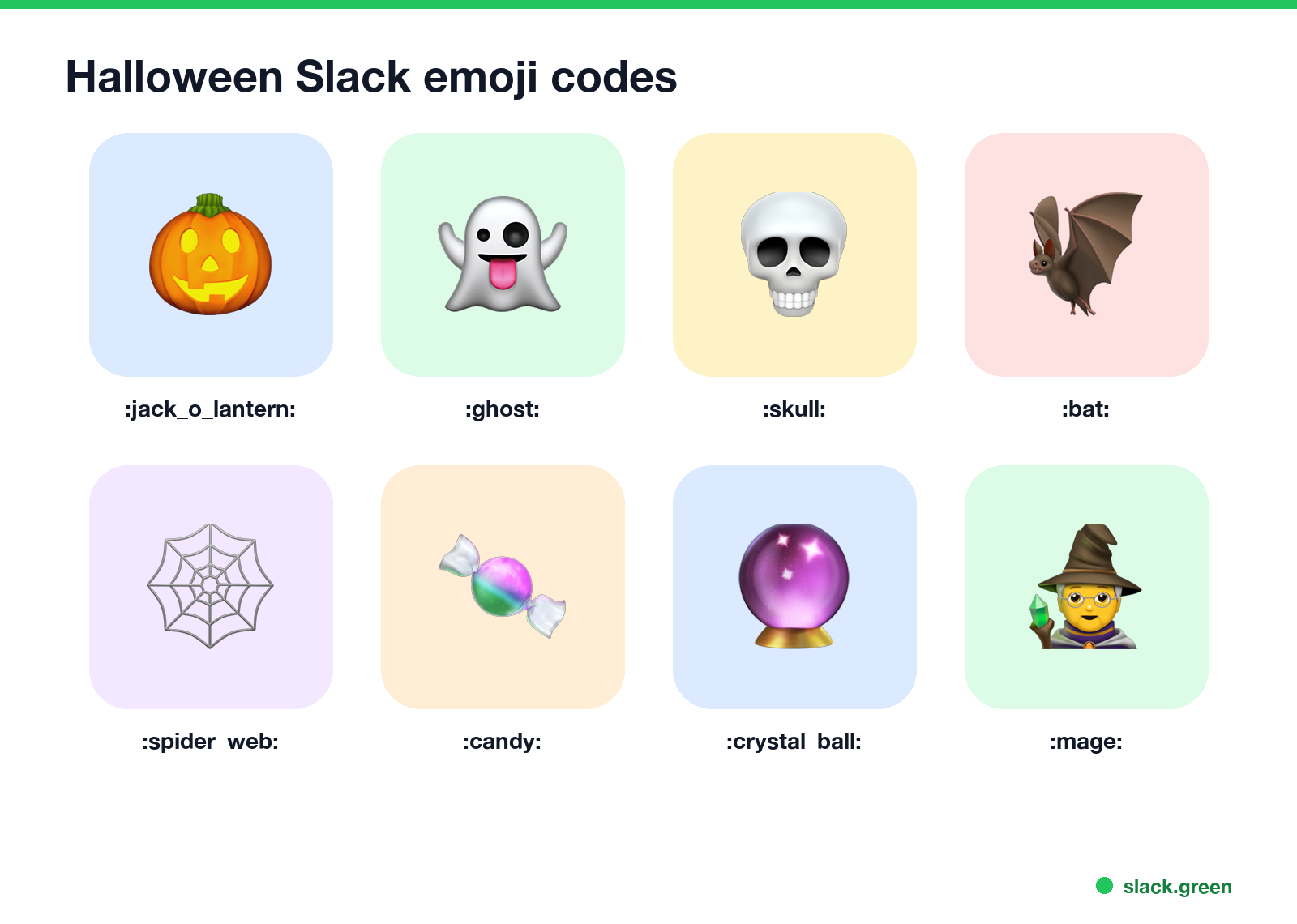
| Emoji | Code |
|---|---|
| 🎃 | :jack_o_lantern: |
| 👻 | :ghost: |
| 💀 | :skull: |
| 🦇 | :bat: |
| 🕷️ | :spider: |
| 🕸️ | :spider_web: |
| 🍬 | :candy: |
| 🍭 | :lollipop: |
| 🔮 | :crystal_ball: |
| 🧟 | :zombie: |
| 🧛 | :vampire: |
| 🧙 | :mage: |
| 🧹 | :broom: |
| ⚰️ | :coffin: |
The Slack pumpkin is :jack_o_lantern:; there is no :pumpkin: code in the standard set, which is why typing :pumpkin finds nothing unless your workspace added a custom one. A few that work well as Halloween reactions: 👻 for "boo, scared me", 💀 for "I'm dead, that is funny", and 🧟 for a Monday.
Christmas and winter Slack emojis
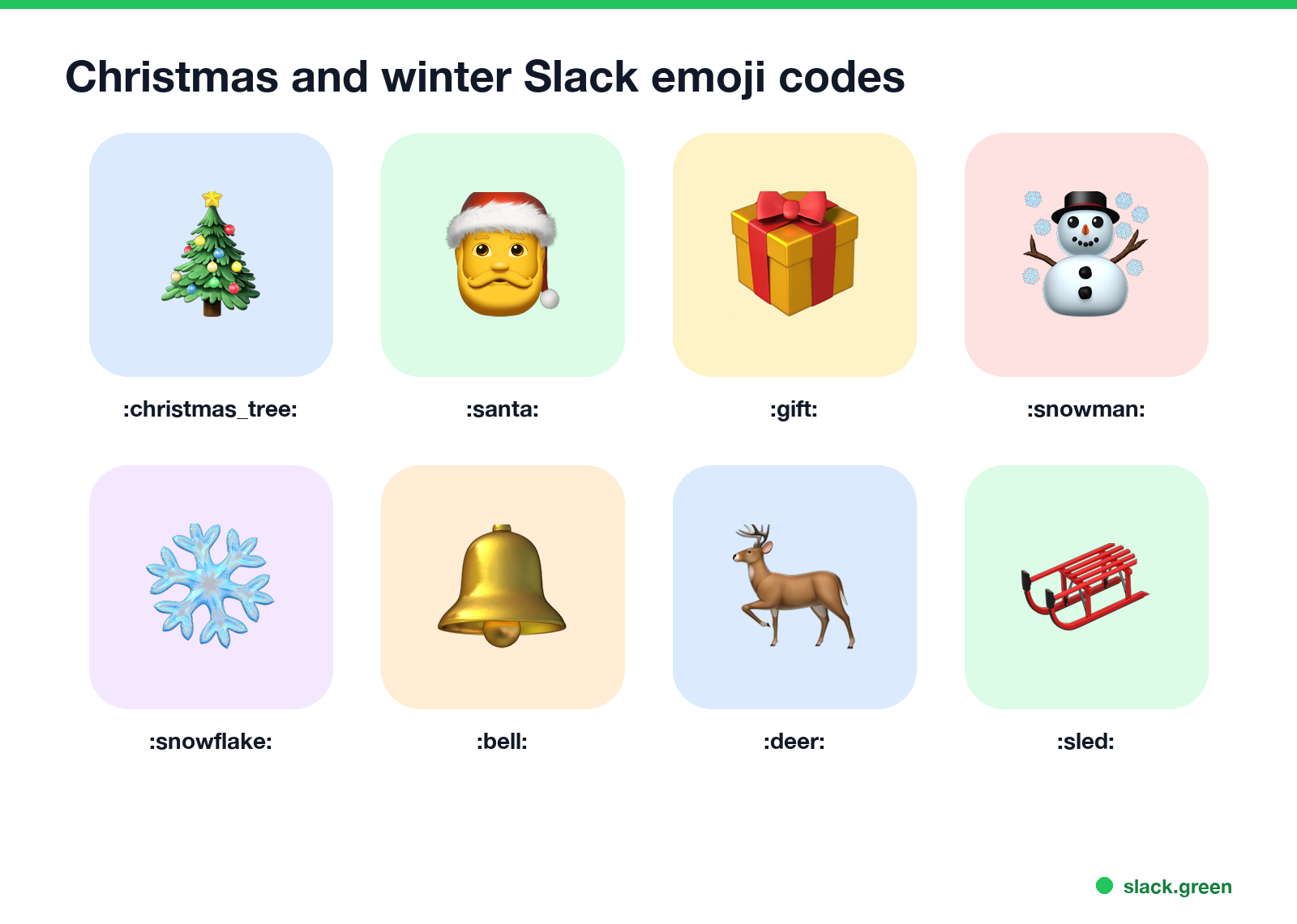
| Emoji | Code |
|---|---|
| 🎄 | :christmas_tree: |
| 🎅 | :santa: |
| 🤶 | :mrs_claus: :mother_christmas: |
| 🎁 | :gift: |
| ☃️ | :snowman: |
| ❄️ | :snowflake: |
| 🔔 | :bell: |
| 🌟 | :star2: |
| 🦌 | :deer: |
| 🍪 | :cookie: |
| 🛷 | :sled: |
:snowman: is the snowman with snow (☃️); :snowman_without_snow: is ⛄. For a team that does not all celebrate Christmas, ❄️ :snowflake: and 🎁 :gift: read as "happy holidays".
Thanksgiving, Hanukkah, Diwali and New Year emojis
Never appear "away" on Slack again
Cloud-based. No downloads. Works 24/7 even when your laptop is off.
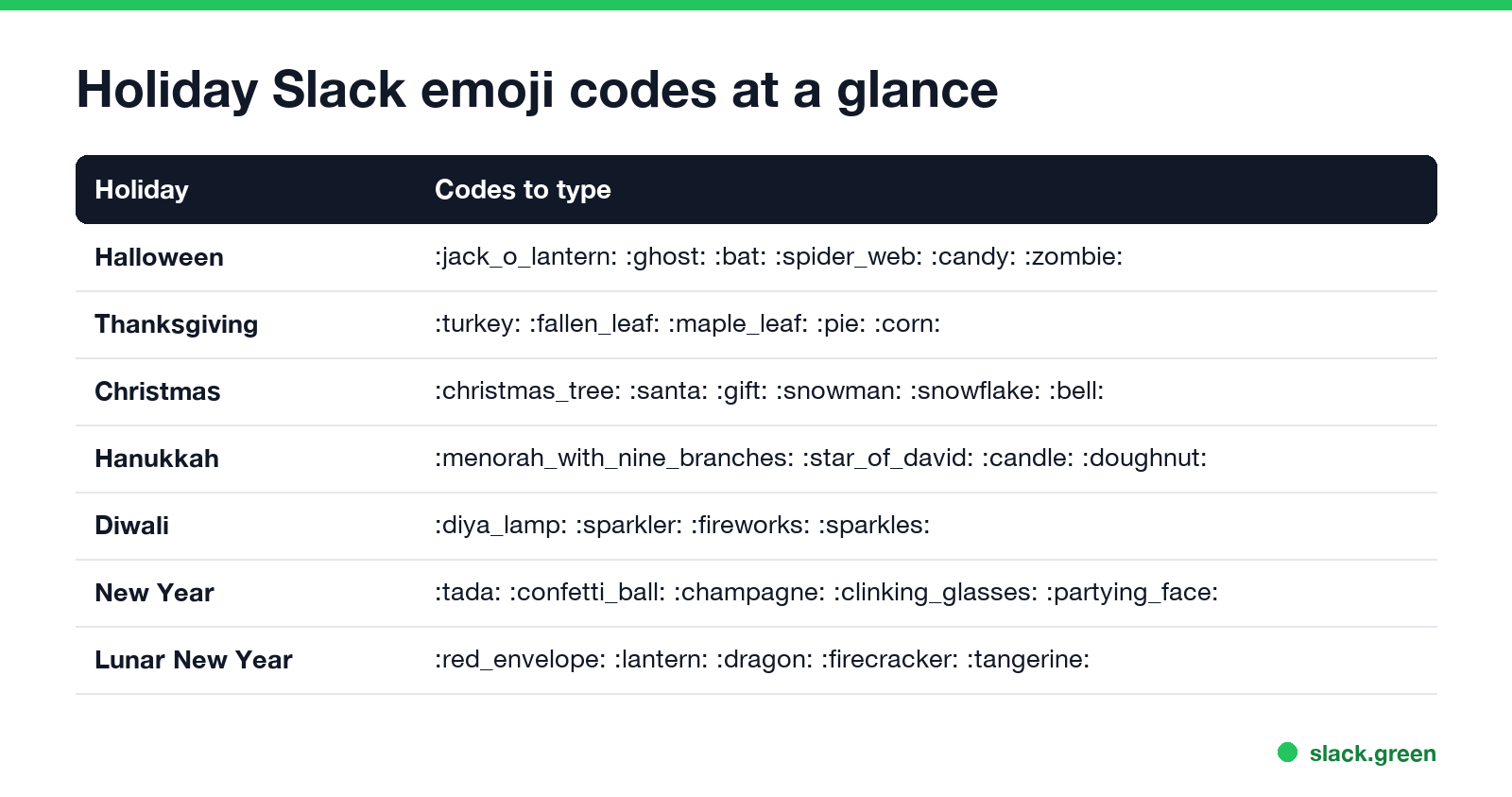
Thanksgiving
| Emoji | Code |
|---|---|
| 🦃 | :turkey: |
| 🍂 | :fallen_leaf: |
| 🍁 | :maple_leaf: |
| 🥧 | :pie: |
| 🌽 | :corn: |
| 🍗 | :poultry_leg: |
| 🙏 | :pray: |
Hanukkah
| Emoji | Code |
|---|---|
| 🕎 | :menorah_with_nine_branches: |
| ✡️ | :star_of_david: |
| 🕯️ | :candle: |
| 🍩 | :doughnut: |
| 🪙 | :coin: |
Diwali
| Emoji | Code |
|---|---|
| 🪔 | :diya_lamp: |
| 🎇 | :sparkler: |
| 🎆 | :fireworks: |
| ✨ | :sparkles: |
New Year
| Emoji | Code |
|---|---|
| 🎉 | :tada: |
| 🎊 | :confetti_ball: |
| 🍾 | :champagne: |
| 🥂 | :clinking_glasses: |
| 🎆 | :fireworks: |
| 🥳 | :partying_face: |
Lunar New Year
| Emoji | Code |
|---|---|
| 🧧 | :red_envelope: |
| 🏮 | :izakaya_lantern: :lantern: |
| 🐉 | :dragon: |
| 🧨 | :firecracker: |
| 🍊 | :tangerine: |
Where a row shows two codes, both work. The complete set, grouped by category, is in our Slack emoji codes list.
Custom Halloween and holiday emoji ideas
Standard emoji cover the symbols. Custom emoji cover the jokes. Ideas teams actually use:
- • Text emoji:
BOO,SPOOKY,HO HO HO,TREAT?,OOO til Jan,HNY. - • Your mascot or logo in costume: the company logo with a witch hat or a Santa hat.
- • Animated versions of standard ones: a spinning pumpkin, a party-color Christmas tree, a shaking ghost.
- • Team in-jokes: the office dog in a costume, the build server as a ghost when CI is down.
- • Status icons for the season: a small plane with a Santa hat for "traveling for the holidays".
- Open the free Slack emoji maker. Pick Text to emoji and type up to three short lines, such as
BOO, or pick Image to emoji and drop a photo. - Pick an effect if you want one: intensifies, spin, party, pulse, slide, bounce, rock or flip. The tool keeps GIFs under Slack's 128 KB and 50-frame limits.
- Download the PNG or GIF.
- In Slack, click your workspace name, then Customize workspace, then Add custom emoji. Upload the file and give it a name such as
:boo-spin:.
More year-round ideas are in 40 Slack emoji ideas for work.
How to make and add a holiday emoji
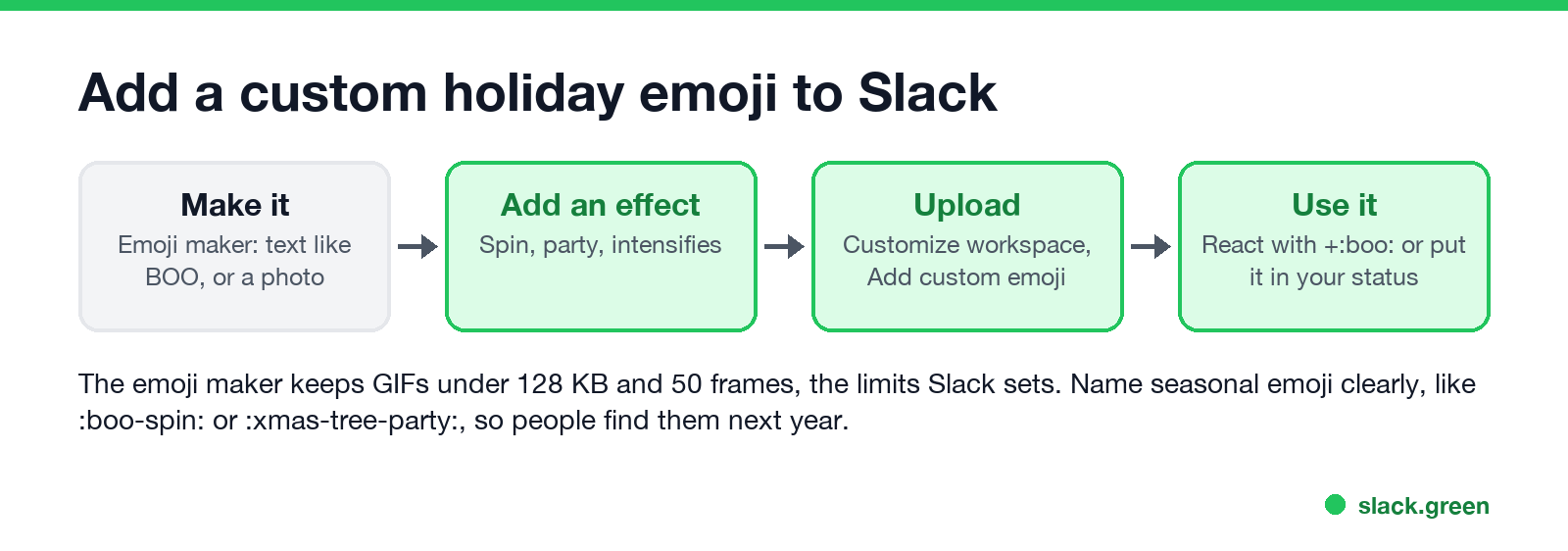
If you already have an image that is too big, the Slack emoji resizer shrinks it in your browser. The full upload steps and who is allowed to add emoji are in how to add custom emoji to Slack.
Where to get Halloween and Christmas emoji packs
Never appear "away" on Slack again
Cloud-based. No downloads. Works 24/7 even when your laptop is off.
Slackmojis.com lists Halloween, Thanksgiving and Christmas among its popular searches, with ready-made GIFs, and emoji.gg has larger community sets. Before you bulk-upload a pack:
:hw- for Halloween, so the set is easy to find and to remove in November.How to upload many at once is in Slack emoji packs.
List holiday emoji codes with a script
This script downloads emoji-data and prints every code for a holiday, including the alternate names, so you can paste them into a message or a channel topic. It uses only the Python standard library:
import json
import sys
import urllib.request

URL = "https://raw.githubusercontent.com/iamcal/emoji-data/master/emoji.json"

HOLIDAYS = {
    "halloween": ["jack_o_lantern", "ghost", "skull", "bat", "spider", "spider_web", "candy",
                  "lollipop", "crystal_ball", "zombie", "vampire", "mage", "broom", "coffin"],
    "thanksgiving": ["turkey", "fallen_leaf", "maple_leaf", "pie", "corn", "poultry_leg", "pray"],
    "christmas": ["christmas_tree", "santa", "mrs_claus", "gift", "snowman", "snowflake",
                  "bell", "star2", "deer", "cookie", "sled"],
    "hanukkah": ["menorah_with_nine_branches", "star_of_david", "candle", "doughnut", "coin"],
    "diwali": ["diya_lamp", "sparkler", "fireworks", "sparkles"],
    "new-year": ["tada", "confetti_ball", "champagne", "clinking_glasses", "fireworks", "partying_face"],
    "lunar-new-year": ["red_envelope", "lantern", "dragon", "firecracker", "tangerine"],
}

with urllib.request.urlopen(URL, timeout=30) as resp:
    by_name = {n: e for e in json.load(resp) for n in e["short_names"]}

holiday = sys.argv[1] if len(sys.argv) > 1 else "halloween"
for name in HOLIDAYS[holiday]:
    e = by_name.get(name)
    if e is None:
        print("missing:", name)
        continue
    char = "".join(chr(int(cp, 16)) for cp in e["unified"].split("-"))
    print(char, " ".join(f":{n}:" for n in e["short_names"]))
python holiday_emoji.py halloween
python holiday_emoji.py christmasWe ran it for all seven holidays on 28 September; none printed a missing: line. Add your own list to HOLIDAYS to check other codes before you post them.
Holiday emoji in your Slack status
A seasonal emoji fits well in your status, next to a line that says when you are back: 🎄 "Out until 2 Jan", 🦃 "Out Thu-Fri for Thanksgiving", 🎃 "Leaving early to take the kids trick-or-treating". Set it to clear on the last day off. For more lines, try the Slack status generator. A matching holiday profile picture is in holiday Slack profile pictures.
FAQ
Never appear "away" on Slack again
Cloud-based. No downloads. Works 24/7 even when your laptop is off.
What are the Halloween emojis in Slack?
:jack_o_lantern:, :ghost:, :skull:, :bat:, :spider:, :spider_web:, :candy:, :zombie:, :vampire: and :mage: are built in.
What is the pumpkin emoji code in Slack?
:jack_o_lantern:. There is no standard :pumpkin:.
What are the Christmas emojis in Slack?
:christmas_tree:, :santa:, :mrs_claus:, :gift:, :snowman:, :snowflake:, :bell:, :deer: and :sled:.
How do I get custom Halloween emojis in Slack?
Make one with our Slack emoji maker, or download a pack, then add it with Customize workspace, Add custom emoji.
Can I react with a holiday emoji?
Yes. Hover the message and click Add reaction, or send +:ghost: to react to the latest message. Details are in how to react to a message in Slack.
Stop Jiggling Your Mouse.
Join hundreds of remote workers who never worry about their Slack status. Set it up once, stay green forever.
Related Articles
Slack Emoji for Approved, Perfect and Sounds Good
The Slack emoji for approved is ✅ :white_check_mark:. For perfect, use 💯 :100: or 🤌 :pinched_fingers:; for sounds good or sure, 👍 :+1: or 👌 :ok_hand:. Every code checked in Slack, what each one means to readers, custom LGTM and SGTM emoji, and a pinned legend for approval channels.
Tips for Working Across Time Zones: 10 Habits That Work
Working across time zones works when the team writes things down, keeps a short overlap window for live talk, says the zone with every time, and lets tools deliver messages in each person's working hours. Ten habits, a follow-the-sun handoff note, the Slack settings that help, and a script that shows your team's local times.
Slack Emoji for OOO, PTO and Days Off
The usual Slack emoji for OOO is 🌴 :palm_tree:, with ✈️ :airplane: for travel and 🗓️ :spiral_calendar_pad: for planned PTO. Enterprise's built-in Out of office status uses ⛔. Codes for vacation, upcoming PTO, sick days, holidays and outages, custom :ooo: and :pto: emoji, and statuses to copy.