
How to Work Two Remote Jobs at the Same Time
Working two remote jobs at once takes four things: contracts that allow it, fully separate devices and accounts, a calendar that protects both jobs, and a chat status that stays believable in both. The practical setup, and the risks.
To work two remote jobs at the same time, you need four things. First, contracts that do not forbid it: read the outside-work, conflict-of-interest and IP clauses in both. Second, complete separation: each job's laptop, accounts and files stay on that job's devices only. Third, one calendar you control, with each job's meetings mirrored as busy blocks in the other so nothing collides. Fourth, a chat status that holds up in both jobs, because Slack and Teams each set you away while you type in the other job's window. The fourth is the part most people underestimate.
That last problem is the one we work on. Slack Green keeps your Slack presence green on the working hours you set, from a cloud server, for up to three workspaces. It does not do your work, and it does not fix a missed message. It stops the grey dot from saying "not here" while you are in the other job's meeting.
Can you legally work two remote jobs at the same time?
In most places holding two jobs is legal. Whether it is allowed is a contract question. Look for these clauses in both offers and handbooks:
- • Outside employment or moonlighting. Some contracts ban other work, some require you to disclose it, some say nothing.
- • Conflict of interest. Two competitors, or a client of one job at the other, is the fastest way to lose both.
- • Intellectual property. Some IP clauses claim anything you build during working hours or on company equipment.
- • Hours and exclusivity. Full-time contracts sometimes state set hours or exclusive service.
- • One laptop per job. Never sign in to job B's Slack, email or VPN on job A's laptop. A company laptop reports its apps, devices and connections to its own IT team, as covered in how do employers monitor remote workers.
- • No work files on the wrong device. Do not copy code, documents or credentials across. That is a contract breach even when the jobs are allowed.
- • A clean phone setup. Use a separate work profile or separate apps for each job, so a notification from job B never pops up while you share your screen for job A.
- • Screen sharing discipline. Share one window, not the whole screen, and close the other job's apps before any call.
Government jobs, finance and roles with security clearance often have stricter rules. If you are unsure, the honest path is to ask HR about outside work in general terms, or to get advice on your contract.
Keep the two jobs completely separate
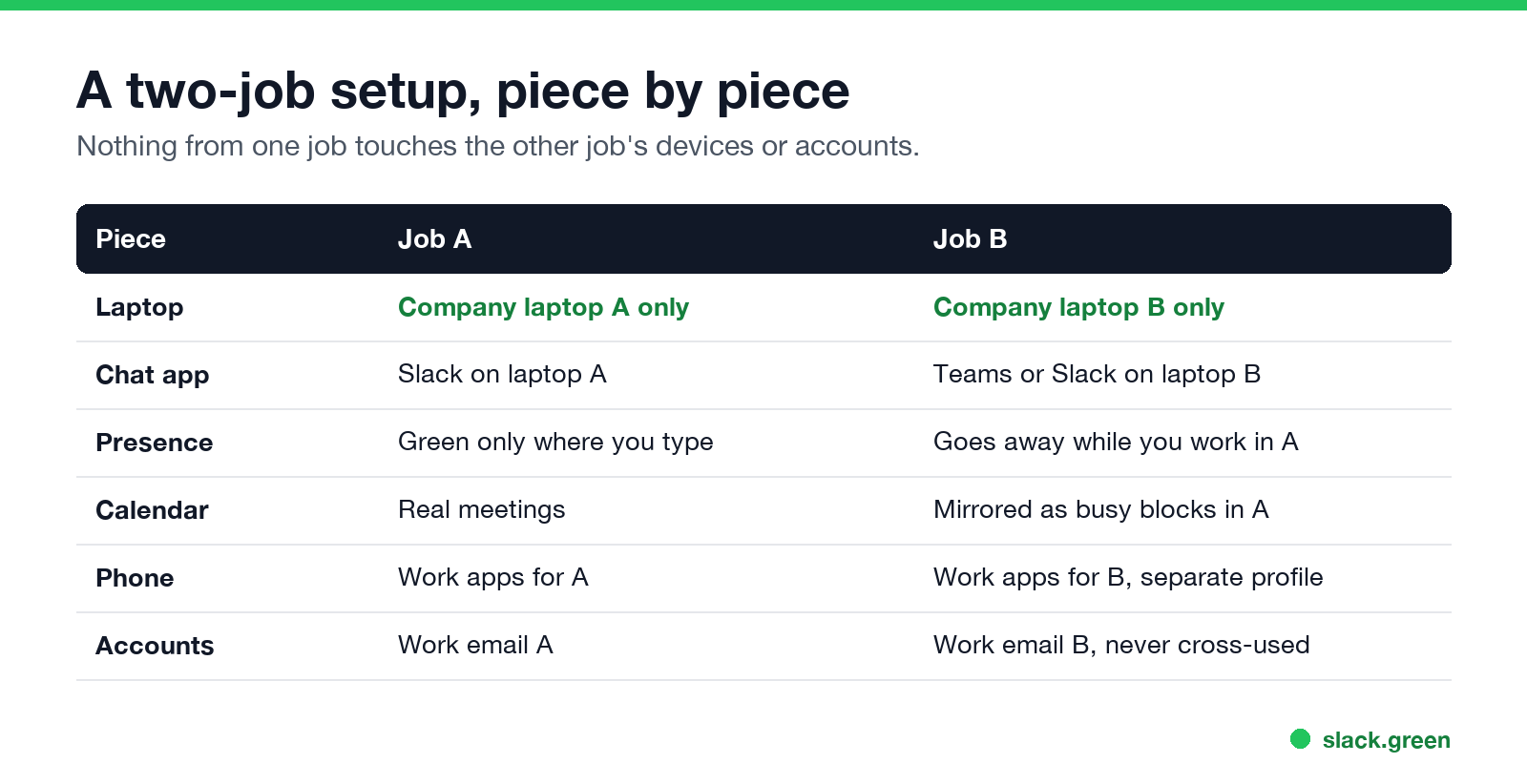
The rule people repeat on r/overemployed is simple: nothing from job A touches job B's devices or accounts.
One calendar that protects both jobs
Meetings are where two jobs collide. Keep a private calendar that shows both, and mirror each job's meetings as plain "busy" blocks in the other job's calendar. Blocks with no details keep the meeting times free without showing the other company's names.
The chat status problem
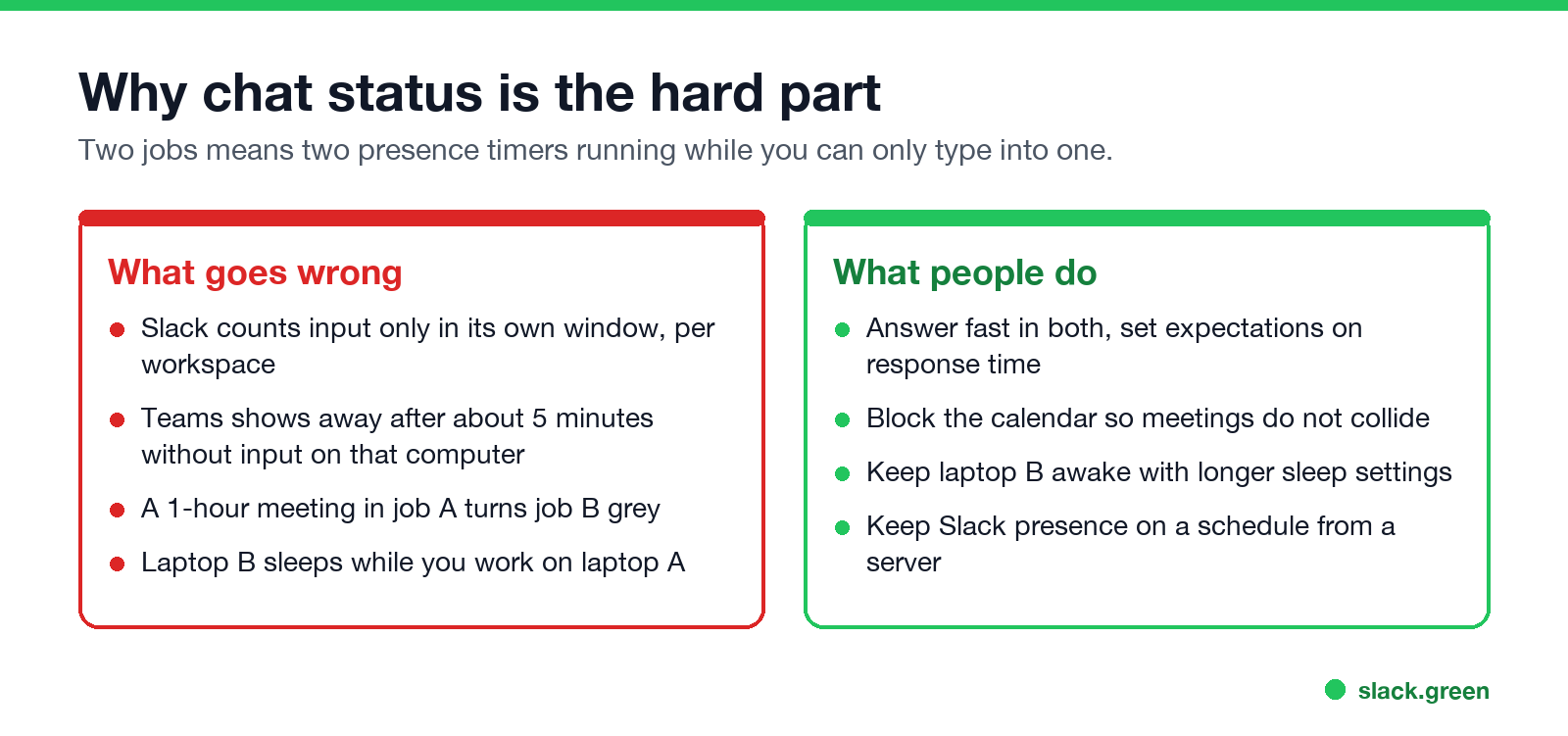
Both jobs watch the same small signal: the dot next to your name. With two jobs you can only type into one window at a time, so the other job's dot goes grey.
What people do about it:
Where working two jobs goes wrong
FAQ
Can you work two remote jobs at the same time?
Yes, if neither contract forbids it and the jobs do not conflict. Many people do it by keeping devices, accounts and calendars fully separate.
How do people handle two Slack workspaces for two jobs?
On separate laptops, with notifications for DMs and mentions on the phone. Slack's presence is per workspace and needs input in each, so people either answer fast or keep presence on a schedule with a tool like Slack Green.
Will my employer know I have a second job?
Not from Slack or Teams, which show only activity in their own workspace. They can learn it from a background check, a conflict of interest, work on the wrong laptop, or a missed meeting.
Is it illegal to work two remote jobs?
Usually not. It can breach your employment contract, which can get you fired. Some government and regulated jobs forbid it outright.
How many hours is working two remote jobs?
It depends on the roles. People who manage it well usually give each job its core meetings and output, and cap total hours so neither job slips.
Related Articles
Slack Lists Tutorial: Create, Organize and Share a List
Slack lists are tables of tasks inside Slack, with fields, assignees, due dates, a board view and a comment thread on every item. How to create a list from scratch or a template, set up fields, turn it into a kanban board, add messages to it, share it, and what the plan limits are.
Slack Jira Integration: Setup, /jira Commands and Notifications
Install the Jira Cloud for Slack app, type /jira connect in a channel to send a Jira space's updates there, /jira notify for personal notifications as DMs, and create work items from any message with More actions. Every /jira command, Jira automation to Slack, and fixes when previews or notifications stop.
How to Create a Slack Workspace, on Desktop or Phone
Go to slack.com/get-started, enter your email, type the confirmation code, and click Create a Workspace. It is free to start, you become the Primary Owner, and it takes about five minutes. Steps for desktop, iPhone and Android, and what to set up next.