
n8n Slack Trigger: Why the Challenge Fails, and the Test URL Trap
We ran the n8n Slack Trigger against a real Slack app: which URL passes Slack's challenge, why a test event can arrive a minute late, why a channel the bot is not in stays silent, and how the bot can trigger itself.
The n8n Slack Trigger works when two things match: the Request URL in your Slack app's Event Subscriptions, and the state of the n8n workflow. Slack's challenge passes on the Test URL only while the node is listening, and on the Production URL only after the workflow is published. On 6 October 2026 we ran n8n 2.41.7 (started with npx n8n) behind a cloudflared tunnel, connected to a throwaway Slack app in our free-plan test workspace, and tried each case. Below are the results, the event JSON n8n received, and five ways the trigger fails without telling you.
Set up the trigger
- Create a Slack app and add bot scopes for the events you want:
channels:historyfor channel messages,im:historyfor direct messages,app_mentions:readfor @mentions,reactions:readfor reactions. Install it and copy the Bot User OAuth Token (xoxb-). - In n8n, create a Slack API credential. Paste the bot token as Access Token, and the app's Signing Secret (Basic Information page) as Signature Secret. The Slack Trigger does not accept the OAuth2 credential.
- Add a Slack Trigger node, pick the events (we used New Message Posted to Channel) and the channel.
- Open Webhook URLs on the node. Copy the Test URL or the Production URL into Event Subscriptions > Request URL in the Slack app, then subscribe to the matching bot events (
message.channels,message.im) and save.
n8n builds those URLs from the WEBHOOK_URL environment variable. On a laptop the default is http://localhost:5678, which Slack cannot reach. We started n8n with WEBHOOK_URL set to our tunnel's https:// address, so the node showed public URLs.
Which URL passes Slack's challenge
When you paste a Request URL, Slack sends a url_verification request with a challenge value and waits for it to come back. We tried four states:
| Request URL | n8n state | What n8n answered | What Slack showed |
|---|---|---|---|
| Test URL | Not listening | 404, webhook is not registered | "Your URL didn't respond with the value of the challenge parameter." |
| Test URL | Listening (Execute step) | the challenge | Verified |
| Production URL | Workflow not published | 404, webhook is not registered | "Your URL didn't respond with the value of the challenge parameter." |
| Production URL | Published | the challenge | Verified, after Retry |
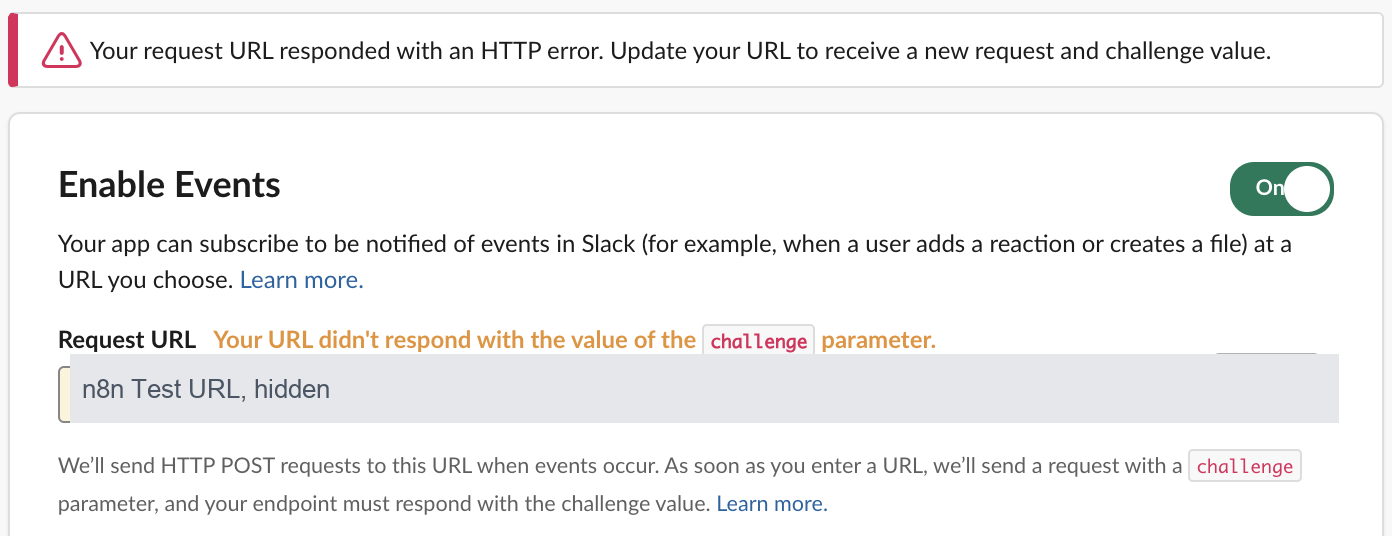
The 404 body n8n sends for the Test URL says why: The requested webhook ... is not registered, with the hint Click the 'Execute workflow' button on the canvas, then try again. (In test mode, the webhook only works for one call after you click this button). For the Production URL the hint reads The workflow must be active for a production URL to run successfully. In n8n 2.x the button is Publish, at the top right of the editor.
The challenge did not use up the test call. After Slack verified the Test URL, the node was still listening, and the next channel message arrived in it.
With a Signature Secret in the credential, the Production URL checks Slack's signature. Our unsigned curl request got 401 Unauthorized, while Slack's own signed request passed. If Slack's challenge fails on a published workflow, check that the Signature Secret is the Signing Secret and not the Client Secret.
The event n8n received
A message in the watched channel reached the listening node in under a second. This is the output:
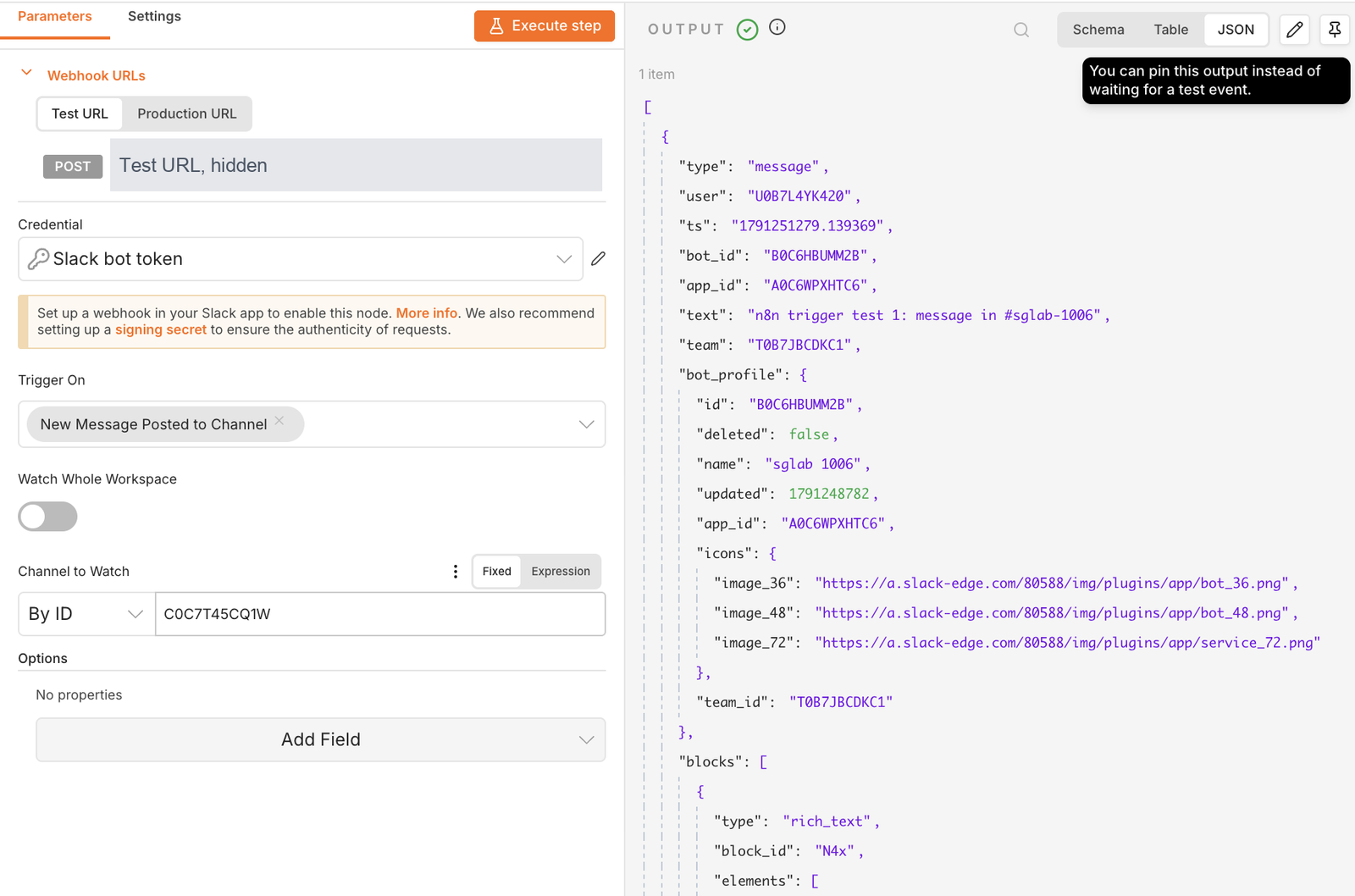
A direct message to the bot looked like this, once the node watched the whole workspace:
{
  "type": "message",
  "user": "U0B7L4YK420",
  "ts": "1791251611.527959",
  "text": "n8n trigger test 7: direct message, Watch Whole Workspace on",
  "team": "T0B7JBCDKC1",
  "channel": "D0C72DQ3D6Y",
  "event_ts": "1791251611.527959",
  "channel_type": "im"
}
We left out the blocks array. On the published workflow, the time from a message to the n8n execution was 0.8 seconds.
Never appear "away" on Slack again
Cloud-based. No downloads. Works 24/7 even when your laptop is off.
Five ways the trigger stays silent
1. One test event, then nothing. After the first event, the node stops listening. Our next message went to a node that was not listening, so n8n answered 404. We clicked Execute step 11 seconds later, and that message arrived 62 seconds after we sent it. Slack retries a failed event about a minute later, and n8n accepted the retry as a new test event. If a test shows an older message than the one you just sent, this is why.
2. The bot is not in the channel. We pointed the node at a channel the bot had not joined and published. A message there started nothing, and n8n logged nothing. Slack sends channel events only for channels the bot is a member of. After the bot joined (we used conversations.join; typing /invite @your-app in the channel does the same), the next message arrived. The bot's own join message ("has joined the channel", subtype channel_join) also started the workflow, so filter on subtype if you only want real messages.
3. Direct messages with a channel picked. With Channel to Watch set to a channel, our direct message to the bot started nothing. With Watch Whole Workspace on, it arrived as the JSON above. The app also needs the message.im event, the im:history scope, and the Messages tab turned on in App Home, or people cannot DM the bot at all.
4. The bot triggers itself. A message the bot posted in the channel started the workflow too. A workflow that answers in the same channel will run again on its own answer. Open the node's Options, add Usernames or IDs to ignore, and enter the bot's user ID (it starts with U, see how to find a member ID). With that set, our next bot message started nothing and a human message still did.
5. Something reset the Request URL. We changed the app's redirect URLs through Slack's App Manifest API, and the update also put back the old Test URL, because a manifest update replaces the whole manifest. Events then went to the Test URL and n8n logged Received request for unknown webhook. Check Event Subscriptions after every manifest edit.
Socket Mode and other questions
The Slack Trigger needs a public HTTPS URL. It has no Socket Mode setting. If you cannot expose n8n, put a tunnel in front of it, as we did, or run a small Socket Mode app that forwards events to n8n. Slack also sends events again when it gets an error or no answer within about 3 seconds; our retry test has the timings. For what the challenge request contains, see the url_verification page.
FAQ
Why does Slack say "Your URL didn't respond" when n8n is running?
n8n is running, but the webhook path is not registered. Click Execute step before pasting the Test URL, or publish the workflow before pasting the Production URL. Then click Retry in Slack.
Can I use the Test URL and the Production URL at the same time?
No. A Slack app has one Request URL. Test on the Test URL, then switch the app to the Production URL and publish.
Which credential do I need for the Slack Trigger?
The Slack API credential with a bot token and the Signing Secret. n8n's docs say the OAuth2 credential does not work with the trigger. For what each credential can do in the regular Slack node, see our n8n Slack credentials test.
Stop Jiggling Your Mouse.
Join hundreds of remote workers who never worry about their Slack status. Set it up once, stay green forever.
Related Articles
Alertmanager Slack Config: slack_configs Example and Templates, Tested
A tested alertmanager.yml for Slack, the messages Prometheus alerts produced, a custom title and text template, and what send_resolved, group_by and color changed. Plus a typo amtool did not catch.
Grafana Slack Alerts: Webhook vs Bot Token, Templates, Tested
We sent Grafana alerts to Slack through both kinds of contact point, then replaced the default message with a notification template. The messages Slack showed, the delays, the template we used and the errors Grafana logged.
Jenkins Slack Notification: slackSend Pipeline Tested with a Bot Token
We ran the Jenkins Slack Notification plugin against a real Slack app: the pipeline that worked, the botUser setting that makes slackSend fail with a 404, threads, Block Kit, and the errors for channels the bot cannot see.