
Send a Slack Message From Python: Webhook, slack_sdk and Threads
Three short Python scripts that post to Slack, run against a real workspace with their output: an incoming webhook with requests, chat_postMessage with a bot token, and a thread reply. Plus the errors we triggered and what an 80-message burst did.
To send a Slack message from Python, POST JSON to an incoming webhook URL with requests, or call chat_postMessage from the official slack_sdk package with a bot token. The webhook takes four lines and posts to one fixed channel. The bot token can post to any channel the app can reach, reply in threads, and edit or delete its messages. We ran every script below on 30 September 2026 with Python 3.14.3 and slack_sdk 3.44.1, against a test workspace, and pasted the output it printed.
Send a message with a webhook and requests
Create the webhook in your app settings (steps in how to create a Slack webhook), keep the URL out of your code, and post:
import os
import requests

url = os.environ["SLACK_WEBHOOK_URL"]
resp = requests.post(url, json={"text": "Deploy finished: *api* v2.14.0 is live"}, timeout=10)
print(resp.status_code, resp.text)
Output:
200 okA webhook answers with the plain text ok, not JSON, and gives you no message ts, so you cannot thread under it or edit it later. *api* became bold because webhook text uses Slack's mrkdwn, where one asterisk means bold. If you only have the standard library, the Slack webhook curl example has a urllib version with a retry.
Send a message with slack_sdk and a bot token
Install the SDK with pip install slack_sdk. The token is the Bot User OAuth Token (xoxb-...) from your app's OAuth page, with the chat:write scope; how to get one is in Slack bot token.
import os
from slack_sdk import WebClient

client = WebClient(token=os.environ["SLACK_BOT_TOKEN"])
resp = client.chat_postMessage(channel=os.environ["CHANNEL"], text="Nightly backup finished in 4m 12s")
print(resp["ok"], resp["channel"], resp["ts"])
Output:
True C0C6GFR9G2C 1790771561.662469Pass the channel ID (C...), which you can copy from the channel details; see how to find a Slack channel ID. Keep the returned ts. It is the message's ID for threads, chat_update and chat_delete.
Reply in a thread from Python
Pass the parent's ts as thread_ts. Add reply_broadcast=True to also show the reply in the channel:
import os
from slack_sdk import WebClient

client = WebClient(token=os.environ["SLACK_BOT_TOKEN"])
channel = os.environ["CHANNEL"]
parent = client.chat_postMessage(channel=channel, text="Build #812 started")
reply = client.chat_postMessage(channel=channel, thread_ts=parent["ts"], text="Tests passed (412 of 412)")
done = client.chat_postMessage(channel=channel, thread_ts=parent["ts"], reply_broadcast=True,
                               text="Build #812 deployed to production")
print("parent", parent["ts"])
print("reply ", reply["ts"], "thread_ts", reply["message"]["thread_ts"])
print("broadcast", done["ts"], done["message"].get("subtype"))
Output:
parent 1790771562.256609
reply  1790771562.659189 thread_ts 1790771562.256609
broadcast 1790771563.096379 thread_broadcast
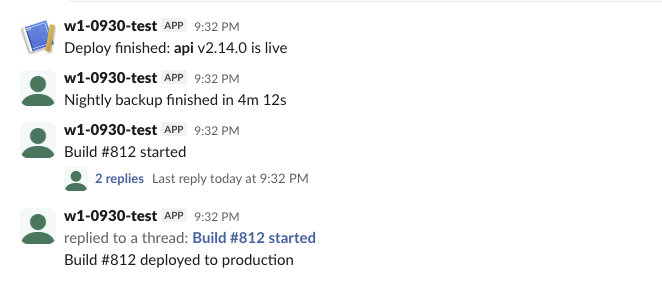
The screenshot at the top shows the result: the parent with "2 replies", and the broadcast reply in the channel as "replied to a thread".
Never appear "away" on Slack again
Cloud-based. No downloads. Works 24/7 even when your laptop is off.
Errors we triggered, and what each one meant
slack_sdk raises SlackApiError when Slack says ok: false. The error code is in e.response["error"]:
import os
from slack_sdk import WebClient
from slack_sdk.errors import SlackApiError

def try_post(label, token, channel):
    try:
        WebClient(token=token).chat_postMessage(channel=channel, text="error test")
        print(f"{label}: ok")
    except SlackApiError as e:
        print(f"{label}: {e.response.status_code} {e.response['error']}")

bot = os.environ["SLACK_BOT_TOKEN"]
try_post("revoked-looking token", "xoxb-1234-5678-abcdefghijklmnop", os.environ["CHANNEL"])
try_post("private channel, bot not invited", bot, os.environ["PRIVATE_CHANNEL"])
try_post("archived channel", bot, os.environ["ARCHIVED_CHANNEL"])
try_post("channel name typo", bot, "#w1-0930-tset")
try_post("public channel, bot not a member", bot, os.environ["OTHER_PUBLIC"])
Output:
revoked-looking token: 200 invalid_auth
private channel, bot not invited: 200 channel_not_found
archived channel: 200 is_archived
channel name typo: 200 channel_not_found
public channel, bot not a member: ok
Every error came back with HTTP 200, so checking resp.status_code alone misses them. A private channel the bot is not in looks the same as a channel that does not exist. The last line worked because our app had the chat:write.public scope, which lets a bot post in public channels it has not joined. Without that scope, the same call returns not_in_channel; the fix for each case is in Slack not_in_channel error and channel_not_found.
Sending many messages: what a burst did
We posted 80 messages to one channel from 10 threads, then the same 80 one at a time:
| How we sent 80 messages | Result |
|---|---|
| 10 threads, no retry handler | 52 ok in 2.8 s, 28 failed with 429 ratelimited, Retry-After: 1 |
10 threads, RateLimitErrorRetryHandler(max_retry_count=3) | 52 ok in 29.1 s, 28 still failed (a second run: 57 ok, 23 failed) |
| One at a time, same retry handler | 80 ok in 54.1 s, no failures |
The retry handler did not rescue a parallel burst: ten threads retrying after one second hit the limit again. Sending in order, one after another, stayed at about 1.5 messages a second and never failed. The messages from the parallel run also landed out of order (burst 1, 3, 8, 9, 6, ...). For a queue of alerts, post from one worker. The 429 bodies and limits per method are in Slack API rate limits.
FAQ
Can I send a Slack message from Python without a bot?
Yes, with an incoming webhook. It still needs a Slack app, but only for creating the URL; your script needs no token, only the URL.
How do I send a direct message to a user?
Call chat_postMessage with the user's member ID (U...) as channel. The message arrives in the app's DM with that user; in our test the response's channel came back as that DM's ID (D...), which you need for chat_update or chat_delete.
How do I send from a GitHub Action instead?
Store the webhook URL or bot token as a repository secret; the workflow file is in send a Slack message from GitHub Actions.
Stop Jiggling Your Mouse.
Join hundreds of remote workers who never worry about their Slack status. Set it up once, stay green forever.
Related Articles
Slack chat.scheduleMessage: Limits and Errors We Measured
We called chat.scheduleMessage with a bot token for times from 10 seconds to 121 days ahead, listed and deleted the results, and watched which messages still arrived. The limits, the exact errors, and a delete that returned ok but did not stop the post.
Slack Invite Link Expiration: 30 Days, and How to Check One
Slack invite links expire after 30 days and have no longer option. We made links in a test workspace, deactivated them, and found a signed-out check that tells a live link from a dead one.
Slack Pinned Messages: Where Pins Are Now, and the 100-Pin Limit
In the current Slack desktop and web app, pinned messages sit in a Pins tab at the top of the channel. We pinned, edited, deleted and searched pins in a test workspace, and pinned messages until Slack refused the 101st.