
Slack Tabs Under a Channel Name: What Each One Is and How to Edit Them
We added, renamed, moved, hid and deleted the tabs under a channel name in Slack web on the Free plan, and compared them with the tabs in a DM.
The tabs under a Slack channel name are views of that channel. Messages is the conversation, Add canvas opens the channel's canvas, folder tabs such as Bookmarks hold saved links, and Pins and Files & links are there too but hidden until you show them. The + at the end adds a tab. Tabs are shared: Slack's own settings page says they are "the tabs that everyone sees in this channel". On 8 October 2026 we added, renamed, moved, hid and deleted tabs in a free-plan test workspace in Slack web.

What each tab is
| Tab | What it shows | Default |
|---|---|---|
| Messages | The channel's messages | Always first, cannot be changed |
| Add canvas | Opens a new canvas for the channel | Shown |
| Folder, e.g. Bookmarks | Links and files you saved to the channel | Appears when you add the first link |
| Pins | Pinned messages | Hidden |
| Files & links | Files and links shared in the channel | Hidden |
Once shown, the Pins tab lists the channel's pinned messages.
Adding a tab
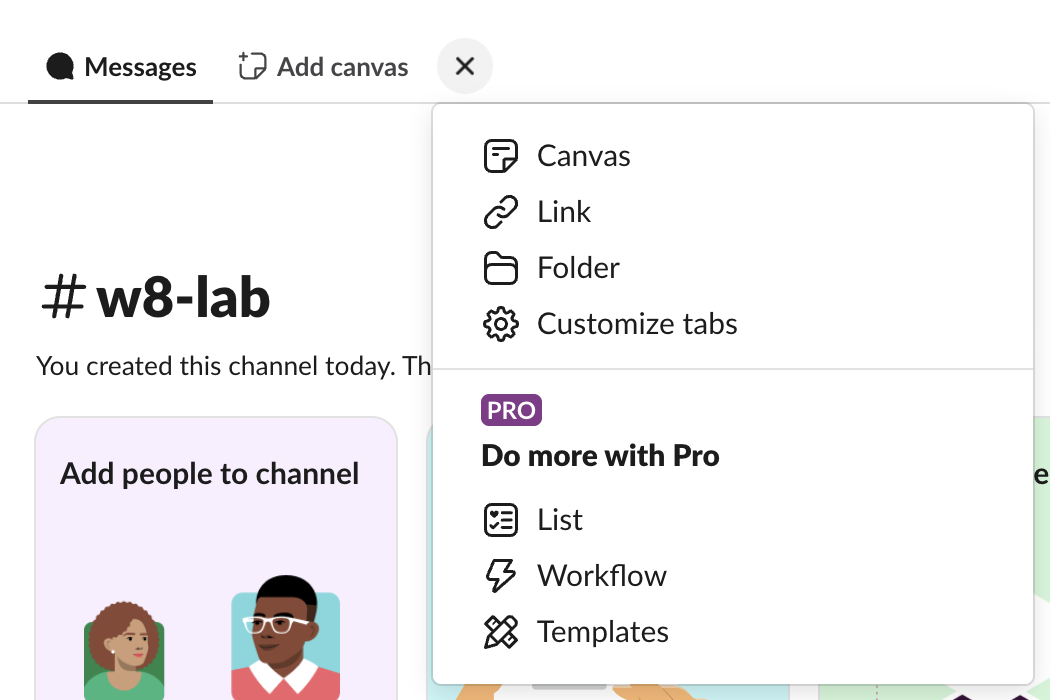
Click + after the last tab. On the Free plan the menu offered Canvas, Link, Folder and Customize tabs. Under "Do more with Pro" it listed List, Workflow and Templates. Clicking Workflow opened a "Select a premium plan to get new workflows" page with Pro and Business+ trials, so those three are paid.
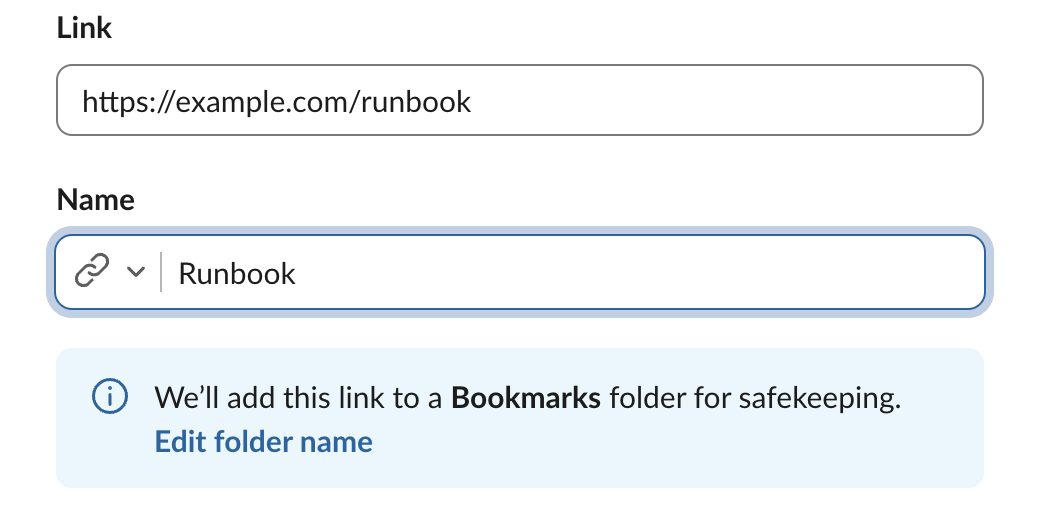
Link does not make a tab of its own. It opened an "Add a bookmark" dialog with a link and a name, and a note: "We'll add this link to a Bookmarks folder for safekeeping." After we clicked Add, a new Bookmarks tab appeared with our link inside. So links always live in a folder tab, and the folder is the tab. Our Slack bookmarks page tests what happens to bookmarks when the folder is deleted.
Renaming, moving, hiding and removing tabs
Open Customize tabs from the + menu, or click the channel name and open the Tabs tab. It lists every tab, including hidden ones. Hover a row to see what you can do with it. The actions were not the same for every tab:
| Tab | Rename | Delete | Hide or show | Move up or down |
|---|---|---|---|---|
| Messages | No | No | No | No |
| Add canvas | No | No | Hide | Yes |
| Bookmarks folder | Yes | Yes | No | Yes |
| Files & links | No | No | Show | Yes |
| Pins | No | No | Show | Yes |
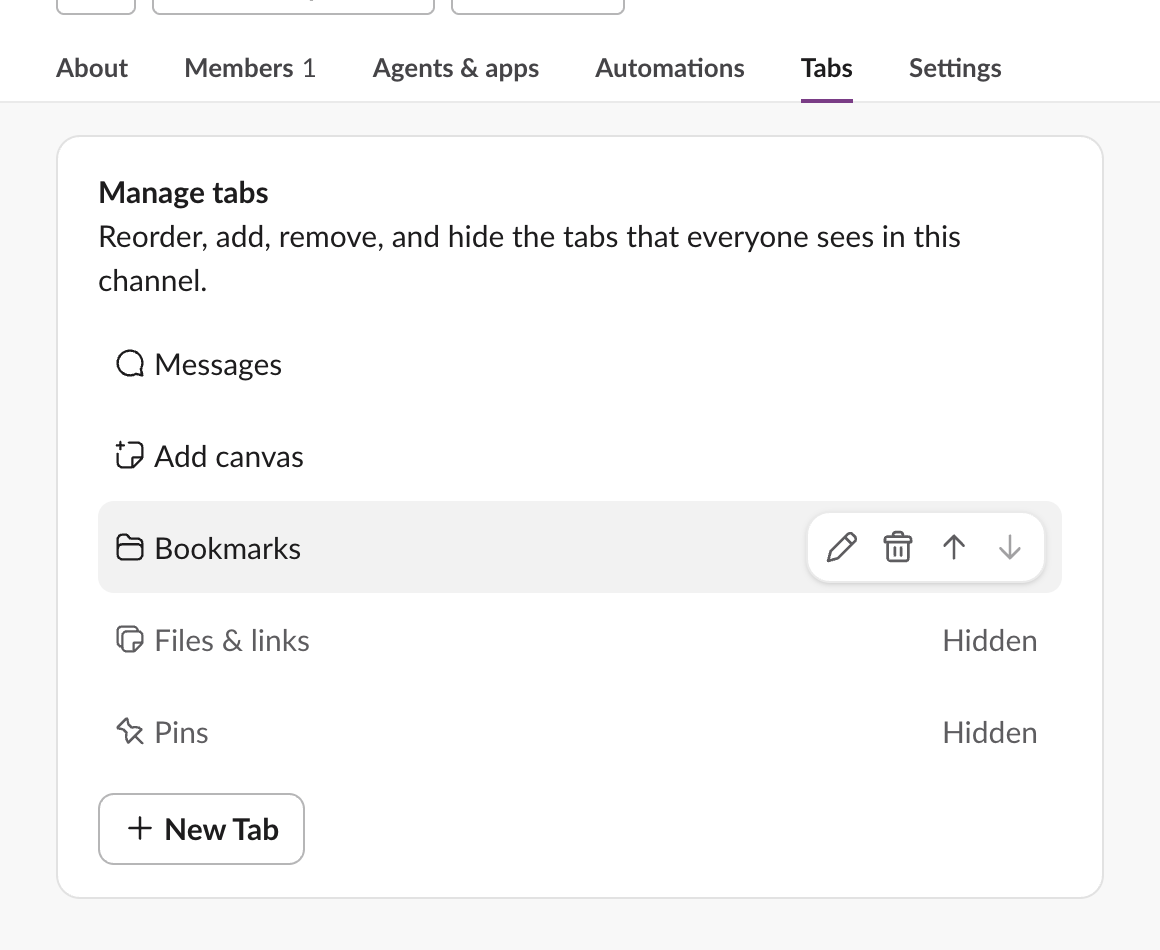
We showed Pins, moved Bookmarks up one place, and renamed it On-call docs in a "Rename tab" dialog. The header changed at once to Messages, On-call docs, Add canvas, Pins. Of the tabs we had, only the folder tab could be renamed. The built-in tabs keep Slack's names; you can only hide or move them.
Never appear "away" on Slack again
Cloud-based. No downloads. Works 24/7 even when your laptop is off.
Tabs in a DM
A DM has tabs too, but fewer choices.
- • In our DM with ourselves the tabs were Messages, Pins, Files & links, and a tab named Deleted file, plus the +. A file we had added as a tab in an earlier test was later deleted, and its tab stayed behind with that label.
- • In the DM with our test app the tabs were Messages and About, with no + button, so you cannot add tabs to a conversation with an app.

What we did not test
The Slack desktop app on our test computer is signed out, so we did not compare these tabs on desktop or mobile. Tab changes are saved on Slack's servers per channel, so they are not a browser setting.
FAQ
Can I add a tab that only I see?
Not in a channel. The Tabs settings page describes the list as the tabs that everyone sees, and we found no per-person option. For a private list of links, use your DM with yourself.How do I get the Pins tab back?
Click the channel name, open Tabs, hover Pins and click Show tab. It is hidden by default in new channels.Stop Jiggling Your Mouse.
Join hundreds of remote workers who never worry about their Slack status. Set it up once, stay green forever.
Related Articles
Slack Daily Standup Without a Paid Bot: /remind, Workflow Builder and a Script
We set up a weekday 9:30 standup in a free Slack workspace three ways: a /remind reminder, Workflow Builder, and a short script that posts the questions and collects the thread replies.
Leave Multiple Slack Channels at Once: 4 Ways Timed, Plus a Script
Slack has no bulk leave button. We made 12 test channels and left them with the sidebar menu, the channel browser, /leave and a 30-line script, and timed each way.
How to Delete Someone Else's Message in Slack, Tested as Workspace Owner
As the owner of a free-plan workspace we deleted an app's message, a webhook message and two system messages, in Slack web and with the API, and checked which settings exist.