
Slack Channel Welcome Message: A Tested Bot and the Free-Plan Catch
Slack has no built-in welcome message per channel, and Workflow Builder is closed to Free workspaces. A 30-line Bolt app that listens for member_joined_channel does the job on any plan. We ran it on 9 November 2026 and timed the welcome.
To post a welcome message when someone joins a Slack channel, you need a workflow or a small bot, because Slack has no channel setting for it. On a paid plan, Workflow Builder can start a workflow when someone joins a channel. On a Free plan it cannot, and a bot that listens for the member_joined_channel event works on any plan. On 9 November 2026 we ran such a bot in a Free test workspace: a Bolt for Python app over Socket Mode that sends the new member a private note and posts a public welcome. The welcome landed 1.2 s after the join.
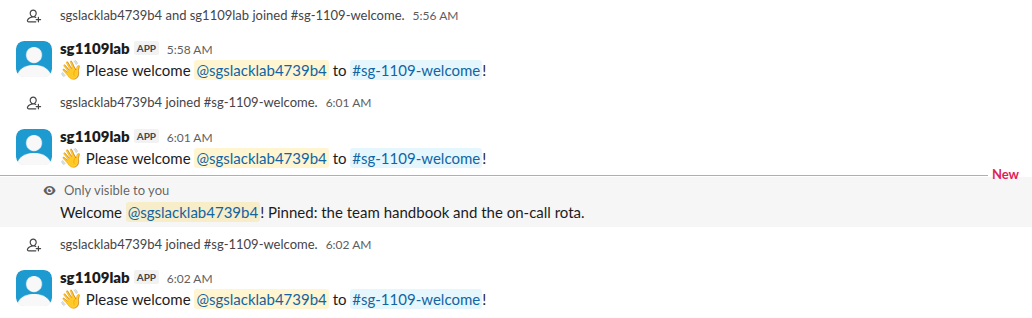
In the screenshot, each join is followed by the public welcome, and the new member also sees a note marked "Only visible to you". That note is an ephemeral message. Nobody else sees it, and it is gone after a reload.
Workflow Builder on the Free plan
Workflow Builder used to be the no-code answer. In our Free workspace, the Workflows page said "Free teams do not have access to use workflows" and the New Workflow button carried a Pro label:

On a paid plan, start a new workflow from the "When someone joins a channel" event and add a "Send a message" step. We could not test that path on Free. The bot below has no plan limit.
The bot
Create an app, turn on Socket Mode, and give it these bot scopes: channels:read (for the event in public channels), groups:read (private channels), chat:write. Subscribe to the bot event member_joined_channel, install the app, and invite the bot to each channel that should greet people. The Socket Mode guide shows where the xapp- token comes from, and the bot token guide covers the xoxb- one.
import json, logging, os, time
logging.basicConfig(level=logging.INFO)
from slack_bolt import App
from slack_bolt.adapter.socket_mode import SocketModeHandler

app = App(token=os.environ["SLACK_BOT_TOKEN"])
WELCOME_CHANNELS = {os.environ["WELCOME_CHANNEL"]}
BOT_USER = app.client.auth_test()["user_id"]

@app.event("member_joined_channel")
def welcome(event, client, logger):
    print("EVENT", json.dumps(event), flush=True)
    if event["channel"] not in WELCOME_CHANNELS or event["user"] == BOT_USER:
        return
    t0 = time.time()
    client.chat_postEphemeral(
        channel=event["channel"], user=event["user"],
        text=f"Welcome <@{event['user']}>! Pinned: the team handbook and the on-call rota.",
    )
    t1 = time.time()
    client.chat_postMessage(
        channel=event["channel"],
        text=f":wave: Please welcome <@{event['user']}> to <#{event['channel']}>!",
    )
    print("POSTED ephemeral %.2f s, message %.2f s" % (t1 - t0, time.time() - t1), flush=True)

if __name__ == "__main__":
    SocketModeHandler(app, os.environ["SLACK_APP_TOKEN"]).start()
Run it with the two tokens and the channel ID:
pip install slack_bolt
SLACK_BOT_TOKEN=xoxb-... SLACK_APP_TOKEN=xapp-... WELCOME_CHANNEL=C0123456789 python welcome.py
Socket Mode means the app opens the connection to Slack, so it runs on a laptop or a small server with no public URL. To serve it over HTTP instead, see running a Slack bot behind a tunnel.
What the event looks like
When our test member left the channel and joined again, Bolt got:
{"type": "member_joined_channel", "user": "U0CDVBA6TMZ", "channel": "C0CGUSWDK08", "channel_type": "C", "team": "T0B7JBCDKC1", "event_ts": "1794204061.000700"}When the bot invited the member instead, the event also had "inviter": "U0CG27WHFC1". Use that field if you want a different message for people who were added by someone else.
Our log after three joins:
POSTED ephemeral 0.32 s, message 0.33 s
POSTED ephemeral 0.32 s, message 0.33 s
POSTED ephemeral 0.32 s, message 0.33 s
Each Web API call took about a third of a second, and the public welcome appeared 1.24 s after the join's event_ts.
Never appear "away" on Slack again
Cloud-based. No downloads. Works 24/7 even when your laptop is off.
Two details that tripped us
The bot's own join fires the same event. When you invite the bot to a channel, member_joined_channel arrives with the bot's user ID, so the code compares event["user"] with the bot's ID from auth.test and skips it. Without that check, the bot welcomes itself.
Bolt also logged an "Unhandled request" warning for every join, with a 404 result. Our app was subscribed to message.channels too, and every join creates a channel_join message, which no listener handled. Either drop that subscription or add an empty @app.event("message") listener. The welcome itself worked either way.
Public welcome, private note or DM
| Option | Call | Who sees it | Stays after a reload |
|---|---|---|---|
| Public welcome | chat.postMessage to the channel | Everyone in the channel | Yes |
| Private note in the channel | chat.postEphemeral with user | Only the new member | No |
| Direct message | chat.postMessage with the user ID as channel, needs im:write | Only the new member | Yes |
A public welcome on every join gets noisy in big channels. For those, the ephemeral note or a DM is kinder, and our ephemeral message guide covers its limits. If you also want to hide Slack's own "has joined the channel" lines, see how to turn off join messages.
FAQ
Can I welcome people to the whole workspace instead of one channel?
Yes. Listen for team_join (scope users:read) and send a DM. People join a workspace once, so that event fires once per person.
Does this work in private channels?
Yes, with the groups:read scope and the bot invited to the private channel. We tested a public channel only.
Can I post the welcome in a thread?
Pass thread_ts of a pinned intro message to chat.postMessage. The welcomes then stack under one message instead of filling the channel.
Stop Jiggling Your Mouse.
Join hundreds of remote workers who never worry about their Slack status. Set it up once, stay green forever.
Related Articles
ngrok for a Slack Bot: What It Needs, and Two Free Alternatives Tested
A Slack bot on localhost needs a public HTTPS URL for events and slash commands, or Socket Mode. We tried ngrok 3.39.13 with no account (ERR_NGROK_4018), a Cloudflare quick tunnel and Socket Mode on 8 November 2026, timed the replies, and broke the tunnel URL on purpose.
Can a Slack Webhook Send a File? What We Tested, and What Works
An incoming webhook cannot upload a file. It can show an image from a public URL in an image block, or a link Slack unfurls. For a real file you need a bot token and the upload API. Every payload we tried on 9 November 2026, with Slack's answer.
Slack Webhook vs Bot Token: 10 Things We Tested Both Ways
An incoming webhook can post, reply in a thread and do little else. A bot token can also edit, delete, upload files, pick the channel and post as a custom name. We sent the same Block Kit message both ways on 9 November 2026 and recorded each answer.