
How to Resolve or Close a Slack Thread (and Who Can Lock One)
Slack has no Resolve or Close button for threads. We checked every thread menu as a member, found the admin-only lock in Slack's code, and tested the workarounds that do work: a checkmark, a to-do you mark complete, and muting replies.
Slack has no Resolve, Close or Archive button for a thread. To mark a thread as done, add a ✅ reaction to its first message so everyone can see it, save the message and mark it complete in your To-dos for your own list, or turn off notifications for its replies so it stops pulling you back. Only admins on an Enterprise organization can lock a thread so nobody can reply. We checked every thread menu as a regular member of a Free-plan workspace on 3 November 2026, read the part of Slack's web app that handles thread locks, and tested each workaround on a test thread with 3 replies.
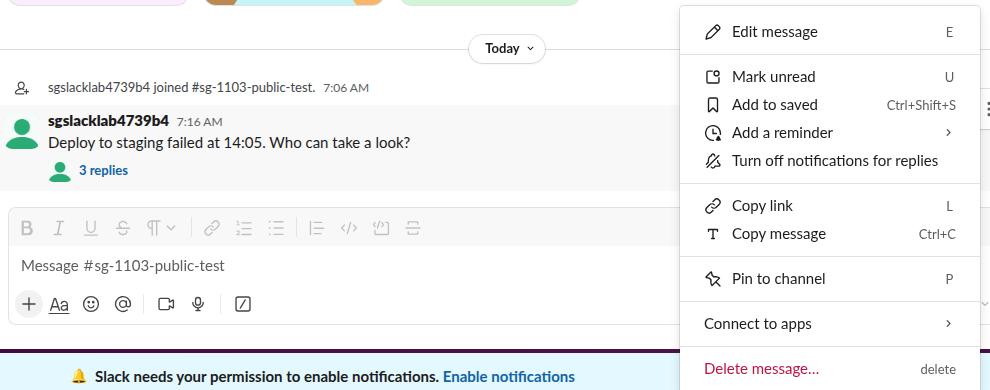
What Slack's menus offer for a thread
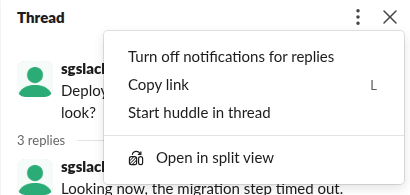
We looked in the two places where a resolve or close action would sit. The More actions menu on the thread's first message, shown above, has ten items, and none of them resolves, closes, locks or archives the thread. The menu behind the three dots at the top of the open thread has four:
Archiving works on whole channels only. A thread lives inside its channel, so it stays as long as the channel and its messages do. To remove a thread instead of closing it, see how to delete a thread in Slack.
The real lock: Turn off replies, for Enterprise admins
Slack does have a thread lock, but it is an admin tool. The code of Slack's web app, which we read from the files it loaded on 3 November 2026, has a menu for threads called Admin controls (or Thread moderation, depending on a feature switch) with these items:
| Menu item | What Slack's own text says it does |
|---|---|
| Turn off replies (newer name: Pause replies and reactions) | "New messages or emoji reactions can't be added to the thread." |
| Turn on replies (newer name: Reactivate thread) | Allows replies again |
| Hide thread | "The entire thread, including all replies and reactions, will not be visible to anyone in your organization." |
A member who opens a locked thread sees the words "Locked thread" and "Replies have been turned off for this thread by your admins." The menu only appears for someone whose role includes a thread-lock or content-review permission, and only when the organization has thread locking turned on.
We called the method behind Turn off replies, moderation.locks.create, on our test thread as a regular member, and Slack answered not_an_enterprise. The error names the workspace's plan, not our role, so outside an Enterprise organization nobody can lock a thread, not even a workspace owner. The API's copy of every thread's first message still carries an is_locked field, which was false on ours. The only "resolved" state we found in the code belongs to pull-request review threads, and its method needs a pr_url, so it does not apply to ordinary threads.
Workaround 1: a ✅ reaction that everyone sees
The quickest shared signal is a reaction on the first message. We added ✅ to the test thread's first message, and it showed under the message in the channel with a count of 1, next to the 3 replies link.

Agree with your team on one emoji for "done", and add it from the first message, not a reply, so it shows in the channel without opening the thread. A reaction does not stop anyone from replying. Teams that need a status per request often add ✅ for done and 👀 for "looking at it"; our guide to the eyes emoji covers that second one.
Never appear "away" on Slack again
Cloud-based. No downloads. Works 24/7 even when your laptop is off.
Workaround 2: a to-do you mark complete
For your own list of open threads, save the first message and finish it later:
- Open More actions on the first message and click Add to saved.
- Open Saved in the sidebar, open the item's three-dot menu and click Move to to-dos.
- In To-dos, hover the item and click Mark complete.
The item moved from In progress to Completed, and Slack showed "To-do marked complete".
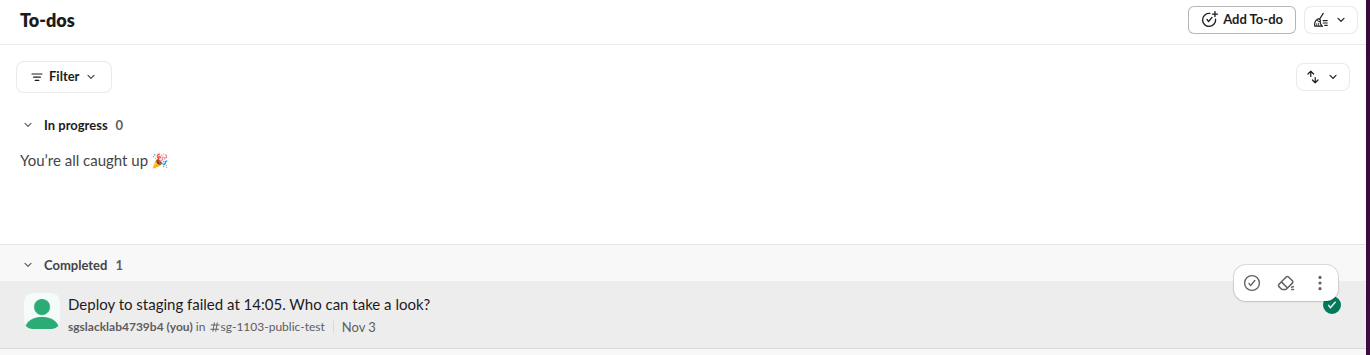
This state is personal. The API returned the message with saved.state set to completed, which belongs to our account, and nothing changed in the channel. Other members see only the message and any reactions. More on the list itself is in how Saved for later works.
Workaround 3: turn off notifications for replies
If a closed thread keeps showing up in your Threads view and activity, stop following it. Turn off notifications for replies is in both menus above. After we clicked it, the API showed the thread's subscribed flag go from true to false. It is the same switch as unfollowing, and it only affects you. If a thread still shows as unread after that, why Slack threads keep showing unread lists the other causes.
FAQ
Can a channel manager lock a thread on the Pro plan?
No. The lock call failed with not_an_enterprise on our workspace, and the menu that holds it is only built for Enterprise roles with the thread-lock or content-review permission.
Stop Jiggling Your Mouse.
Join hundreds of remote workers who never worry about their Slack status. Set it up once, stay green forever.
Related Articles
How to Search for Images in Slack, Including Text Inside Them
To find an image in Slack, search, switch the results from Messages to Files and set File type to Images, or type type:images. We tested 6 images: Slack also found words written inside PNGs, but not inside JPGs.
Lock Icon Next to a Slack Channel? What the Lock and Grey Text Mean
A padlock next to a Slack channel means it is private. Grey text with a crossed-out bell means you muted it. We made a private, muted, archived and unread channel and screenshot each one in the sidebar.
Download Slack for Mac Without the App Store: DMG, PKG or App Store?
Click Download, not Download on the Mac App Store, on slack.com/downloads/mac and you get the universal DMG. We downloaded all four direct installers for 4.53.276, measured them, checked their signatures and read the code paths that differ in the App Store build.